
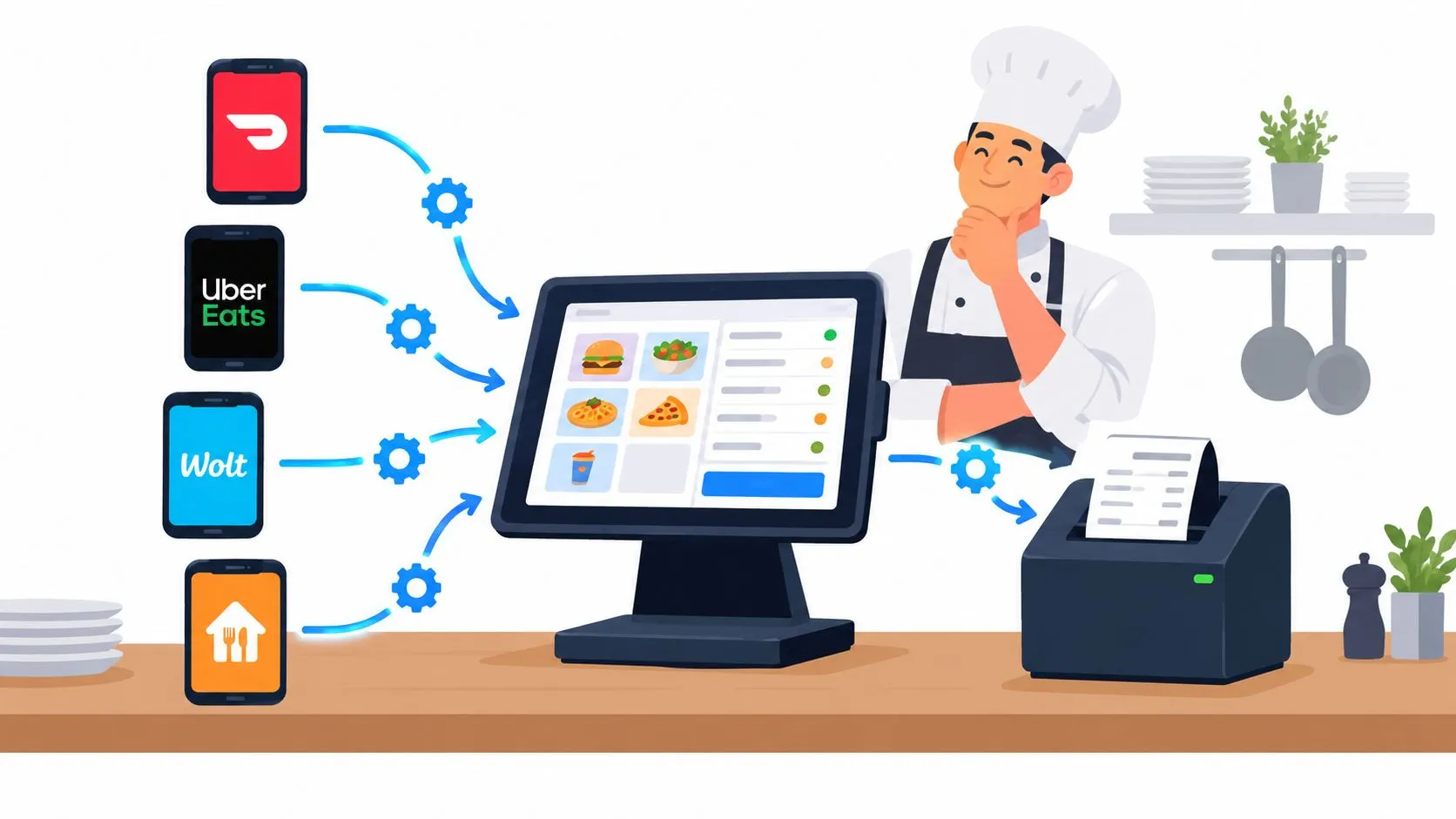
A restaurant POS API is the programmatic bridge that injects third-party delivery orders from Uber Eats, DoorDash, and Grubhub directly into a point-of-sale system such as Clover or Square, eliminating manual re-keying and extra tablets. Around 72% of restaurants globally use POS systems, while about 54% have connected those systems to online ordering and delivery platforms.
That adoption changes the integration question. Operators aren’t deciding whether delivery apps should connect to the POS. They’re deciding whether the connection will remain accurate when menus change, modifiers drift, orders are retried, or a marketplace cancels a ticket during the rush. A successful authorization handshake is only the beginning. The true test is whether the kitchen receives one correct, native ticket every time.
The Reality of Tablet Hell and API Integration
At 7:00 p.m., a delivery order appears on the Uber Eats tablet. Another arrives through DoorDash. Grubhub sends one moments later, but its modifier names don’t match the labels in the POS. A team member reads each screen, types the orders into Clover or Square, and tries to remember which ticket belongs to which marketplace.
That workflow creates several points of failure. Someone can miss a side, select the wrong size, omit a modifier, or enter the same order twice. The kitchen then works from a ticket that may not match what the customer ordered, while the front-of-house team spends the busiest part of service monitoring devices instead of serving guests.
A delivery-to-POS integration follows a different path. The restaurant authorizes the connected platforms, maps each marketplace menu, injects incoming orders into the POS, and exchanges status information where the systems support it. Staff don’t have to watch separate tablets or manually re-key every ticket.
Why manual re-keying breaks under pressure
Manual entry looks manageable when order volume is light. It becomes fragile when several channels deliver orders at once, especially when the same item has different modifier structures across marketplaces.
The operator has to coordinate:
- Order accuracy: Every item, option, quantity, tax rule, and special instruction must reach the POS correctly.
- Kitchen timing: The ticket needs to enter the normal preparation flow without a second manual handoff.
- Availability: An item that is unavailable in the POS shouldn’t remain orderable on a connected marketplace.
- Reporting: Sales attribution should remain visible in the POS rather than being reconstructed from several tablet reports.
The difference isn’t merely technical. A direct integration makes Clover or Square the operational source of truth. The delivery marketplace remains the customer-facing channel, but the restaurant controls preparation, ticket handling, and sales reporting from the system the team already uses.
Practical rule: If staff still have to read an order from one screen and type it into another, the restaurant hasn’t removed the integration problem. It has only moved it.
What the API should remove
A useful restaurant POS API removes repetitive decisions from the rush. It should accept an order from Uber Eats, DoorDash, or Grubhub, translate that order into the POS’s structure, and create a native ticket with the relevant modifiers and pricing.
That is why a consolidated delivery order workflow matters. It gives staff one place to monitor incoming orders and one operational process for fulfillment. The strongest implementation doesn’t ask employees to become integration operators. It lets them work from the POS and kitchen workflow they already understand.
Core Capabilities of a Robust POS API
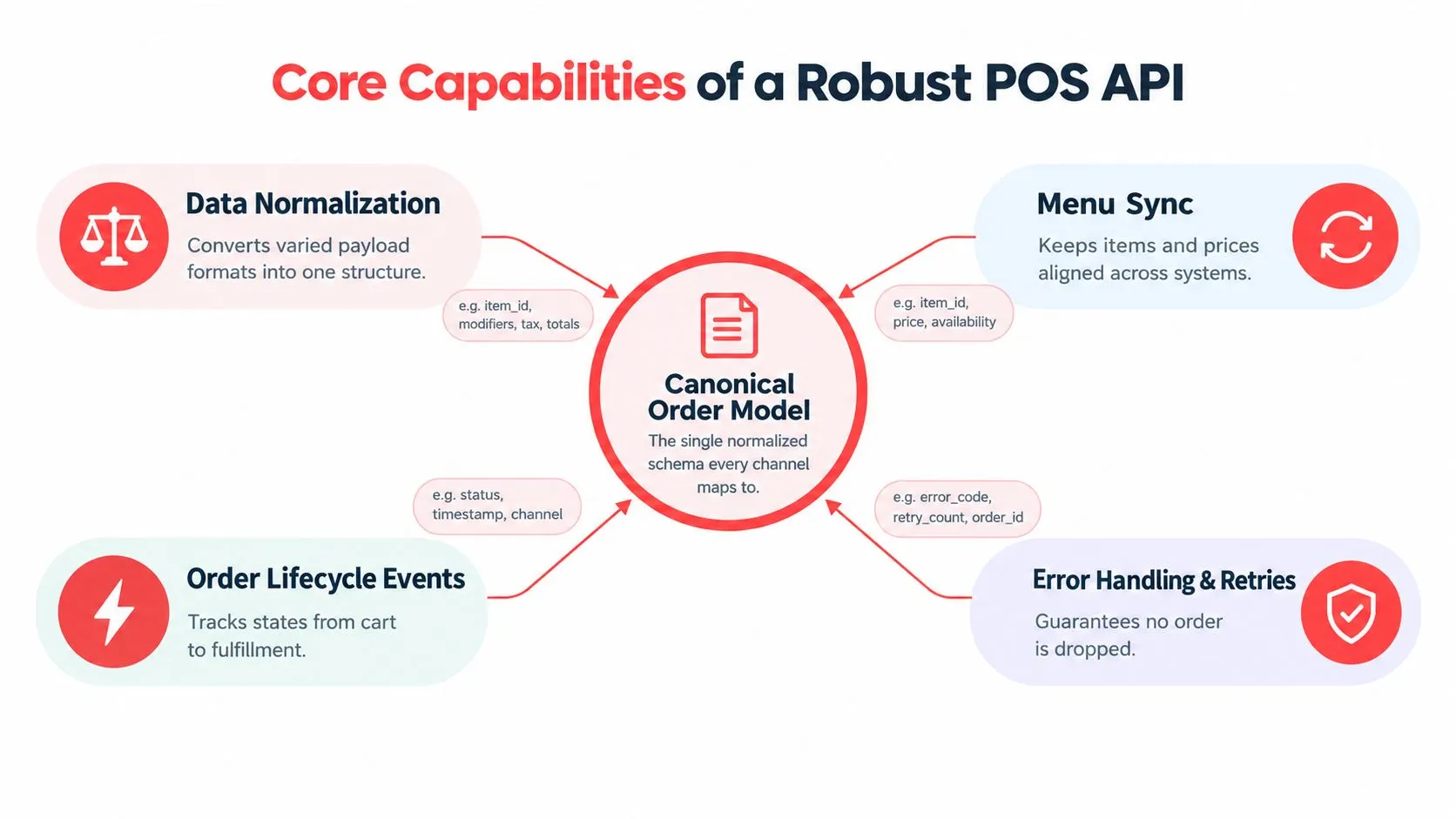
A reliable integration starts with a canonical order model. Delivery marketplaces and POS platforms don’t always describe the same information in the same way. One system may represent a modifier as a nested option, another as a line-item attribute, and another may attach it to a menu group. Taxes, item names, availability states, and order statuses can vary too.
The integration layer needs to convert those different payloads into one typed structure before sending the order to Clover or Square. OrderOut’s API integration guidance describes this normalization problem in practical terms. Without it, a menu change that seems harmless can produce a malformed kitchen ticket during live service.
Normalize before you inject
A canonical model should define the fields that every connected channel must supply or explicitly omit. That usually includes:
- Item identity: The marketplace item must map to a known POS item rather than relying on a display name alone.
- Modifiers: Options need consistent IDs, quantities, required states, and parent-child relationships.
- Taxes and totals: The integration must preserve the correct tax treatment and order total for the destination POS.
- Lifecycle state: Accepted, preparing, ready, canceled, and completed events need clear meanings.
- Location context: A multi-location restaurant needs the order routed to the correct menu, price set, and POS account.
Strict validation should happen before ticket creation. If a required modifier is missing or an item mapping has expired, the system should flag the payload for resolution instead of creating an incomplete ticket. A technical team evaluating an integration can benefit from studying a broader API integration platform, particularly the way it handles schemas, transformations, and error states.
The practical test is simple. Take a complex delivery order with nested modifiers, a special instruction, and a location-specific price. If the integration can translate that order into the same native ticket a cashier would create, the model is doing useful work.
Idempotency prevents duplicate tickets
Transient failures are normal. A request can time out after the marketplace sends it, even though the POS has already accepted it. If the integration blindly retries, the restaurant may receive two kitchen tickets for one customer order.
Idempotency gives the request a stable identity. The integration stores an idempotent key for the order and treats a retry with that same key as the same operation, not a new order. Replayable requests then become safe: the system can retry after an authentication or network problem without creating a duplicate ticket.
This matters most during peak service, when a duplicate order can waste ingredients, confuse the kitchen, and trigger a refund conversation. A reliable API should also preserve an audit trail showing the original request, retry attempts, POS response, and final state.
Treat webhooks and errors as operating data
A connection that only sends orders is incomplete. The integration also needs a plan for status changes, menu updates, availability, cancellations, and failed mappings. Webhooks can notify the receiving system that an event occurred, but the restaurant still needs rules for deciding what to do with that event.
For example, a failed menu update shouldn’t leave an item available on one marketplace without notice. A canceled delivery order shouldn’t remain in an active kitchen queue without a clear reconciliation state. The Square developer API guide is useful background for teams thinking through catalog, order, and event handling at the POS layer.
The best architecture doesn’t promise that failures never occur. It makes failures visible, prevents duplicate side effects, and gives staff a clear recovery path.
Mapping Marketplaces to Clover and Square
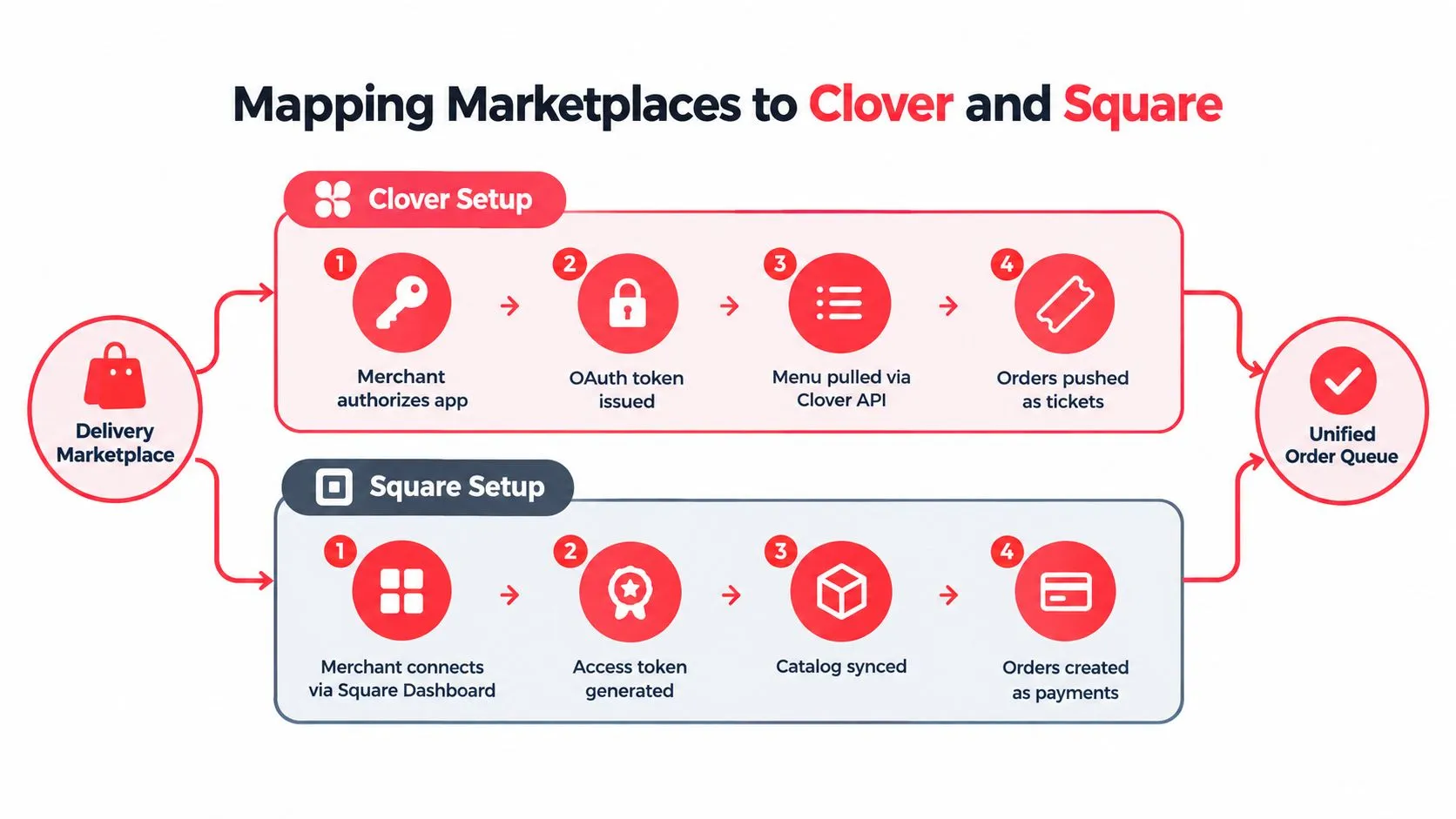
The setup process has four practical parts: authorize the systems, map the menus, route the order, and confirm how status events move back. The exact screens differ between Clover and Square, but the operational objective is the same. Marketplace data should enter the POS as a usable order, not as a notification that someone must type again.
Clover setup and routing
Clover’s delivery materials describe a marketplace-to-POS path that starts in the Clover Dashboard. DoorDash Drive can be enabled there for delivery, while the Grubhub flow includes merchant signup in the dashboard, integration verification by Grubhub, and menu creation from Clover inventory, as described by Clover’s delivery setup documentation.
The operator should check the menu before activating live traffic. Confirm that item names map correctly, modifiers appear under the right parent item, prices reflect the intended channel, and store hours match the marketplace. A clean authorization cannot compensate for an incomplete catalog.
Clover’s integration materials also describe Uber Eats orders arriving in Clover with modifiers, kitchen printing, and sales-report attribution. Grubhub orders can push into Clover with full modifier mapping and support for separate delivery and dine-in pricing, according to OrderOut’s integration API documentation.
That distinction matters to operators. The POS isn’t just receiving a message that an order exists. It is receiving a ticket that the kitchen can act on and that management can recognize in reporting.
Square setup and routing
Square’s flow begins with merchant access and catalog permissions. The restaurant connects the relevant application through Square’s marketplace or dashboard, then supplies the menu information needed to associate delivery items with Square catalog objects. DoorDash’s merchant guidance identifies the practical prerequisites for a POS or middleware connection: an active merchant account, administrator access to both systems, menu data with items, prices, modifiers, and store hours. Those requirements are outlined in DoorDash’s third-party delivery integration guidance.
Square operators should pay particular attention to catalog hygiene. A display name such as “combo” isn’t enough if the marketplace and Square use different item identifiers or modifier groups. The mapping needs a durable relationship that survives routine menu edits.
Start with a controlled test
Don’t activate every location and menu variation at once. Test one representative location with a realistic order that includes required modifiers, optional additions, a special instruction, and the pricing rules used for delivery. Confirm the ticket, kitchen print behavior, payment or sales record, and cancellation handling before expanding.
Restaurants using Clover can install the Clover delivery integration from the Clover App Market. It’s free to install on the Clover App Market. Square operators can use the corresponding OrderOut listing in the Square App Marketplace.
The guide to connecting multiple delivery apps to one POS can help operators compare the workflow across Uber Eats, DoorDash, and Grubhub without treating each tablet as a separate operational system.
After the test, watch the first live service closely. The important question isn’t whether the order arrived. It’s whether the entire order arrived with the right structure, entered the right location, printed where expected, and moved through the correct status lifecycle.
Navigating Post Go Live Failure Modes
A green connection status only confirms that the systems authenticated and exchanged enough information to communicate. It does not show whether the integration will survive a menu edit, a location-specific change, or a marketplace event that arrives after the POS has already advanced the ticket. The failures that matter usually appear after go-live, during service, when staff have little time to investigate.
Reconciliation is the operational test
Suppose a delivery marketplace accepts an order and the POS creates the ticket. The kitchen starts preparing it. The marketplace then cancels the order or changes its status. If the POS does not receive, interpret, and record that event correctly, the restaurant can face a charge-state mismatch with no clear answer about whether production should continue.
The same problem occurs when an item changes after the POS accepts the original payload. A refund may be appropriate, but staff need a visible record of what changed, when it changed, and which system owns the current state. OrderOut’s overview of POS integration failure modes highlights this reconciliation gap. An analysis of common order problems shows how charge-state mismatches surface during service.
Idempotency matters during peak rushes. If a timeout causes the marketplace to retry an order, the integration must recognize the same event and avoid creating a second ticket. Each order needs a stable identifier, while retries should be safe to process. Without that control, duplicate tickets can reach the kitchen before anyone notices.
Menu drift creates quiet failures
Menu drift is more dangerous than an outage because orders continue arriving. The marketplace may still show an item while the POS has renamed it, removed a modifier, changed its price, or moved it to another category. Modifier normalization creates another failure point. “No onions,” an optional add-on, and a required choice must map to the POS structures that kitchen and pricing rules use.
A useful operating policy assigns ownership for mapping changes. When a manager edits the POS menu, someone should verify the connected marketplace representation. When a marketplace changes its payload or status behavior, the integration owner should review the affected mappings and test a representative order.
Multi-location restaurants need tighter controls. One store may use a different price, modifier group, availability rule, or preparation station from another. A shared integration must preserve those local differences without turning every location into a custom point-to-point project.
Build a recovery path
When an order fails, the system should tell staff what failed and what action is safe. “Integration error” is not enough. A useful message identifies the location, order, item or modifier, destination POS, and whether the request can be retried without duplication.
A failed order should become a visible work item, not a mystery that the manager discovers after a customer calls.
Operators should review failed mappings, canceled orders, duplicate suppression, and pending status events as part of normal reconciliation. That turns the API from a one-time installation into an operating process that protects the kitchen when peak demand exposes weak data handling.
The Hidden Costs of Ecosystem Fragmentation
Every direct connection adds another relationship to maintain. The restaurant may start with delivery marketplaces and later add branded ordering, loyalty, dispatch, reporting, or back-office tools. If each application connects independently to Clover or Square, every menu field, webhook, authentication change, and rate limit becomes another maintenance responsibility.
That architecture can work for a narrow use case. It becomes expensive to reason about when several vendors interpret the same menu and order differently. A change in one system can create a failure somewhere else, and the restaurant may not know which connection owns the problem.
Integration investment reflects the shift
The 2025 Restaurant Technology Outlook reports that the share of respondents planning to invest in integrations and APIs rose to 20% from 14% a year earlier. That movement reflects an operational need, not just enthusiasm for new software. Restaurants need systems that exchange data without asking staff to recreate it by hand.
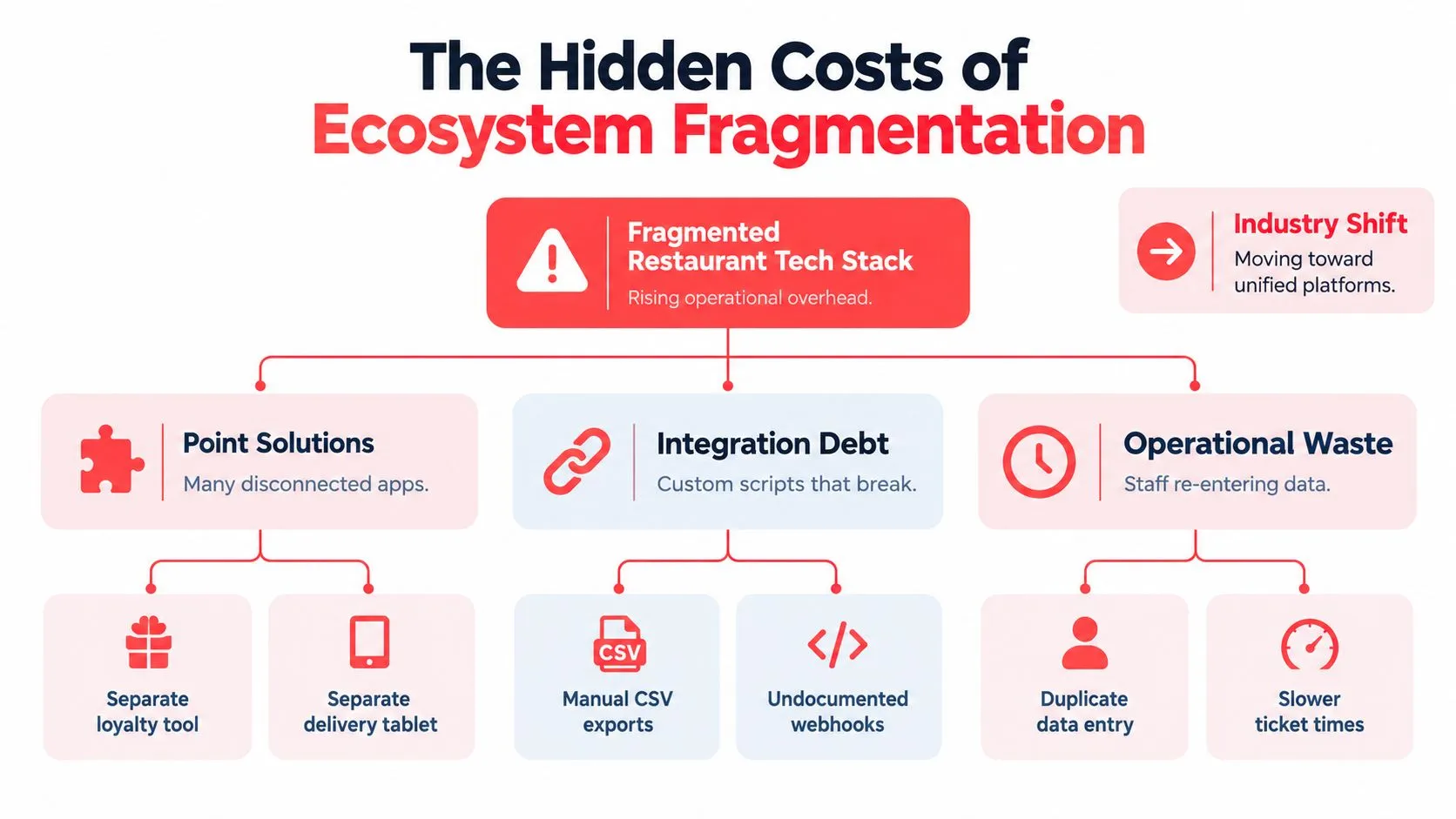
A unified integration layer reduces the number of translations the restaurant has to manage directly. It can normalize menu objects, apply location rules, receive marketplace events, and route the resulting order to the POS. The POS remains the source of truth for operational fulfillment while the middleware handles the differences between channels.
Avoid point-to-point debt
The wrong approach is to solve each new channel with a custom script that knows only its immediate neighbor. That script may pass today’s test and fail after a modifier update, a catalog change, or a new cancellation state.
The more durable approach establishes shared rules:
- One order model: Every channel maps into the same structure before POS injection.
- One mapping authority: Item and modifier relationships have an owner and a review process.
- One event policy: Cancellations, retries, and status changes have documented outcomes.
- One operational queue: Staff can see what needs attention without opening several unrelated systems.
This structure doesn’t remove every vendor dependency. It does make those dependencies visible and manageable. For operators investigating the labor and process impact, restaurant order fulfillment cost analysis provides a useful way to frame the hidden work created by fragmented order handling.
OrderOut is one example of a delivery-to-POS integration layer that maps Uber Eats, DoorDash, and Grubhub menus to a normalized schema and injects orders into Clover or Square. The point isn’t to add another screen. It’s to remove the extra tablet and manual re-keying step while keeping the POS at the center of fulfillment.
Frequently Asked Questions
Does OrderOut work with Clover?
Yes. OrderOut connects third-party delivery orders from Uber Eats, DoorDash, and Grubhub to Clover so the orders can enter the POS rather than being manually re-keyed from separate tablets. Clover operators can start from the Clover App Market and review menu and modifier mappings before enabling live order traffic.
Does OrderOut work with Square?
Yes. Square restaurants can connect through the Square App Marketplace. The integration requires accurate catalog data, including items, prices, modifiers, and store information, so the delivery menu can map to the appropriate Square records.
How does a restaurant POS API handle modifiers?
An integration maps marketplace modifiers into a normalized order structure before creating the POS ticket. Required options, optional additions, quantities, and parent item relationships should be validated so a modifier doesn’t arrive as free text or attach to the wrong menu item.
What happens if a delivery marketplace changes its API?
The integration needs to detect and handle changes in payloads, menu structures, and order lifecycle events. Restaurants should also monitor failed mappings and test representative orders after meaningful marketplace or POS catalog changes. Authentication alone doesn’t guarantee that a changed field will still produce a correct kitchen ticket.
Can a POS API prevent duplicate orders?
It can prevent duplicate creation when it uses idempotent request keys and replay-safe retry behavior. If a network failure occurs after the POS accepts an order, the integration can recognize a retry as the same order instead of creating another kitchen ticket.
Connect Uber Eats, DoorDash, and Grubhub to Clover or Square through OrderOut, with normalized menu mapping and direct POS order injection instead of tablet-based re-keying. Visit OrderOut to start onboarding free in a few clicks and test the workflow with your restaurant’s real menu.