
The marketplace commission isn’t the full order fulfillment cost. For a restaurant, the actual cost includes payment processing, packaging, handoff labor, refunds, mistakes, and the staff time spent moving Uber Eats, DoorDash, or Grubhub orders from a tablet into Clover or Square.
That distinction changes the operational question. Instead of asking only, “What percentage does the delivery app charge?”, ask, “What does it cost my team to receive, enter, prepare, check, hand off, and reconcile this order?” The second question exposes margin leaks that a commission report won’t show.
The Hidden Reality of Restaurant Order Fulfillment Cost
Many operators stop their calculation at the marketplace commission because it appears clearly on the payout statement. That fee matters, but it isn’t the complete fulfillment bill. A delivery ticket also consumes card-processing capacity, packaging supplies, staff minutes, kitchen attention, and sometimes the cost of correcting an avoidable error.
A neutral comparison from Otter’s restaurant ordering systems analysis illustrates the stack with a $45 ticket. At a 25% commission, the order also carries about $1.31 in card fees, $0.75 to $1.50 in packaging, and $0.50 to $1.00 in labor for bagging and handoff. Those amounts are separate from the commission, so a delivery order can look acceptable at the marketplace level while producing a much thinner contribution after execution.
Practical rule: Treat every delivery ticket as a small operating process, not just a sale.
The labor component is especially easy to miss. Someone must watch the marketplace device, accept the order, read modifiers, enter the ticket into the POS, print or send it to the kitchen, confirm the bag, and mark the order ready. If the order arrives through several disconnected channels, the same work repeats with every tablet.
That’s why our guide to delivery app fees is only a starting point for the calculation. The headline fee tells you what the marketplace deducts. It doesn’t tell you what your restaurant spends to make the order usable and accurate.
The hidden cost also includes the consequences of bad data. A missed modifier can trigger a remake. A delayed acceptance can frustrate the customer and the courier. A duplicate ticket can create waste and confusion at the pass. These leaks don’t always appear under a single accounting category, but they still reduce what the order contributes.
Breaking Down the True Cost Per Delivery Order
A useful restaurant calculation starts with the ticket and follows it through the operation. Separate the costs that appear on the payout statement from the costs created inside the building.
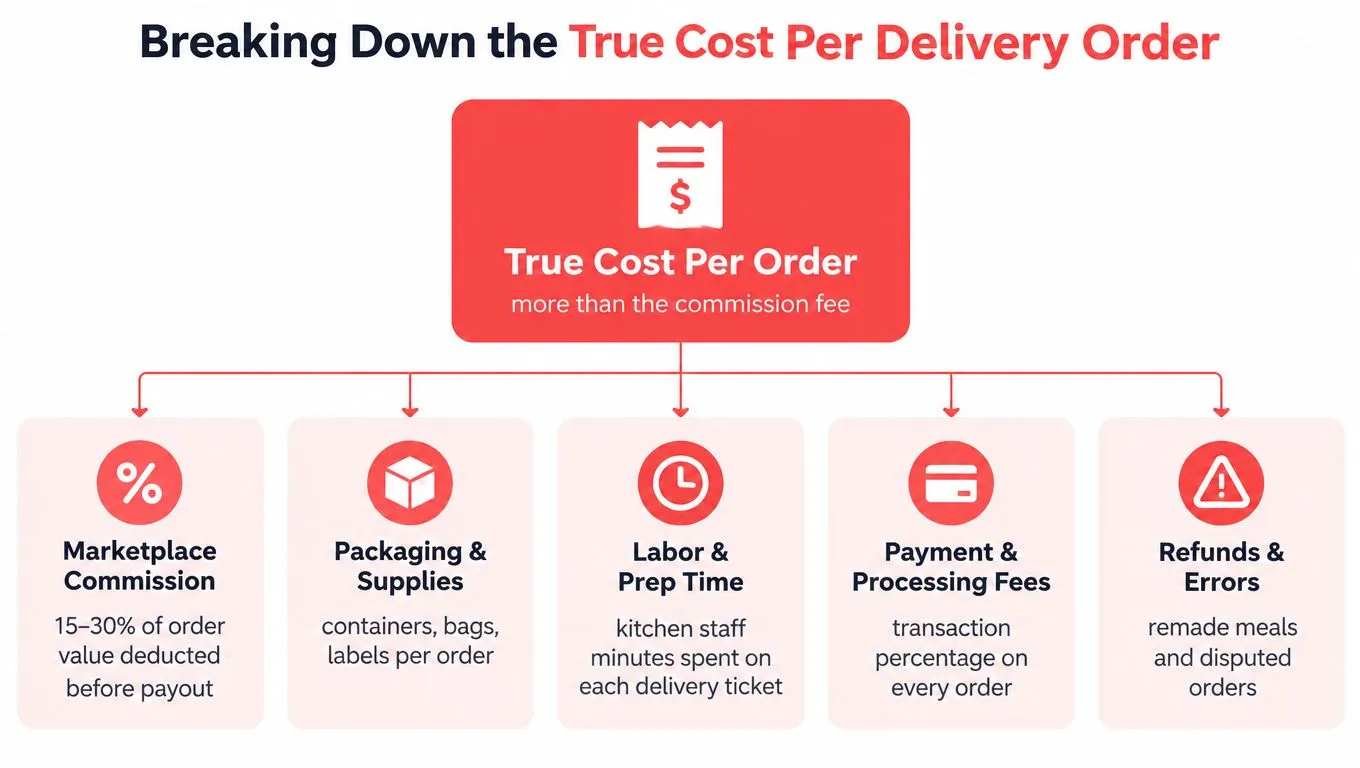
For most delivery orders, the stack includes:
- Marketplace commission: The amount deducted by the delivery channel before the restaurant receives its payout.
- Payment processing: Card or transaction fees attached to the order.
- Packaging and supplies: Containers, bags, labels, seals, utensils, and other handoff materials.
- Preparation and staging labor: Staff time spent entering, preparing, checking, bagging, and releasing the order.
- Refunds and errors: Remakes, missing items, disputed tickets, and credits caused by incorrect handling.
- Reconciliation effort: Time spent comparing marketplace records with POS sales and payouts.
The e-commerce comparison is useful because it shows how fulfillment behaves as a cost stack. A 2026 industry benchmark from World Metrics puts the average cost of fulfilling a single e-commerce order at $11.23. The same source says fulfillment costs represent 10% to 15% of e-commerce revenue, compared with 8% to 12% in 2020. Restaurants don’t have identical shipping economics, but they face the same underlying problem: the act of completing an order carries costs beyond the channel fee.
For a restaurant, the right unit of analysis is the all-in cost per delivery order. Add the commission, processing charge, packaging consumed, direct handling labor, and an allowance for error-related loss. Then compare that figure across Uber Eats, DoorDash, Grubhub, direct online ordering, and any in-house delivery workflow.
A practical calculation
Start with one representative ticket rather than an average that hides differences. A fragile family meal, a heavily modified order, and a simple pickup-style delivery ticket don’t require the same packaging or staff attention.
Track the following for a sample of orders:
- The gross ticket value and marketplace deduction.
- Payment fees connected to the transaction.
- Packaging used for that order.
- Staff time spent from acceptance through handoff.
- Remakes, credits, and refunds associated with delivery.
- The time required to reconcile the order later.
If you also manage broader food-cost reporting, this resource on how to calculate COGS for tax compliance can help separate product costs from the operational fulfillment expenses discussed here.
The point isn’t to create false precision. It’s to stop treating commission as the complete answer. Once the full stack is visible, an operator can decide whether to improve a marketplace workflow, shift demand toward commission-free ordering, or eliminate manual work that adds cost without adding output.
The Financial Drain of Manual Tablet Re-Entry
The most overlooked fulfillment expense often sits in labor scheduling rather than the delivery payout. A team member who re-enters a marketplace ticket isn’t producing a new guest-facing sale. They’re translating data that already exists into another system.
With Uber Eats, DoorDash, and Grubhub running on separate tablets, the workflow usually looks like this: monitor several screens, accept each order, read the item and modifier details, key the ticket into Clover or Square, print the kitchen ticket, and return to the tablets for the next request. During a rush, that sequence competes directly with counter service, phone calls, payment handling, and order checking.
An independent analysis from US Tech Automations estimates that a restaurant handling 350 orders per week can spend about 3.5 labor hours weekly re-entering orders from multiple tablets. At $18 per hour, that equals roughly $63 per week or $3,276 annually. The source also explains that the burden grows with the number of channels because each additional tablet creates more duplicate entry work.
Those figures describe labor alone. They don’t include the cost of a wrong modifier, a missed order, a duplicated ticket, or a delayed response that forces a staff member to interrupt another task.
Fragmentation has a compounding effect
Manual entry creates a queue inside the restaurant. One employee becomes the traffic controller for several marketplaces, and every order waits for that person to notice, interpret, and re-key it. When that employee is pulled away, the queue grows even though the kitchen may have capacity to prepare the food.
The operational symptoms are familiar:
- Missed modifiers: The POS ticket doesn’t match the customer’s marketplace selection.
- Duplicate entry: A ticket is entered twice or remains active on both systems.
- Delayed acceptance: The restaurant sees the order late because no one is watching the correct device.
- Interrupted service: Front-of-house staff leave guests or phones to process delivery data.
- Unclear accountability: Staff can’t easily tell whether the marketplace, POS, or kitchen caused the exception.
This is the hidden cost behind order-entry errors. The error itself may be a remake or refund, but the root cause is often a disconnected workflow that forces people to copy information under pressure.
The question isn’t whether your team can re-enter orders. It’s whether re-entry is the highest-value use of those staff minutes during service.
A POS integration changes the task from transcription to execution. The order still needs to be prepared, checked, and handed off, but the employee no longer has to recreate the ticket manually. That distinction protects labor capacity where it matters most, especially during peak periods when a small interruption can delay several orders.
How POS Integration Eliminates Fulfillment Leaks
The fix is to remove the manual handoff between the marketplace and the kitchen. Delivery-to-POS integration connects the channel order to the restaurant’s operational system so Clover or Square becomes the source of truth for preparation and fulfillment.
OrderOut maps each marketplace menu to a normalized POS schema. In practical terms, the integration matches marketplace items, option groups, modifiers, prices, and availability to the records already used by the POS. That mapping must be accurate before an order is injected, because clean automation depends on clean menu data.
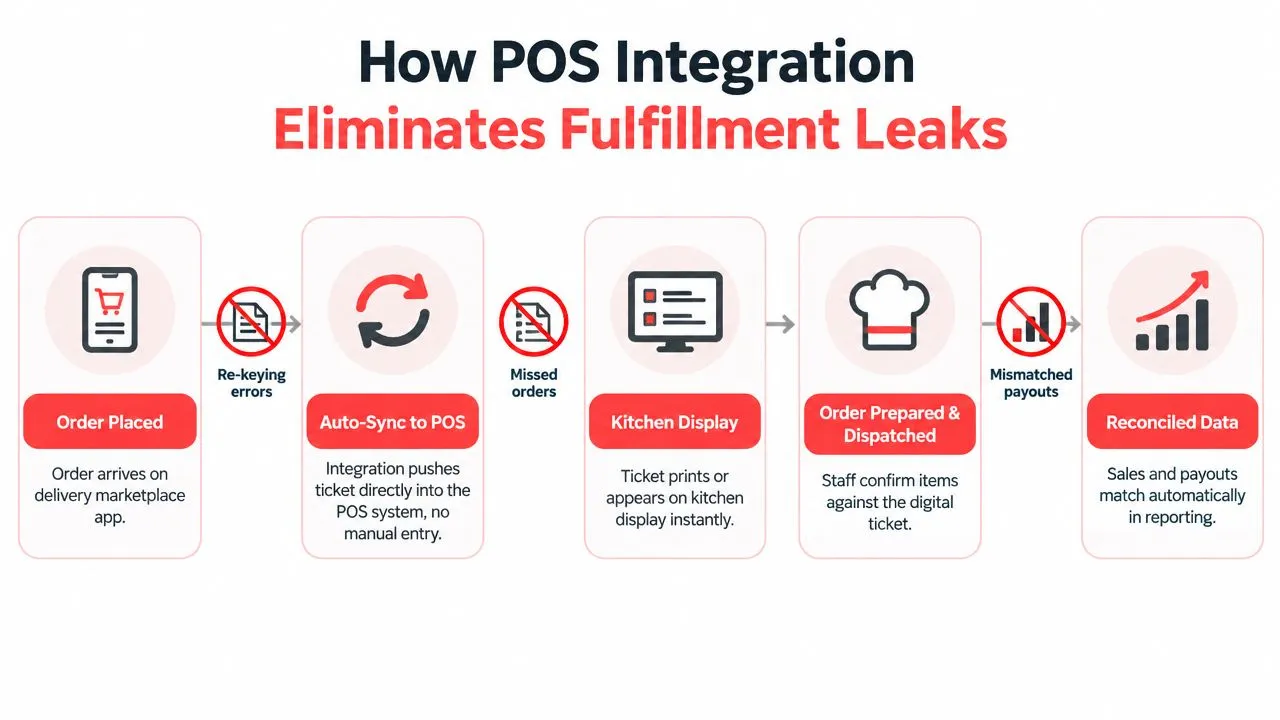
A guide from OrderOut on restaurant integration systems describes the workflow as platform authorization, menu mapping, order injection, and status exchange. That sequence matters because the POS can’t reliably prepare an order if the marketplace’s menu structure doesn’t correspond to the POS’s item and modifier structure.
What the workflow looks like
- Authorize the channels: Connect the restaurant’s supported marketplace accounts, such as Uber Eats, DoorDash, and Grubhub.
- Map the menus: Match marketplace items, modifier groups, pricing, and availability to Clover or Square records.
- Inject the order: Send the structured order into the POS without manual re-keying.
- Route the ticket: Let the restaurant’s existing POS and kitchen workflow handle preparation.
- Exchange status data: Return relevant order status information through the connected workflow.
The advantage isn’t just fewer screens. Structured order data reduces the number of interpretation steps between customer selection and kitchen execution. Staff can work from the POS ticket instead of reading one system and recreating it in another.
OrderOut is one example of this model. It injects third-party delivery orders from Uber Eats, DoorDash, and Grubhub into Clover or Square, removes extra delivery tablets, and maps marketplace menus to the POS structure. For the specific channel workflow, see OrderOut’s Grubhub to Clover integration.
The same principle applies to real-time restaurant integration. The value comes from keeping order information synchronized across the systems that receive, prepare, and manage the ticket, not from adding another dashboard for staff to monitor.
For Clover operators, OrderOut is free to install on the Clover App Market. The practical starting point is to install the app, connect the relevant marketplace accounts, review menu mappings, and test the flow before relying on it during a busy service.
Comparing Manual Workflows to Integrated Operations
The difference between manual tablets and POS integration is easiest to see in the handoff. A manual workflow asks a staff member to interpret an order and reproduce it. An integrated workflow sends structured information to the system that already controls the restaurant’s ticket process.
Independent restaurant-technology guidance from OrderOut’s order management best practices cites a 6.3% error rate for manually managed delivery orders, compared with 0.8% for fully integrated orders. Those figures show why an order-entry problem is also a fulfillment-cost problem. Every incorrect item or modifier can consume food, labor, packaging, staff attention, and customer goodwill.
| Operational Metric | Manual Tablet Stack | Integrated POS Workflow |
|---|---|---|
| Order receipt | Staff monitors multiple marketplace tablets | Orders arrive through the connected POS workflow |
| Data entry | Employee reads and re-keys the ticket | Structured order is injected into Clover or Square |
| Modifiers | Staff manually interprets selections | Mapped modifiers follow the POS schema |
| Kitchen routing | Ticket depends on successful re-entry | POS handles the established kitchen workflow |
| Error exposure | Higher risk of missed items and duplicate tickets | Fewer manual transcription points |
| Staff attention | Split between tablets, guests, and phones | Focused on preparation, checking, and handoff |
| Reconciliation | Staff compares separate records | POS remains the operational source of truth |
For operators building a more specialized workflow, a home baker order system guide is a useful reminder that order intake, customization, production, and pickup or delivery should be treated as one connected process. The same logic applies to restaurants, even though the menu and service pace differ.
What actually changes on a busy shift
Manual handling creates uncertainty about whether the ticket was seen, entered, printed, and prepared. Integration removes much of that uncertainty by giving staff one operational record. It doesn’t replace menu maintenance or quality checks, but it reduces the number of places where information can be lost.
That distinction is central to consolidated order management. Consolidation isn’t just a cleaner screen. It changes who owns the order, where the kitchen reads it, and how the operator investigates an exception.
The integrated workflow still has trade-offs. Menu mapping requires attention, modifier changes must stay aligned, and staff need a clear process for handling exceptions. But those are controlled maintenance tasks. Manual re-entry is a recurring labor task attached to every order.
Implementing Integration and Tracking the Right KPIs
Implementation should start with the restaurant’s actual order flow, not with a software demo. List every marketplace, identify which POS receives the final kitchen ticket, and document where staff currently copy information. That map will show whether the largest leak is entry labor, modifier accuracy, delayed acceptance, or reconciliation.
Set up the connection carefully
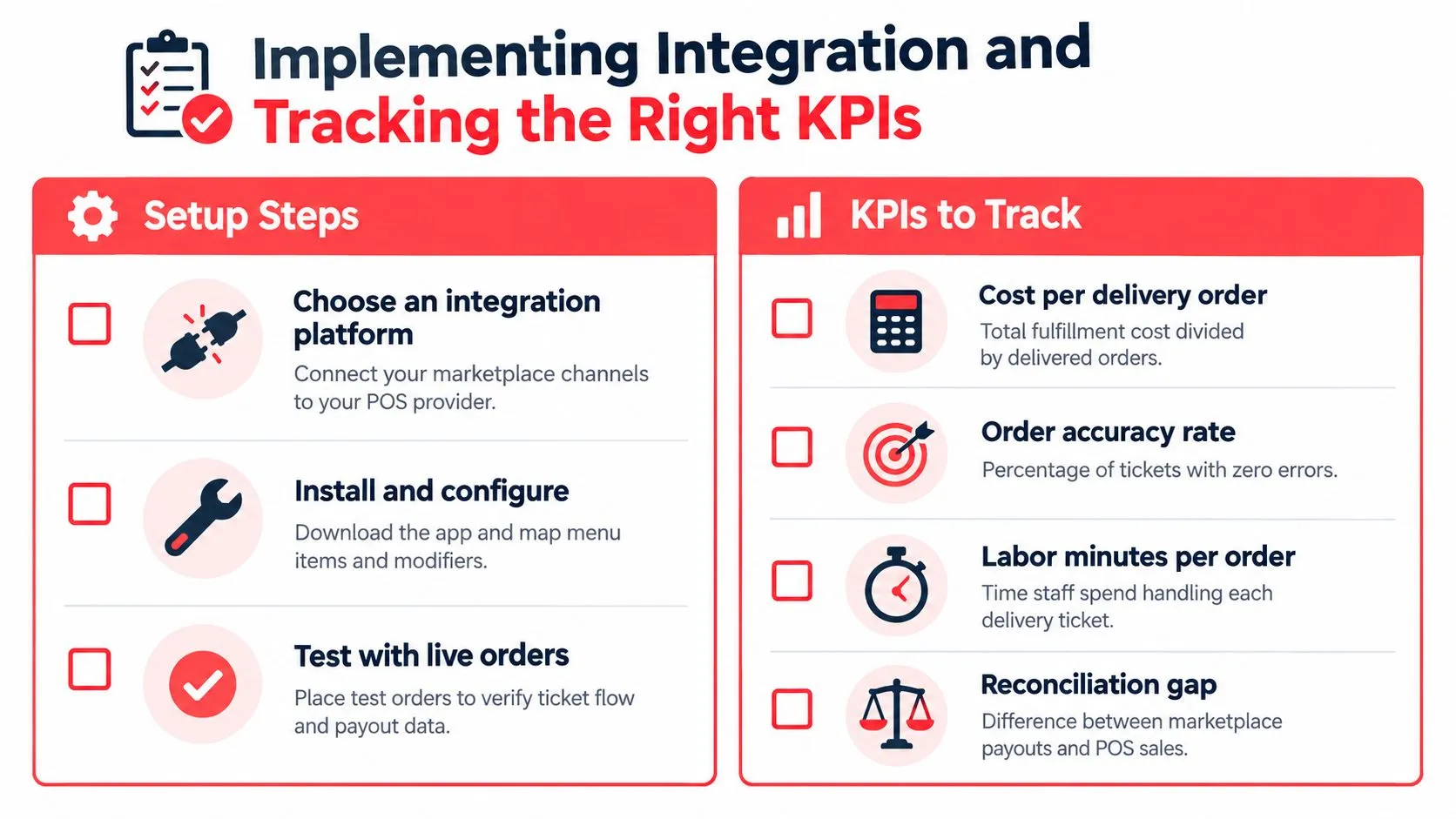
- Choose the integration path: Confirm that the workflow supports the restaurant’s Clover or Square setup and the channels it actively uses.
- Install the application: Clover merchants can start through the OrderOut Clover App Market listing. Square operators should use the OrderOut Square App Marketplace listing.
- Authorize marketplace channels: Connect Uber Eats, DoorDash, and Grubhub accounts as applicable. DoorDash’s merchant guidance explains that adding DoorDash through a middleware provider follows the same general workflow used for Uber Eats, Grubhub, or another marketplace, with the channel added in the provider dashboard. See DoorDash’s POS integration guidance.
- Map menu records: Match items, modifier groups, prices, and availability. Resolve duplicates before accepting live orders.
- Test the ticket flow: Place controlled test orders and confirm that the POS receives the right items, modifiers, and order details.
- Train around exceptions: Decide who handles unavailable items, refunds, menu changes, and orders that need review.
Track operating signals, not vanity metrics
After launch, compare the old workflow with the integrated one using the same observation method. Useful measures include:
- Cost per delivery order: Fulfillment expense divided by delivered orders.
- Order accuracy: Tickets completed without a missing item, wrong modifier, or avoidable remake.
- Labor minutes per order: Staff time spent receiving and managing each delivery ticket.
- Ticket time: Time from accepted order to kitchen completion or handoff.
- Reconciliation gap: Difference between marketplace payout records and POS sales.
- Exception volume: Orders requiring manual intervention after injection.
The purpose of restaurant data analytics isn’t to collect more dashboards. It’s to verify that the integration changed the work. If staff still re-key orders, the mapping or configuration isn’t complete. If errors remain concentrated around a particular modifier group, fix the menu structure rather than blaming the channel.
Review the results by marketplace and by order type. A single blended average can hide the fact that DoorDash orders are clean while a particular Grubhub menu has stale modifiers. Operational detail is what turns integration from an installation into a reduction in fulfillment leakage.
Frequently Asked Questions
Does OrderOut work with Clover?
OrderOut connects supported third-party delivery channels, including Uber Eats, DoorDash, and Grubhub, to Clover so orders can be injected into the POS. It maps marketplace menu records to the Clover structure and removes the need for manual re-keying.
Does OrderOut work with Square?
OrderOut supports delivery-to-POS workflows for Square. Operators should connect their marketplace accounts and verify menu and modifier mappings before using the workflow during live service.
How are menu modifiers handled?
Marketplace items, option groups, prices, and availability are matched to POS records during menu mapping. Accurate modifier setup matters because the injected order depends on the normalized POS structure.
Does integration remove every fulfillment cost?
No. Packaging, marketplace fees, payment processing, preparation, handoff, and exception handling still exist. Integration targets the labor and error costs created by disconnected order entry.
Where does a restaurant start?
Clover merchants can install OrderOut through the Clover App Market, and Square merchants can use the Square App Marketplace listing. The restaurant should then authorize channels, map menus, and test the order flow.
OrderOut connects Uber Eats, DoorDash, and Grubhub orders directly to Clover or Square, so your team can stop re-keying delivery tickets across separate tablets. Start by reviewing your current order fulfillment cost and visit OrderOut to onboard free in a few clicks.