
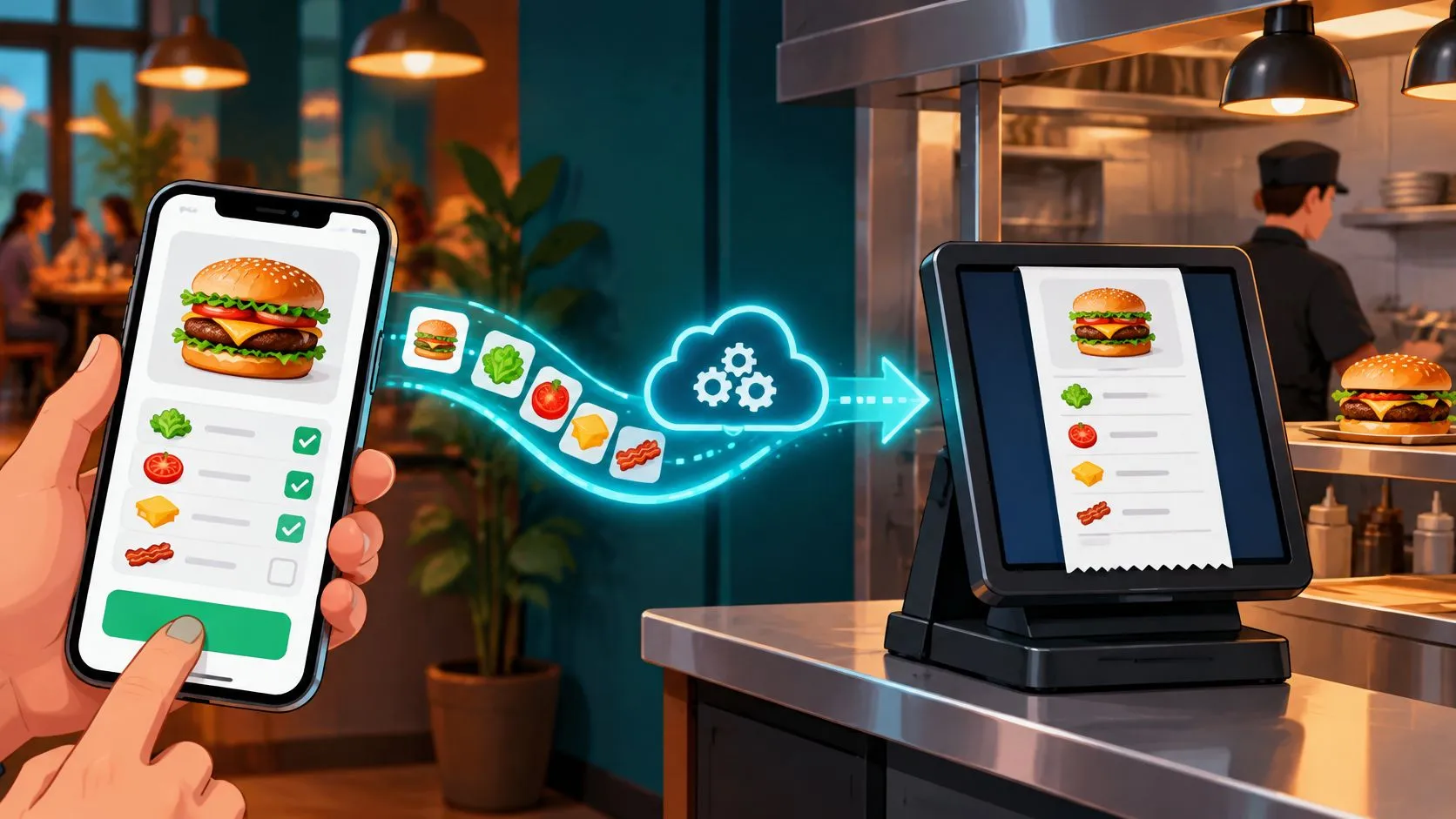
An online ordering API is the documented contract that moves menu, order, modifier, price, and status data between ordering channels and a restaurant’s POS. Its job isn’t finished when a message arrives, but when the correct ticket reaches the kitchen without being duplicated and the restaurant retains a usable order record.
A successful response on a screen can still leave staff with a missing customization or an order whose final state is unclear. For an operator, the useful question is simple: can the kitchen cook what arrives, and can the manager explain what happened afterward?
What an Online Ordering API Does
Say a guest orders a burger through Uber Eats, adds cheese, removes onion, and chooses pickup. The connection needs to carry those choices into Clover or Square as recognizable items and modifiers, not leave a cashier to interpret a marketplace screen.
Delivery-to-POS integration connects that marketplace sale to the system staff already use. Uber Eats, DoorDash, and Grubhub orders belong in the same operational queue as other tickets, with the POS remaining the source of truth for preparation.
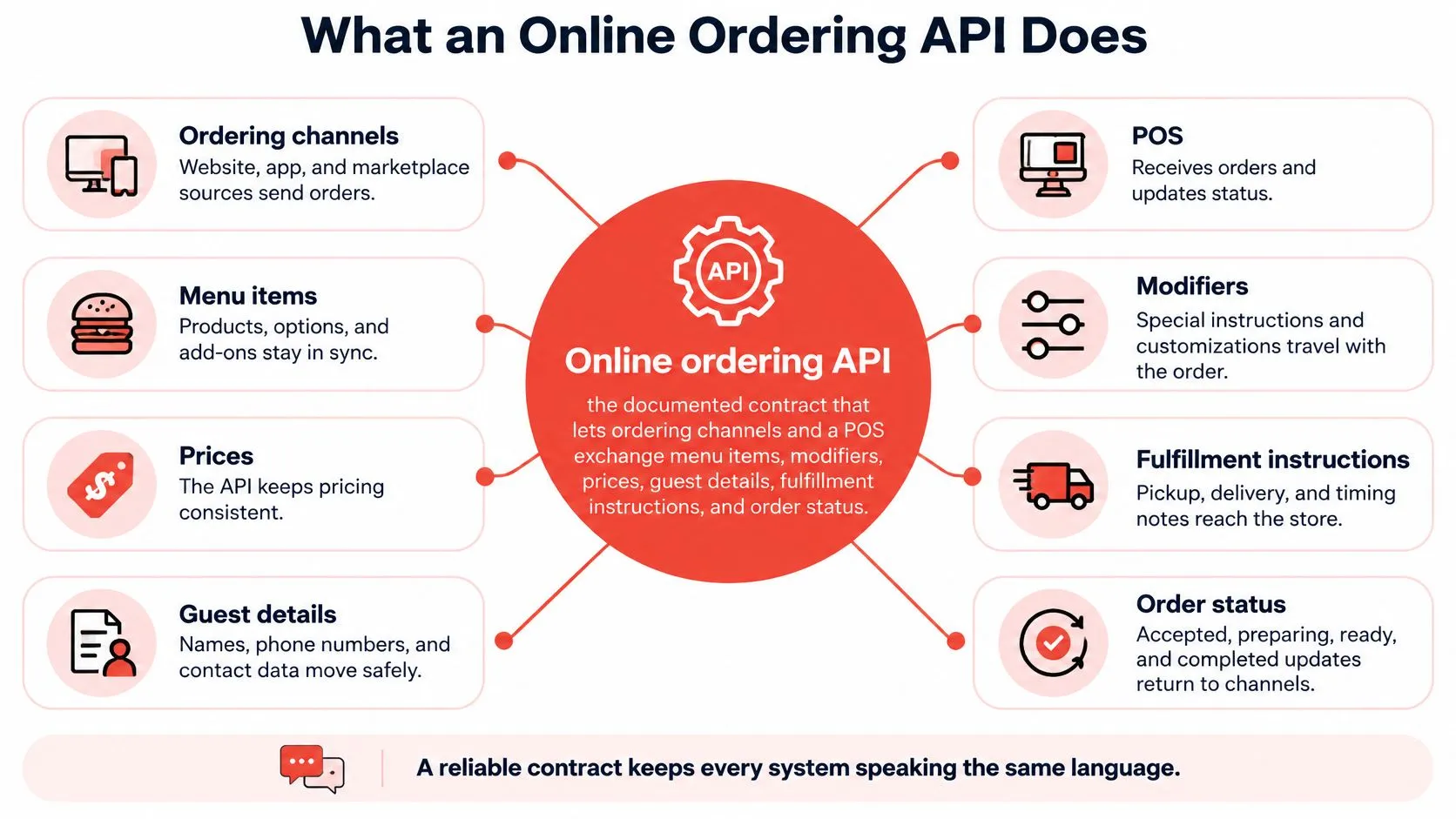
Traffic needs to move in both directions, within the capabilities each channel supports:
- Into the restaurant: New orders, guest details available from the channel, fulfillment instructions, and subsequent changes.
- Back to the channel: Menu changes, availability, and supported preparation or fulfillment states.
Restaurant Tools’ restaurant technology overview identifies cloud-based platforms as the leading technology segment and mobile ordering as the leading interface trend. The practical issue isn’t the interface the guest taps. It’s whether every system behind that interface agrees about what was sold.
An API doesn’t automatically guarantee complete synchronization. A connection might create orders but leave cancellations, refunds, or availability changes outside its coverage.
Practical rule: A ticket that arrives isn’t necessarily a ticket that arrived correctly.
Successful injection also doesn’t remove marketplace commissions. It removes the extra tablet and manual re-keying from the order-entry workflow, reducing opportunities for staff to select the wrong item or overlook a modifier. Use an endpoint map, rather than a feature slogan, to test what a connection covers.
Endpoints a Restaurant Order Workflow Uses
Online ordering API endpoints in a restaurant workflow
| Call | What it carries | When it runs | If it fails |
|---|---|---|---|
| Menu sync | Items, prices, categories, availability | Before sale and when the menu changes | Guest orders an item the kitchen cannot make |
| Modifiers and combos | Required choices, add-ons, sizes, special instructions | With the menu and on each order | Ticket is vague and the line guesses |
| Create order | Items, modifiers, totals, guest, fulfillment type, promised time | When the channel accepts a sale | Staff re-keys from a tablet |
| Order status | Accepted, preparing, ready, completed, handed to courier | As the kitchen and courier progress | Guest and courier get the wrong time |
| Cancel and refund | Void reason, items removed, amount returned | When the channel or store cancels | Kitchen cooks a dead ticket or the drawer disagrees |
| Webhooks | Event ID, event type, timestamp, order reference | Whenever the channel pushes a change | POS only learns the truth if someone polls or looks at a tablet |
| Hours and throttle | Store hours, paused channels, throttle or rate-limit signals | When the store opens, closes, or pauses a channel | The app keeps selling into a closed kitchen |
These are workflow capabilities, not promises that every provider uses those exact endpoint names. Some systems combine calls; others separate menu management, orders, and payments into different interfaces.
Before the guest checks out
Menu synchronization needs to preserve the relationship between an item and its choices. Publishing a burger without its required size or cook-temperature selection creates a problem before the order even exists.
Availability needs its own attention. Removing an item from the POS won’t protect the kitchen if the marketplace continues offering its old menu. Confirm which system owns availability and how a rejected update becomes visible to staff.
Hours and throttling deserve the same treatment. A scheduled closing time, a temporary channel pause, and an API capacity limit are different controls. Test each separately rather than assuming a generic pause switch handles them all.
After the guest pays
The create-order call needs enough structured information to produce a cookable ticket. An item name and a total aren’t enough when fulfillment type, required choices, and promised time affect what staff do next.
Status labels also need explicit mapping. Don’t treat accepted as preparing, or ready as handed to courier. A guest shouldn’t receive a collection notification because the POS received the sale.
Cancellation and refund handling require separate checks:
- Kitchen action: Does the cancellation reach staff before they prepare the food?
- Payment action: Is the refund recorded against the correct sale?
- Partial changes: Can the integration represent removed items without incorrectly canceling the entire order?
A webhook is an event notification, not a substitute for these business rules. It tells the receiving service something changed; the service still needs to validate the event and apply the correct action.
For a technical handoff, use the guide to connecting to an API to organize authentication, requests, responses, and error handling. Request a sample payload containing a modifier-heavy order and its later cancellation. A marketing page isn’t an API contract.
Delivery POS Integration Patterns for Clover and Square
A restaurant can receive a marketplace order through a direct cloud connection, an aggregator layer, or a tablet-and-re-key workflow. The difference becomes visible at the pass: staff either receive a structured ticket or wait for someone to turn a screen notification into an order.
Cloud connections and aggregation
With a direct cloud connection, a channel sends order information to a service that creates the ticket through the POS interface. The restaurant needs to establish who maintains that connection and who investigates when the channel says accepted but the POS has no ticket.
An aggregator layer sits between multiple marketplaces and the POS. Instead of operating separate order-entry workflows for Uber Eats, DoorDash, and Grubhub, staff work from a shared POS queue. This is the delivery-to-POS pattern used here, not a replacement for Clover or Square.
The architectural issue is translation between systems that describe the same transaction differently. Yellow.ai’s discussion of connecting banking AI assistants to mainframes offers a cross-industry comparison for technical teams evaluating connections to established systems. For a restaurant, the useful lesson is narrower: the connector must preserve the receiving system’s rules, not just transport text.
Tablet fallback and transport choices
With tablet-and-re-key fallback, an employee reads the marketplace order and types it into the register. A tablet might also require an acceptance action, so clarify whether any screen interaction remains in the proposed setup.
Polling asks a system for changes on a timer. Webhooks let a system push a notification when something changes, reducing dependence on repeated checks. Neither transport alone guarantees correct handling of a late cancellation.
Buy the maintained connection, not just the first successful ticket.
During evaluation, confirm:
- Structured receipt: Items and modifiers arrive as usable POS records.
- Return coverage: Supported status changes and cancellations reach the channel.
- Maintenance ownership: Someone is responsible when a marketplace changes its API.
The Clover API documentation guide can help a technical contact distinguish Clover’s interfaces from the integration provider’s responsibilities. For Square, apply the same operational test: what exactly does the kitchen receive, and who resolves a failed handoff?
Menu Mapping That Keeps Tickets Clean
The DoorDash menu, Uber Eats menu, Grubhub menu, and Clover or Square menu are different languages. A normalized POS schema is the translation card that gives their items and choices a consistent structure.
Consider a hypothetical burger order: a large size, cheese and bacon add-ons, a required cook temperature, and no onion. The marketplace’s product identifier needs to resolve to the correct POS burger, while each customization needs an appropriate destination.
A clean mapping distinguishes paid add-ons from preparation instructions. Cheese might carry an additional charge; no onion changes preparation without becoming another sellable item.
Map choices instead of matching names
Matching the word burger isn’t enough. The integration needs to preserve which modifier group applies, which choices are required, and which combinations the POS permits.
If a DoorDash payload contains large, extra cheese, and no onion but no corresponding groups exist in the POS, free text may be the only usable remainder. That leaves the cook reading prose where the kitchen expected consistent ticket lines.
The menu synchronization guide is useful for organizing this work around items, modifiers, prices, and availability rather than treating menu setup as a file upload.
- Marketplace-only item: A Grubhub special needs an intentional POS destination, not an accidental match to a similarly named product.
- Required-choice conflict: If an app allows guests to skip a choice the POS requires, correct the menu rules before accepting live orders.
- Combo components: A meal containing separately tracked products needs a mapping that preserves those components where the POS workflow requires them.
Keep the translation current
Mapping isn’t finished after setup. Renaming a modifier, replacing an item, or changing a combo can invalidate an otherwise working connection.
An item marked unavailable in the POS should stop selling through connected channels when that synchronization is supported and configured. Verify the actual result on the marketplace rather than assuming the local change propagated.
Pricing needs similar discipline. Channel prices don’t have to be identical, but each order must preserve the price the guest agreed to pay and the intended POS representation. Don’t let an outdated map substitute a different amount.
Menu check: Read the resulting kitchen ticket, not just the integration’s success message.
Clean translation makes automated entry useful. The POS remains the operational record for preparation and payment, while staff receive recognizable items instead of a second screen they must interpret.
How a Marketplace Order Reaches the POS
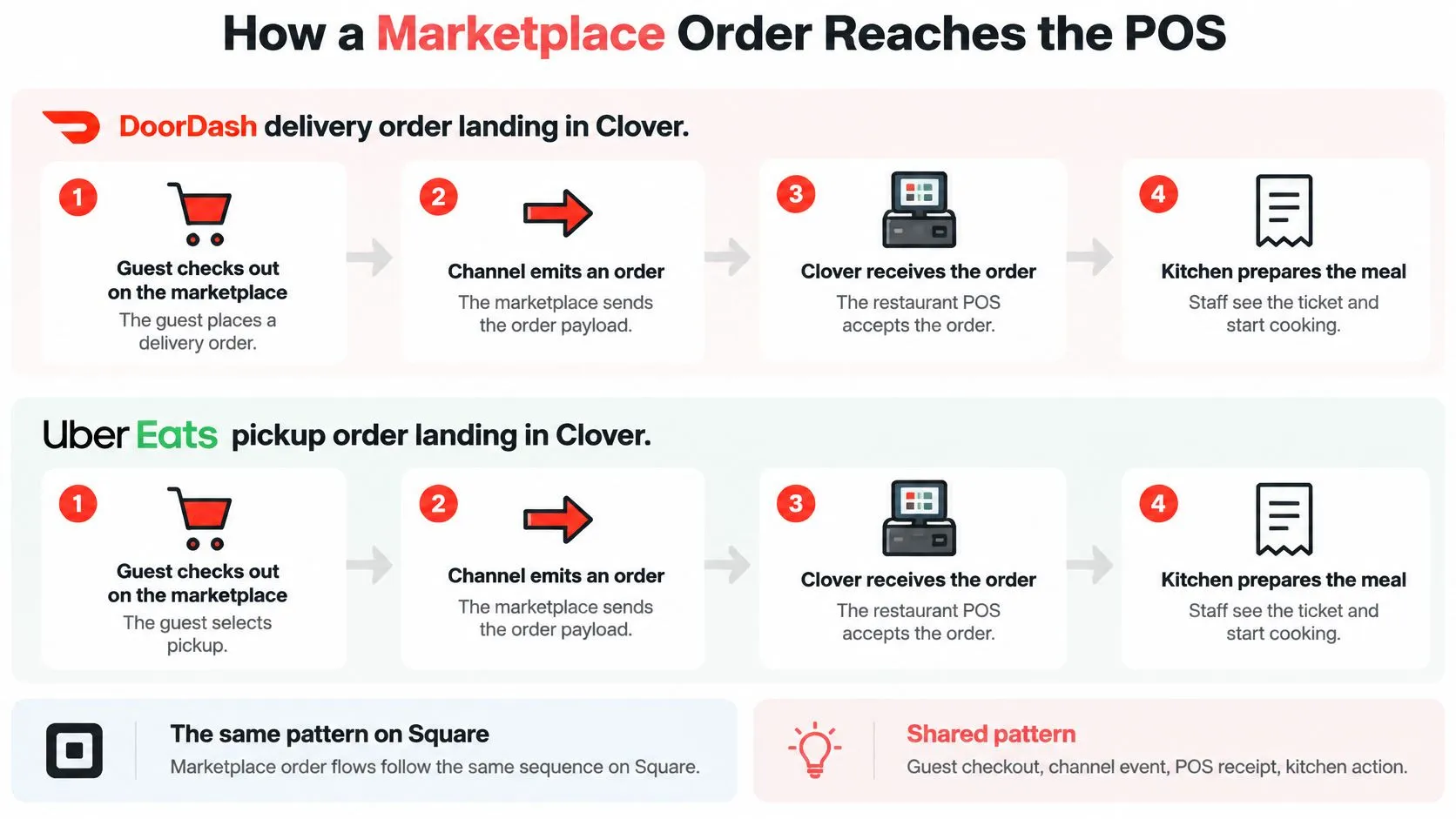
A marketplace order reaches the kitchen only when the POS receives a usable ticket. Follow a DoorDash delivery order into Clover: the guest checks out, the order enters the routing system, and the POS receives the translated order.
OrderOut’s Clover delivery integration routes marketplace orders into Clover. The DoorDash-to-Clover workflow is one example of that connection.
From event to kitchen action
The receiving service checks which restaurant the order belongs to, identifies the event, translates its contents, and sends it to the POS. The transmission is complete only when the POS confirms that it created the order.
An Uber Eats pickup order follows the same route, with pickup instructions instead of courier handoff details. Square uses the same general pattern. OrderOut routes orders from Uber Eats, DoorDash, Grubhub, ChowNow, and Wix into supported POS systems so staff can work from one queue.
APIs and webhooks describe different parts of this exchange: one provides a way to request or submit data, while the other can notify a service when an event occurs. WebinOne’s guide to webhooks and APIs explains the distinction. OrderOut’s webhook integration guide provides context for handling incoming events.
Make a replay harmless
Idempotency means that processing the same order event again does not create a duplicate sale. If Clover creates a ticket but the confirmation gets lost, a retry should locate the existing ticket rather than print another burger.
OrderOut’s unified API guide describes event identifiers, timestamps, idempotency keys, event records, and an audit trail for tracking this workflow. A timeout leaves the result uncertain. It does not prove that the POS failed to create the order.
Keep the original event, retry attempts, POS response, and final status available for review. Matching marketplace and POS identifiers helps a manager trace a disputed order without relying on similar item names.
- Normal sale: Check that the ticket has the intended kitchen destination and fulfillment instructions.
- Cancellation and refund: Confirm the preparation and payment records reflect the change.
- Modifier-heavy combo: Check that each component appears correctly on the ticket.
- Replayed event: Confirm the retry does not create another ticket.
- Uncertain result: Make it clear to staff whether the order was created or still needs investigation.
OrderOut’s third-party order engine routes marketplace orders into supported POS workflows. Clover owners can install OrderOut from the Clover App Market; Square owners can use the OrderOut Square App Marketplace listing.
Security and Rate Limits on Live Orders
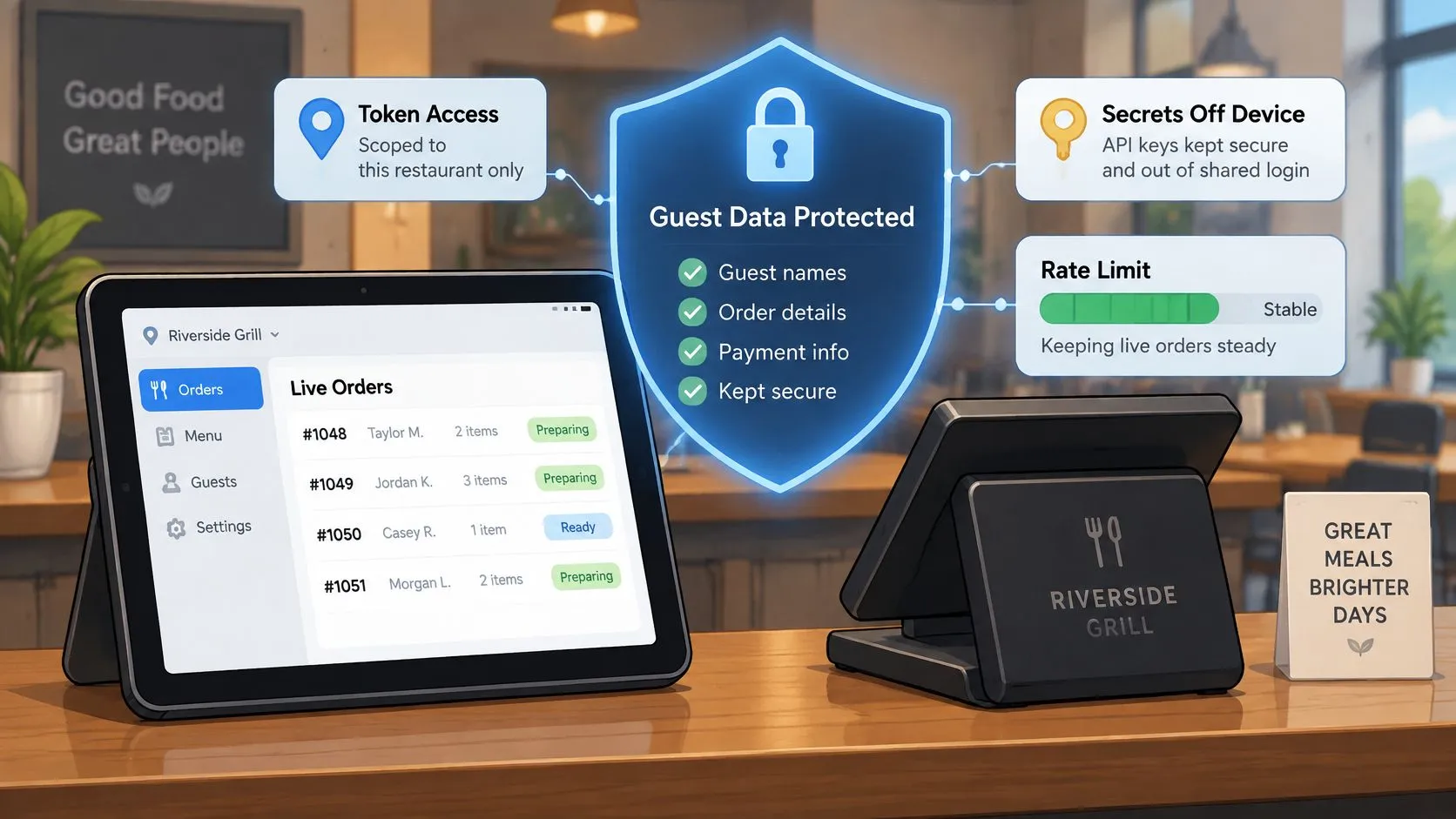
API security protects guest information and the ability to change restaurant orders. A working login isn’t enough: access must also be limited to the correct restaurant, location, and action.
Use token-based access with the narrowest practical permissions. A credential used for menu synchronization shouldn’t have unrestricted authority to issue refunds.
Protect access and order history
Keep secrets in a managed credential store, not on a delivery tablet or in a shared spreadsheet. Establish who can revoke access when an employee or vendor leaves, and test that location-specific credentials can’t reach another store’s records.
Signing up for OrderOut gives us access to incoming online orders and past online-order data executed by connected partners. That makes the storage question concrete: identify which party retains order history, what the restaurant can export, and what happens when the connection ends.
Technical access doesn’t automatically grant permission to use guest details for unrelated purposes. Keep exports, staff access, and retention aligned with platform terms and applicable privacy obligations.
Protect paid orders during a rush
HTTP 429 indicates rate limiting. The caller should slow down using exponential backoff with jitter, a randomized pause that helps prevent synchronized retries, rather than repeatedly hammering the same request.
DevArmor’s discussion of rate limiting to prevent API abuse provides security context for controlling request traffic. Restaurant integrations also need queue discipline so a bulk menu refresh doesn’t hold up an already-paid order.
- Separate workloads: Keep menu synchronization, live order submissions, and status updates in appropriately isolated queues.
- Bound concurrency: Limit simultaneous requests instead of allowing bursts to grow without control.
- Isolate locations: Prevent a busy restaurant from consuming shared capacity needed elsewhere.
- Classify failures: Distinguish throttling from expired credentials or an invalid order schema.
Monitor rejected requests, queue age, delayed ticket creation, and unresolved submissions by location. An authentication failure needs a different response from a temporary capacity restriction.
Sandbox success isn’t proof of rush readiness. Test concurrent traffic across locations, including menu updates while orders arrive. The deciding question is practical: what happens to an in-flight DoorDash order when menu synchronization is rate-limited at the same moment?
How to Choose an Online Ordering API
What to check before you pick an online ordering API
| Criterion | What good looks like | Ask the provider |
|---|---|---|
| Channels | Uber Eats, DoorDash, and Grubhub on one queue | Which marketplaces inject today, and which are a promise? |
| POS fit | Tickets land in Clover or Square as structured items | Can you show a modifier-heavy order on my POS? |
| Once-only tickets | Retries do not print a second ticket | What is the idempotency key and where is it stored? |
| Menu hygiene | Items, required choices, prices, and availability map correctly | Who updates the map when I change an item? |
| Status both ways | Ready and canceled states return to the channel | Do refunds and substitutions sync back? |
| Guest data | Direct orders keep contact and history; marketplace limits are stated honestly | Which fields can I export, and from which channel? |
| Rush behavior | Menu sync cannot block a live order | What happens on a 429 during dinner? |
| Economics view | Fees stay visible even after the ticket prints | Can I reconcile payout against commissions and error charges? |
Use the checklist as a demonstration script, not a questionnaire answered with yes. Show the provider a real menu configuration and inspect the resulting POS record.
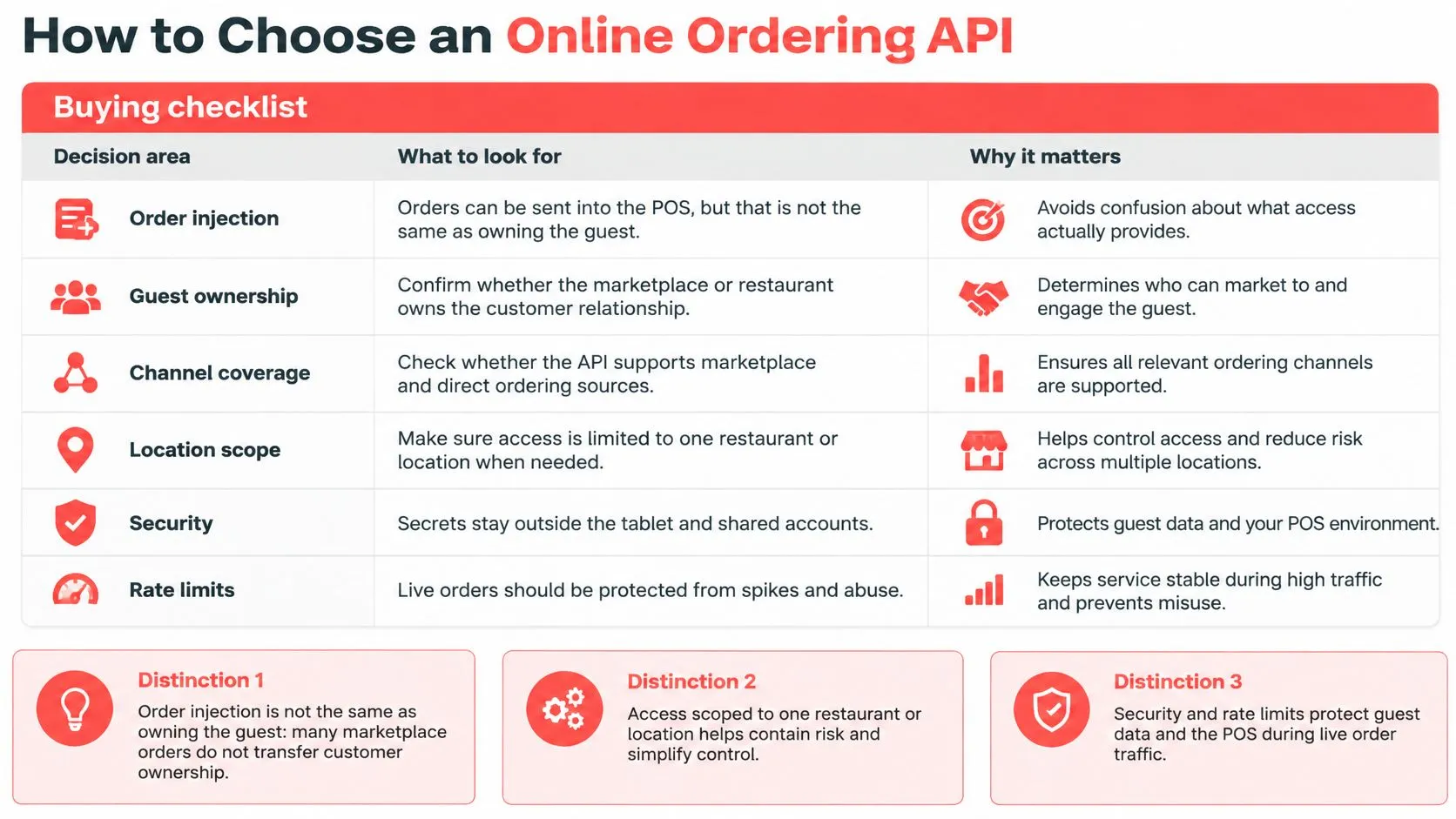
Separate order access from guest ownership
Order ingestion isn’t data portability. Opalink’s State of Restaurant Delivery overview describes marketplace control of customer information as a limitation for restaurants seeking usable contact details, history, and preferences.
Ask for a field-level explanation of exports, retention, historical backfill, and permitted use. A restaurant-owned order record should preserve source identifiers and connect fulfillment, payment, and service events without claiming access to information the marketplace doesn’t provide.
The contrast is commission-free online ordering through a restaurant-owned branded page, where the restaurant keeps the direct customer relationship and order history. That’s a different channel decision from connecting marketplace demand to the POS.
Keep marketplace charges visible
DoorDash’s published U.S. merchant pricing lists delivery commissions of 15% for Basic, 25% for Plus, and 30% for Premier, a 6% pickup commission across plans, and commission-free DoorDash Online Ordering. Those are DoorDash’s channel terms, not charges removed by POS routing.
The same burger therefore has different channel economics even when staff prepare it from the same queue. Commission-free also shouldn’t be interpreted as a promise that every other possible service cost disappears.
DoorDash’s delivery commission explanation describes remittances net of applicable commissions and deductions including promotional, preparation-error, and equipment fees. Compare the sale, adjustments, and deposit rather than treating the ticket total as the payout.
For the software category behind a shared connection, the restaurant iPaaS guide provides additional context. The buying decision should still turn on operational proof: correct tickets, recoverable failures, honest data boundaries, and clear maintenance responsibility.
Frequently Asked Questions
Does OrderOut work with Clover?
Yes. OrderOut can be installed from the Clover App Market and injects marketplace orders into Clover so staff don’t have to re-key them from a delivery tablet. Match items and modifiers before accepting live orders so each ticket is ready for preparation.
Does OrderOut work with Square?
Yes. OrderOut routes orders from Uber Eats, DoorDash, Grubhub, ChowNow, and Wix into supported Square POS systems. Check the Square ticket against the marketplace order, including fulfillment instructions and required selections.
Does an online ordering API remove DoorDash or Uber Eats commissions?
No. Routing a marketplace order to the POS cuts out manual re-entry, while marketplace fees still follow the channel’s terms. An API connection does not turn a marketplace sale into a direct order.
What should I fix before I turn the API on?
Match marketplace items and modifiers to the POS, including required choices, combos, and availability rules. Then check that the order arrives once with its customizations intact, and test how cancellations, refunds, and repeated events are handled. A ticket that appears in the POS but lacks a usable order record or guest information can still leave staff with work to do.
Send the Next Order into Your POS
For a Clover restaurant, start with the OrderOut listing in the Clover App Market and follow the onboarding steps. Square restaurants can begin with the Square App Marketplace listing and follow its setup flow.
Review OrderOut pricing before enabling every channel, and confirm which costs apply to the setup you intend to run.
Verify the receiving workflow
Before going live, choose a test store and check the full handoff:
- Menu readiness: Match items, prices, required choices, and modifier groups.
- Kitchen readiness: Confirm a customization-heavy order reaches the right preparation destination.
- Exception readiness: Check how cancellations, refunds, and replayed orders are handled.
- Record readiness: Verify marketplace references remain connected to the POS order.
For technology providers, OrderOut’s Integration API is a REST API for routing orders from Uber Eats, DoorDash, Grubhub, ChowNow, or Wix into a POS. Providers integrate once, and OrderOut handles marketplace connections and updates when marketplace APIs change.
Keep Clover or Square as the operational source of truth. Once the menu and test tickets are ready, start OrderOut onboarding and connect the restaurant’s ordering workflow.
OrderOut routes orders from Uber Eats, DoorDash, and Grubhub into supported POS systems such as Clover and Square, reducing manual entry and helping keep orders in one queue. Visit OrderOut to review its POS connections, then test a modifier-heavy order before accepting live marketplace traffic.