

A Square reseller merchant residual review is a monthly reconciliation that checks each merchant’s residual against Square’s processing report and your written agreement, so every change has a traceable cause. If a restaurant’s residual has fallen while its sales look steady, start with that merchant’s records, not the portfolio total.
The useful routine is straightforward: spot the change, open Explain, verify the reported factors, and describe the confirmed cause in plain words. Your job isn’t to defend a number on a screen. It’s to show which record supports it and what, if anything, needs attention.
What a Monthly Residual Review Checks
Review each merchant separately. A portfolio total can conceal an active account that disappeared, an adjustment that offset another merchant’s decline, or a pricing change that affected processing revenue without changing sales.
The distinction between sales and eligible revenue matters. The Square reseller residual explainer describes why the contractual revenue base, rather than gross restaurant sales, determines what belongs in a residual review.
Monthly residual review layers
| Review layer | Question to answer | Record to confirm |
|---|---|---|
| Merchant population | Did every merchant that processed last month appear? | Merchant list in the portal and Square’s report |
| Eligible card volume | Which card volume counts toward the residual? | Square’s processing statement |
| Net revenue base | What remains after network and processor costs? | Agreement definition and statement lines |
| Residual by month | What did each merchant produce this month and last month? | Residual view by merchant and month |
| Explanation | Why did a merchant change? | Explain output and review notes |
Say Juniper Street Cafe, an invented merchant, has steady card sales but a lower residual. Confirm that you’re comparing the same merchant and complete reporting periods before investigating the difference. Then compare eligible activity, the applicable revenue base, and the reported residual rather than treating steady sales as proof of an error.
The data boundary is firm: figures come from Square’s report and the payments OrderOut collects from Square, never from an AI estimate. The portal shows residuals by merchant and month and offers Explain. It doesn’t calculate splits or track payouts, so the agent confirms the arithmetic against the statement and agreement.
Practical rule: Pull the same records in the same order each month. Consistent inputs make an unusual merchant-month easier to identify.
Keep the merchant identifier attached to every working record. A restaurant’s trading name can change, and similar location names can lead you to compare unrelated accounts.
Check Net Processing Revenue in the Monthly Routine
The residual base is eligible net processing revenue, not gross card sales or hardware revenue. The Vivid Square reseller program describes compensation tied to processing revenue after specified costs and recurring residuals while processing continues. Your own written agreement controls eligibility, deductions, and duration.
Use the following workflow as a check on the underlying revenue base.
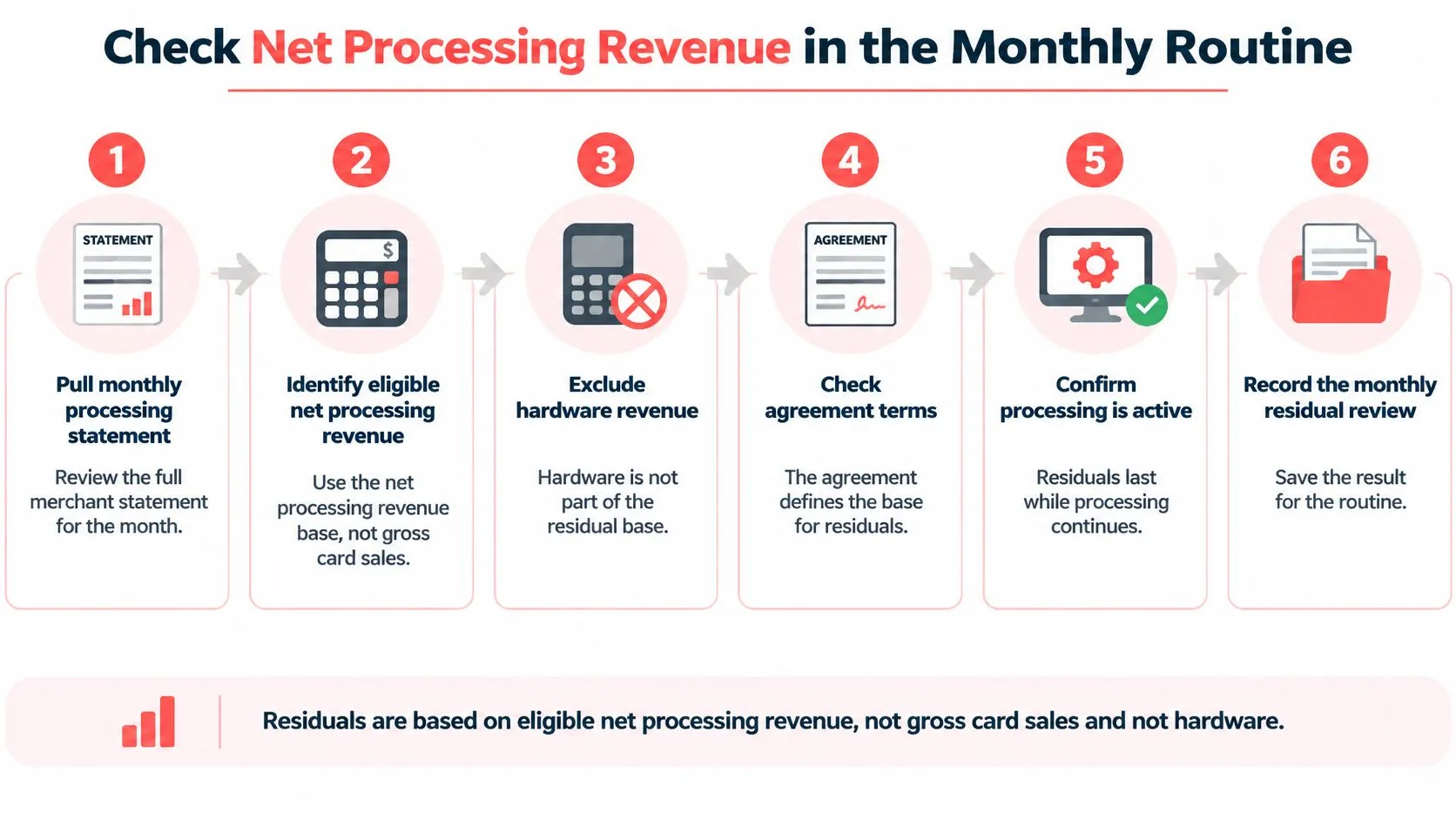
Pull the merchant-month comparison
Start with the portal’s residual view for the current month and the prior month, organized by merchant. Match the merchant identifiers to Square’s report before sorting for declines. Compare complete reporting periods, and mark any incomplete record rather than treating it as a final result.
Include merchants that processed previously but now show no residual. Don’t build your review solely from records with positive amounts, because that removes the exceptions you most need to investigate.
RelyOn’s residual statement audit guide recommends merchant-level reconciliation, including prior-period merchants, and matching card volume and transaction counts to processing statements. Its control-workbook approach is useful here: retain the merchant identifier, volume, transactions, merchant fees, authorized costs, expected residual, actual residual, variance, and explanation.
Flag changes before interpreting them
Flag a merchant when its residual moves without a corresponding movement in eligible card volume. Also flag any merchant that continues processing but produces no residual, or appears in Square’s report but not in your working comparison.
These flags are questions, not conclusions. Juniper Street Cafe might have a payment-channel change, a pricing-plan change, or an adjustment. Don’t select whichever explanation sounds plausible and work backward to support it.
- Volume mismatch: Confirm that both records use eligible card activity rather than total POS sales.
- Unchanged volume: Compare payment classifications and current pricing with the prior period.
- Missing merchant: Check identifiers, reporting periods, and contractual eligibility.
- Unexplained deduction: Preserve the statement line and identify the governing clause before accepting it.
Open Explain on each exception
Use the Explain a residual help guide to review the merchant-month record. Keep the merchant and period explicit so the explanation stays attached to the right comparison.
For follow-up questions, the Explain a residual in the AI assistant release guide provides context for using the assistant. Ask focused questions about the displayed change, then verify the answer against the underlying report. Explain helps interpret reported figures; it isn’t a substitute for source records.
The accompanying video provides another reference for the review.
Match the explanation to the agreement
Reconstruct the merchant’s processing revenue using only authorized network costs, processor costs, per-item charges, adjustments, and documented intermediary arrangements. Apply refunds or chargebacks only as the governing rules permit. Log a deduction with no identifiable rule as unresolved, rather than accepting it.
Watch for an outdated rate after a pricing change and for arithmetic based on gross sales. Card-present, online, and keyed activity can occupy different processing categories, so use Square’s actual classifications. The Square reseller residual payment types guide helps distinguish processing residuals from other compensation categories.
When a restaurant operator needs background on acceptance channels, Zaro’s card payment solutions for small business offers a separate reference. Keep that conversation distinct from the contractual reconciliation.
Record the cause and close the exception
Rebuild a merchant’s result from its statement during each review cycle, then compare your result with the portal. Record the merchant, month, confirmed cause, supporting line, and any unresolved clause.
For Juniper Street Cafe, a valid conclusion might be that more activity moved into the keyed-payment category, changing eligible processing revenue. Write that only after the report supports it. Otherwise, record the channel shift as a question still under review.
A reconciled list separates confirmed explanations from open exceptions. An explanation without a supporting line isn’t a closed review.
If you’re also assessing the restaurant’s delivery workflow, start with the Square delivery integration app. Keep that operational assessment separate from the residual arithmetic.
Explaining a Residual Drop in Plain Words
Why did my number move? Answer that question by comparing card volume and residual together, then confirming the relevant statement lines.
Residual change patterns and the plain explanation
| What Changed | Likely Cause | Plain Explanation to Give |
|---|---|---|
| Residual and card volume both down | Slower sales month | Fewer card payments came in, so the residual followed the sales |
| Residual down, card volume steady | Payment mix shift or pricing change | Card sales held, but more payments moved to a different channel or plan |
| Merchant processes, residual zero | Possible exception or agreement rule | Flag for contract and statement review before explaining to the merchant |
| Merchant no longer processing | Closure or inactivity | Confirm closure before counting it as attrition |
| Residual rises sharply | One-off adjustment or new merchant ramp | Find the adjustment line tied to a specific date |
Treat the table as a triage tool, not a script to repeat before checking the records. Similar declines in volume and residual may support a straightforward sales explanation, but an adjustment can still affect the result. A sharp rise deserves scrutiny too, especially before you describe it as recurring growth.
BizBite’s merchant-services agent guide frames residual performance around margin and attrition rather than volume alone. That distinction helps you avoid calling a processing merchant inactive merely because its residual has disappeared.
Separate the cause from the next action
For Juniper Street Cafe, steady card volume and a smaller residual call for a payment-category and pricing comparison. If the report confirms a channel shift, describe that shift. Don’t tell the owner that the restaurant sold less when the eligible volume says otherwise.
Chargebacks aren’t automatically commission deductions. Their treatment must match the written agreement, and each adjustment needs an authorized rule. If you can identify a chargeback but can’t establish its residual treatment, leave that part of the explanation open.
The Square reseller residual change guide provides further context for distinguishing sales activity, tender mix, and reported processing factors. In the merchant conversation, keep the language narrower than the investigation: explain only what you’ve confirmed.
Conversation standard: Name the period, state the supported cause, and identify the next check.
A useful template is: “For [month], your reported residual changed because [confirmed driver shown in the report]. We matched that to [statement line or agreement term], and we’ll check [specific remaining item] next.”
If the cause isn’t confirmed, say so directly. “The merchant is still processing, but this month’s residual needs a statement and agreement review” is more useful than a confident guess.
Partner Models and What Each One Changes in Review
A reseller earns residuals on the merchants it brings and places, so the monthly review follows merchant-month processing economics rather than a one-time referral event.
Partner models and what each one means for review
| Model | How the Partner Is Paid | What to Review Monthly |
|---|---|---|
| Direct referral | Payment on adoption through a tracked link | Adoption date and whether the merchant processes |
| Solutions partner | Share tied to the integrations it builds | Integration activity alongside processing |
| Reseller | Monthly residual on merchants it places | Full residual reconciliation by merchant and month |
Turnkey’s Square partner-program comparison distinguishes these operating models and identifies control of the Square relationship and deployment responsibility as important differences. Confirm those responsibilities before deciding which records belong in your review.
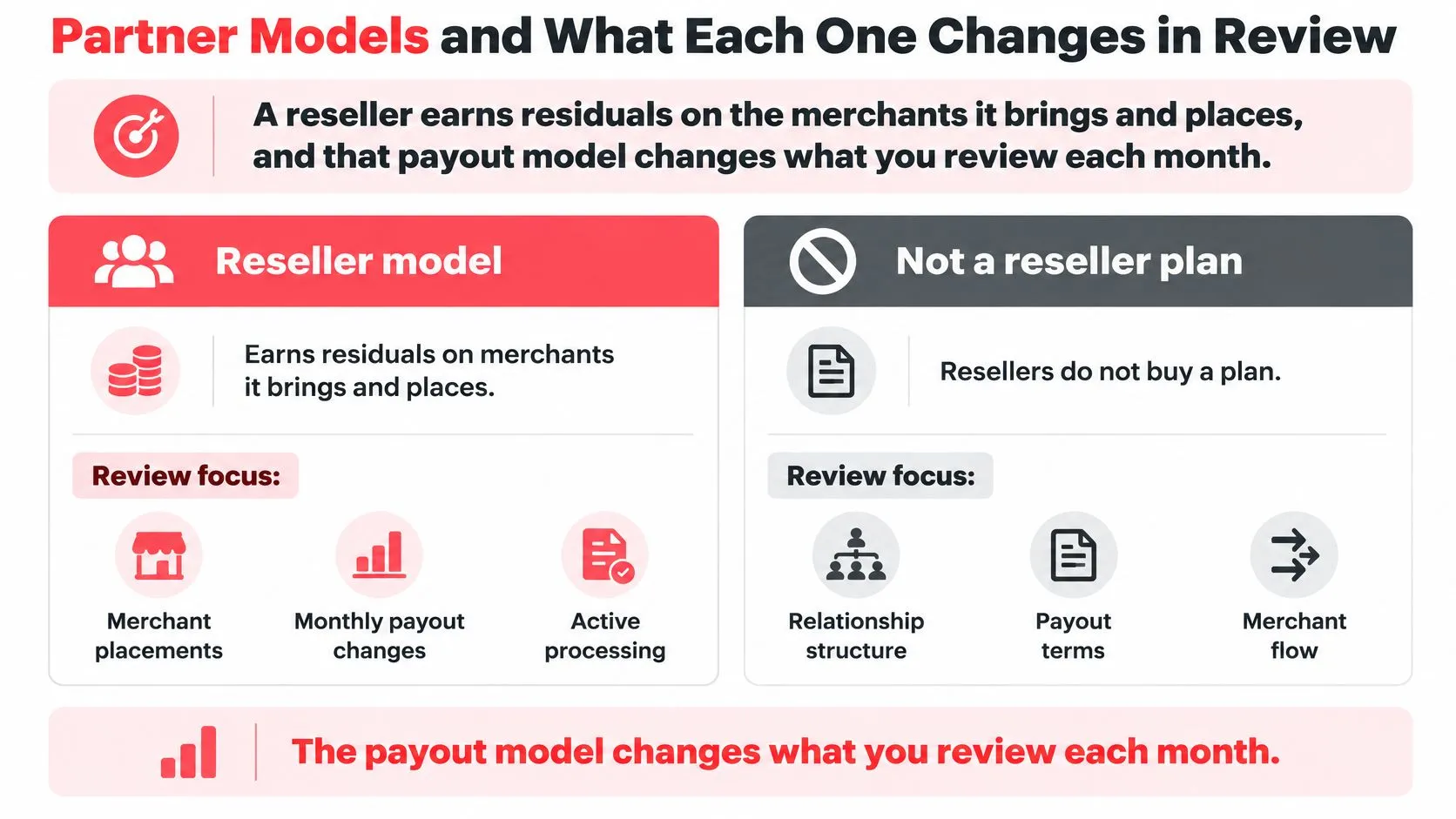
Resellers do not buy a plan. They earn residuals on the merchants they bring to OrderOut. A referral review therefore centers on attribution and adoption: did the tracked merchant activate, and is it still processing? A reseller review goes further, reconciling each placed merchant by month and flagging any account that processes without a matching residual. A solutions partner also needs to examine the integration activity covered by its agreement, because the payment trigger is tied to what it builds and maintains.
Keep restaurant operations beside the review
The delivery-to-POS integration routes Uber Eats, DoorDash, and Grubhub orders into Square or Clover without extra delivery tablets or manual re-keying. Item and modifier hygiene still matters: each marketplace selection needs a valid POS destination, and unavailable items should be reflected before they create failed or refunded orders.
For a restaurant client, reliable order routing is an operational reason to maintain the relationship. Track integration health and order activity beside residuals, and keep marketplace order totals separate from processor-confirmed eligible card volume. The first shows the service is working; the second drives the residual.
Partners who also advise on adjacent recurring services should keep each contract in its own lane. A different recurring-revenue example such as guest WiFi revenue for MSPs shows why compensation terms, reporting fields, and review cadence should not be blended into one explanation.
Use the ISV versus ISO guide to clarify partner roles, and review how the reseller program works for the relationship structure. The practical test is simple: for every merchant on the residual report, you should know which model applies, which record explains the month, and which open item still needs a written rule.
Confirm the Review Routine Before You Join
A commercial offer earns nothing if you cannot trace a merchant-month change back to its supporting record. Confirm the written revenue definition and the review routine before you sign anything.
OrderOut’s Reseller Program lets partners resell Square, Clover, and Online Ordering, and resellers earn residuals on the merchants they bring to OrderOut rather than buying a plan. Ask which of those products your portfolio will carry, because the mix shapes what your monthly review checks.
Verify the reporting you’ll use
Before committing, confirm these points in the Square reseller program discussion:
- Revenue definition: Obtain the written definition of eligible processing revenue.
- Authorized deductions: Match permitted deductions to identifiable statement lines.
- Historical review: Confirm Explain availability for the merchant-month periods you need.
- Exception handling: Establish how a processing merchant with no residual gets flagged.
Run through each item against a real statement, not a sales deck. A revenue definition that cannot be matched to line items will leave you guessing the first time a residual drops.
Merchant residuals are live in the reseller portal, with merchant-by-month reporting and Explain available for review. The portal shows the figures without calculating splits, so confirm the arithmetic against Square’s statement and your written agreement. The merchant-services agent guide frames the ongoing responsibilities this kind of review carries, beyond the initial placement.
Choose a routine you can repeat accurately every month. The useful outcome is a merchant list with a supported explanation for each change and clearly assigned open questions.
Frequently Asked Questions
Why did my Square merchant residual fall when sales stayed steady?
Start with the merchant-month line and compare it to gross sales. A residual can fall when eligible card volume shifts across payment categories, pricing changes, or an authorized adjustment posts even while the register total looks flat. Open Explain for that month, identify which reported line moved, then tie that line back to the statement before you call it an error.
Does Explain calculate my residual split?
Use Explain to interpret the reported merchant-month figures and put the change into plain words for the merchant. Do the residual arithmetic from Square’s statement and the written agreement so the split, deductions and payout timing match the contract you signed.
Does OrderOut connect delivery orders to Square?
Yes. Marketplace orders can route into Square automatically and land in the POS workflow, with no extra delivery tablet and no manual re-keying. For direct ordering, OrderOut sends orders from a branded page into the same POS flow restaurants already use for in-store sales.
Can Canadian merchants join the reseller program?
Treat merchant coverage and rate options as contract items. Confirm eligible locations, available pricing and any option limits in the written reseller agreement before you submit the account.
OrderOut offers delivery-to-POS integration alongside merchant-level residual reporting, so you can review the restaurant’s operating workflow and its reported processing activity in the same monthly pass. Request access to the Reseller Portal to begin reviewing merchant-month records with Explain and prepare a supported explanation for each change.