
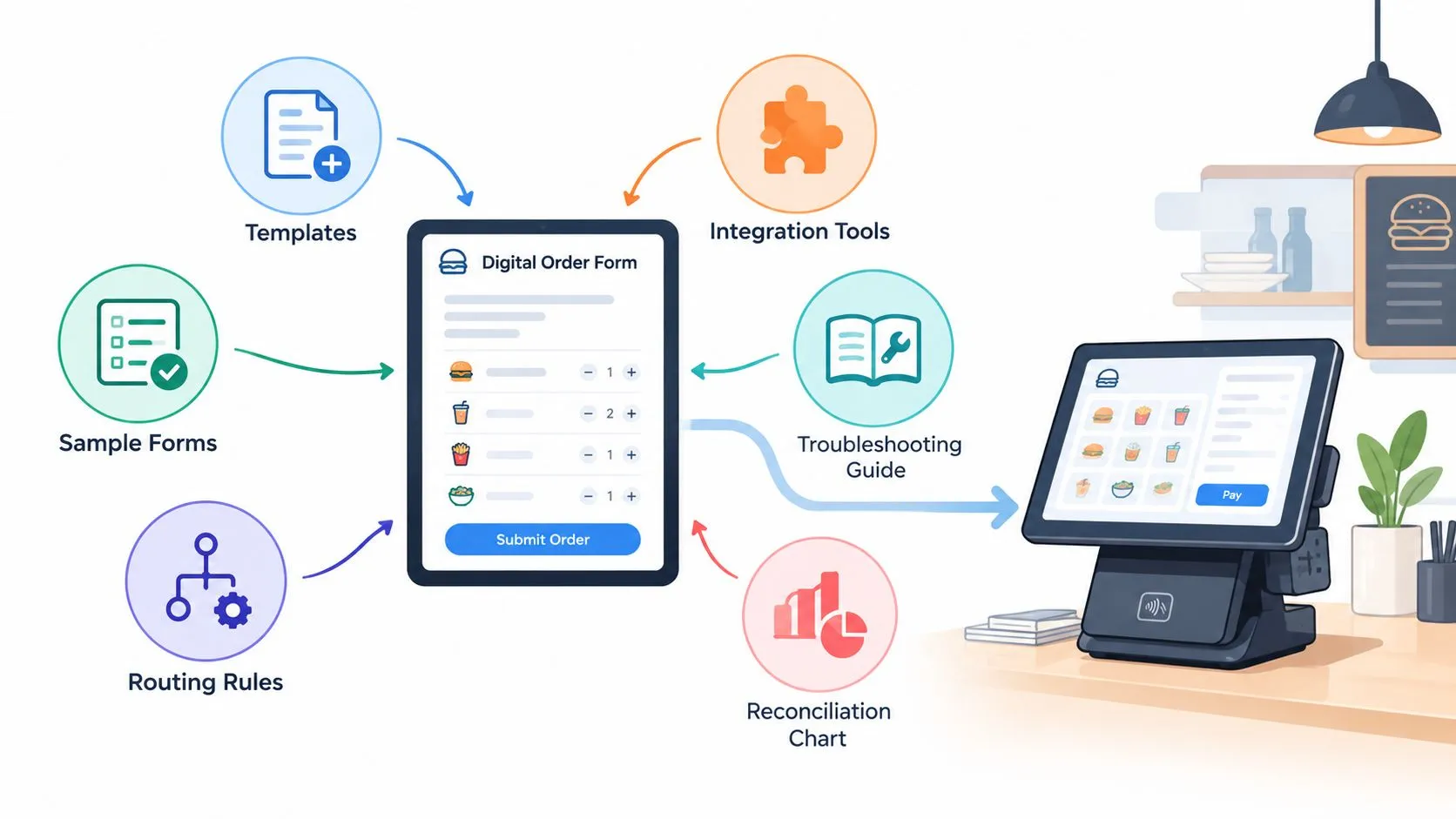
A routing order form organizes marketplace fields, mapping rules, and destination logic so Uber Eats, DoorDash, and Grubhub orders can reach Clover or Square without extra tablets or manual re-keying. Automatic routing can reduce delivery-order errors from 6.3% manually to 0.8% when orders flow through a fully integrated kitchen system, according to OrderOut’s order-routing definition.
That makes the routing order form more than a digital ticket. It’s the operating layer that connects menu data, marketplace orders, POS records, kitchen destinations, exception handling, and reconciliation. OrderOut maps each marketplace menu to a normalized POS schema, helping Clover or Square remain the operational source of truth while Uber Eats, DoorDash, and Grubhub orders arrive in the format staff can use.
The six resources below follow the order that works in practice: map data first, validate launch readiness, define routing, investigate technical failures, and reconcile operational records after launch. The approach also fits the broader order management software overview because the objective is controlled movement from order capture to fulfillment.
Clean routing starts with accurate item and modifier data, not with adding another tablet.
Start with OrderOut’s third-party order engine for restaurant delivery POS integration, then build the supporting documents around the way your restaurant sells, prepares, and records delivery orders.
1. Normalized POS schema mapping template
A routing order form works only when the menu schema is consistent before orders start moving. A marketplace item can look correct to a guest yet fail at the POS because its name, modifier label, or availability status differs. The mapping file assigns every Uber Eats, DoorDash, and Grubhub record a defined destination in Clover or Square, giving operators a reliable base for routing, testing, and reconciliation.
A pizza shop may sell “Large Pepperoni” on all three marketplaces. Each channel can use a different item identifier, while the restaurant maps those records to one Clover SKU. The kitchen receives one consistent product and preparation instruction, rather than treating each marketplace version as a separate menu item.
Build-your-own bowls expose gaps quickly. The schema must represent the base item, modifier groups, exclusions, additions, sizes, and special instructions. “No tomato plus extra avocado” should arrive as a valid POS combination. If it becomes an unmatched marketplace note, a cashier has to interpret it during service, increasing delay and correction work.
What the mapping file should contain
Keep the template usable by restaurant operators, POS teams, and integration partners. Include:
- Marketplace identifiers: Place each Uber Eats, DoorDash, and Grubhub item ID beside its matching Clover or Square item.
- Canonical item name: Select the POS name staff will recognize and use consistently.
- Modifier groups: Match required, optional, included, and paid modifiers to the POS structure.
- Availability status: Separate inactive, seasonal, location-specific, and delivery-only items.
- Pricing behavior: Record marketplace pricing and specify which value reaches the POS for fulfillment and reporting.
- Exception owner: Name the person responsible for correcting a mapping and define when the issue moves to the POS team or integration partner.
Audit the Clover or Square menu before importing data. Remove inactive items, consolidate duplicates, and standardize modifier groups. Build the first version in a spreadsheet, then test a small category such as appetizers before expanding across the catalog. Keep a change log, because menu edits, seasonal products, and location differences will otherwise create silent routing failures.
OrderOut’s POS integration API guidance helps clarify how marketplace data becomes a POS ticket. Store marketplace-only bundles in a separate section so they do not distort the core schema or complicate later troubleshooting.
2. Delivery-to-POS integration checklist
A delivery-to-POS connection is ready only when the full handoff works at every location. Check credentials, menu behavior, routing destinations, staff actions, and exception ownership before removing older tablets or changing the shift routine.
DoorDash describes POS integrations as automated data exchange between the restaurant’s POS or middleware and DoorDash. Its guidance also identifies middleware as useful for restaurants operating across DoorDash, Uber Eats, and Grubhub. Use that model to validate each location separately, because shared procedures do not guarantee shared credentials, stations, or menu settings. See the POS integration guidance for the integration responsibilities involved.
Run the launch review with the manager who will handle live orders. The developer or POS team can confirm technical settings, while the operator confirms that the workflow works during service:
- Connection: Check marketplace and POS credentials, location assignments, and permissions.
- Order content: Place test orders covering items, sizes, modifiers, special instructions, prices, and availability.
- Routing: Confirm the order reaches the intended Clover or Square terminal, kitchen queue, printer, and station.
- Shift handling: Have staff identify where the order appears, acknowledge it, and escalate an exception.
- Tablet retirement: Keep redundant delivery tablets until live-order testing confirms the POS path.
- Support ownership: Record contacts for marketplace support, POS support, and OrderOut integration support.
Record the result for each location, including the test order ID, destination, and any manual intervention. A passing order proves only that one path worked. Repeat the review after menu, modifier, pricing, credential, or station changes, since a small catalog edit can stop an order from building correctly.
The morning manager should audit overnight orders, rejected tickets, and any order staff re-entered manually. Log the marketplace, item, date, failure reason, and owner. This gives the POS team or integration partner enough context to isolate a mapping, routing, or account problem.
OrderOut’s order-entry automation resource explains the operational shift from manual re-keying to a controlled order flow.
For Clover locations, install OrderOut from the Clover App Market. OrderOut is free to install on the Clover App Market. Validate the connection against the menu and kitchen workflow before treating the setup as complete.
3. Sample API payload templates for order injection
A usable payload connects normalized menu data to the POS ticket. Give the restaurant’s developer, POS reseller, ISV, or integration partner enough context to trace an order from marketplace acceptance through injection, rejection, retry, or ticket creation. Include the marketplace order ID, source channel, location, customer details, line items, modifiers, pricing, fulfillment details, and supported special instructions.
For example, a Clover reseller may add DELIVERY_UBER or DELIVERY_DD as the source label. That label supports reconciliation only when the receiving POS and downstream reports interpret it consistently. A modifier failure often comes from a value mismatch. “Med. Pepsi” in the incoming payload will not resolve to a Clover item stored as “Medium Pepsi” unless the transformation maps both values to the same normalized product.
Read the payload as a handoff record
Start with a known-good order and compare it with the failed request. This approach narrows the investigation to fields that affect ticket construction instead of encouraging random edits.
- Source identity: Verify the marketplace, order ID, location, and fulfillment type.
- Item identity: Confirm that each marketplace item maps to an active Clover or Square product.
- Modifier identity: Compare names, IDs, modifier groups, required selections, and quantities.
- Customer and fulfillment data: Check that supported contact and delivery fields sit in locations the receiving POS accepts.
- Pricing fields: Match the POS format for subtotals, discounts, taxes, fees, and totals.
- Event status: Record whether the request was accepted, rejected, retried, or acknowledged without producing a ticket.
Run changes through a sandbox or developer account before testing at a live restaurant. Keep the request and response logs, remove or protect customer information, and store customized transformations under version control. Marketplace schemas and menus change, so retest after catalog, modifier, credential, or integration updates. Restaurant operators define the expected ticket, POS teams confirm what the endpoint accepts, and integration partners own the transformation and monitoring path.
Use the OrderOut integration API documentation as the technical reference for the request and response contract. Teams connecting systems around Clover or Square can use how to connect to an API to organize authentication, request structure, response handling, and monitoring.
4. Order routing rules engine and conditional logic template
Once menu data is normalized, routing decides where each accepted order should appear. A rule can send it to a terminal, kitchen station, printer, preparation queue, or manual-review path. The operational payoff is clear: staff see the ticket at the right place without sorting it by hand.
At a two-location bagel shop, Uber Eats orders might go to the main kitchen while Grubhub pickup orders go to a satellite counter. A sushi restaurant might send orders containing an allergy-related special instruction to a review queue before plating. Each destination must have available staff, and the rule should be explainable in plain language during service.
Start with the smallest rule that proves the flow. “Uber Eats orders go to Terminal 1” is easier to test and maintain than a condition chain combining marketplace, item, modifier, fulfillment method, and time of day. Add item or modifier conditions after the basic channel and location path works. Complex logic can improve control, but it also creates more cases for operators and integration partners to maintain.
Give every rule an owner and a failure path. A useful record contains:
- Trigger: The marketplace, location, item, modifier, order type, or exception that activates the rule.
- Destination: The Clover or Square terminal, kitchen station, printer, or review queue.
- Fallback: The destination or manual action used when no condition matches.
- Owner: The manager or technical contact authorized to change the rule.
- Test case: A dummy or controlled order that verifies the intended result.
A rule nobody can explain during the rush becomes a support ticket.
Test routing during a quiet period and compare the expected destination with the actual ticket. Keep the test order, rule version, and observed result together so the POS team or integration partner can reproduce a failure. Recheck the configuration when a station becomes overloaded, a location changes its prep layout, or delivery-only products are added. Restaurant operators should approve the operational outcome, POS teams should confirm the destination behavior, and integration partners should maintain the transformation and monitoring logic.
The restaurant order-routing software guide describes routing as more than placing a marketplace order in a POS. Its guidance also covers menu normalization, modifier mapping, and availability checks. Complete those checks before the ticket reaches the kitchen, and avoid conditions the restaurant cannot review or maintain.
5. POS integration troubleshooting and error-code reference guide
A troubleshooting guide should shorten the gap between a failed delivery order and a verified fix. Start with the symptom staff can see, then record the likely failure point, the evidence to collect, and the person responsible for the next action.
Use a wall-ready decision card for the kitchen, with the full record in a shared workspace. Organize it by what happened:
401 unauthorized: Check the affected marketplace or POS credential, confirm the location, and reconnect through the approved workflow.
Menu item not found: Compare the marketplace item ID and name with the active Clover or Square mapping. Confirm that the item is available at that location.
Modifier mismatch: Check spelling, modifier-group membership, required selections, and the menu version used in the order payload.
Wrong kitchen destination: Review the live routing rule, terminal assignment, and printer configuration. Confirm the resulting ticket with the kitchen lead.
Order accepted but not visible: Confirm the response status, search the POS by order ID, and check whether the order entered a retry or exception state.
Codes narrow the search, but they rarely identify the full cause. Preserve the order ID, timestamp, marketplace, location, payload or log reference, and action taken. This record lets OrderOut, the POS team, or the marketplace partner distinguish a credential failure from a mapping problem, location mismatch, or failed retry.
Use a short drill to test the handoff. Give a manager a hypothetical disconnected location or failed modifier and ask them to identify the safe action. Staff should know when to retry, when to correct menu data, and when to stop retrying and escalate. Repeated retries can create duplicate orders or leave operators unsure whether the original request reached the POS.
For recurring order-entry issues, use OrderOut’s guide to problems with orders as a practical reference. Keep the error guide current after credential changes, menu revisions, POS updates, and integration-partner fixes. A closed ticket should include the confirmed cause, the correction, and the test result, not only the original error code.
6. Multi-marketplace order reconciliation and payout template
A routed order is complete only after the restaurant can trace it from marketplace acceptance through POS fulfillment and payout. Reconciliation connects those records and shows problems that kitchen monitoring cannot reveal.
Build the record around a shared order key. For each marketplace order, capture the marketplace order ID, POS order ID, location, source channel, gross sales, refunds, adjustments, fees, commissions, and payout status. Keep marketplace deductions in their own fields so operators can compare operational sales with accounting results without changing the POS value.
Reconcile by exception, then verify the payout
Export Clover or Square sales by source when the POS supports that view. Standardize labels such as UBER_EATS, DD, and GH before comparing the export with marketplace statements. Spreadsheet lookups can match IDs quickly, but a person should review every unmatched row.
Start with the exceptions that affect revenue or duplicate production:
- Missing in POS: The marketplace lists an order, but Clover or Square has no matching ticket.
- Missing in marketplace report: The POS contains an order absent from the channel statement.
- Refund mismatch: A refund or adjustment appears in only one system.
- Duplicate order: Multiple POS tickets use one marketplace order ID.
- Location mismatch: The order belongs to another restaurant or terminal.
- Unresolved status: The order was accepted, but fulfillment or payout remains unclear.
Review the evidence before changing either record. Preserve the order IDs, timestamps, source, location, ticket details, refund history, and relevant statement rows. Then classify the discrepancy: customer cancellation, refund, test order, rejected ticket, duplicate injection, or menu and mapping problem.
Assign ownership at the handoff. Restaurant operators confirm what happened during the shift, POS teams verify ticket and payment records, and integration partners investigate delivery status or payload failures. The reconciliation sheet should record the owner, correction, and verification result, not just mark the row as resolved.
Clover states that delivery integrations can connect Uber Eats, DoorDash, and Grubhub with Clover POS. Its delivery documentation describes DoorDash Drive orders being processed in Clover before dispatch and Grubhub using Clover inventory to create a menu, as detailed in Clover’s delivery documentation. Source labels therefore need to remain consistent across the POS and marketplace reports, because the POS supports operations while the marketplace remains part of the payout record.
Reconcile often enough for shift managers to identify the event, and repeat the checks after menu, location, credential, or integration changes. A closed discrepancy should include the confirmed cause, correction, and test result.
Routing Order Form: 6-Resource Comparison
| Item | Core Purpose | Unique Value ✨ | Target Audience 👥 | Quality ★ | Value 💰 | Recommendation |
|---|---|---|---|---|---|---|
| OrderOut’s Normalized POS Schema Mapping Template | Map marketplace SKUs/modifiers → Clover/Square POS | Single source of truth; prevents duplicate tickets ✨ | Ops managers, onboarding teams 👥 | ★★★★☆ | High ROI; reduces errors 💰💰 | 🏆 OrderOut recommended |
| Delivery-to-POS Integration Checklist (Pre-Launch & Ongoing) | Pre-launch validation + ongoing monitoring | Comprehensive checklist + escalation matrix ✨ | Managers, shift leads, trainers 👥 | ★★★★☆ | Low-cost ops guardrail; time investment 💰 | , |
| Sample API Payload Templates for Order Injection (Uber Eats, DoorDash, Grubhub) | Developer reference for JSON/XML order payloads | Exact payloads, error signatures, customization hooks ✨ | Developers, ISVs, ISOs 👥 | ★★★☆☆ | Technical value; requires dev resources 💰 | , |
| Order Routing Rules Engine & Conditional Logic Template | Route orders to printers/stations by rule | Conditional routing (station, priority, location) ✨ | Multi-location ops, kitchen leads 👥 | ★★★★☆ | Improves throughput; moderate setup cost 💰💰 | , |
| POS Integration Troubleshooting & Error-Code Reference Guide | Diagnose/fix integration failures quickly | Error-code index + decision trees + quick fixes ✨ | Support teams, managers, resellers 👥 | ★★★★☆ | Cuts MTTR; saves support costs 💰💰 | , |
| Multi-Marketplace Order Reconciliation & Payout Template | Reconcile orders, payouts, fees vs POS & bank | Payout audit, fee verification, tax-ready summary ✨ | Accountants, multi-unit operators, managers 👥 | ★★★★☆ | Prevents revenue leakage; manual effort 💰💰 | , |
Turn the form into a working order flow
A routing order form works when it reflects the complete handoff, not just the moment an order enters the POS. Start by cleaning the Clover or Square menu, assigning one canonical item and modifier structure, and documenting marketplace identifiers. Then validate the connection with real examples from Uber Eats, DoorDash, and Grubhub before removing redundant delivery tablets.
After the basic connection works, introduce routing rules that staff can understand. Route by marketplace, location, or fulfillment type first. Add item or modifier conditions only when there’s a clear operational reason, a fallback destination, and an owner who can maintain the rule.
Technical teams should document authentication, payload fields, response handling, retries, and version changes. Restaurant managers should own the daily checks and escalation path. POS partners and integration providers should agree on who changes menu mappings, who reviews failed orders, and who confirms that a fix worked in the live environment.
The business case is operational accuracy. Independent reporting cited by OrderOut states that integrated operations often remain under 1% error, compared with 5% to 8% for manual processes, as explained in OrderOut’s order-routing definition. The same discipline also protects guest experience. A 2026 restaurant experience study reported 92% average satisfaction for mobile ordering, but found that nearly 1 in 5 orders were not ready on time, with satisfaction reaching 97% when orders were ready as expected and dropping to 76% when they were late, according to InTouch Insight’s restaurant experience study.
Choose the resource that matches your current stage. If the menu is inconsistent, begin with schema mapping. If launch is approaching, use the integration checklist. If the connection is live but unreliable, focus on payloads and troubleshooting. If orders are flowing but records don’t line up, start with reconciliation. Restaurants using Clover can review OrderOut’s Clover delivery integration, while Square operators can review the Square delivery-to-POS solution.
Frequently Asked Questions
Does OrderOut work with Clover?
Yes. OrderOut connects supported third-party delivery channels to Clover by mapping marketplace menu data to a normalized POS schema. The Clover POS remains the operational source of truth, so staff can work from the connected system instead of re-keying orders from separate delivery tablets.
Can Uber Eats, DoorDash, and Grubhub orders reach Square?
OrderOut is designed to route supported marketplace orders into supported POS systems such as Square. The exact setup depends on the restaurant’s account, menu, location, and integration configuration, so operators should validate item mappings and modifiers before launch.
What should a routing order form capture?
It should capture the marketplace order identity, item and modifier mappings, location, destination, fulfillment details, exception path, and reconciliation fields. It should also name the person responsible for maintaining each part of the workflow.
What happens when a menu item or modifier does not map?
The order may require an exception review instead of reaching the kitchen as a clean ticket. Compare the marketplace value with the active Clover or Square menu, correct the mapping, and test the affected item or modifier before relying on it in live service.
Why does menu normalization matter?
Uber Eats, DoorDash, and Grubhub can represent the same product or modifier differently. Normalization gives those marketplace records a consistent POS destination, reducing the chance that staff must interpret or re-enter the order manually.
OrderOut maps Uber Eats, DoorDash, and Grubhub orders into Clover or Square without extra delivery tablets or manual re-keying. Build your routing order form around clean menu data, clear destinations, and documented exception handling, then visit OrderOut to connect your delivery workflow and onboard free in a few clicks.