
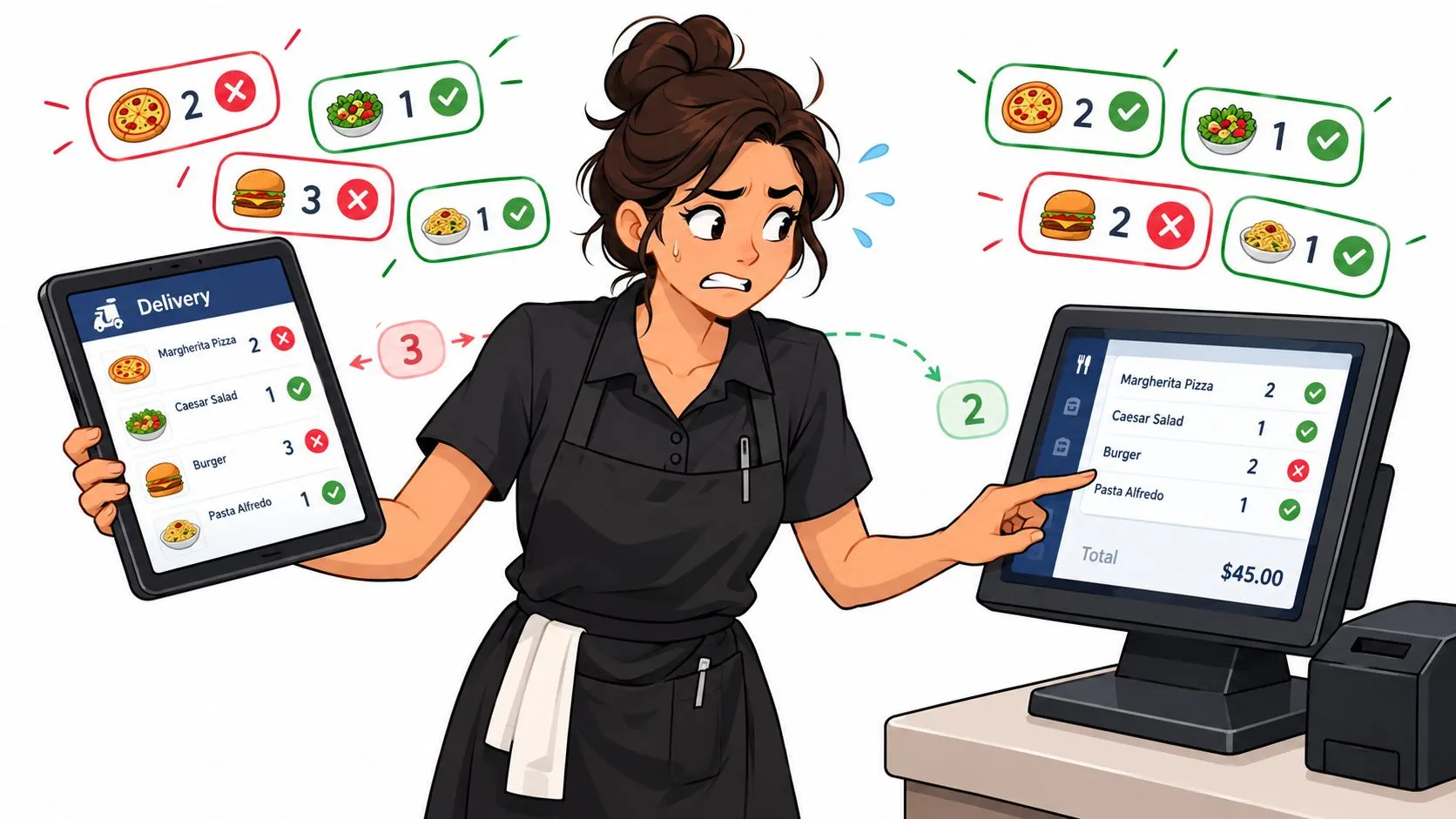
Manual data entry errors are mistakes made when staff type information from one system into another, and manual entry commonly produces about 1% field-level errors, with practical benchmarks often clustering around 1% to 4%. In delivery-heavy restaurants, those errors most often come from re-keying third-party orders into the POS.
On a busy Friday, DoorDash, Uber Eats, and Grubhub orders arrive on separate tablets while the line is already moving. Someone reads each item, modifier, quantity, and customer note, then types it into Clover or Square. The order may look correct at a glance, but one missed “no onions,” a modifier attached to the wrong entrée, or a changed quantity can travel from the marketplace screen to the kitchen, the guest, and the settlement report.
The practical fix isn’t asking staff to type faster. It’s removing the handoff that creates the opportunity for the mistake.
What Manual Data Entry Errors Mean in a Restaurant
Manual data entry errors happen when a team member re-enters information from one system into another instead of capturing it once at the source. In a restaurant, the clearest example is a delivery order sitting on a DoorDash tablet while an employee types the same order into a Clover POS.
During a rush, the employee isn’t copying a clean spreadsheet. They may be translating shortened marketplace names, matching a customer-selected modifier to a different POS label, and interpreting free-text instructions while answering a phone call. “No on” may become no onions, no modifier, or nothing at all. The employee can make a mistake even while working carefully.
The problem includes more than a typo in an item name. It can involve:
- Wrong line assignment: A sauce or topping is attached to the second item instead of the first.
- Quantity changes: Two meals become three, or a required side disappears from the ticket.
- Dropped instructions: A delivery note or allergy-related instruction never reaches the kitchen.
- Price and fee differences: The POS total doesn’t match what the marketplace records.
- Substitution gaps: A replacement item is made but not recorded in the order data.
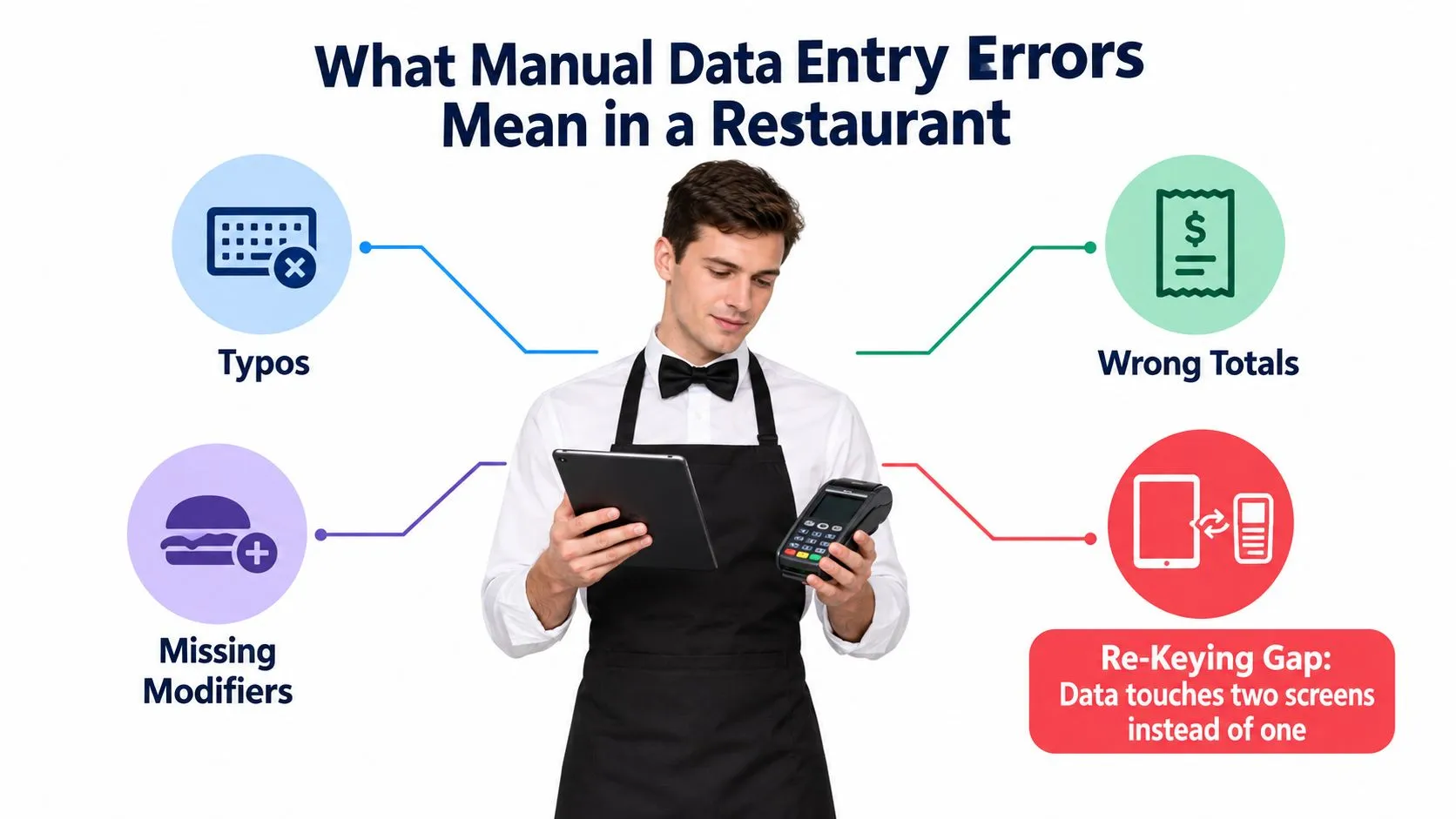
That handoff makes a POS ticket different from an ordinary document typo. The kitchen uses the entered line items to prepare food, the dispatch process uses the order details to get it to the guest, and the marketplace uses its own record to calculate what was sold and collected. One bad re-keying decision can therefore affect several operational records.
The data-integrity issue is easy to miss because the order often enters the POS successfully. The key question is whether the same order stayed accurate end to end. OrderOut’s explanation of restaurant delivery data integrity focuses on this broader risk, including mismatched totals, modifiers, and information that drifts between connected systems.
Why These Errors Cost Restaurants Time and Money
The most useful way to assess manual data entry errors is to follow one order through the shift. A wrong topping can send a ticket back to the kitchen. A missing modifier can create a remake or a guest complaint. A mismatched total can leave the manager comparing a marketplace dashboard with the POS instead of closing the shift.
The research summarized by Lido’s data entry error rate guide places manual entry at about 1% per field under controlled conditions, with many practical benchmarks clustering around 1% to 4% per field. That represents roughly 10 to 40 errors per 1,000 manually entered fields. A controlled comparison cited by Lido found 0.82% errors with single entry checked by eye and 0.027% with double entry and comparison, showing that verification can reduce errors by more than 30-fold.
Restaurant orders are especially exposed because a single ticket may contain several fields, including item names, quantities, modifiers, notes, prices, and delivery details. More fields create more opportunities for a small entry mistake to become an order-level problem.
| Impact Area | What Goes Wrong | Operational Cost | Financial Cost |
|---|---|---|---|
| Order speed | Staff read and type the same ticket twice | The cashier spends attention on transcription instead of the queue | Labor shifts toward correction rather than service |
| Order accuracy | Modifiers, quantities, or notes change during re-entry | The kitchen pauses for clarification or remakes the ticket | Food waste, refunds, credits, or comps |
| Guest experience | The delivered order doesn’t match the marketplace request | The guest contacts support or leaves a complaint | Lost goodwill and additional service work |
| Settlement reconciliation | Marketplace and POS records disagree | A manager investigates item counts, fees, and totals | Payout discrepancies remain unresolved longer |
Practical rule: Treat every manually re-keyed delivery order as a data handoff, not just a typing task.
The cost often appears in places operators don’t initially connect to the entry mistake. A wrong quantity can distort prep expectations and inventory usage. A missing modifier can cause a refund that staff remember as a “kitchen issue,” even though the error started at the tablet. A delivery detail that doesn’t carry through can create more communication between the restaurant, the courier, and the guest.
A delivery-heavy operation pays for these failures through labor time, food waste, refunds, guest recovery, and reconciliation work. The direct correction may be small, but repeated exceptions take managers away from service and make it harder to trust the reports used for daily decisions.
Where the Risk Really Comes From in Delivery Workflows
Blaming the cashier for every manual data entry error misses the design problem. The highest-risk moment is the third-party tablet-to-POS handoff, where a person has to convert one system’s menu language into another system’s ticket structure while the restaurant is handling live demand.
The staff member may face a DoorDash item called one thing and a Clover item called something else. Uber Eats or Grubhub may expose modifiers in a different order from the POS. Special instructions can arrive as free text, while price adjustments, delivery fees, and tips may appear in separate areas of the marketplace interface. Even a careful employee has to interpret the order before typing it.
That creates silent data drift. The order isn’t rejected. It changes as it moves.
- Modifier drift: “No onion” disappears or lands on the wrong item.
- Quantity drift: The employee enters a quantity based on the visible line rather than the customer’s full selection.
- Menu drift: The marketplace description and POS item no longer represent the same product.
- Price drift: A marketplace price or modifier charge differs from the POS record.
- Instruction drift: A courier or customer note remains on the tablet and never reaches the kitchen ticket.
The OrderOut guide to delivery order management reflects the operational distinction between seeing an order and managing it across connected systems. A restaurant can have an order displayed correctly on a tablet and still produce the wrong result if the next system receives an altered version.
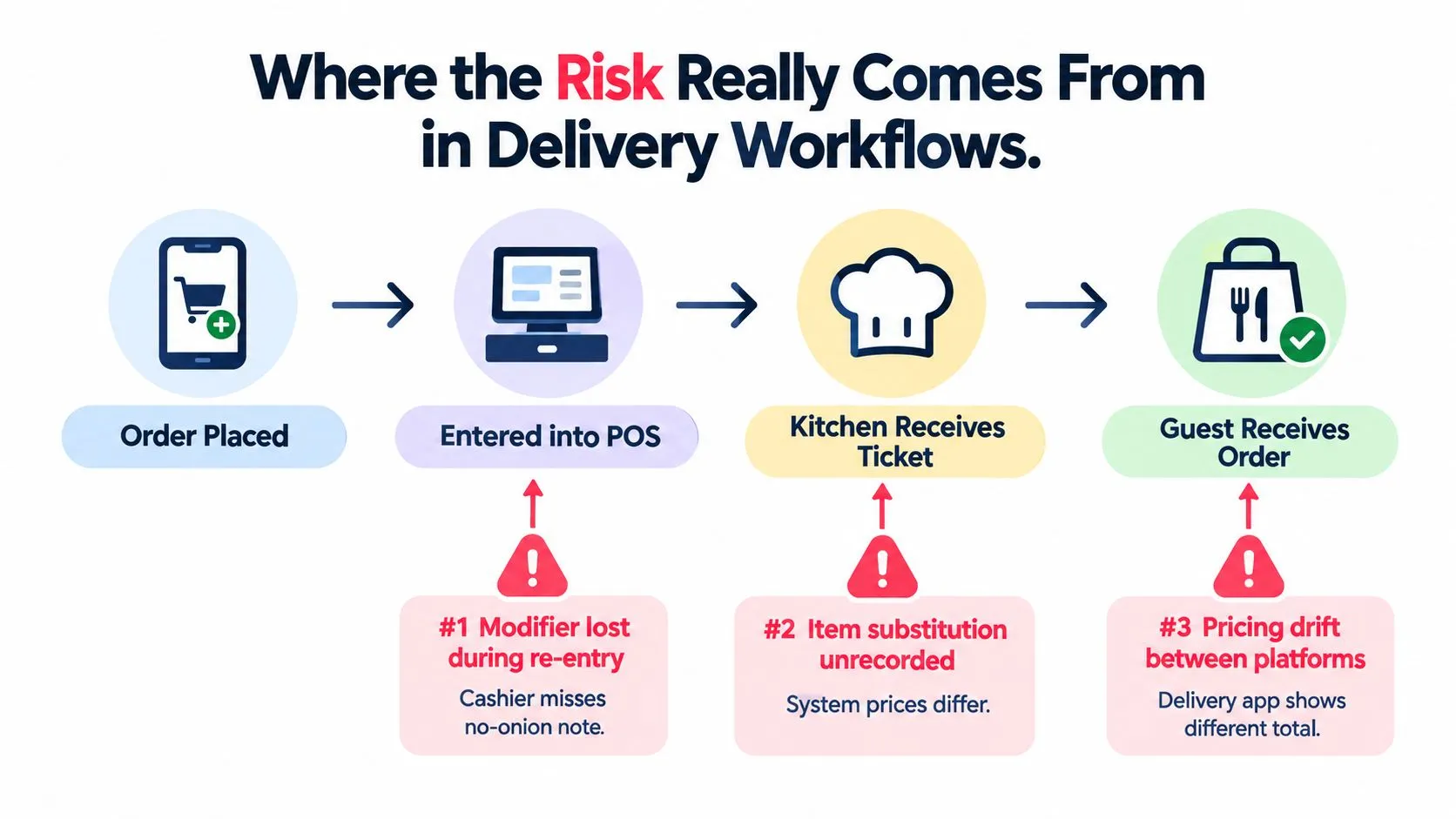
The risk is therefore not a lack of typing skill. It’s the number of translations the workflow demands. Each translation asks a person to recognize an item, understand its modifiers, remember the correct POS equivalent, and enter it in the right place. During a rush, that is cognitive overload disguised as routine administration.
A better control removes the translation wherever the systems can exchange structured order data directly.
How Delivery to POS Injection Stops Re-Keying
A DoorDash order can reach a Clover-equipped restaurant while the actual work still happens on two separate screens. Without an integration, the order stays on the DoorDash tablet at the pass. A staff member reads the ticket, finds the matching Clover items, enters the meal, selects modifiers, checks quantities, and sends the ticket to the kitchen.
Every handoff creates another opportunity for a manual data entry error. A modifier may be missed, a similar item selected, or a price taken from the wrong menu version. The employee may also need to serve an in-house customer before finishing the delivery ticket, leaving the order partially entered or waiting for another person to complete it.
Delivery-to-POS injection removes that re-keying step. The DoorDash order is normalized and sent into Clover as structured data. The POS receives mapped items, modifiers, quantities, and applicable order details, allowing the kitchen to work from one operational ticket instead of a staff member’s interpretation of the marketplace screen.
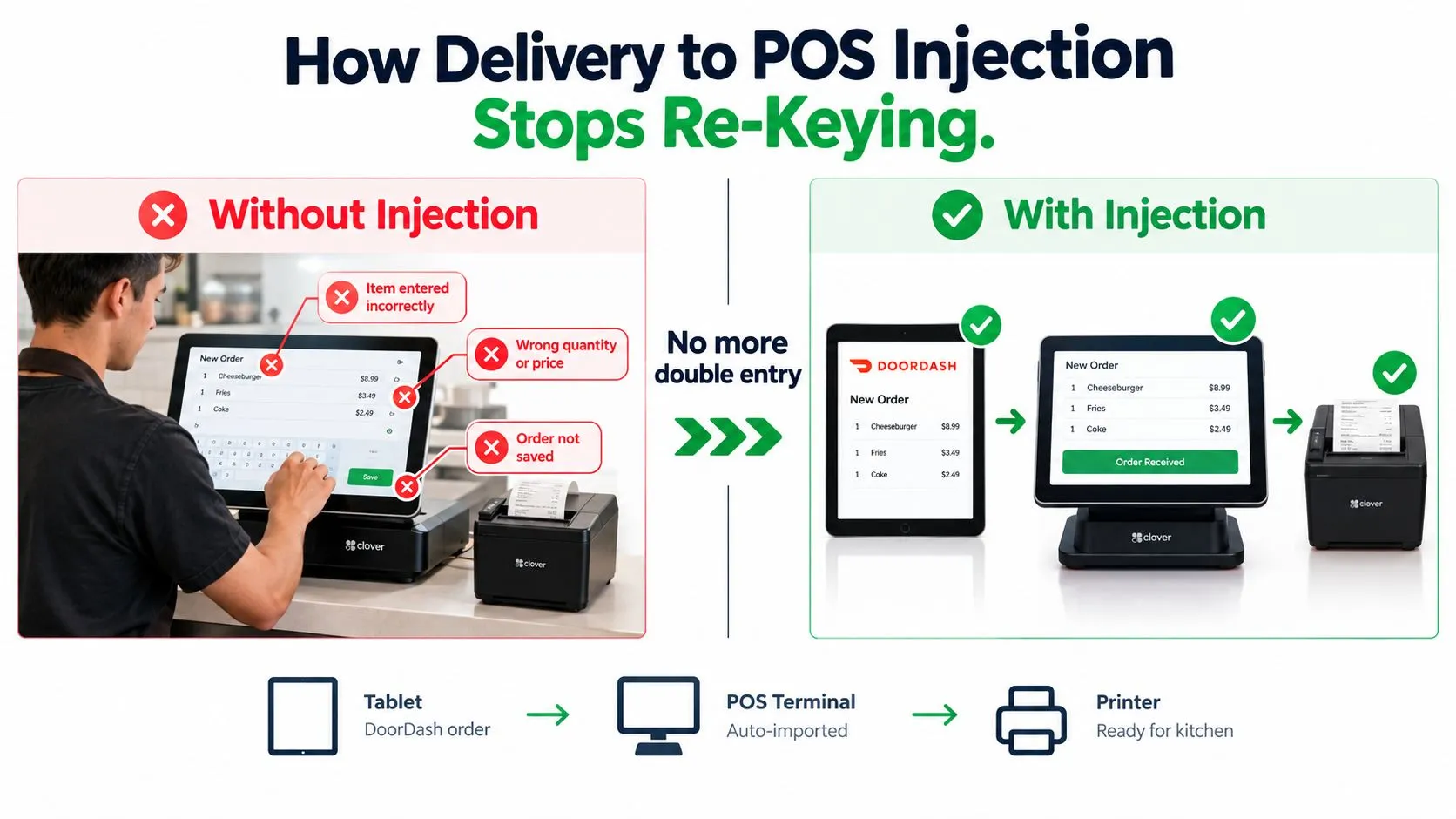
The workflow changes in a specific way:
- Manual route: Marketplace order, employee interpretation, POS re-entry, kitchen ticket.
- Injected route: Marketplace order, mapped structured payload, POS ticket, kitchen production.
Once the mapping is correct, staff no longer type each item, modifier, and quantity into the POS. Menu setup still matters because the integration sends the item and modifier relationships that operators configured. Bad mapping can therefore reproduce an error consistently, while accurate mapping removes the repeated typing that causes many errors during busy service.
The POS becomes the kitchen’s practical operational record. Staff can follow one order stream rather than decide which tablet shows the latest state. Consistent numbering, ticket presentation, and status handling also make it easier to identify the order being prepared and completed.
For operators comparing workflows, the direct-express-routing overview explains how normalized delivery orders integrate with POS systems. The third-party order engine overview describes the role of normalized delivery orders in a POS-connected setup. In a DoorDash to Clover workflow, the key operational change is direct: staff stop copying a ticket from one screen into another.
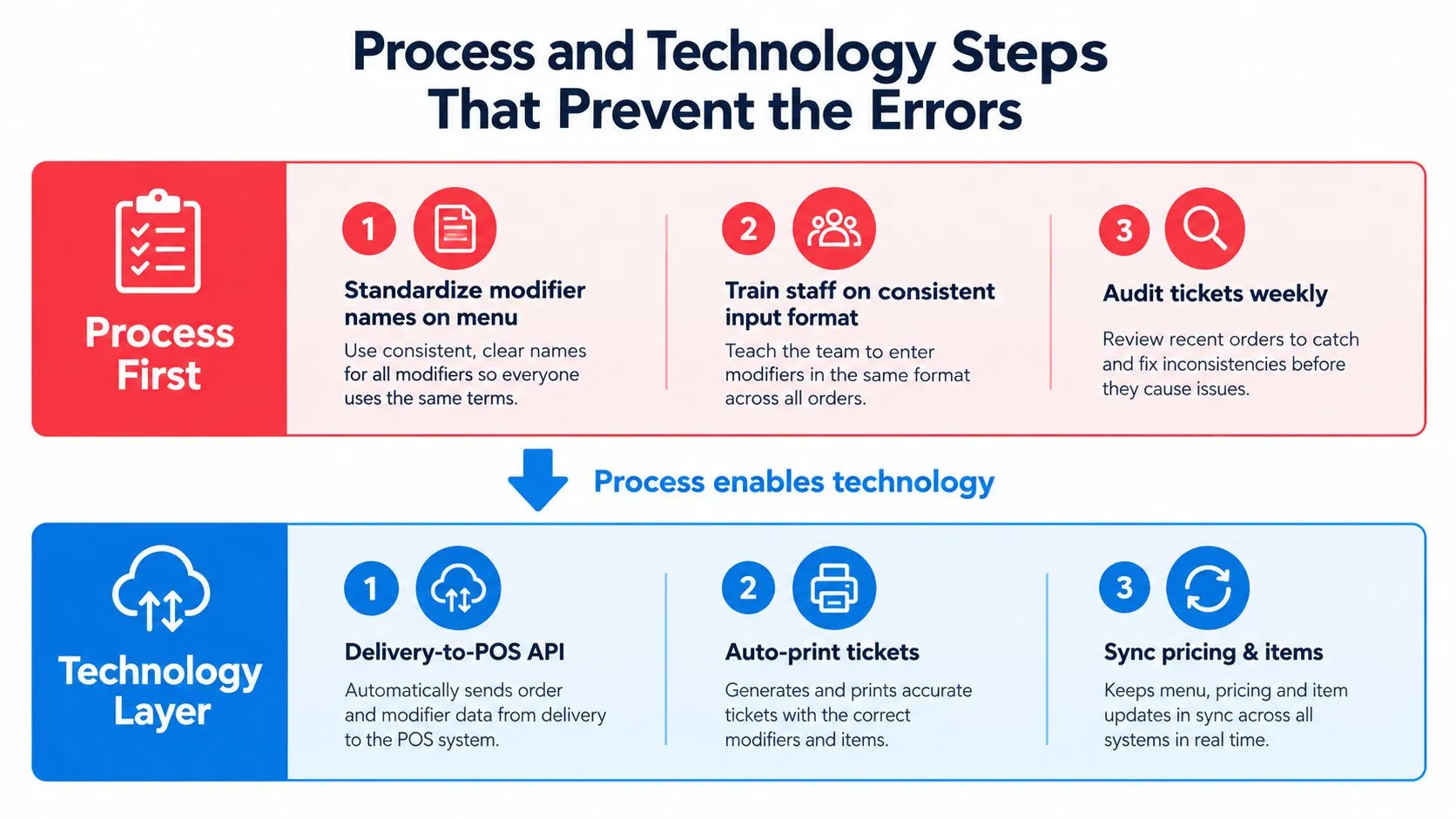
Process and Technology Steps That Prevent the Errors
Technology can’t repair a menu that has inconsistent names, duplicate modifiers, or conflicting prices. Start with the process, then use the integration to remove the repetitive transfer work.
Process first
Create one operational version of every menu item. The marketplace menu should use names and modifier choices that clearly correspond to the POS item, not a shorthand that forces staff to interpret the order later.
Set a price of record for each item and modifier. Decide who owns menu changes, how staff confirm a substitution, and which employee checks delivery tickets during the busiest part of the shift. The process doesn’t need to be complicated, but it must be unambiguous.
Train employees to confirm the actual modifier selection rather than guess from a shortened label. If a menu item has several related options, the ticket should make the choice obvious before the order reaches production.
For teams building or refreshing documentation, this Franchise Foundry training manual guide offers useful context for turning recurring work into clear training material. Apply that discipline to marketplace menus, POS terminology, escalation rules, and exception handling.
Technology second
Once the menu is stable, connect DoorDash, Uber Eats, and Grubhub to the restaurant’s Clover or Square environment through a delivery-to-POS integration. Map each marketplace SKU, modifier, and price relationship to the correct POS schema, then send orders directly into the ticket flow.
Keep a tablet available as a monitoring view if the workflow requires it, but don’t make the tablet the place where staff must manually copy orders. The restaurant’s operational source of truth should remain the POS, where the kitchen sees the ticket and staff manage the order state.
The OrderOut order-entry best practices guide provides a useful reference for reducing ambiguity around item setup and order handling. The sequence matters. Stabilize naming and pricing first, then test injection with real menu combinations, including modifiers, substitutions, and special instructions.
The strongest workflow doesn’t ask employees to become perfect re-keying machines. It gives them a clean menu structure and removes the re-keying step that creates most of the avoidable exposure.
Verifying Accuracy After the Order Goes Through
Injection reduces transcription risk, but it doesn’t remove the need for verification. A connected order can still reveal a mapping problem, an outdated price, or a marketplace dispute after the kitchen has completed the ticket.
Start with duplicate detection at the POS level. If the same DoorDash ticket number appears twice, staff should be able to identify the duplicate before the kitchen prepares both orders. The exact control depends on the POS and integration, but the operating principle is consistent: flag duplicate order identity before production.
Next, compare marketplace and POS records during daily reconciliation. Review item counts, modifier counts, tax bases, and order totals against the relevant marketplace dashboards. Injection handles the initial transfer, but it doesn’t decide whether a guest dispute is valid or whether a menu mapping has changed since the last review.
End-of-day settlement review should compare each marketplace settlement file with the POS day sheet and the deposit record. A restaurant can enter every line correctly and still find a price mismatch if the marketplace menu and POS menu aren’t aligned.
Use a simple weekly tracker for every exception:
- Menu item: Name the item or modifier involved.
- Failure type: Record price drift, missing modifier, wrong address, duplicate, or another specific issue.
- Detection point: Note whether staff caught it before production, after delivery, or during settlement.
- Source: Identify whether a person re-entered the order or whether the issue came from mapping or configuration.
- Correction: Record the menu, process, or integration change that prevents a repeat.
The data reconciliation tools guide can help operators think about reconciliation as an active control rather than a final administrative chore. The useful question isn’t only how many mistakes occurred. It’s where the workflow allowed the wrong data to survive.
Putting It Together and Getting Started
Start by watching one delivery shift without changing anything. Identify which channels require re-keying, which order types generate the most corrections, and whether Clover or Square is receiving the same item structure that customers see on DoorDash, Uber Eats, and Grubhub.
Then choose one channel and a limited menu set for a controlled test. Confirm POS compatibility, map the items and modifiers, and compare injected orders with the manual workflow before expanding the connection. The objective is to remove re-keying, not to create a new checklist that keeps staff typing.
For Clover operators, OrderOut’s Clover delivery integration is available through the Clover App Market, and installation is free. Owners can start the OrderOut setup from the dashboard without replacing their current kitchen printer or POS hardware.
Frequently Asked Questions
Does the delivery-to-POS workflow work with Clover?
The workflow is designed to send connected third-party delivery orders into Clover as standard POS orders instead of requiring staff to type them again. Clover remains the operational source of truth for the kitchen ticket.
Does it work with Square?
Square is supported through standard delivery-to-POS integrations. The important setup step is mapping marketplace menu items and modifiers to the correct Square item structure before orders are routed into production.
Can restaurants connect Grubhub with DoorDash and Uber Eats?
Restaurants can connect Grubhub alongside DoorDash and Uber Eats, depending on the available channel and POS connection. The purpose is to bring supported marketplace orders into a consistent POS workflow rather than make employees manage separate re-keying tasks.
Do printed kitchen tickets still work?
A POS-connected delivery workflow can keep delivery orders in the same ticket flow used by the restaurant’s kitchen. Whether a ticket prints or displays depends on the restaurant’s configured POS and printer settings, so test the full route with a sample order before going live.
What happens to modifiers and special instructions?
Modifiers need to be mapped from each marketplace menu to the matching POS item and option. Special instructions should be tested during setup because free-text fields can behave differently from structured modifiers, and the restaurant needs to confirm what the kitchen receives.
OrderOut connects Uber Eats, DoorDash, and Grubhub orders to Clover or Square without extra delivery tablets or manual re-keying. Visit OrderOut to review the delivery-to-POS workflow and start onboarding your restaurant.