
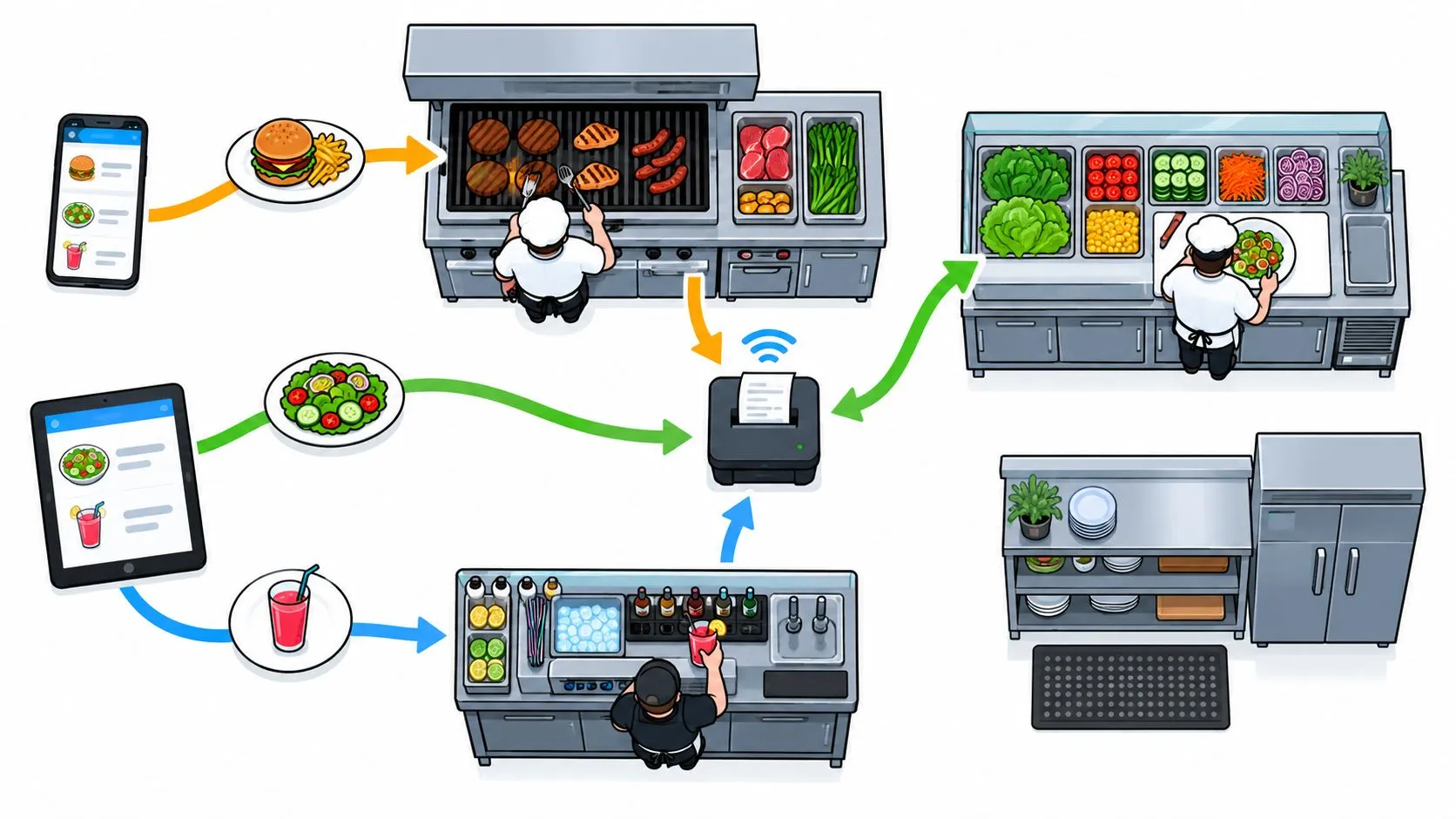
Order routing in a restaurant is the decision process that takes an order from Uber Eats, DoorDash, or Grubhub and sends it to the correct POS, kitchen station, preparation queue, or fulfillment location. In U.S. equities, routing can be highly concentrated, with the SEC estimating that more than 90% of retail orders passed through six wholesalers in the first quarter of 2022, a reminder that routing isn’t a minor handoff but a market-shaping decision.
For restaurants, the destination isn’t an exchange. It’s usually Clover or Square, a kitchen printer, a KDS queue, or another store location. The routing layer decides whether a DoorDash order lands as a usable ticket, whether an Uber Eats modifier stays attached, and whether the right kitchen receives the work without staff retyping it.
The surprising part is that a delivery app can show a customer a perfectly valid order while the restaurant still receives something incomplete or unusable. The customer sees “large latte with oat milk.” The kitchen may see a generic latte if the marketplace item and POS modifier weren’t matched correctly. That difference is where restaurant order routing becomes operational technology rather than supply-chain jargon.
What Order Routing Means in a Restaurant Context
A plain-English order routing definition is simple: routing determines where an incoming order goes and what happens to it next. A delivery order might arrive from DoorDash, pass through an integration layer, enter Clover or Square, and then fire to the bar, grill, cold station, or expo queue.
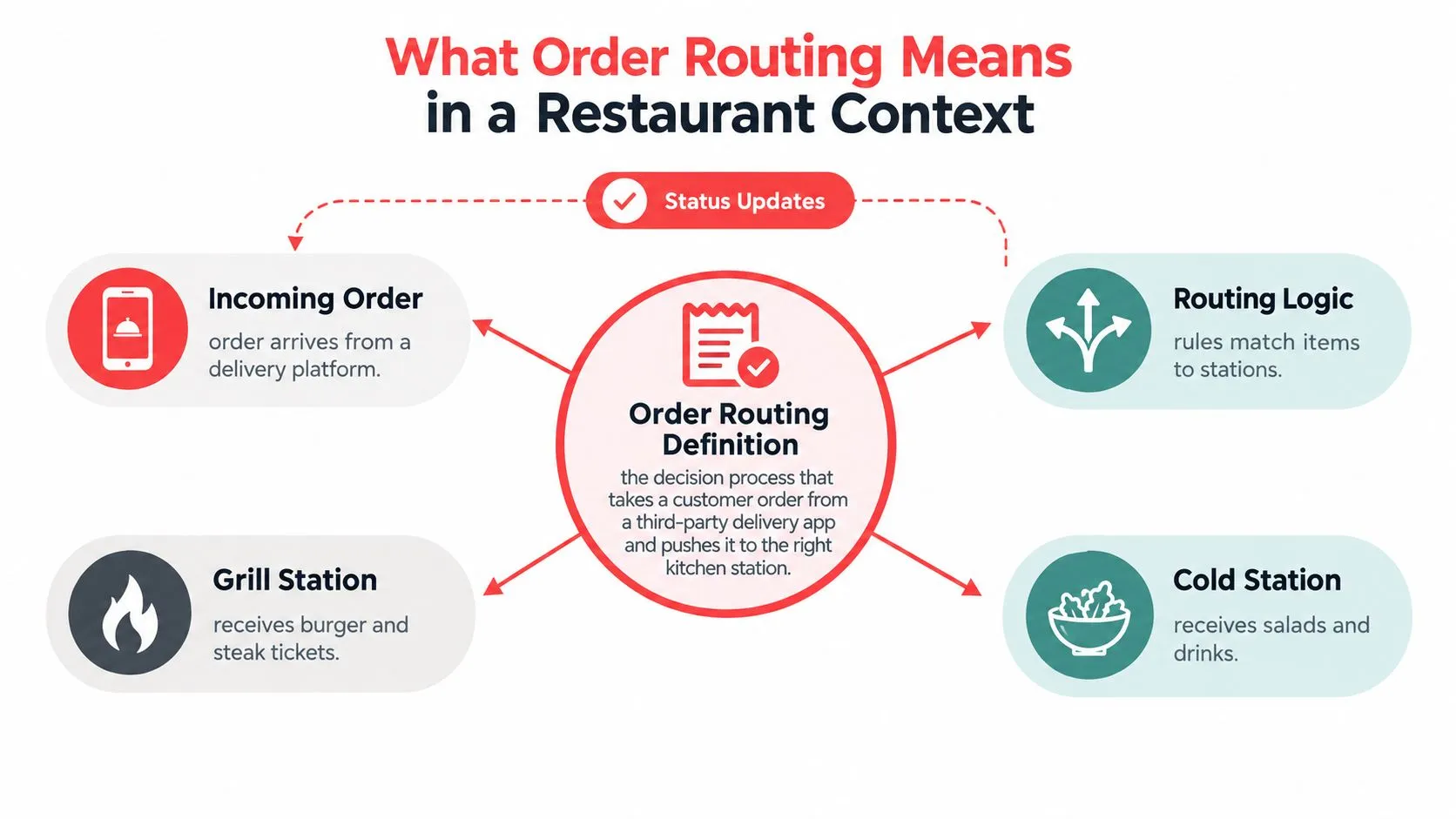
Think of routing as the head server during a rush. The server doesn’t cook the burger or pour the drink. They read the ticket, identify which stations need to act, and make sure the ticket reaches each station with the right instructions. Software performs the same coordination for orders arriving through several digital channels.
The route can include several decisions:
- Channel: Was the order placed through Uber Eats, DoorDash, Grubhub, or the restaurant’s own ordering page?
- POS destination: Should it enter Clover or Square?
- Kitchen destination: Does the item belong with the grill, cold station, bar, or a shared printer?
- Location: If a restaurant has multiple stores, which location can fulfill the order?
- Status path: How does acceptance or preparation status return to the originating channel?
That makes routing the connective tissue between customer demand and kitchen execution. Without it, each delivery app acts like a separate workstation with its own screen, ticket format, and timing. Staff must watch multiple devices, interpret each order, and manually reproduce the ticket in the POS.
Routing is narrower than full order management. An order management system can cover the wider lifecycle, while routing focuses on the decision and handoff that place an order in the right operational path.
Practical rule: If an order reaches the kitchen but the item, modifier, location, or status is wrong, the routing process hasn’t succeeded.
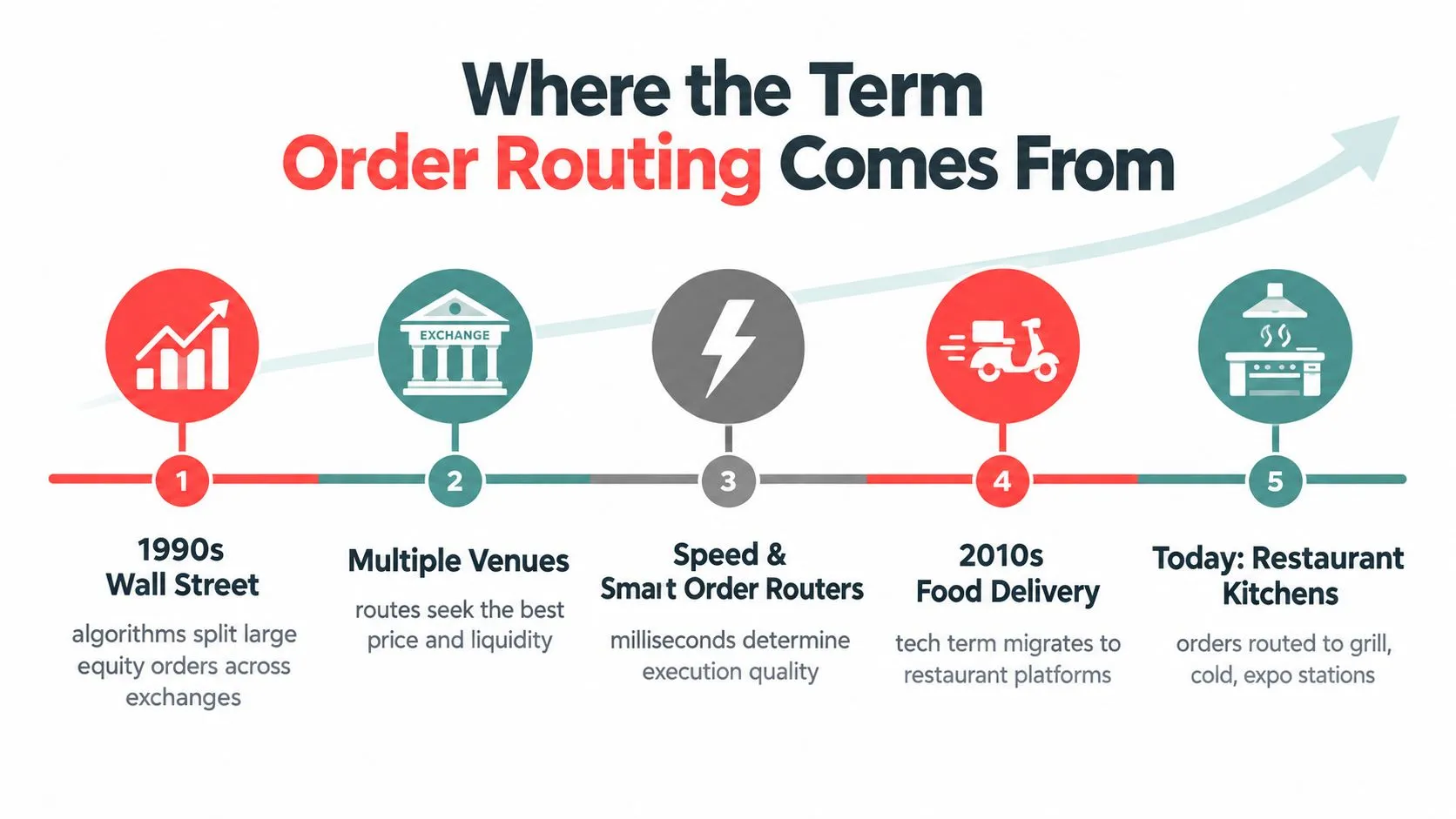
Where the Term Order Routing Comes From
The term began in a world that looks far removed from a restaurant line. In U.S. equities, order routing describes how a broker sends a customer order to an execution venue, such as an exchange, market maker, or alternative trading system. The SEC treated routing as central to market structure for decades, and its 2000 special study described automated systems that electronically received and handled orders across exchanges and large over-the-counter market makers. You can read the SEC’s special study of order routing and market structure for the original financial-market context.
The finance version asks, “Where should this order go for execution?” A commerce system asks, “Which warehouse, store, or fulfillment node should handle it?” Kibo describes commerce routing as a rules engine that evaluates information such as inventory, address, and location capacity, then recommends or assigns the best location or split of locations at order creation. Its implementation uses Routes, Scenarios, Filters, and After Actions to structure those decisions.
Restaurants face the same basic problem, but the destinations are operational rather than financial. One customer order can need several destinations at once:
- A sandwich goes to the hot line.
- A salad goes to the cold station.
- A bottled drink goes to the beverage area.
- The complete ticket goes to expo.
- The status returns to the delivery marketplace.
A delivery marketplace is like the venue that introduces the order, while the POS and kitchen stations provide the execution path. The software must preserve the customer’s requested choices while directing each part of the work.
The word also fits distributed restaurant operations. Tecsys describes omnichannel order routing as an orchestration layer that receives an order from a source channel and sends it to a fulfillment node using rules related to geography and inventory availability. In a restaurant, that node may be a store, commissary, or shared virtual-brand kitchen.
The meaning has shifted in emphasis. Financial routing often centers on execution quality, price, and liquidity. Restaurant routing centers on destination accuracy, menu compatibility, preparation timing, and status visibility.
A related concept is real-time integration for restaurant systems, because a route only helps when the receiving system gets the order while the kitchen can still act on it.
How Order Routing Works Between Delivery Apps and Your POS
Order routing decides whether a delivery-app ticket becomes usable kitchen work or another task for a busy employee. The connection must move more than an order number. It must carry the right restaurant, menu item, modifier, destination, and status between DoorDash or Uber Eats and systems such as Clover or Square.
The four routing stages
- Authentication links the marketplace, integration layer, and POS account. The systems confirm the restaurant, location, and authorized connection before the order can move.
- Menu normalization converts marketplace items, modifiers, prices, and availability into the POS schema. If a guest selects oat milk in Uber Eats, the integration must match it to the modifier Clover or Square uses for that drink.
- Order payload delivery sends structured data into the POS. Customer details, items, modifiers, and available order information arrive as fields the receiving system can process, rather than as a ticket someone must retype.
- Ticket firing and status exchange sends the usable ticket to the correct printer or KDS queue and returns supported acceptance or preparation updates to the originating marketplace. Stage 4 depends on status exchange reaching the marketplace quickly. Tools such as Premier Broadband Suredrip status show how order confirmation can be treated as its own operational layer, rather than as a forwarded message.
| Routing Stage | What Happens | Clover Example | Square Example |
|---|---|---|---|
| Authentication | Systems verify the restaurant, account, and authorized connection | A delivery order is associated with the correct Clover location | A marketplace order is associated with the correct Square account |
| Menu normalization | Marketplace data is matched to POS items and modifiers | “Oat milk” maps to the correct coffee modifier | A virtual-brand item maps to the correct Square catalog record |
| Payload delivery | Structured order data enters the POS | The coffee ticket appears without manual retyping | The ghost-kitchen ticket enters the Square order flow |
| Ticket firing and status | The POS sends work to the kitchen and exchanges supported updates | The bar receives the mapped drink ticket | A shared printer receives the correct brand header |
Routing handles the path of each order and its component data. A consolidated order workflow can place several channels in one operational view, while the routing layer determines how each ticket reaches the restaurant’s execution system.
Consider a coffee chain using Clover. A guest chooses oat milk in Uber Eats, the integration matches that choice to the Clover modifier, and the bar receives a ticket that identifies the requested milk. The menu mapping makes the order usable. Without it, the order may arrive while leaving staff to interpret or correct the choice.
A Square ghost kitchen applies the same process to shared equipment. The routing layer sends the item to the right catalog record and preserves the virtual brand context, so the receiving ticket identifies which menu and preparation path apply.
Tablet Routing vs Automated POS Injection
Tablet routing leaves the restaurant responsible for translating every marketplace ticket. Automated POS injection moves that translation into the integration, so a DoorDash or Uber Eats order can reach Clover or Square as structured, usable POS data.
Tablet routing works like a runner carrying a handwritten ticket from one station to another. An employee watches the delivery-app screen, reads the order, and recreates it in the POS. Automated injection works more like a kitchen printer connected to the correct station: once the menu and modifiers match, the system sends the order into the POS workflow.
| Factor | Tablet Routing | Automated POS Injection |
|---|---|---|
| Speed | Staff must notice the order, read it, and re-enter it | The mapped order enters the POS workflow automatically |
| Accuracy | Keystrokes can alter items, quantities, or modifiers | Structured fields preserve mapped item and modifier data |
| Labor | Staff spend rush-period attention monitoring and copying tickets | Staff focus on preparation and exception handling |
| Scalability | More channels create more screens and manual work | Additional channels can use the same normalized POS path |
The operational difference appears during a rush. A modifier such as oat milk can be typed incorrectly, a pickup can delay re-entry, or a ticket can be missed while an employee handles another screen. Every tablet adds another place to monitor, much like giving the expediter a separate queue for each delivery app.
A direct POS path removes those manual handoffs. Clover or Square stays the restaurant’s working record, while the kitchen receives a standard ticket that reflects the mapped item, quantity, and modifier. If the integration supports menu-availability updates, operators can also manage those changes through a central workflow instead of editing each marketplace separately.
OrderOut provides a direct delivery order engine for Clover and Square that maps third-party orders before injection. Clover operators can start directly from the app market listing referenced in the setup section below.
A tablet displays an order. POS injection converts it into kitchen work the restaurant can execute.
Common Order Routing Strategies Operators Use
Operators don’t all route orders for the same reason. A single-store café may need station rules, while a multi-location group may need location allocation. The useful question is not “Do we have routing?” but “Which decision should the routing layer make?”
Location routing
Location rules assign an order to the store or fulfillment node that can prepare it. Geography, available inventory, store capacity, and service coverage can all matter. In a multi-location operation, the rule might send an order within a defined service area to one store and redirect orders outside that area to another approved location.
Brand and channel priority
A shared kitchen may receive orders for a flagship restaurant and a virtual concept. Priority rules can determine whether direct website orders enter the queue before marketplace orders, or whether a particular brand receives a dedicated printer path.
Preparation-time routing
Prep-time rules look at the kitchen’s current workload and the promised pickup or delivery expectation. If DoorDash and Uber Eats send orders close together, the system can use available preparation capacity and requested timing to avoid treating every ticket as an identical immediate fire.
| Routing Strategy | Problem It Solves | Clover / Square Config |
|---|---|---|
| Location-based | Sends demand to the appropriate store or node | Store assignment, service area, inventory, and capacity rules |
| Brand-based | Separates virtual brands sharing a kitchen | Brand catalog, ticket header, printer, or queue assignment |
| Channel priority | Helps operators order work across direct and marketplace demand | Channel tags and queue priority rules |
| Prep-time based | Reduces simultaneous pressure on an already busy line | Promised time, current ticket load, and preparation rules |
| Station-based | Sends components to the correct work area | Item categories, printer destinations, and KDS routing |
Start with the decision that causes the most operational pain. If the wrong store receives delivery orders, geographic routing comes first. If modifiers reach the wrong printer, station and schema configuration deserve attention before more advanced priority logic.
For operators comparing systems, OrderOut’s third-party order engine is relevant when the core requirement is bringing Uber Eats, DoorDash, and Grubhub orders into Clover or Square without separate tablet entry.
Why Menu Schema Mapping Is the Hidden Core of Routing
Routing an order to Clover isn’t enough. The ticket must contain the information the kitchen needs to make the order correctly.
Consider a Grubhub order arriving at a Clover station. The marketplace may call an item “Spicy Chicken Sub,” while the POS catalog uses a structured item such as “SPCK CHK SUB” with required side and heat-level modifiers. Those aren’t merely different labels. They represent different records and rules inside the POS.
Without schema mapping, several problems can appear:
- The item may arrive as unmatched text.
- A required side selection may disappear.
- The heat level may fail to map.
- The kitchen may need to call the guest or ask a manager to correct the ticket.
- The operator may manually recreate the order, which brings back the original tablet problem.
With mapping, the integration translates the marketplace item into the correct POS parent, preserves its modifier logic, and sends the result through the configured kitchen route. If inventory changes, the system can also support availability updates back to the marketplace where that capability is supported.
This is why menu work is part of routing, not a separate administrative task. A route is only successful when the receiving system recognizes the data and the kitchen can act on it.
Operator test: Don’t ask only whether a vendor can route an order. Ask what happens when the marketplace name, modifier group, price, or availability state differs from the POS record.
A menu management workflow helps operators maintain the records that routing depends on. When evaluating an integration, review mapping depth, modifier handling, required-option behavior, availability synchronization, and exception handling. Those details usually matter more than a dashboard that merely displays incoming orders.
Setting Up Order Routing for Your Restaurant
Order routing succeeds when the delivery-app ticket reaches the right POS record and kitchen station without staff rebuilding it by hand. Set it up like a kitchen line: identify each incoming order, define the system that controls the recipe, then test every handoff before service depends on it.
- List active channels. Record whether the location receives orders from Uber Eats, DoorDash, Grubhub, a direct website, or other supported sources. Each channel is another ticket stream to connect.
- Choose the source of truth. Decide whether Clover or Square controls item names, prices, modifier groups, printer destinations, and availability. This keeps the marketplace menu from becoming a second, conflicting recipe book.
- Clean the menu records. Match each delivery item to its POS record. Check sizes, add-ons, required choices, prices, and kitchen stations so a DoorDash burger with a selected side arrives as a usable POS order.
- Start with a controlled launch. Use one channel or location first when menus are complex. Fewer moving parts make errors easier to identify.
- Test a complete ticket. Include several modifiers, a special instruction, and items for different stations. Confirm the order in the POS, printer, and kitchen workflow.
- Pilot during a quiet period. Keep a paper fallback while staff verify order acceptance, ticket firing, preparation status, and availability behavior.
- Resolve exceptions before expansion. Fix unmatched items and modifier conflicts before adding channels or locations.
Clover operators can install OrderOut from the Clover App Market, while Square operators can use the OrderOut Square App Marketplace listing.
OrderOut connects third-party delivery orders to Clover and Square by normalizing marketplace menu data before it enters the POS. In practice, that mapping layer helps a DoorDash, Uber Eats, or Grubhub order arrive with the item and modifier structure the restaurant can prepare.
Frequently Asked Questions
What is the difference between order routing and order management?
Order routing decides where an order and its data should go, such as a Clover printer, Square queue, kitchen station, or store. Order management covers the broader lifecycle, including capture, fulfillment status, exceptions, and operational follow-up.
Does order routing replace third-party delivery tablets?
Automated POS injection can remove the need for staff to re-key delivery-app orders from separate tablets. The exact tablet and channel workflow depends on the restaurant’s integration setup, but the purpose is to place supported DoorDash, Uber Eats, and Grubhub orders directly into the POS workflow.
Does OrderOut work with Clover?
OrderOut supports delivery-to-POS workflows for Clover and can be installed through the Clover App Market. It maps marketplace menu items and modifiers into the Clover schema so delivery orders can enter the restaurant’s normal POS and kitchen process.
What happens when a delivery app sends an item with no POS match?
The order may require exception handling rather than clean automatic injection. Operators should review unmatched items, modifier groups, and availability records during setup, then correct the menu mapping before relying on that route during service.
Can routing support more than one restaurant location?
Multi-location behavior depends on the configured integration, POS setup, marketplace accounts, and routing rules. Location assignment should be tested with the actual stores, menus, service areas, and fulfillment responsibilities before launch.
OrderOut connects Uber Eats, DoorDash, and Grubhub to Clover or Square by mapping marketplace menus into a normalized POS schema and injecting usable tickets into the kitchen workflow. Visit OrderOut to start onboarding free in a few clicks and replace manual delivery-order re-entry with a cleaner routing path.