
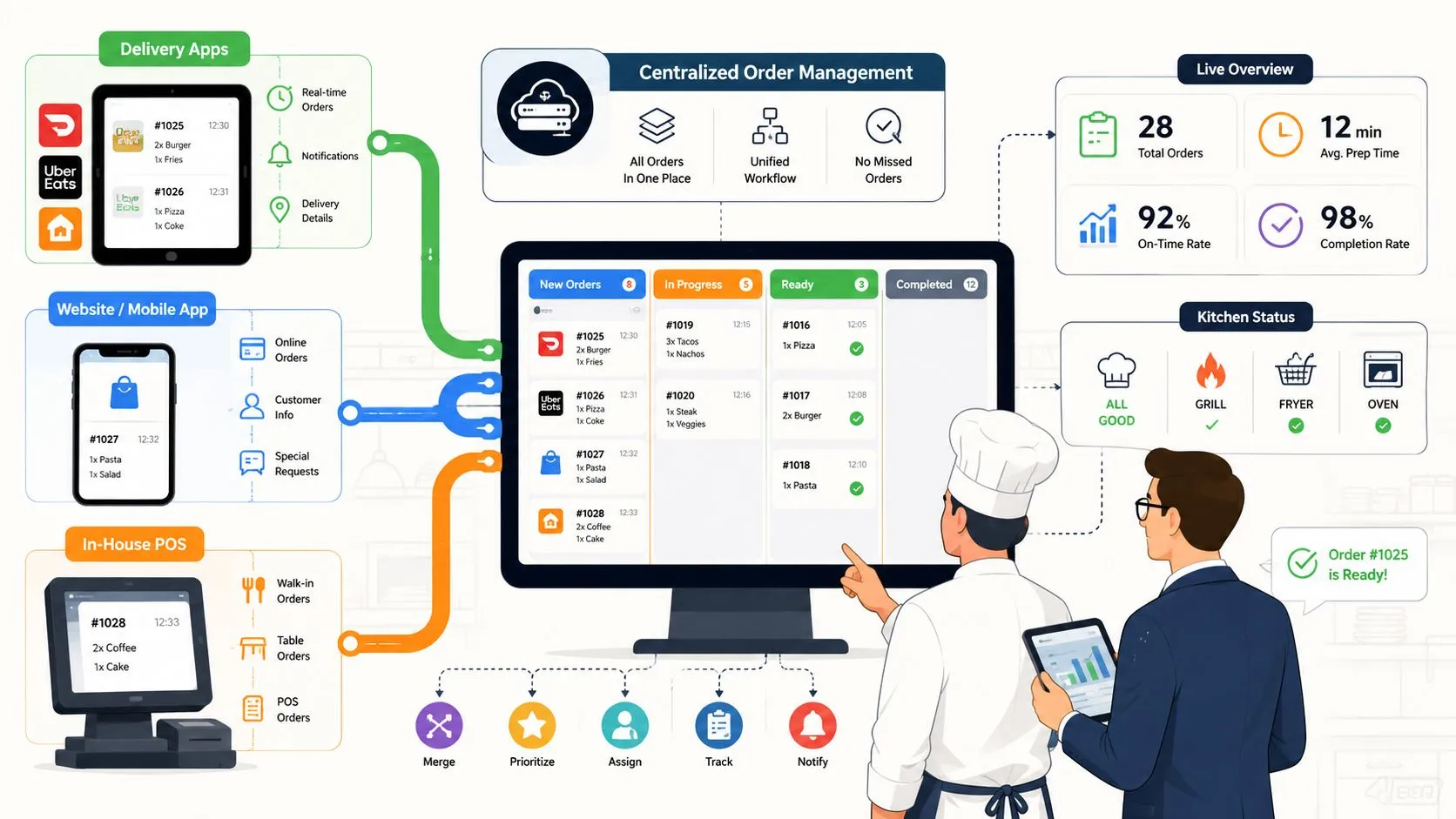
Order management best practices for delivery-heavy restaurants center on routing third-party orders straight into the POS, normalizing marketplace menus, and running everything from a unified queue. That matters because restaurant order accuracy still sits around 85% to 90%, which means roughly 1 in 7 to 1 in 10 orders has an error, and at a store doing 200 orders a day that can mean 20 to 30 wrong orders daily Kwick2Go.
The minute a restaurant adds a second delivery tablet, the whole operation starts to split. One screen gets Uber Eats, another gets DoorDash, a third gets Grubhub, and the POS is left trying to keep up after the fact. The kitchen stops working from one truth, modifiers drift, and managers spend the rush doing cleanup instead of running the line.
That’s why the right way to think about order management is as one pipeline, not a pile of apps. Intake, menu normalization, routing, dispatch, and reporting all need to point back to the POS as the source of truth. If the POS doesn’t hold that role, the restaurant ends up managing symptoms, not fixing the workflow.
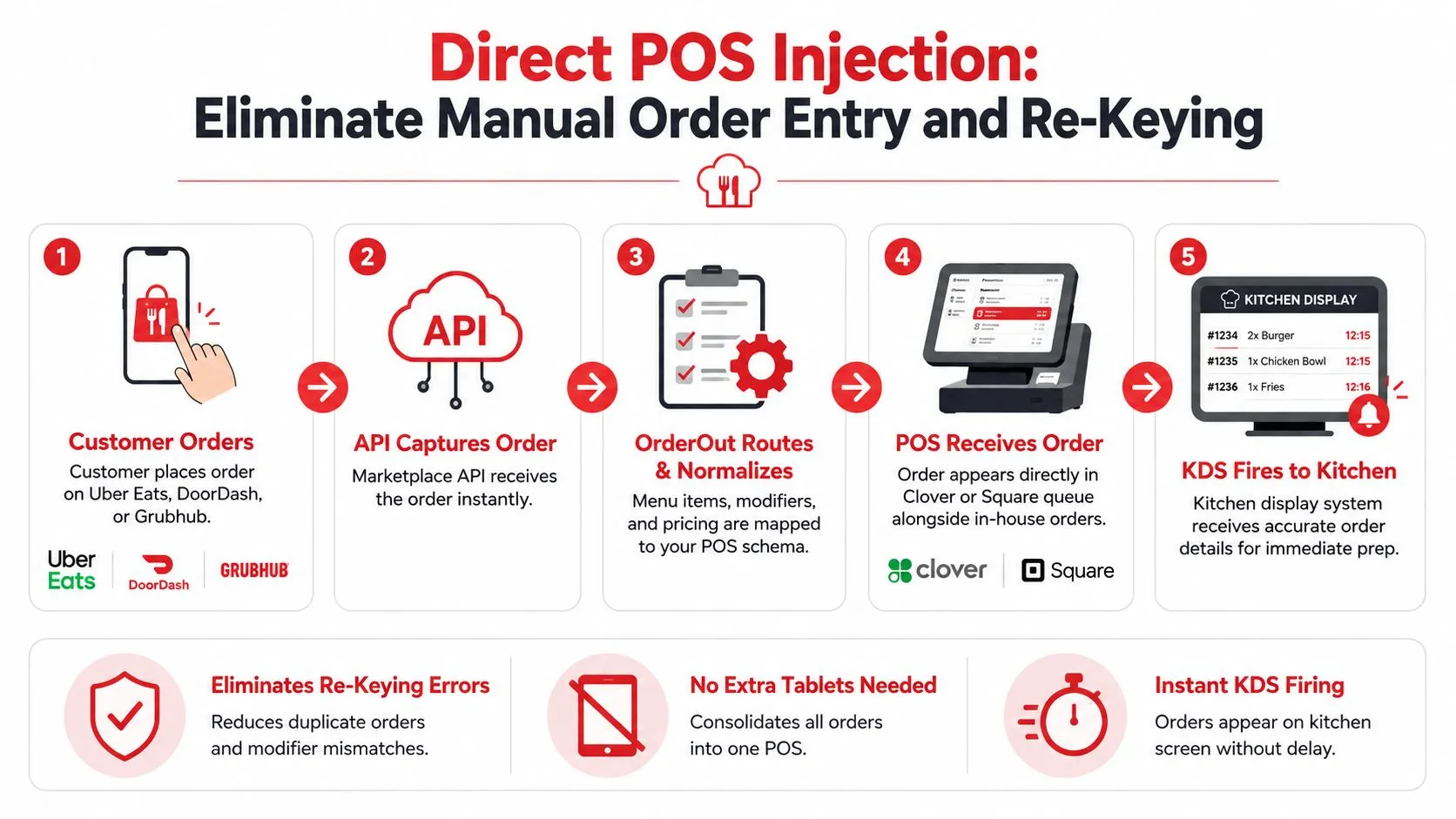
For restaurants using Clover or Square, OrderOut fits that pipeline by injecting Uber Eats, DoorDash, and Grubhub orders straight into the POS with no extra tablets and no re-keying. The practical difference shows up fast in a real shift, because the team reads one queue, one menu structure, and one set of prep priorities instead of chasing tickets across devices. If you’re already dealing with marketplace chaos, the fix isn’t another tablet, it’s tighter order control from the start.
1. Direct POS Injection
Direct POS injection stops the shift from getting bogged down in re-entry. When Uber Eats, DoorDash, and Grubhub flow straight into Clover or Square, staff do not have to type the same ticket twice, and the kitchen works from one structured order instead of a rough transcription.
That matters because delivery-to-POS integration does more than forward an order. It maps each marketplace menu into a normalized POS schema, so the item name, modifier, and price land where they belong. The difference shows up on the line fast. A ticket that reads cleanly in the POS gives cooks the full order, while handwritten transfer work leaves room for missed modifiers and pricing errors.
Practical rule: if an order has to be retyped, it can be mistyped.
Manual tablet handling breaks down quickly during peak service. Independent reporting cited in the search results shows manually managed delivery orders at 6.3% error rate versus 0.8% for fully integrated orders that flow automatically into the kitchen system, and the same source says integrated operations often stay under 1% while manual processes sit in the 5 to 8% range Spindl. In practice, that means fewer duplicate fires, fewer modifier mistakes, and fewer calls back to guests after the food is already packed.
A rollout works best when it starts with the highest-volume marketplace and the busiest menu items. Check the Uber Eats, DoorDash, and Grubhub menus against the POS before go-live, then test the orders your kitchen fires most often during a slow window. If manual re-entry is still part of the process, comment Logivo automatise les tâches shows the same pressure point from another angle, the work disappears only when the handoff is automated end to end. If you are using OrderOut, its delivery order entry automation guidance is a useful reference for how that handoff should behave in a restaurant setup.
What to do first
- Audit item names and modifiers: Match the marketplace menu to the POS menu before you connect it.
- Start with one busy item set: Signature burgers, best-selling pizzas, or top lunch combos will show mapping issues fastest.
- Watch the first two days closely: Missing modifiers and wrong pricing are easier to catch before the rush gets heavy.
- Brief the team: Cooks should know that marketplace tickets now appear in the POS queue, not on a separate tablet.
A Clover operator who installs OrderOut’s Clover delivery integration can test that flow without turning the line into a retyping station. The point is straightforward. Remove the handoff gaps, and the kitchen spends less time fixing tickets and more time firing food.
2. Unified Order Queue
A unified order queue puts delivery, in-house, and owned-channel orders in one place so the kitchen stops bouncing between screens. That sounds basic. In service, it changes whether the line moves with purpose or keeps pausing to ask where an order went.
A good queue does more than merge channels. It surfaces timing clearly enough that staff can sort by urgency instead of by habit. A DoorDash pickup, a walk-in burger, and a commission-free online order should all live in the same workstream, but they should not all get the same treatment if one is about to miss a pickup window.
Order mistakes hit the guest first and the operator next. Innowi cites Restaurant Dive reporting that incorrect delivery orders, refunds, and lost repeat business show how often fragmented handoffs turn into customer damage. That is a queue problem as much as a service problem, because missed tickets and bad handoffs usually start when staff have to watch too many screens.
A single queue also shows where labor is getting wasted. If DoorDash keeps producing late tickets, or in-house orders keep sliding behind tablet work, you can adjust staffing and prep flow before service slips. That matters more than any clean dashboard. It gives you control over the rush.
What a good queue should do
- Show order source clearly: Staff should know instantly whether the order came from Uber Eats, DoorDash, Grubhub, or direct ordering.
- Sort by fulfillment urgency: Tight deadlines should surface first, not just the newest order.
- Keep prep stations aligned: Kitchen, expo, and counter staff should all be looking at the same live order list.
- Reduce context-switching: No one should have to toggle between tablets to see what’s due next.
If your setup still forces people to jump between screens, OrderOut’s multi-channel order management software overview is a useful reference for how one queue can replace three disconnected ones. It works the same way whether you run one location or many.
3. Menu Normalization and Schema Mapping
A customer’s “extra guac” only stays simple if the menu schema is clean. Uber Eats, DoorDash, and Grubhub do not structure items and modifiers the same way, so a sloppy map sends the POS a scrambled version of the order instead of usable operational data.
That step covers more than item names. Pricing, modifier groups, availability, and prep notes all need to land in the format the POS already expects. If the mapping is loose, the kitchen sees one version, the cashier sees another, and the guest pays for an order the back line never received correctly.
Consistency breaks fast across channels. A condiment request may carry one label on one platform and a different label on another, and unless those requests are normalized into one POS schema, staff will treat the same request like three different things. OrderOut’s approach centers on that mapping step, so marketplace menus follow the restaurant’s operational structure instead of forcing the team to translate each channel by hand.
Treat menu mapping as a live control, not a setup task you finish once and forget. New items go live, old items retire, modifiers change, and the marketplace menus need to reflect those updates at the same time as the POS mapping. If that sync slips, the restaurant serves yesterday’s menu to today’s customer.
A clean menu map keeps the kitchen from guessing.
A practical baseline is OrderOut’s menu management software guidance. It is especially useful for restaurants that run high-modifier items, because those orders break first when the menu structure is sloppy.
What to verify before go-live
- Modifier names: Use the same label for the same request across channels.
- Price tiers: Premium add-ons need to reach the POS with the correct charge.
- Availability rules: Sold-out items should stop selling on the marketplace.
- Item hierarchy: Bundles, combos, and sides need to map cleanly, not as random one-off entries.
A Mexican fast-casual shop, a burger chain, and a catering operation all run into the same problem in different ways. If the schema is wrong, the kitchen works harder than it should. If the schema is right, the order enters once and behaves like it came from the restaurant itself.
4. Real-Time Inventory Sync
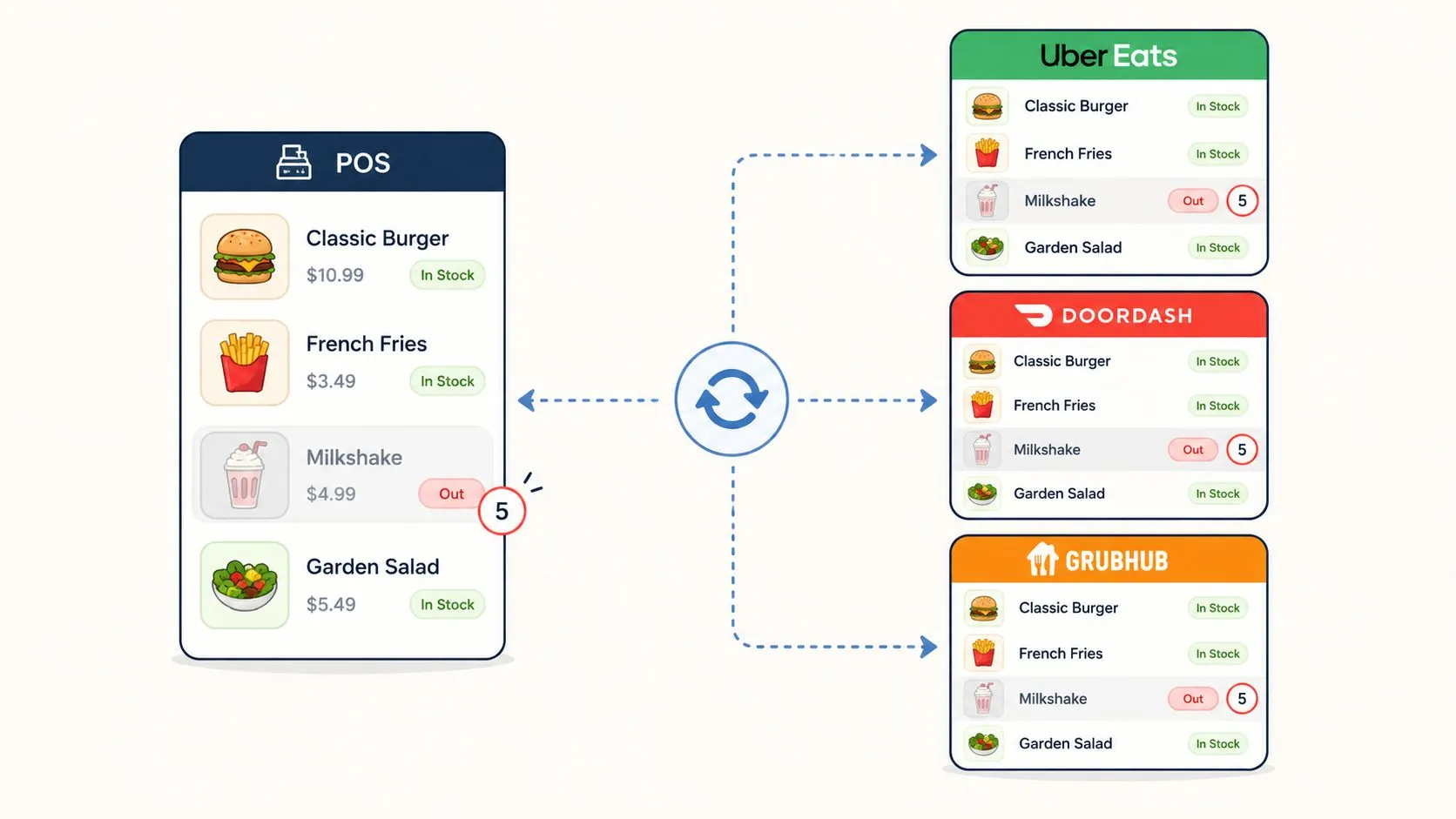
Real-time inventory sync keeps a restaurant from promising food it cannot make. When the POS marks an item sold out, that change needs to reach Uber Eats, DoorDash, and Grubhub right away, or the team ends up canceling orders, issuing refunds, and burning time on problems that should have been prevented.
The pressure shows up first on limited items. Wings, fresh fish, daily specials, and high-demand add-ons create the fastest pain because the guest has already made a choice before the kitchen can recover. If the menu stays live after the item is gone, the restaurant usually takes the blame, even if the marketplace still showed it as available.
Operators usually learn this from the fallout. Orders keep arriving for a product that has already run out, and staff have to explain the cancellation to a customer who thought the item was still live. Inventory sync is the guardrail that keeps that mismatch from becoming a service issue.
The catch is simple, the sync is only as good as the counts behind it. If staff do not reduce inventory correctly in the POS, the marketplaces inherit bad data. The restaurant has to tighten its internal counting habits before it expects automation to hold the line.
OrderOut’s online inventory management guidance matters here because the control point is the same one that keeps menu data accurate. Once inventory moves correctly inside the POS, the external channels can follow without extra work from the team.
Tighten these controls first
- Start with the most oversold items: Protect the products that trigger the most complaints.
- Set clear thresholds: Do not wait until the last unit is gone if prep time is slow.
- Train the line on counts: Inventory sync depends on disciplined item tracking.
- Review exceptions regularly: If the same item keeps overselling, the prep plan is too loose or the count process is broken.
A seafood counter may need to pull the fresh catch offline as soon as the remaining supply stops being realistic. A chicken shop may need to stop selling wings before the fryer gets backed up. The point is the same in both cases. Sync protects the guest experience and keeps the kitchen from making promises it cannot keep.
5. Order Routing and Prioritization Rules
Order routing is where the ticket stream stops being equal. A Grubhub order with a tight pickup window should not wait behind slower in-house work just because it arrived later, and a dine-in ticket should not get stuck behind delivery batches that could have been sent elsewhere.
Operators are not guessing blind here. Analysts at USTechAutomations report that in the 2026 ACSI Food Delivery study, overall customer satisfaction was 75, with order process satisfaction at 83 and order accuracy at 79 USTechAutomations. The workflow around the order matters as much as the food on the plate.
Simple rules work better than clever ones. A channel with a shorter SLA should be flagged as urgent. Tickets with more prep time can stay in the normal flow. If the line knows what should move first, it does not have to make that call under pressure.
The other job is protecting the room. Dine-in service should not feel ignored because the kitchen is staring at a stack of delivery tablets. If the POS can send the right order types to the right prep station, the team can keep both sides moving without turning the shift into a scramble.
The goal is not to make every order fast. The goal is to make the right orders first.
OrderOut’s order routing software overview shows how those rules play out at the station level. The value is in the routing logic, not the label on the tool.
A few rules usually carry the load.
- Channel-based urgency: Put tighter marketplace windows ahead of low-priority work.
- Station-based routing: Send simple builds to the front line and complex builds to the back.
- Deadline-aware prep: Use fulfillment timing, not just order time, to decide priority.
- Lead review: Let the kitchen lead tune the rules so they match real prep flow.
A burger shop can flag urgent delivery tickets early, a pizza franchise can protect dine-in tickets, and a sandwich shop can split simple and complex builds. The common thread is timing. The line needs a system that understands which ticket should move now and which one can wait.
6. Commission-Free Online Ordering
Commission-free online ordering gives the restaurant an owned channel instead of renting traffic through a marketplace. The ticket still lands in the POS like any other order, but the restaurant controls the branding, the customer relationship, and the repeat-business path.
That matters because digital demand already drives a large share of restaurant activity. Independent reporting shows restaurant apps and websites account for 62% of digital orders, mobile devices drive most digital ordering, and 60% of U.S. consumers order delivery or takeout weekly Lavu. The question is no longer whether guests order digitally. It is where that order begins.
The economics change too. When a guest orders through the restaurant’s own page, QR code, or text-to-order flow, the restaurant avoids marketplace commission on that ticket. It also gets direct access to the customer for follow-up, loyalty, and repeat visits, which is harder when a marketplace sits between the guest and the brand.
The channel still has to earn its way into the workflow. If the QR code is buried, the link is clumsy, or the menu is harder to use than a delivery app, guests will ignore it. If the owned channel is clear and easy to use, it becomes another clean intake path into the same POS flow.
A diner can scan a code at the table, place the order, and have it hit the POS without re-keying. That reduces handoff errors and keeps the front of house from acting like a manual relay.
For owners using Square, OrderOut’s Square delivery integration helps keep owned ordering tied to the same operational source of truth. If the goal is a direct owned channel, OrderOut’s commission-free online ordering solution is the relevant starting point.
What strong owned ordering usually includes
- Clear QR placement: Tables, receipts, and signage should point to the same ordering path.
- Simple menu flow: Guests should not have to hunt for items or modifiers.
- Repeat-customer convenience: Text-to-order or saved links help regulars come back.
- POS continuity: Owned-channel tickets should land in the same queue as marketplace orders.
A restaurant does not need to drop delivery apps to build this. It needs a channel it controls alongside them, with the same order flow feeding the same POS.
7. Multi-Location Order Consolidation
Multi-location consolidation gives operators one operating picture instead of forcing them to jump between separate store logins. Once a restaurant group has more than one unit, that matters fast. A weak store can drag on the brand before anyone spots the pattern.
Local drift is the core issue. One location is buried in delivery, another is slow on prep, and a third is running a different channel mix entirely. Without a consolidated view, there is no quick way to compare ticket age, prep speed, or late-order pressure across the group. A regional manager ends up guessing at the fix.
A good consolidated view turns scattered issues into something the team can act on. If one store keeps missing delivery targets, management can check whether the issue is staffing, station layout, channel volume, or menu complexity. That is a cleaner response than waiting for reviews to surface the problem.
It also makes scheduling less reactive. If Friday night delivery volume keeps climbing at one suburban store, the manager can staff for that pattern instead of relying on last week’s memory. Centralized control only works if it reflects local demand, not a one-size plan.
What to standardize across locations
- Dashboards by role: Corporate, store managers, and kitchen staff should not all see the same screen.
- Location-level alerts: One store slipping should trigger review before the issue spreads.
- Comparative tracking: Prep time and late-ticket trends need to be visible across the group.
- Channel mix awareness: Delivery-heavy stores and dine-in-heavy stores should not be managed the same way.
A chain running Clover in one market and Square in another still needs the same operating logic. OrderOut’s 3rd-party order engine hub is where that cross-channel setup starts. For a narrower example, OrderOut’s Grubhub to Clover integration path shows how specific the mapping can get when the delivery-to-POS flow is set up properly.
For multi-unit operators, the win is fewer blind spots, not more screens.
8. SLA Monitoring and Compliance Alerts
SLA monitoring keeps the kitchen from missing deadlines it could have hit with tighter timing. When the POS or KDS shows how much time is left on a ticket, the team can act before an order turns into a late pickup or a bad marketplace experience.
That matters because missed windows affect more than the current order. If the restaurant keeps missing the expected pickup time, marketplace ratings slip, customer complaints rise, and the store starts working against its own demand. The line needs alerts early enough to do something with them, not after the driver is already waiting at the counter.
A good alert changes behavior. A screen warning is easier to manage than a guest complaint. If the kitchen sees time pressure building, it can reshuffle prep order, call for help, or move a ticket to a faster station before the deadline passes.
Timing rules should match the work on the line. Friday dinner is not Tuesday lunch, and a catering build is not a single sandwich. The alerts need to reflect channel mix and order size instead of forcing every ticket into the same timing assumption.
If the warning comes too late, it’s not a warning.
Review SLA performance by channel and time slot. That shows where the kitchen is getting squeezed and where the routing rules need adjustment. A OrderOut’s delivery API overview can fit into that workflow when the deadline control has to connect back to delivery-to-POS setup.
A useful alert setup starts with the work the store handles.
- Set a warning buffer: Alerts should fire before the rush becomes unrecoverable.
- Separate channel timing: Marketplace tickets and in-house orders need different timing logic.
- Escalate slow order types: Large catering or complex builds should be flagged earlier.
- Review misses weekly: Patterns by daypart usually point to staffing or routing problems.
A pizza shop that watches Friday rush timing differently from lunch, or a chicken shop that treats pickup timing as a live metric, stays ahead of preventable misses. SLA visibility turns service from guesswork into something the team can manage.
9. Delivery Dispatch and Tracking Integration
Dispatch and tracking only work well when they sit inside the same order flow as the POS, kitchen routing, and delivery handoff. A store that has to check the Uber Driver app, DoorDash tools, and an internal dispatch screen is wasting time on extra lookups and creating more chances for a missed handoff.
The test is what happens during overlap. Two orders heading to the same area should not be treated as separate problems if one driver, one route, or one timing adjustment can handle both. Better dispatch logic cuts confusion for the team and gives the customer a cleaner ETA.
The useful part is not just seeing where a driver is. It is seeing which orders are ready, which ones can wait a few minutes, and which deliveries should move first so the line does not stall. That matters for restaurants running their own drivers alongside marketplace delivery, because the routing decision has to match the kitchen’s pace, not fight it.
A pizza shop with its own drivers can use dispatch rules to cluster nearby stops and avoid wasted miles. A catering operation can keep third-party and in-house deliveries visible in the same view, which makes fast decisions easier when a pickup window shifts and someone has to leave first.
A clean setup keeps the team out of app-juggling mode. One screen for trip status, one place for driver communication, and one ETA view for staff and customers give the manager a better read on what is moving and what is stuck.
What to look for in a dispatch setup
- Single delivery view: In-house and third-party trips should sit in one place.
- Batching logic: Nearby stops should be grouped when the route makes sense.
- Driver communication: Staff need one place to coordinate without bouncing between tools.
- ETA visibility: Customers and managers both need timing that reflects real conditions.
This last-mile delivery guide is a useful broader reference for how the final handoff affects service. In a restaurant, the goal stays simple, fewer moving parts and fewer missed calls between the kitchen, the driver, and the guest.
9-Point Order Management Best Practices Comparison
| Solution | Implementation 🔄 (Complexity) | Resources ⚡ (Requirements) | Expected outcomes 📊 (Impact) | Ideal use cases 💡 | Key advantages ⭐ |
|---|---|---|---|---|---|
| Direct POS Injection: Eliminate Manual Order Entry and Re-Keying | Medium–High, API integration + menu mapping; POS compatibility required | Integration vendor or dev time; careful initial menu audit; reliable POS uptime | Near-zero manual entry errors; faster KDS firing; lower labor on order management | High marketplace volume QSRs; single-POS shops replacing tablets | Eliminates re-keying; centralized order history; improved KDS accuracy ⭐ |
| Unified Order Queue: Consolidate Marketplace, In-House, and Owned-Channel Orders | Medium, unify feeds into one POS queue; UI/UX tuning needed | Integration work across channels; staff training; possible POS enhancements | Fewer missed orders; reduced context-switching; clearer channel metrics | Multi-channel restaurants juggling tablets and POS | Single chronological queue; channel labeling and reporting; simpler staffing decisions ⭐ |
| Menu Normalization & Schema Mapping: Sync Marketplace Menus to POS Accurately | High, audit & map disparate marketplace schemas to POS | Significant upfront mapping time; ongoing maintenance when menus change | Accurate modifiers/pricing; fewer refunds and prep errors | Complex menus with many modifiers or tiered pricing | Consistent modifier translation; price reconciliation; reduced kitchen confusion ⭐ |
| Real-Time Inventory Sync: Prevent Overselling and Out-of-Stock Orders | Medium, connect POS inventory to marketplaces; threshold rules | Strong POS inventory discipline; config of thresholds and multi-location rules | Prevents oversells/refunds; protects margin; improves customer satisfaction | Perishable or limited-quantity items; busy delivery nights | Automated disable/enable of sold-out items; reduces commission loss ⭐ |
| Order Routing & Prioritization Rules: Intelligently Direct Orders Based on Channel and SLA | Medium, define SLA rules, KDS routing and station logic | SLA data from marketplaces; KDS capable of routing; kitchen collaboration | Improved SLA compliance; fewer late deliveries; better throughput | Busy kitchens with mixed SLA orders (delivery + dine‑in) | Priority-driven prep; station routing; reduced late-delivery rate ⭐ |
| Commission-Free Online Ordering: Owned Channel Reduces Marketplace Dependency and Fees | Low–Medium, branded site + POS integration; marketing required | Website/QR setup, payment processing, promotion to customers | Higher per-order margin; owned customer data; reduced commission spend | Restaurants aiming to shift volume off marketplaces | Keeps 100% of order value; builds direct marketing lists; controls UX ⭐ |
| Multi-Location Order Consolidation: Centralize Management Across Restaurant Chains and Groups | High, aggregate multiple POS instances into one dashboard | Central platform, compatible POS stack, network reliability, role-based access | Network visibility, benchmarking, capacity planning across stores | Chains/franchises with many locations or regional managers | Single dashboard for all locations; comparative analytics; faster interventions ⭐ |
| SLA Monitoring & Compliance Alerts: Track Delivery Deadlines and Prevent Deactivation | Low–Medium, timers and alert thresholds on POS/KDS | KDS/POS features, tuning alerts, weekly monitoring | Fewer missed SLAs; lower refund/deactivation risk; actionable SLA data | Restaurants at risk of marketplace penalties or late deliveries | Real-time countdowns/alerts; historical SLA reports; protects marketplace standing ⭐ |
| Delivery Dispatch & Tracking Integration: Manage In-House and Third-Party Delivery from One Place | High, GPS, route optimization, and third-party API integration | Driver apps, real-time GPS, API connectors, operational changes | Better ETA accuracy; optimized routing; reduced driver wait and fuel cost | Restaurants operating in-house fleets or hybrid delivery models | Unified delivery view; route batching; customer ETA notifications ⭐ |
From Tablet Chaos to One Queue
The cleanest order management setup follows one chain, intake, normalization, queue, routing, dispatch, and reporting. If one of those steps lives on a separate tablet or gets handled by hand, the whole system gets harder to run and easier to break. The point of best practice is not to add more software, it’s to make the existing workflow harder to mess up.
The rollout should be practical, not grand. In week one, map the menus so the POS and the marketplaces speak the same language. In week two, turn on POS injection for the highest-volume channel first, usually the one creating the most retyping and the most mistakes. In week three, consolidate the queue and tighten the routing rules so the kitchen sees one live workstream instead of three competing ones.
Week four is where the system starts to feel like a system. Add SLA alerts, review the deadline misses, and bring commission-free online ordering into the same flow so more orders come in through a channel the restaurant controls. That combination gives operators a cleaner path to better service, because the queue, the menu, and the kitchen are all working off the same source of truth.
The evidence points the same way across the board. Order accuracy remains a real operational leak Kwick2Go, delivery mistakes damage repeat business Innowi, and customer satisfaction rises when the order process is easier to manage USTechAutomations. The practical answer is to stop managing delivery apps as separate businesses and start managing them as inputs into one restaurant workflow.
For Clover and Square operators, OrderOut gives you a way to wire Uber Eats, DoorDash, and Grubhub straight into the POS, with menu mapping and order flow built around the way restaurants run. If you’re ready to stop re-keying tickets and get the first channel into the POS the right way, install it free and start from the busiest marketplace first.
OrderOut connects Uber Eats, DoorDash, and Grubhub directly into Clover and Square so your team can work from one queue instead of juggling tablets. If you want to cut the manual handoff out of your delivery workflow, start by looking at OrderOut and then move into onboarding from there.