
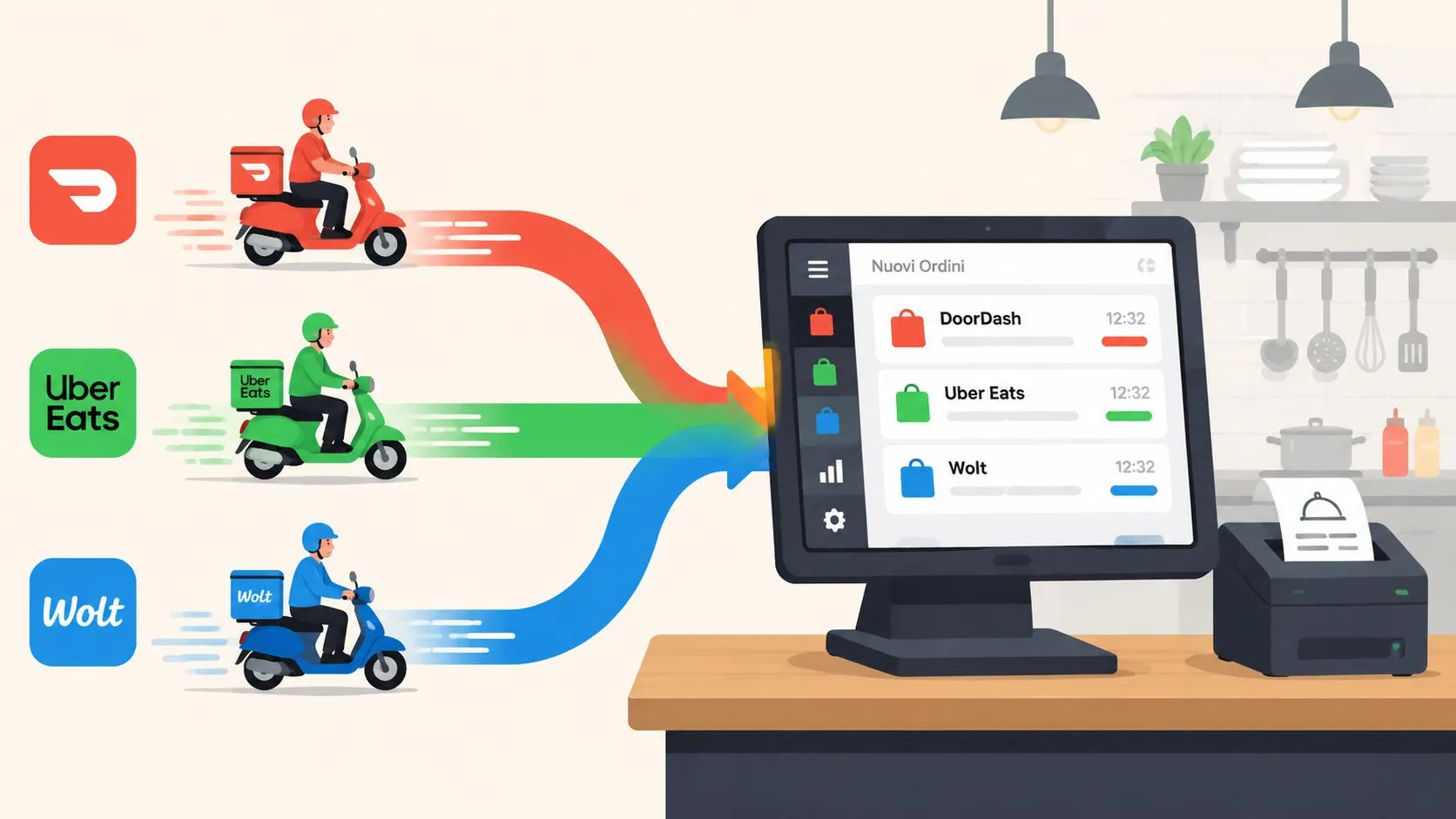
Direct express routing takes an order from Uber Eats, DoorDash, or Grubhub and injects it into Clover or Square as a native POS ticket, with no extra tablet and no manual re-keying. In a delivery environment where full-service restaurants saw a 237% increase in digital orders since 2020, that routing layer has become operational infrastructure, not a minor convenience, as reported by RestoLabs’ online ordering statistics summary.
Friday dinner rush exposes the problem quickly. A DoorDash order arrives on one tablet, an Uber Eats ticket appears on another, and a Grubhub alert competes with an in-store customer at the counter. Someone still has to read each order, enter it into Clover or Square, check modifiers, and send the right ticket to the kitchen. Direct express routing removes that handoff by turning each marketplace order into the same POS-native workflow your staff already use.
What Direct Express Routing Means for Delivery Orders
Direct express routing is the connection between a delivery marketplace and the restaurant’s point-of-sale system. Uber Eats, DoorDash, and Grubhub create the orders. A routing layer receives those orders, matches their menu data to the restaurant’s POS catalog, and sends the completed ticket into Clover or Square.
The operator should experience one result: the order appears in the POS queue with the correct items, modifiers, discounts, service charges, and customer instructions. The kitchen printer or KDS then receives the ticket through the same operational path as a dine-in or pickup order.
The Friday rush test
Suppose a customer orders a pizza through Uber Eats and selects “no onions,” adds a side, and chooses a dipping-sauce modifier. A separate DoorDash customer orders a combo with a required drink choice. A Grubhub customer changes the default topping.
With separate tablets, staff must monitor three interfaces and interpret three versions of the menu. With manual re-entry, someone types those selections into Clover or Square. With direct express routing, the integration translates each marketplace’s structure into the POS menu structure before creating the ticket.
That translation matters because marketplaces don’t always represent menu items, modifier groups, and discounts in the same way. A normalized POS schema gives the routing layer a common format for those details, while Clover or Square remains the place where staff manage the resulting ticket.
Practical rule: If a delivery order still requires staff to read it from one screen and type it into another, the restaurant has connected displays, not direct express routing.
The distinction is important for multi-channel operations. OrderOut’s consolidated order workflow describes the broader goal, bringing outside ordering channels into one operational flow instead of making staff manage each channel independently. The POS should receive a usable ticket, not a notification that still needs interpretation.
Why Restaurants Replace Tablets and Re-Keying
During a Friday rush, a DoorDash tablet may show one order, an Uber Eats tablet another, while a staff member types a third order into Clover or Square. Each screen seems manageable during a quiet shift. As volume rises, the restaurant must watch several channels, interpret different menu formats, and keep the kitchen’s ticket accurate.
| Routing methods compared for delivery POS | Hardware needed | Re-keying required | Modifier fidelity | Failure risk at peak |
|---|---|---|---|---|
| Marketplace tablets | Separate marketplace devices | Yes, if the POS is the kitchen source | Depends on staff entry | Multiple screens and missed alerts |
| Aggregator hub | Hub device or interface | Sometimes | Depends on mapping quality | Translation and synchronization failures |
| Manual re-keying | POS plus marketplace screen | Always | Depends on staff interpretation | Typing mistakes and delayed tickets |
| Direct express routing | Clover or Square workflow | No | Depends on normalized mapping | Integration, mapping, or sync exceptions |
A DoorDash tablet can stop responding, leaving staff uncertain whether an order was accepted, delayed, or missed. An aggregator hub may display the order correctly but lose a modifier during the handoff to the POS. A server entering an Uber Eats instruction manually can mistype “no onions” or overlook it entirely.
The operational cost extends beyond inconvenience. One restaurant-technology source estimates that human error can cost around $30 per order, and about $9,000 per month for a restaurant with 20 tables processing 6,000 monthly orders, assuming a 5% error rate, as reported by OrderOut’s analysis of order-entry errors. The same source says 4 out of 5 businesses experience manual order-entry errors, with reported error rates of 4% to 7%.
What the POS-native model changes
Direct express routing turns each delivery channel into a single POS-native ticket. The integration receives the marketplace order, translates its items and modifiers into the Clover or Square catalog, and sends the resulting ticket into the restaurant’s normal workflow. Staff do not copy the order, and the kitchen does not interpret a separate tablet receipt. This approach is part of the broader order-entry automation workflow.
The POS-native result still depends on configuration. Menu mapping, modifier maintenance, item availability, and price synchronization determine what reaches Clover or Square. After go-live, those controls need review as menus change, items are 86’d, and marketplaces update their order formats. Direct express routing reduces repeated staff entry, while the integration handles the translation and exposes exceptions for correction.
Channel coverage also matters. Delivery demand is spread across several marketplaces, so a routing model built around only one tablet leaves gaps. Restaurants need a connection that can bring DoorDash, Uber Eats, and Grubhub orders into the same POS workflow, with channel-specific differences mapped before the ticket reaches the kitchen.
How the Routing Layer Connects Marketplaces to Your POS
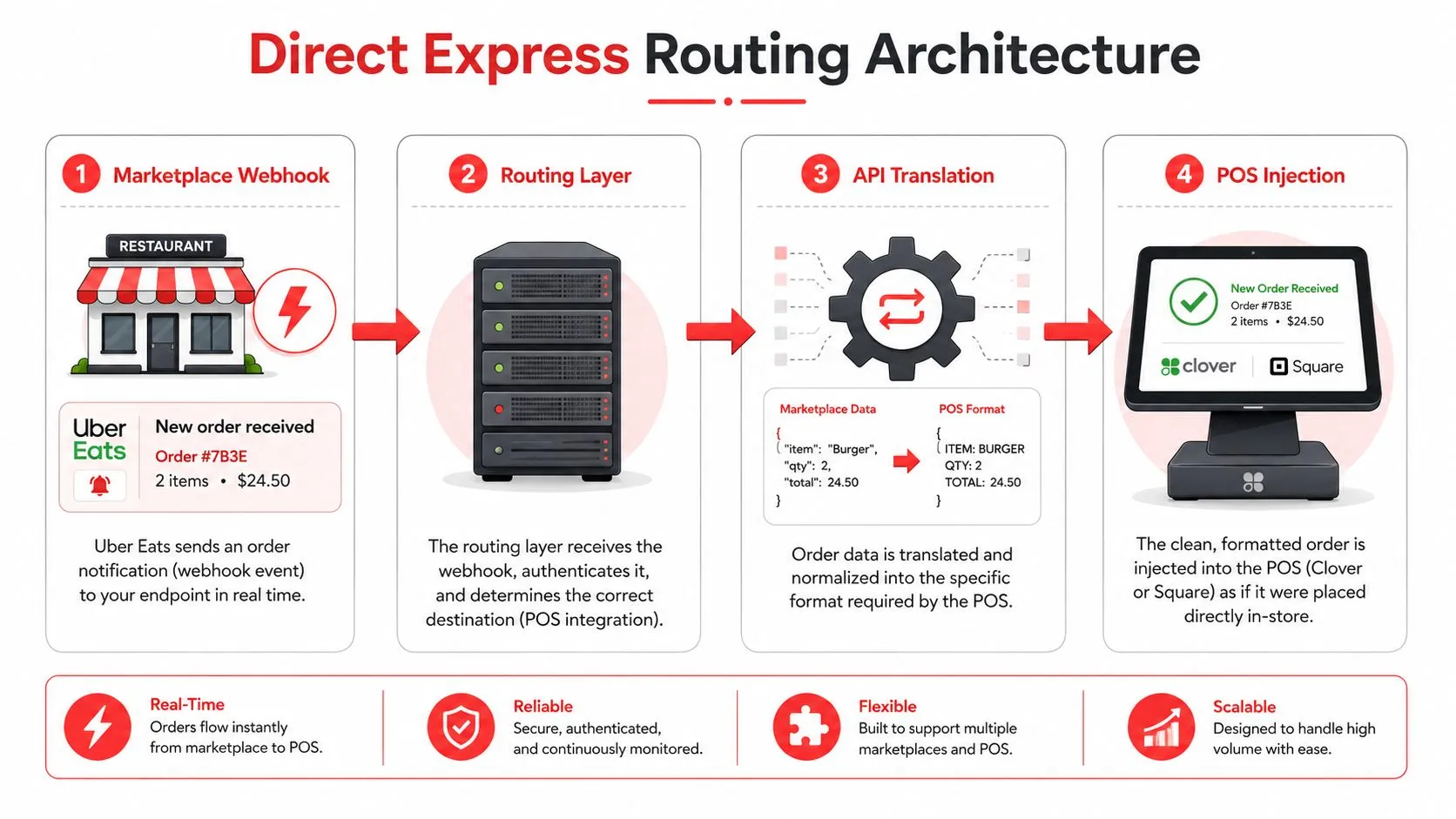
A direct express routing architecture has four practical stages. The marketplace creates the order, the routing layer receives it, the integration translates it, and the POS distributes the finished ticket to the kitchen.
1. Marketplace event
Uber Eats, DoorDash, or Grubhub sends an order event to the integration. That event contains channel-specific identifiers, item references, quantities, modifiers, customer notes, fees, discounts, and fulfillment information.
The routing service should acknowledge the event, preserve the marketplace order ID, and place the order into a controlled processing path. That identifier becomes important later if the marketplace retries the event or the operator needs to reconcile an order.
2. Normalized menu mapping
Each marketplace has its own menu representation. The routing layer maps those channel objects to a normalized POS schema, then resolves them against the restaurant’s Clover or Square catalog.
A pizza size, topping, combo choice, and special instruction must each land in the correct POS field. A modifier that appears as a free text option on one marketplace may correspond to a structured modifier group in Clover or Square. Good mapping preserves the meaning of the choice instead of flattening every detail into a note.
OrderOut’s third-party order engine uses this type of normalized order approach for delivery channels connected to POS systems. The practical benefit is consistency across marketplace inputs, though operators still need to maintain the underlying menu and modifier relationships.
3. POS injection
Clover’s Orders API can create a complete order with line items, modifiers, discounts, and service charges in a single API call. Clover also calculates order totals and taxes in real time, according to Clover’s Orders API integration documentation.
For Square, the downstream path includes configurable KDS routing. Square’s restaurant KDS documentation shows that operators can choose which POS devices send orders and which POS sources feed a given kitchen station. That lets a restaurant route delivery tickets to the appropriate preparation area rather than treating every incoming order as an identical print job.
4. Kitchen handoff
After the POS accepts the mapped order, Clover or Square handles the normal ticket workflow. The ticket can print or appear on the KDS according to the restaurant’s existing station rules.
The goal is easy for a manager to verify. An Uber Eats order should appear as a complete ticket on the same kitchen workflow used for pickup or dine-in, with the correct item, modifier, and instruction data. OrderOut’s order-routing software overview provides additional context on routing orders into the systems that staff already operate.
Latency and Performance Considerations at the Counter
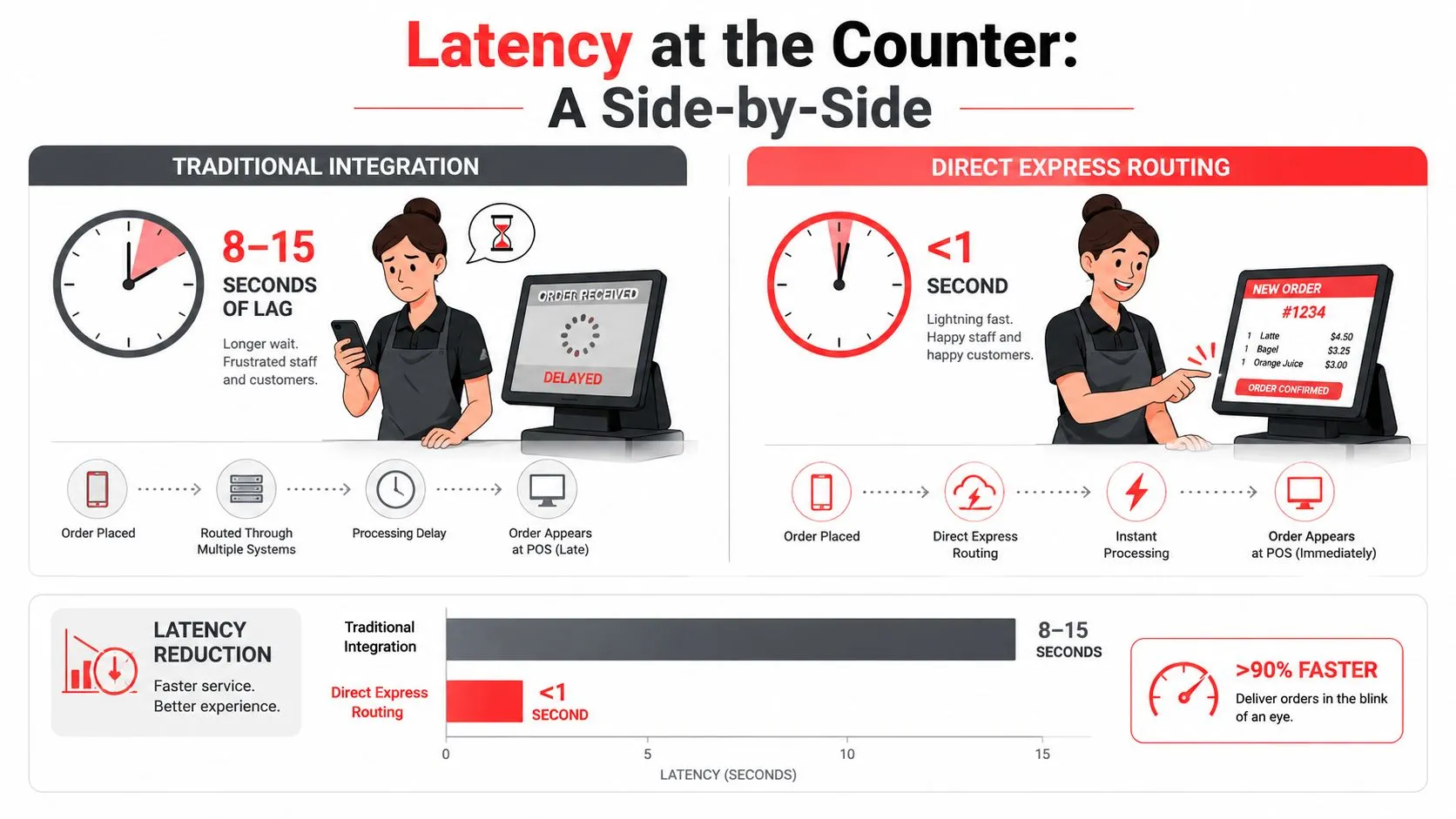
Latency is the time between marketplace order creation and the point when staff can act on the order in Clover or Square. Operators don’t need to monitor network traces to notice it. They feel latency when a customer is waiting, the kitchen is idle, or a ticket appears after staff have already started preparing another order.
A well-engineered POS routing path should feel close to immediate during normal service. An independent hospitality broadband guide notes that POS-related routing benefits from sub-second latency, and that cloud menu updates and modifier lookups can feel sluggish above 200 milliseconds, as described by Broadband Switch’s hospitality connectivity guidance.
That source points to an important design principle. The routing layer should minimize unnecessary hops, cache stable menu and modifier mappings, and keep validation, order creation, and printer or KDS handoff in a short transaction path.
Where the delay can originate
A slow ticket doesn’t always mean the POS integration is at fault. Separate the workflow into observable stages:
- Marketplace delay: The order event hasn’t reached the routing service yet.
- Translation delay: The service is resolving an uncached item, modifier, or price mapping.
- POS delay: Clover or Square hasn’t accepted or completed the order request.
- Kitchen delay: The POS accepted the ticket, but printer or KDS routing hasn’t delivered it to the expected station.
- Fulfillment delay: The ticket is ready, but the driver or courier handoff is taking longer.
Peak-hour contention can expose weak queue handling. A cold connection, a modifier cache miss, or a backlog of webhook events can make a ticket arrive late enough that staff question whether it was duplicated or lost.
A useful dashboard should show the event received time, mapping completion, POS acceptance, and kitchen handoff. Managers can then distinguish an Uber Eats delivery delay from a Clover ticket delay instead of asking staff to guess.
For a deeper operational view, OrderOut’s order-processing guidance explains why the interval between order creation and kitchen action deserves attention. The objective isn’t a flashy speed claim. It’s a workflow that stays predictable when the counter is busy.
What Breaks After Go-Live and How Routing Handles It
The first installation can look perfect because the team tests a few representative orders. Problems often appear later, after the menu changes, a marketplace promotion runs, or a customer selects a combination nobody included in the original test.
Modifier mismatches are especially disruptive. A Grubhub combo might map to a Clover modifier group, but the marketplace option could use a different identifier or pricing rule. The order may still arrive, yet the drink choice, topping price, or required selection can be wrong.
Duplicate tickets create a different kind of risk. A marketplace may retry an event when it doesn’t receive a timely acknowledgment. If the routing layer and POS treat the retry as a new order, Square KDS can show the same delivery ticket twice.
| Common Post-Go-Live Failures and Routing Layer Responses | Root Cause | Routing Layer Response |
|---|---|---|
| Modifier mismatch | Marketplace and POS use different item or modifier structures | Validate schema mappings, flag unmapped selections, and require review |
| Duplicate ticket | Retried event is processed as a new order | Use marketplace order identifiers and idempotent processing |
| Stale 86 status | Sold-out item remains available on a marketplace | Sync availability or place the item in an exception queue |
| Price discrepancy | Marketplace promotion or price differs from POS | Preserve channel pricing data and reconcile totals |
| Missing special instruction | Free-text note is lost during translation | Map notes explicitly and surface incomplete fields |
The maintenance reality
An 86 list is only useful if it reaches every sales channel. If a Clover item is unavailable but still active on DoorDash, customers can continue ordering it. Staff then need to call the customer, substitute an item, issue a refund, or cancel the order.
Price discrepancies can develop in the opposite direction. A Square menu may have one price while a marketplace applies a promotion or uses a channel-specific price. If the integration doesn’t preserve the relevant details, the order can look valid while creating a reconciliation problem later.
A mature routing layer should prevent some failures and expose others. Schema validation can stop an incomplete modifier mapping. Idempotency keys can prevent a repeated marketplace event from creating a second ticket. Two-way inventory synchronization can keep sold-out items from remaining active, while an alert queue can make unresolved exceptions visible.
OrderOut’s Grubhub to Clover integration illustrates the channel-specific nature of this work. The connection isn’t finished when an order appears once. Operators need a process for reviewing declined tickets, mapping changes, duplicate alerts, and price exceptions after launch.
Why the POS Becomes the Single Source of Truth
A restaurant’s POS becomes the operational source of truth when direct express routing turns each delivery channel into one POS-native ticket. Uber Eats, DoorDash, and Grubhub still handle customer ordering, payment, and marketplace communication. Clover or Square becomes the place where staff receive, prepare, adjust, and report the order.
Consider a multi-location pizzeria using Clover. A DoorDash delivery, an Uber Eats pickup, and an in-store sale can follow the same station and printer rules. The kitchen receives one ticket format, while the manager handles modifiers, voids, and status changes through the Clover workflow instead of checking several tablets.
The benefit is consistency across the order’s full meaning. A modifier is not merely text, an 86 item is not merely a menu setting, and a duplicate event is not a second sale. The routing layer must preserve those relationships as marketplace data enters the POS.
Why consistency compounds
A shared POS workflow gives managers one operational catalog to review. They can update an item or modifier, confirm the mapping, and check how the change reaches each connected marketplace. Staff also learn one ticket convention rather than separate procedures for every channel.
Square provides the same anchor for reporting. When orders enter Square consistently, the restaurant has a cleaner basis for reviewing sales activity in Square Analytics, handling tips, and applying the POS tax and discount model. Marketplace promotions and fees can still require reconciliation, but the ticket begins in a common system.
OrderOut’s data-integrity guidance explains why this distinction matters. The goal is not just fewer manual entries. Item, modifier, price, availability, and order status must keep their meaning from marketplace to POS to kitchen.
Online and phone orders represent a substantial share of restaurant sales activity. The POS routing layer therefore supports a major operating workflow, rather than serving only occasional delivery tickets. Its value appears after launch, when staff need one reliable record for correcting modifiers, honoring 86s, investigating duplicates, and reconciling the final order.
Best Practices for Operators and POS Partners
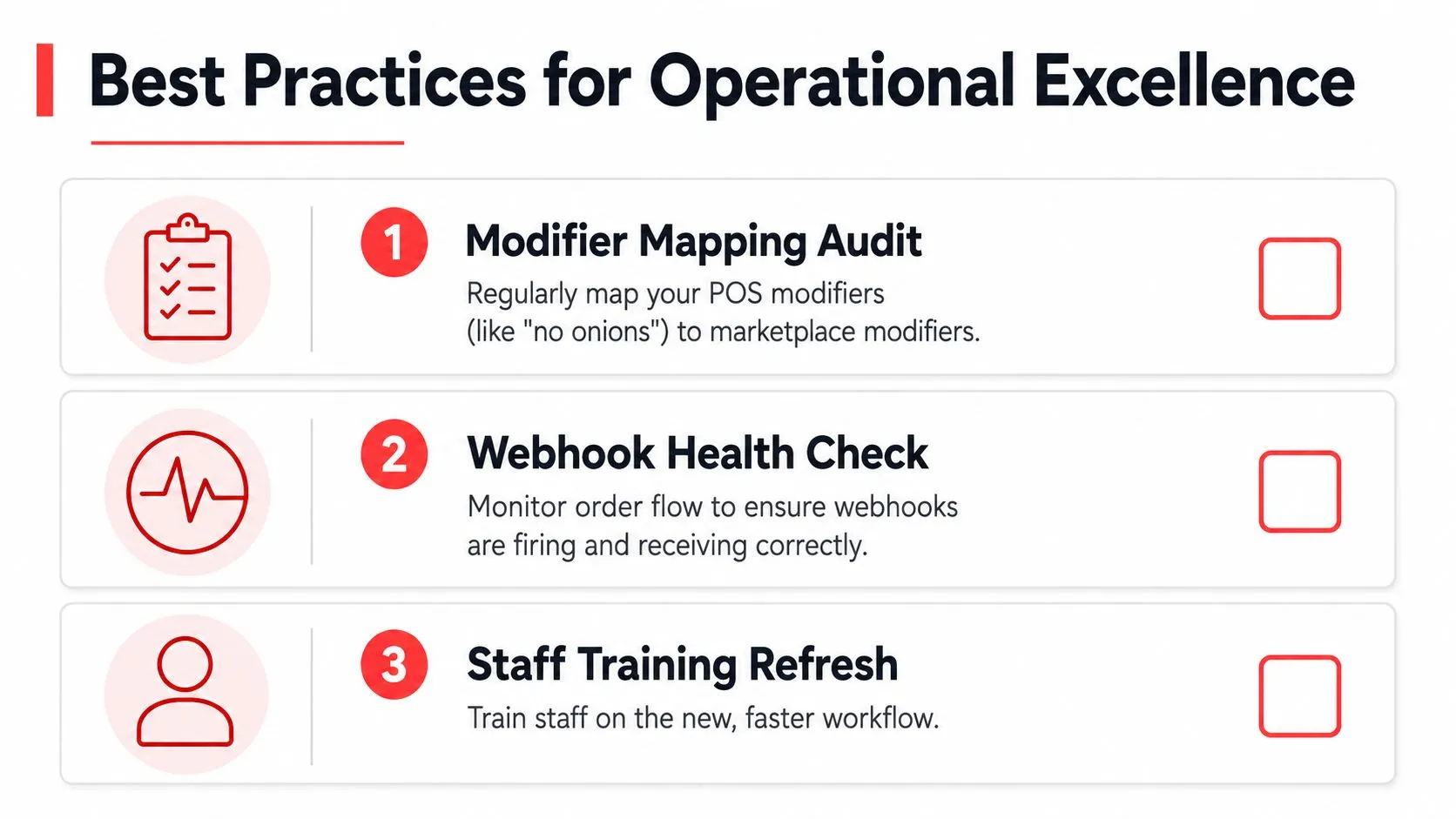
Direct express routing needs ownership after launch. The restaurant should treat menu mapping, channel availability, ticket exceptions, and webhook health as operating responsibilities, not as tasks that disappear after installation.
Start with a mapping audit. Test the combinations customers buy, including required modifiers, nested choices, combo selections, special instructions, discounts, and unavailable items. A menu can look correct at the item level while failing on the modifier relationship that makes the order usable.
The operator checklist
- Review mappings: Compare Clover or Square modifiers with the versions shown on Uber Eats, DoorDash, and Grubhub.
- Check exceptions: Review declined, adjusted, duplicated, and manually corrected tickets on a regular operating cadence.
- Verify availability: Confirm that 86 changes reach each marketplace promptly enough to prevent unavailable-item orders.
- Test price behavior: Check standard prices, channel-specific prices, and marketplace promotions against the POS record.
- Rehearse fallback: Document what staff should do if a ticket stalls, including how to verify the marketplace order and reprint the kitchen ticket.
- Assign ownership: Give one person at each location responsibility for routing accuracy and escalation.
The partner checklist
POS dealers, integration partners, and restaurant technology consultants should monitor the technical signals operators can’t see at the counter. Webhook receipt, queue depth, failed transformations, retry activity, and dead-letter queues should feed a manager-friendly dashboard.
The dashboard should separate a marketplace event failure from a POS rejection. It should also preserve enough context for support staff to identify the affected location, channel, menu object, and order identifier without asking the restaurant to reconstruct the entire incident.
Operational standard: A routing system isn’t ready for peak service until the team knows both how normal tickets arrive and how failed tickets are recovered.
OrderOut connects third-party delivery orders from Uber Eats, DoorDash, and Grubhub into Clover and Square, using normalized menu mapping so the POS can remain the restaurant’s working source of truth. Restaurants can review the OrderOut delivery-to-POS solution and evaluate whether its tablet-free workflow fits their menu and exception-handling needs.
Frequently Asked Questions
Does OrderOut work with Clover?
OrderOut connects third-party delivery channels such as Uber Eats, DoorDash, and Grubhub to Clover so marketplace orders can enter the POS without manual re-keying. OrderOut is free to install on the Clover App Market, and restaurant owners can review the OrderOut Clover App Market listing.
Does OrderOut work with Square?
OrderOut supports delivery-to-POS workflows for Square, allowing connected marketplace orders to enter the restaurant’s Square workflow. Operators can start from the OrderOut Square App Marketplace listing and confirm the setup requirements for their operation.
What happens when a delivery order has the wrong modifier?
A modifier mismatch usually indicates that the marketplace option and the POS catalog aren’t aligned. The operator should review the mapping, correct the menu relationship, and test the affected combination before relying on it during service.
Can direct express routing remove delivery tablets?
Yes. The purpose of the workflow is to route marketplace orders into Clover or Square without requiring staff to monitor a separate tablet for each channel. The restaurant still needs a process for reviewing exceptions and confirming that marketplace menus remain synchronized.
How do I start delivery-to-POS integration?
Restaurant owners can begin through the OrderOut dashboard, where onboarding is free in a few clicks. Before activating live service, review menu items, modifiers, prices, availability, kitchen routing, and the fallback process with the person responsible for each location.
Start by connecting Uber Eats, DoorDash, and Grubhub to the Clover or Square workflow your staff already use, then test real menu combinations before the next rush. Visit OrderOut to begin free onboarding and replace tablet monitoring and manual re-keying with a POS-native delivery ticket process.