
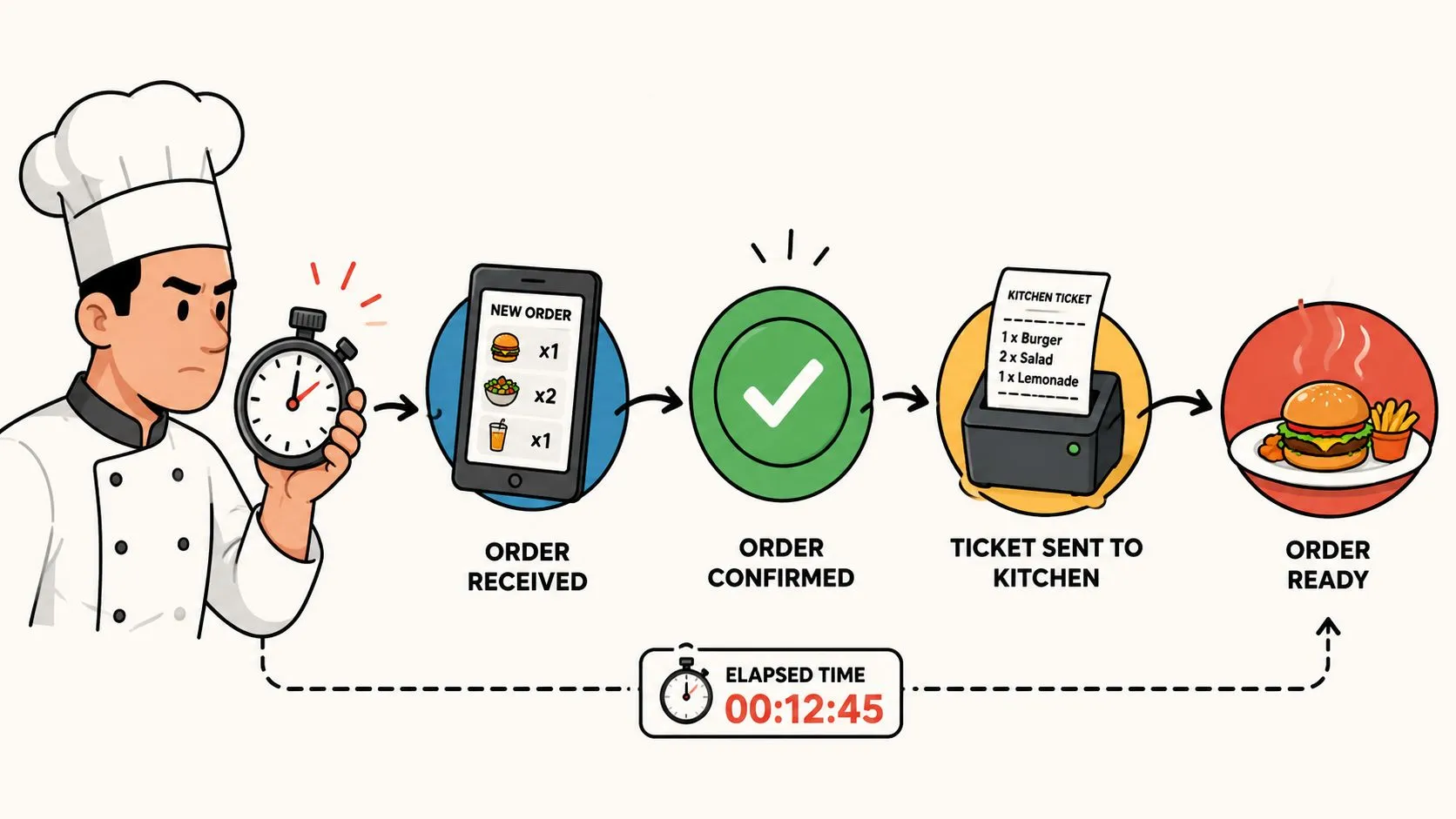
Order processing time is the clock that runs from the moment a customer hits place order to the moment the kitchen sees a clean, accurate ticket. In restaurant terms, that clock should be measured in seconds and minutes, not days.
On a Friday night, that clock gets noisy fast. Three delivery tablets are blinking, a server is trying to read off a modifier, the expo printer is jammed, and nobody’s sure which ticket came in first. The problem isn’t just speed, it’s that every handoff creates another place for the order to stall or go wrong.
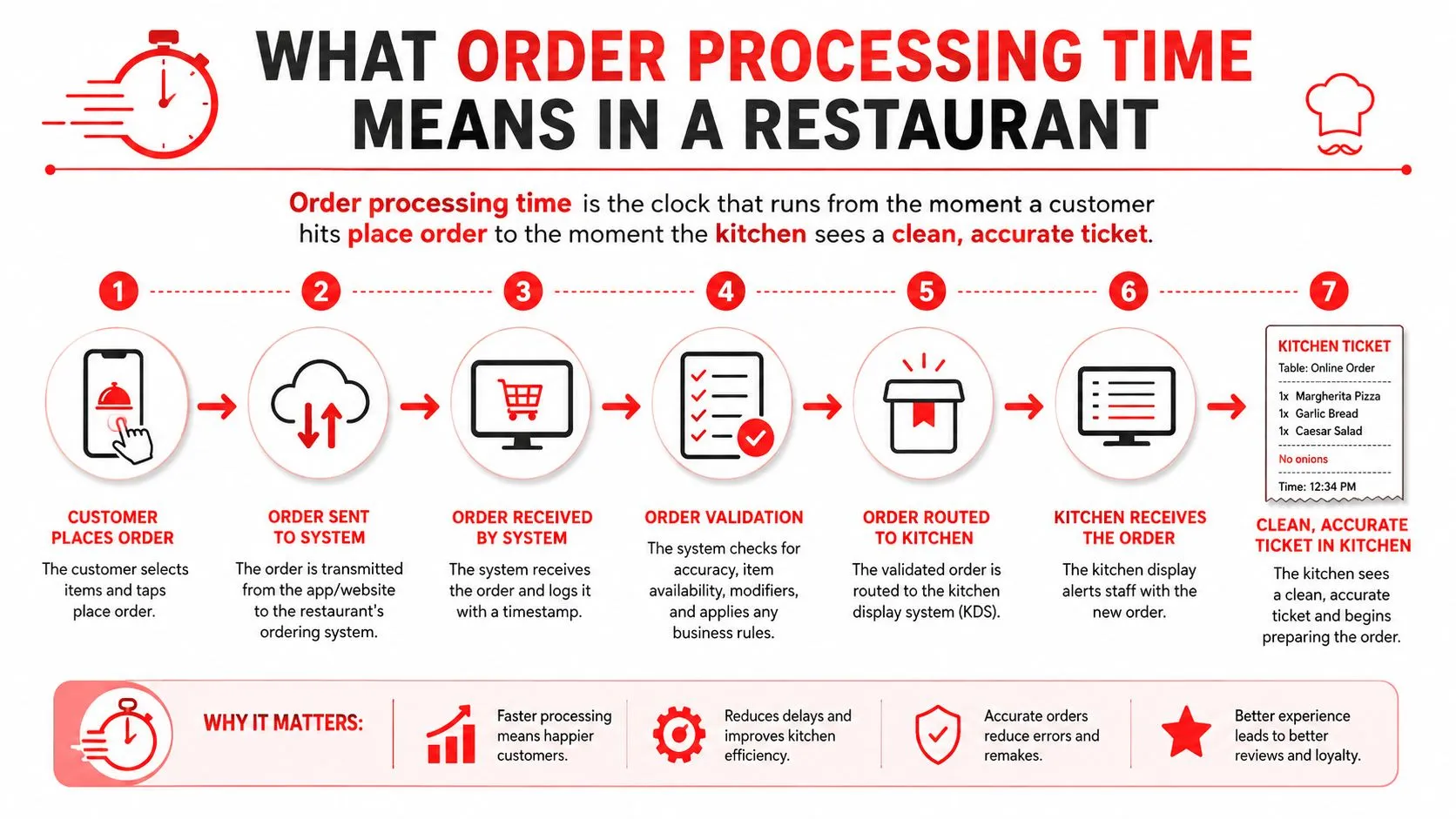
Order processing time in a restaurant is the full path from intake to kitchen handoff, and it includes validation, ticket routing, and any prep-side delay before the line starts cooking. That’s different from cook time and different from delivery time. A ticket can be “fast” to cook and still be slow to reach the kitchen if the order sits on a tablet, gets retyped, or needs a correction before it can print.
The cleaner way to think about it is simple. If the order arrives from Uber Eats, DoorDash, or Grubhub, how quickly does it become a real ticket in Clover or Square, with the right items and modifiers attached? That’s the part managers can control, and it’s the part that usually gets buried under the chaos of service.
For restaurants that want to shorten that gap, the broader category is a 3rd-party order engine, which is the software layer that turns marketplace orders into usable POS tickets.
If you want a plain-language primer on how systems like this fit into restaurant operations, start with OrderOut’s what is order management system guide.
What Order Processing Time Means in a Restaurant
In restaurant terms, order processing time is the gap between a customer confirming their order and the kitchen receiving a ticket it can act on. That gap sits inside the restaurant, not on the road, and it often decides whether a dinner rush feels controlled or chaotic. If the kitchen gets blamed for slow tickets, the delay may have started on a delivery tablet, in a menu mapping error, or during a manual re-key.
A manager sees it play out fast. A DoorDash order lands on one tablet, an Uber Eats order shows up on another, and a Grubhub modifier does not match the way the item is built in the POS. Someone has to catch the mismatch, fix it, and push it through before the line can work it. Those seconds, or those few minutes, are where service starts to slip.
What belongs inside the clock
The metric includes intake, validation, ticket routing, and prep hand-off. Intake is the order arriving from the marketplace. Validation is the check for item availability and modifier logic. Routing is the moment the ticket reaches the kitchen printer or KDS. Prep hand-off is when the kitchen can finally treat it like any other order in the line.
Practical rule: if a ticket needs a human to retype, reinterpret, or repair it before the kitchen sees it, that time belongs inside order processing time.
That is why restaurant operators should separate this metric from delivery speed. Delivery speed belongs to the driver and the road. Order processing time belongs to the handoff inside the store, where a clean ticket keeps the line moving and a broken one stalls the whole rush.
For operators who want the broader operational picture, OrderOut’s what is order management system guide is a useful companion. It explains how the software layer connects marketplace orders to the POS without forcing staff to patch every ticket by hand.
The key point is to treat order processing as a chain, not a single event. One weak link slows everything behind it. Clean orders in the POS save more time than asking staff to type faster under pressure.
How to Calculate and Measure Order Processing Time
A dinner rush can mask the underlying delay. A ticket may look “sent” on the tablet, but the kitchen still cannot use it until the order is validated, routed, and readable on the line. That gap is what operators need to measure.
The simplest formula is Processing Time = Kitchen-Ready Timestamp minus Order-Placed Timestamp. That gives you the full span from customer action to a ticket the kitchen can work from. The value is not in the subtraction itself. The value is in using the right timestamps so you can see where the delay starts.
Break the delay into stages
The total clock is made up of several smaller pieces. Intake and validation covers the marketplace handoff and the menu logic check. Inventory or modifier check catches the cases where the order is technically placed but still not ready to route. Ticket routing is the step that sends the order to the kitchen printer or KDS. Prep hand-off is the final lag before the line starts working the ticket.
A Grubhub order with a modifier mismatch is a better example than a clean happy-path order. The order lands, but the modifier does not match the menu setup in the POS, so someone has to confirm whether “no onions” means a free note, a charged add-on, or a menu item that needs to be reclassified. That manual fix is part of processing time because the kitchen is still waiting on a usable ticket. If the staff has to retype the order by hand before it reaches the line, that re-key step should be logged on its own. It is usually where the biggest waste hides.
What to pull from the POS
Operators can start with the data they already have in Clover or Square. Pull the created time and the printed time fields for a sample week, then compare those against the ticket the kitchen used. That gives you a real baseline instead of a vague impression from the shift lead.
Operator shortcut: track the gap between the marketplace order time and the first kitchen-ready timestamp separately from the rest of the ticket life. That is the part most likely to expose tablet drag.
For a broader view of how those timestamps fit into the rest of the workflow, OrderOut’s restaurant performance metrics and restaurant operations guide is a useful reference point. It keeps the focus on operational numbers rather than marketing language.
The point is not to build a perfect analytics project on day one. It is to find the moments where the order is no longer moving automatically. Once that is visible, the next question is what good looks like.
Industry Benchmarks That Set the Target
Restaurant operators should treat logistics benchmarks as direction, not a direct match. Statista’s order fulfillment timing data shows how far manual handling can stretch a simple request before it ever reaches the customer, and the broader takeaway is still useful for the kitchen floor. If outside fulfillment work is measuring time in minutes, every re-keyed ticket in a restaurant is spending part of that window before a cook even sees it. Statista’s order fulfillment timing data
OpenSend makes the same point from the customer side. Its order processing time statistics show tighter delivery expectations, faster projected norms, and a market where on-time performance matters as much as speed itself. For a restaurant, that means the clock starts long before driver handoff. A tablet delay, a re-entered modifier, or a menu mismatch can consume the same patience that a guest expects to use for prep, packing, and dispatch. OpenSend’s order processing time statistics
Retail numbers help, too, as long as they are translated carefully. Retail Dive reported faster fulfillment in a test environment, with fewer issues when the workflow had less manual handling. In restaurant terms, the lesson is plain, every extra touchpoint adds a chance for the ticket to stall, and every stall makes the kitchen feel slower even when the line is moving at normal speed. Retail Dive’s fulfillment report
Esker’s benchmarking is the closest analog to restaurant ticket flow because it separates manual processing from automated handling. The median manual order processing time was 11 minutes, while automated processing was much faster, and top performers were under 1 minute. For a restaurant, that 11-minute manual benchmark means every re-keyed ticket is eating into a window most kitchens do not have during service. The comparison does not mean a dinner rush should mirror warehouse software. It means the same waste shows up whenever a host, manager, or expo has to type the same order more than once. Esker’s benchmark article
For a restaurant manager, the useful target is the low end of the minute range per ticket, not the multi-minute range that starts to build once staff are retyping orders, checking modifiers, and fixing mismatched menus. In practice, that means the benchmark is not just speed, it is how quickly a clean ticket reaches the kitchen without a human having to rescue it.
If you want a practical look at where that kind of cleanup happens in the workflow, see how to improve delivery performance. The same logic also shows up in the delivery-to-Square money page and the delivery-to-Clover money page, where the point is less about software features and more about getting the order to the line before the rush starts stacking tickets.
The Five Root Causes That Stretch Processing Time
A ticket can look fine when it leaves the marketplace and still stall before the kitchen sees it. In restaurant service, that delay usually comes from the same five places, and managers run into them again and again on a bad dinner rush.
Re-keying and mismatch drift
The first culprit is manual re-keying from a delivery tablet into the POS. Every time a host or manager types the ticket again, they add another handling step and another chance for a typo. A clean marketplace order can still reach the kitchen with the wrong modifier, the wrong item name, or the wrong pacing.
The second issue is modifier confusion. A marketplace menu and a Clover or Square menu can describe the same item in different ways, and that mismatch forces someone to interpret what the guest meant. When the tablet language does not line up with the way the kitchen sells the item, the clock keeps running while staff sort it out.
That is why menu normalization matters. A workflow that maps marketplace items into the POS schema gives the line a readable restaurant ticket instead of a retyped approximation. The practical gain is simple, fewer moments where a human has to guess under pressure.
What usually breaks next
The third delay is menu drift between channels. An Uber Eats listing says an item is available, but the POS says it is out of stock or built differently. The fourth is a printer or KDS failure, which stalls routing even when the order entry itself was correct. The fifth is call volume spikes during the rush, when staff get pulled off intake to answer phones, calm a guest, or fix an exception that should have been automatic.
These problems line up with the same failure points called out in wider operational guidance, document intake, data validation, system handoffs, and exception resolution. In a restaurant, those breaks show up fast. If the ticket gets stuck in any one of those steps, the kitchen feels it as a late order, even when the marketplace side looked instant.
The fix starts with reducing entry errors before they spread. A practical guide to order entry errors shows why a small mismatch at intake often becomes a longer delay at the pass.
A delivery-to-POS workflow can help here, but only if it removes a real handoff. For operators who want a working example, streamline café order workflows points to the same basic idea, keep the order moving through one system instead of asking staff to translate it twice.
Workflow Changes and POS Integrations That Cut Processing Time
The first fixes are boring, and that’s why they work. Standardize modifier names across Clover and the delivery marketplaces, set printer fallback rules, and make one person the intake owner during the rush. Those changes don’t require new hardware, but they do reduce the number of decisions a staffer has to make while tickets are piling up.
A better next step is to remove the extra handoff entirely. If a DoorDash or Uber Eats order lands directly inside Clover or Square, staff stop acting like human middleware. The order shows up where the kitchen already works, which cuts down on re-keying, reduces exception traffic, and keeps inventory tied to one operational source of truth.
That’s the basic promise of a delivery-to-POS pipeline such as OrderOut. It maps each marketplace menu to a normalized POS schema, injects the order straight into the restaurant system, and removes the need for extra tablets and manual re-entry. On the Clover side, that means a cleaner ticket flow during rush periods, and OrderOut is free to install on the Clover App Market through the Clover App Market listing.
One useful outside reference for operators comparing workflow cleanup is Monopack ltd.’s streamline café order workflows article, which reinforces the same practical point, fewer handoffs usually means fewer delays. That’s exactly why the intake owner should be a traffic controller, not a typist.
When the routing path is cleaner, the kitchen feels it immediately. Staff spend less time deciphering retyped items, the exception queue stays smaller, and the POS becomes the source of truth instead of the tablet wall. The result isn’t flashy, but it’s real, fewer mistakes and faster movement from order receipt to cook-start.
For a broader system view, the order processing automation article ties together the same logic from intake through handoff.
KPIs and a One-Week Improvement Plan
A manager does not need a giant dashboard to get control of this. The useful weekly KPIs are the ones that show where the ticket stalls, where the errors come from, and whether the kitchen is still relying on extra touches. Start with the ticket clock, then track the parts that make it longer.
| KPI | What it measures | Qualitative target after integration |
|---|---|---|
| Average ticket-to-kitchen seconds | Time from order placed to a usable kitchen ticket | Moves toward the low end of the minute range |
| Modifier mismatch rate | How often the marketplace and POS disagree on item details | Drops noticeably as menus stay aligned |
| Manual re-keys per shift | How many delivery orders staff type in again | Falls sharply when orders inject directly into the POS |
| Tablet-free delivery share | How many delivery orders route without an extra tablet | Rises as more channels feed Clover or Square directly |
A simple one-week plan works better than a vague “fix the process” memo. First, pull a week of timestamps from Clover or Square and write down the average time from order receipt to kitchen-ready ticket. Second, mark every manual re-key, because those are the tickets that usually hide the biggest drag. Third, count how many delivery orders reached the kitchen without someone switching to a separate tablet.
Working rule: if the same order is touched twice before the kitchen sees it, the workflow is already too slow for a busy service.
The reason an OrderOut-style integration changes the numbers is practical, not theoretical. When marketplace orders inject directly into Clover or Square, the re-key count falls, modifier mismatches fall, and the kitchen gets the same source-of-truth workflow it already uses for in-house tickets. That is what makes the clock compress.
For restaurants that want a deeper operational check on costs and fit, the pricing page and the FAQ are both useful next stops. The first week is not about perfection, it is about proving where the time goes and whether the fix removes the drag.
Frequently Asked Questions
Does OrderOut work with Clover?
Yes, OrderOut connects delivery apps into Clover, so orders can flow into the POS without extra tablets or manual re-keying. It is also free to install on the Clover App Market, which makes it easy to trial in a live store and see how the ticket flow changes during service.
Does OrderOut work with Square too?
Yes, OrderOut also supports Square for delivery-to-POS routing. That gives operators the same workflow across different POS setups, while the kitchen still works from one ticket stream instead of splitting attention across multiple devices.
Does it remove the third-party delivery tablets?
That is the point of the workflow. Instead of juggling separate tablets for Uber Eats, DoorDash, and Grubhub, the orders route into the POS where the team already works, which cuts down on side tasks at the host stand or expo line.
What changes on day one?
The biggest change is that staff stop retyping marketplace orders into the POS. The kitchen gets cleaner tickets, the intake desk gets quieter, and the manager has fewer chances to lose time to modifier fixes or missing item details. In practice, the rush feels less like a relay of handoffs and more like one straight path from tablet to printer.
Where can I learn more before installing?
The FAQ and pricing pages are the best places to dig deeper. They give operators a straightforward view of what OrderOut does and how to think about the setup.
If order processing time is getting away from your team during the rush, OrderOut gives you a cleaner path from marketplace order to kitchen ticket. It is built to push delivery orders into the POS your staff already uses, so you spend less time re-keying and more time serving guests. Visit OrderOut and start onboarding in the dashboard when you are ready to test it in your own store.