
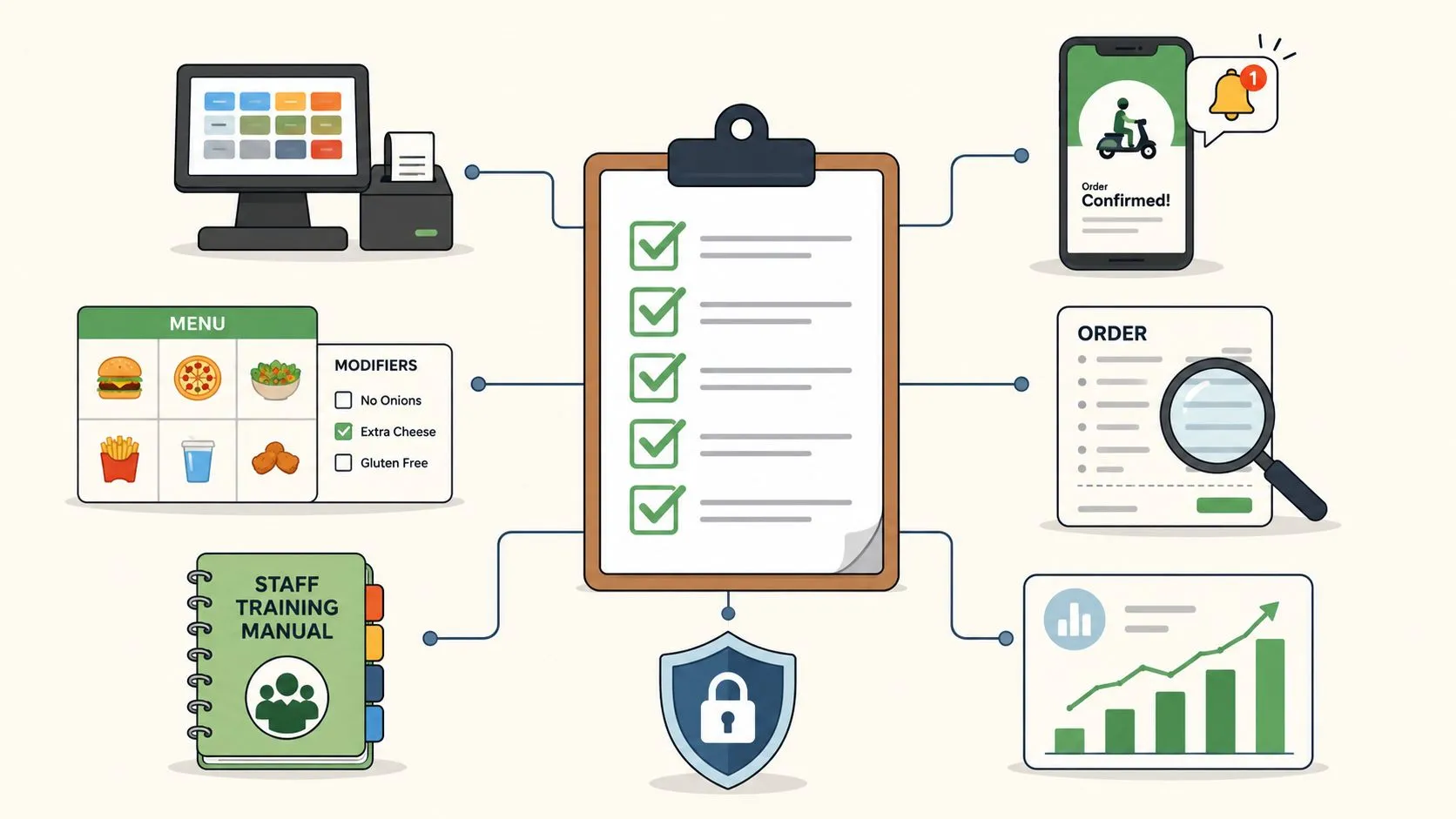
Your Restaurant’s Order Entry Checklist for 2026 starts with a simple truth, computerized order entry reduces errors because the system can validate data before the order is committed, instead of after the kitchen is already cooking the wrong thing. That’s why order entry best practices aren’t really about typing faster. They’re about building a controlled workflow that keeps delivery apps, your POS, and your kitchen on the same page, especially when the line is out the door and the phones won’t stop ringing. For a quick baseline on food-safety training culture, you can also get your food safety certificate in NSW, because clean processes usually start with trained people.
The practical version is this. If you’re still copying Uber Eats, DoorDash, and Grubhub orders by hand into Clover or Square, you’re paying staff to do transcription work during the busiest part of service. The cleaner path is direct POS integration, where the delivery order lands in the POS without manual re-keying, extra tablets, or the usual modifier chaos. That’s the kind of setup OrderOut is built for, and it matters because the POS becomes the source of truth, not the tablet stack on the expo counter. You can start by looking at OrderOut’s Clover delivery integration if Clover is your system, or OrderOut’s delivery order engine if you’re still mapping out the bigger workflow.
One thing operators miss is that order entry is not just a front-of-house task. It’s a systems problem. If the menu is messy, the routing is unclear, or the status updates lag, the whole operation pays for it in rework, comps, and avoidable interruptions.
1. Eliminate Manual Order Re-Keying with Direct POS Integration
Manual re-keying is where most delivery order mistakes start. A name gets typed wrong, a modifier gets missed, or a special instruction never makes it past the tablet into the POS. The AHRQ summary of computerized provider order entry cites a 2013 meta-analysis finding prescribing errors fell by 48% with computerized order entry versus paper-based orders, which the same source says translates to more than 17 million medication errors prevented annually in U.S. hospitals. The restaurant takeaway is clear, structure beats transcription, because the system should validate the order before staff ever touch it.
That principle is exactly why direct POS integration works in a busy dining room. A DoorDash order should appear in Clover or Square as a live ticket, not on a separate tablet waiting for a manager to copy it over. When OrderOut injects Uber Eats, DoorDash, and Grubhub orders straight into the POS, your team stops acting like human middleware and starts acting like operators. For restaurant owners, that’s the difference between a kitchen that moves and a kitchen that gets buried.
A good rollout is simple, not flashy.
- Audit platform menus first: Match item names, prices, and modifiers before you connect anything, or mapping errors will surface at the worst possible time.
- Train the team on the new flow: Staff need to know the order now lives in the POS kitchen view, not on a side tablet.
- Watch the first live shifts closely: The first day or two will reveal modifier mismatches, discontinued items, or pricing drift.
- Push status updates from the POS: Ready, picked up, and completed should travel back out automatically so the delivery app stays current.
A 20-table pizzeria with Clover doesn’t need a person standing at a DoorDash tablet during Friday night rush. The kitchen needs a single queue it can trust. That’s where OrderOut’s Clover delivery integration earns its keep, because the order arrives in the system the kitchen already uses.
Practical rule: If a delivery order has to be retyped, it’s already exposed to avoidable error.
For a deeper look at the operational side, OrderOut’s order entry automation guide is a useful companion when you’re cleaning up the intake process.
2. Standardize Menu Mapping Across All Delivery Platforms
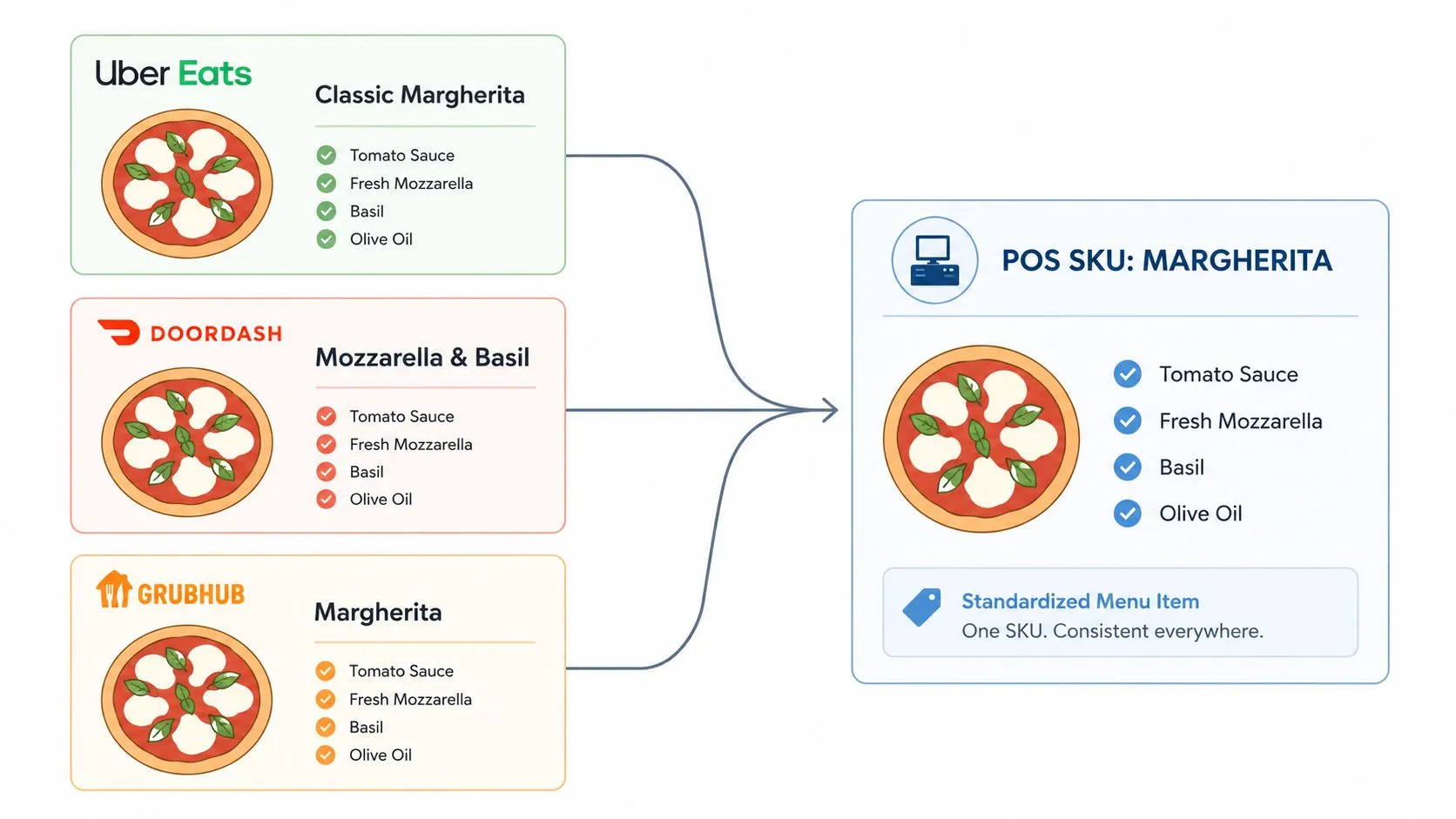
Menu mapping is where restaurants either get disciplined or get punished. Uber Eats, DoorDash, and Grubhub rarely describe the same item the same way, and that creates friction before the ticket even hits the kitchen. A taco restaurant might sell the same product as “Carne Asada Tacos” on one app, “Grilled Beef Tacos” on another, and “Asada Tacos” on a third. If those names do not resolve to one POS item code, staff end up guessing, and guessing costs time, money, and accuracy.
The right move is to build one source of truth, then map each marketplace to it. OrderOut does this by normalizing each marketplace menu into a structured POS schema, which keeps item names, modifiers, and pricing consistent when the order enters Clover or Square. That matters because a busy expo line cannot stop to interpret three different ways of saying the same taco. The kitchen needs one item, one modifier set, and one result. For a closer look at the systems behind that workflow, the Splash Access POS comparison is a useful reference point, and OrderOut’s menu management software guidance shows how menu structure affects day-to-day operations.
A clean mapping process usually looks like this:
- Start with the POS menu, not the app menu: Your POS should define the canonical item structure.
- Document every modifier group: Sides, add-ons, sizes, and proteins need the same logic across all channels.
- Assign one owner: One manager or ops lead should control menu mapping so changes do not drift.
- Test edge combinations before launch: Extra cheese, no onions, add avocado, double protein, those details are where bad mappings hide.
A coffee shop shows why this matters. If Uber Eats says “Large Americano” and DoorDash says “16oz Americano,” the barista should not have to decode the difference during the lunch rush. The order should normalize to one POS item, and the modifier rules should stay intact so the drink gets built the same way every time.
The technical side matters, but the operational payoff is easier to see. Standardized mapping keeps delivery channels from behaving like separate menus with separate rules, and it reduces the retyping and cleanup that slow service down. The same logic behind order entry automation applies here, because consistent menu data is what makes direct POS integration usable at speed.
3. Keep Inventory and Menu Items In Sync Across Channels
Inventory sync is the difference between a clean night and a pile of refunds. If fresh mozzarella runs out in your POS but the item stays live on a delivery app, customers can still order food you can’t make. That creates wasted time, frustrated guests, and a kitchen that ends up making apologies instead of meals. The POS has to be the source of truth, and every connected channel needs to listen.
The logic is simple enough for any manager to understand. When stock changes in Clover or Square, delivery menus should reflect it quickly. When a platform marks something unavailable, the rest of the system should know so the same item doesn’t continue flowing through a different channel. OrderOut’s approach to synchronized menu and inventory handling helps restaurants reduce overselling by tying third-party orders back to the live operational system.
A sushi restaurant is the cleanest example. If wild salmon sells out at 7:45 PM, the salmon rolls should stop appearing on Uber Eats, DoorDash, and Grubhub as soon as the POS marks them unavailable. Nobody wants a late-night refund cycle just because the menu was left open. A burger shop running a truffle fries special has the same issue in reverse. Once the last bag is gone, the item should disappear everywhere, not keep generating tickets for a product that’s already dead.
Inventory problems are rarely about stock alone. They’re about delay, drift, and disconnected systems.
Before you go live, the useful habits are straightforward.
- Set low-stock alerts in the POS: Give staff time to disable items before they sell through.
- Do end-of-shift counts consistently: A real inventory process starts with real counts.
- Test the unavailability flow: Mark an item unavailable in the POS and confirm it drops from the active menus.
- Review recurring stockouts: If one item keeps disappearing, the problem may be menu design, not purchasing.
If you’re still sorting out the broader stock workflow, OrderOut’s multi-location inventory management article is a good companion piece, especially if you manage more than one store or one busy menu.
4. Route Orders to the Correct Kitchen Station or Prep Area
A busy kitchen doesn’t fall apart because staff are lazy. It falls apart because every ticket lands in the same place and forces someone to sort it under pressure. Order routing fixes that. It sends pizzas to the oven station, salads to prep, wings to fry, and sandwiches to the right part of the line before anyone has to manually triage the work. In a restaurant with real volume, that’s not a nice-to-have, it’s the difference between flow and bottleneck.
The logic is easier to see in a mixed-order rush. A pizza and wings restaurant gets one DoorDash order for two large pies and an order of wings. If the ticket goes to a single queue, somebody has to split it. If routing is set up correctly, the pies go to the pizza station and the wings go to the fryer station immediately. The kitchen works in parallel instead of serially.
A small salad concept can benefit just as much. Lunch rush hits, three Grubhub orders arrive back-to-back, and the prep team shouldn’t have to sort hot items out of a mixed list. Smart routing keeps the workflow clean and reduces context switching, which is one of the fastest ways to slow a line down. For operators using a KDS with Clover or Square, that routing layer is what keeps the right station looking at the right work.
The best starting point is basic, not complicated.
- Map each prep zone clearly: Write down what each station owns.
- Start with the obvious rules first: Pizzas to pizza, salads to prep, fried items to fryer.
- Watch the line during peak hours: If one station is backed up, the routing needs adjustment.
- Train the team on the display behavior: Staff should know what lands where and why.
For kitchens that want the hardware side of this to make sense, OrderOut’s restaurant kitchen display systems guide helps connect the routing logic to real line execution.
A short video walkthrough can help owners see how routing plays out in practice.
The goal is not to make the screen look cleaner. The goal is to make the line move without anyone stopping to sort tickets by hand.
5. Implement Clear Order Status Updates for Customers and Drivers
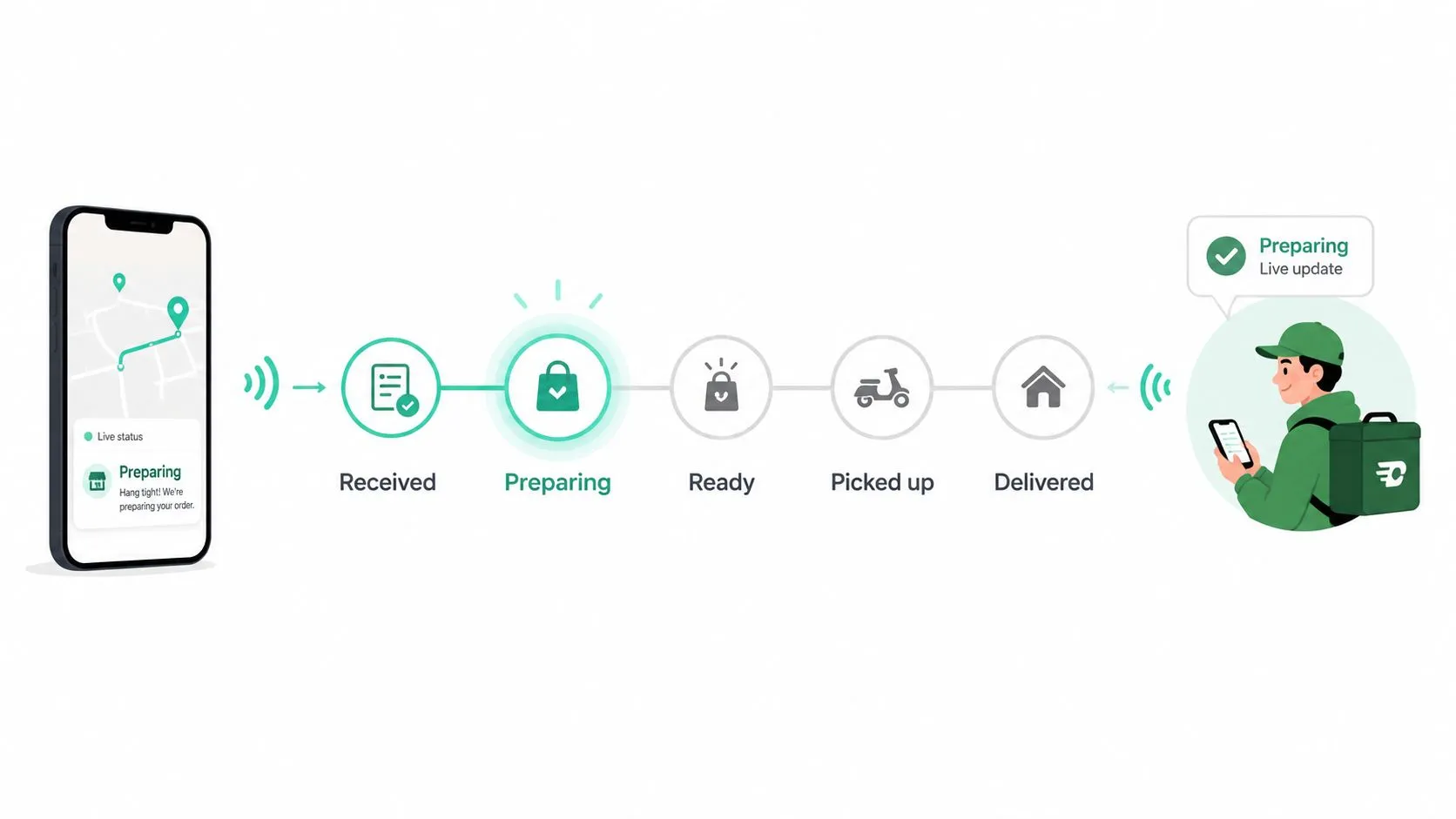
Order status updates are the only reason customers and drivers know where the order stands. If the app says nothing, people start calling the restaurant. If the app says the wrong thing, drivers show up too early and food sits around. The restaurant needs to push clear status changes from the POS, so the customer sees what the kitchen is doing.
This matters more than most managers think. When an Uber Eats or DoorDash order moves from confirmed to in prep to ready, that status should sync back out quickly. A customer waiting on the other end doesn’t care which staffer hit the button. They care whether the app tells the truth. The same goes for drivers who are trying to time their arrival so the food doesn’t cool off on the counter.
A casual restaurant on DoorDash can use this to cut down on noise at the host stand. The order is confirmed, the kitchen starts prep, and the customer app updates. When the bag is sealed, the driver sees that it’s ready. A pizza shop can do the same on Uber Eats so the driver route aligns with the actual pickup window, not a guessed one. That’s a cleaner handoff and less food sitting under heat lamps waiting for somebody to guess right.
A few habits keep the system honest.
- Define the milestones in advance: Confirmed, in prep, ready, picked up, delivered.
- Train staff on the moment to mark ready: Only when the food is bagged and ready for handoff.
- Set realistic prep times: If your estimate is fantasy, your statuses won’t help.
- Watch for missing driver updates: If pickup or delivery status isn’t moving, the integration needs a look.
For a focused explanation of how status visibility should work in a restaurant workflow, OrderOut’s order status software article is the right place to dig deeper.
6. Minimize Order Acceptance Delays by Automating Dispatch Workflows
A delayed acceptance is a delayed kitchen start. If a DoorDash, Uber Eats, or Grubhub order sits on a tablet waiting for someone to tap accept, the food starts aging before prep even begins. In a rush, that pause stacks up fast and becomes a real bottleneck. The better approach is to automate acceptance rules inside the POS, so the order is confirmed without a human having to babysit another screen.
The common “automate everything” advice needs a little correction. The smartest operators automate the repetitive intake first, then add exception handling for low stock, special approvals, or pricing conflicts. The bottleneck is the exception handling, not the tap itself. A restaurant that auto-accepts normal orders during peak hours and routes exceptions to staff will usually move faster than one that tries to manually inspect every ticket.
A quick example makes the point. A QSR gets multiple DoorDash orders in a short burst at lunch. Instead of a manager confirming each one by hand, auto-acceptance rules confirm them instantly and the kitchen starts cooking right away. A pizza shop can take that further by checking inventory before acceptance, so an order only lands if the ingredients are there. That keeps the line from committing to an impossible ticket.
Automation is strongest when it handles the common case and leaves the odd case to people.
Useful settings include:
- Peak-hour auto-accept: Let the system confirm routine orders when volume is high.
- Inventory-aware rules: Reject or flag tickets when a key ingredient is short.
- Clear staff communication: The kitchen should know orders will appear immediately.
- Timing review: Look at acceptance and rejection behavior in reporting, then adjust.
The more you remove the delay between order submission and kitchen start, the easier it is to keep food quality intact. If dispatch is part of your broader delivery workflow, OrderOut’s delivery API page is a useful next read.
7. Audit POS Data Quality and Order Completeness Before Going Live
Bad data turns a good integration into a rough service night. If the POS has missing modifiers, inconsistent prices, typo-ridden item names, or broken category logic, those problems do not stay hidden. They flow into the delivery menus and come back to the kitchen as incomplete or incorrect orders. A pre-launch audit is not busywork. It is the check that keeps a rollout from collapsing on day one.
Order quality lives at the system level. That is the same lesson behind computerized ordering guidance in the AHRQ summary on CPOE. For restaurants, the point is simple. If the menu is dirty, the integration will deliver dirty data. If the menu is clean, the system has a real chance to work the way it should.
A sushi restaurant runs into this fast. If DoorDash allows a rice choice but the POS does not, the order lands incomplete and staff have to correct it by hand. A taco shop can have a different problem. If the POS shows one price and the marketplace shows another, the ticket may still print, but margin gets distorted before the guest ever gets the food. The audit needs to cover item names, modifier groups, tax rules, categories, and price consistency.
The safest launch is the boring one. Verify the data before the first live ticket hits the line.
- Compare the POS to every live channel: Check the apps, the website, and the physical menu.
- Lock down edits during final testing: One person should own changes before launch.
- Test sample orders: Use a few real combinations to verify the mapping.
- Fix discontinued items first: Dead items should not survive into a live menu.
If you want the operational version of this process, OrderOut’s restaurants overview is a solid starting point before you build out the rest of the workflow.
Order Entry: 7 Best Practices Comparison
| Item | Implementation Complexity 🔄 | Resource Requirements 💡 | Expected Outcomes ⭐ | Speed/Efficiency ⚡ | Ideal Use Cases 📊 |
|---|---|---|---|---|---|
| Eliminate Manual Order Re-Keying with Direct POS Integration | Moderate, API integration and initial menu mapping required 🔄 | POS integration (Clover/Square), initial mapping, minimal extra hardware 💡 | Eliminates transcription errors; unified orders and accurate reporting ⭐ | Very fast, orders inject to POS in seconds, reduces entry time dramatically ⚡ | Multi-platform restaurants with high delivery volume and busy peak hours |
| Standardize Menu Mapping Across All Delivery Platforms | High, detailed item/modifier audit and ongoing maintenance 🔄 | Manager/ops time, mapping spreadsheet or middleware, platform API access 💡 | Consistent item translation across platforms; fewer fulfillments errors ⭐ | Improves fulfillment efficiency by reducing ambiguity; mapping setup is time-intensive ⚡ | Restaurants with complex menus or many delivery marketplaces |
| Keep Inventory and Menu Items In Sync Across Channels | Moderate, requires real-time POS tracking and SKU mapping 🔄 | Accurate POS inventory module, API connectivity, monitoring tools 💡 | Prevents overselling; reduces refunds and waste; better purchasing visibility ⭐ | Near real-time updates (small API latency); prevents orders for OOS items ⚡ | Perishable inventory, limited-time offers, high-demand items across channels |
| Route Orders to the Correct Kitchen Station or Prep Area | Moderate, define routing rules and KDS integration; testing needed 🔄 | KDS-capable POS, rule configuration, staff training and monitoring 💡 | Balanced station loads; fewer bottlenecks; clearer station responsibilities ⭐ | Speeds throughput by parallelizing prep and reducing sorting delays ⚡ | Multi-station kitchens (pizza/grill/fryer) and high-throughput operations |
| Implement Clear Order Status Updates for Customers and Drivers | Low–Moderate, map POS statuses to marketplace states and sync 🔄 | POS status workflow, API hooks, staff discipline to update statuses 💡 | Reduces customer inquiries; improves driver timing and platform ratings ⭐ | Real-time status pushes reduce wait times and missed pickups ⚡ | Operations focused on customer experience and delivery reliability |
| Minimize Order Acceptance Delays by Automating Dispatch Workflows | Moderate, configure acceptance rules and inventory checks 🔄 | Automation rules engine, reliable inventory data, monitoring and overrides 💡 | Instant acceptance reduces time-to-kitchen and missed orders ⭐ | Significantly lowers order acceptance lag; increases effective capacity ⚡ | QSRs and peak-hour businesses needing faster order throughput |
| Audit POS Data Quality and Order Completeness Before Going Live | Moderate, comprehensive, time-consuming audit process 🔄 | Staff time (ops/chef/manager), spreadsheets, test/sandbox orders 💡 | Prevents garbage-in→garbage-out; reduces mapping errors and rework ⭐ | Slows initial go-live but prevents downstream delays and error handling ⚡ | Any restaurant integrating delivery platforms; essential for large/complex menus |
Frequently Asked Questions
Does OrderOut work with Clover?
Yes, OrderOut is built to connect delivery apps directly into Clover so orders land in the POS without manual re-keying. It’s also free to install on the Clover App Market, which makes it a practical starting point for operators trying to reduce tablet clutter and entry errors.
Does OrderOut work with Square?
Yes, OrderOut also supports Square, so restaurants can bring Uber Eats, DoorDash, and Grubhub orders into one POS workflow. That keeps the team working from the same system instead of juggling separate marketplace tablets.
What makes direct POS integration better than a delivery tablet?
Direct POS integration reduces transcription mistakes and keeps the kitchen working from one order queue. It also makes status updates, routing, and menu sync easier to manage because the POS stays the source of truth.
Can OrderOut help with menu mapping and modifier issues?
Yes, that’s a core part of the value. OrderOut maps marketplace menus into a normalized POS structure, which helps keep item names, modifiers, and pricing consistent across channels.
Is OrderOut only for restaurants with high delivery volume?
No, smaller restaurants can benefit too, especially if staff are wasting time on re-keying or dealing with multiple delivery tablets. The less manual work your team does at the point of order entry, the easier it is to keep service steady during rush periods.
From Chaos to Control: Your Next Step
Implementing these order entry best practices moves your restaurant from reactive to controlled. When you eliminate manual re-keying, standardize menu mapping, keep inventory in sync, route tickets cleanly, push accurate status updates, automate acceptance, and clean up your POS data before launch, you give your team a system they can trust instead of another source of stress. The goal isn’t just to survive the delivery rush, it’s to make the rush manageable.
That’s where a direct integration layer matters. OrderOut is designed to inject third-party delivery orders into Clover or Square without extra tablets or manual re-entry, while keeping the POS as the operational source of truth. If you’re ready to tighten up your delivery workflow and reduce the friction your staff deal with every shift, start with OrderOut and see how the pieces fit together.
If you want to stop retyping orders and start running one clean workflow, begin onboarding at OrderOut’s dashboard. It’s the fastest way to connect delivery apps to your POS and put these order entry best practices to work in a real restaurant environment.