
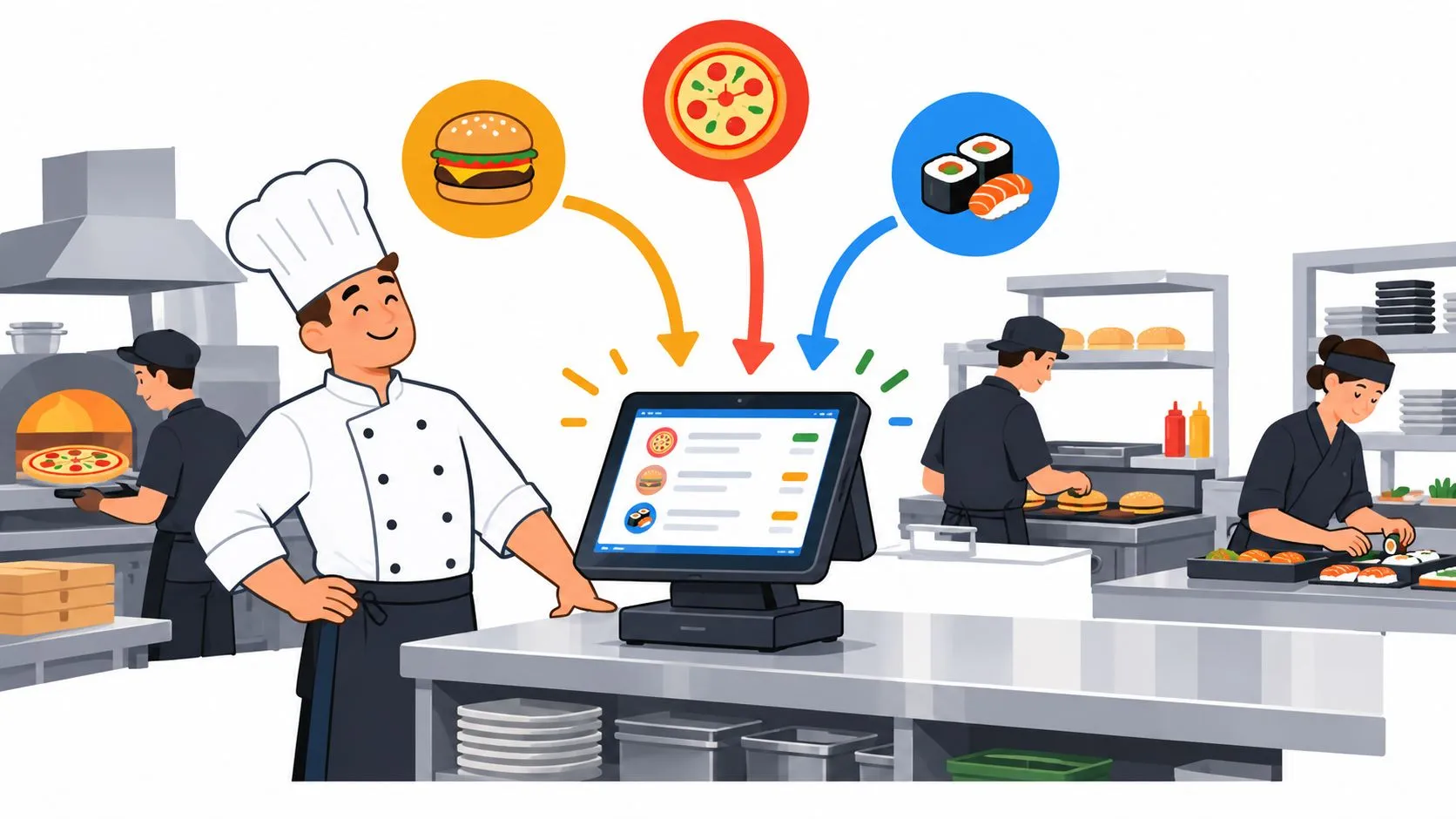
A high-volume restaurant needs delivery-to-POS integration when Uber Eats, DoorDash, and Grubhub orders compete with dine-in and pickup tickets. The practical fix is to route those marketplace orders directly into Clover or Square, without extra tablets or manual re-keying, so the POS remains the kitchen’s operational source of truth.
Friday dinner exposes weak routing quickly. A dine-in ticket prints, a DoorDash tablet chimes, an Uber Eats order waits behind it, and someone notices a Grubhub order only after a guest calls. The problem may look like staffing, but the first failure often happens earlier, when separate channels send work into the kitchen through separate paths.
For operators, high volume isn’t defined only by seats or covers. It’s the velocity, concentration, and unpredictability of order flow across dine-in, pickup, drive-thru, and delivery. The National Restaurant Association reports that nearly 75% of restaurant traffic now occurs through off-premises channels, including takeout, pickup, drive-thru, and delivery, while its July 2026 tracking found 40% of operators saw traffic rise and 49% saw traffic fall. That volatility makes routing discipline more important than adding people. (National Restaurant Association data)
Defining High Volume Restaurant Operations
Friday service can overwhelm a restaurant before the kitchen runs out of food or staff. A pickup order, a dine-in table, and several marketplace tickets may reach the same grill, fryer, and expo counter within minutes. The failure point is often the route into production. If each channel follows a different path, the team spends the rush sorting orders instead of cooking them.
A high-volume restaurant commonly handles more than roughly 300 covers per service, while throughput, labor deployment, equipment reliability, and compliance affect one another. (Kitchen Management Authority’s high-volume restaurant guidance) A smaller site can face the same operating pressure when delivery and pickup orders arrive in sharp clusters.
Volume means velocity, not just capacity
A kitchen may have enough burners, cooks, and prep for a normal evening, then buckle when multiple marketplaces release orders together. In high-volume operations, a ticket-time moving average above 22 minutes signals a structural throughput problem. (Kitchen Management Authority explains the 22-minute throughput alarm)
The practical distinction is order velocity and unpredictability. A unified POS queue lets the team sequence dine-in, pickup, and delivery production from one visible stream. Separate tablets force employees to watch notifications, copy orders, interpret modifiers, and enter the same details again before cooking begins.
Test the routing with a complicated order: substitutions, combinations, special instructions, and an unavailable item. If accurate handling depends on one employee reading a small screen during the rush, the operation has a technical bottleneck.
Operator rule: Treat every incoming channel as part of the same production system, not as a separate side business.
The modern high-volume restaurant has several queues
Dine-in service, pickup, and marketplace delivery may share equipment and staff. Customers do not care which app created the ticket. They care that the order is accurate, ready when promised, and handed off clearly.
Document the route from marketplace acceptance to kitchen fulfillment. The delivery order management guide helps operators examine each handoff, including how orders reach the POS and kitchen printer. If the restaurant uses digital ordering, printed QR codes and table signs also need a reliable destination. Operators who change menus or ordering links should know how to update QR destinations after printing without replacing every physical sign.
The useful capacity question is how many correctly routed orders the kitchen can absorb during the next spike. That answer reflects the whole order system, not seating capacity alone.
The Hidden Costs of Tablet Chaos and Manual Entry
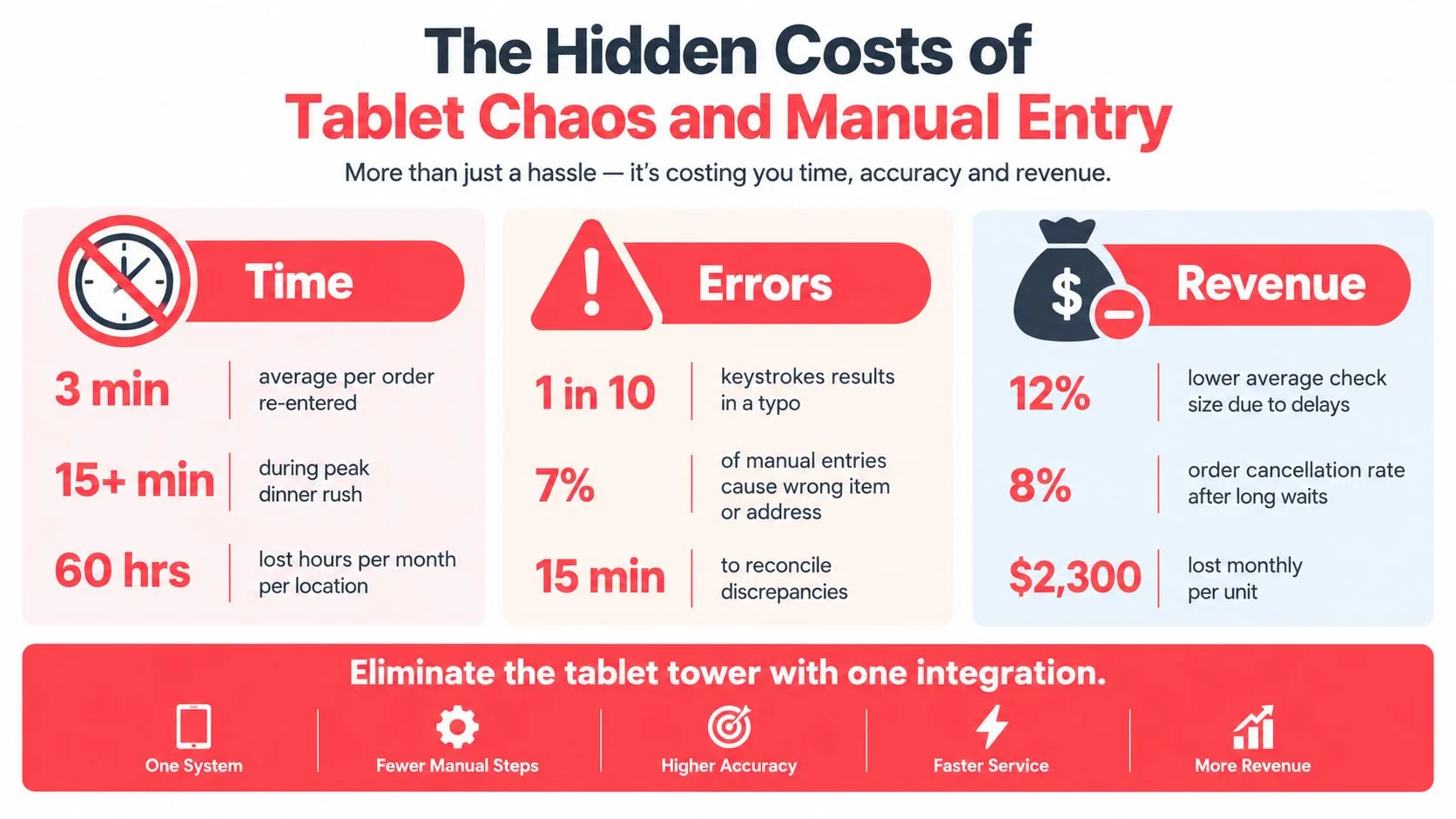
During a dinner rush, a delivery order arrives while the cashier is helping a pickup guest and the expo station is calling for the next ticket. Someone must notice the notification, open the order, read its details, transfer items into Clover or Square, interpret modifiers, confirm timing, and return to the marketplace device. Each handoff can drop an item, instruction, or timing detail before production begins.
The National Restaurant Association reported that full-service restaurant salaries and wages, including benefits, represented a median 36.5% of sales in 2024. Its analysis also notes that high-volume operators often treat labor above 35% of revenue as a signal of staffing misalignment. (National Restaurant Association analysis of elevated labor costs) Assigning a team member to watch delivery tablets can put labor into clerical duplication instead of cooking, expediting, or guest service.
Why small mistakes become service failures
A missing modifier sends the wrong preparation to the line. An overlooked unavailable item can trigger a refund or customer-service call. A delayed acceptance makes the kitchen appear slower than its actual production time.
The cost includes repeated interruption. A manager pulled from expo to reconcile a marketplace order loses visibility at the pass. A cashier answering a tablet cannot support a pickup guest. A cook waiting for clarification may hold an entire batch because the original instruction never reached the ticket.
The guide to reducing restaurant order-entry errors provides a useful audit framework before a restaurant chooses an integration. Track where information is copied, who owns each handoff, and which errors recur. Repeated failures usually indicate a routing or system-design problem, not individual carelessness.
What doesn’t work during the rush
Adding another tablet increases the monitoring burden. Staff now manage another screen, login, and menu-availability list, while the POS may still show different item status.
A dedicated tablet watcher can also leave the underlying workflow untouched. If orders still require manual re-entry, that employee becomes a bridge between systems instead of adding production capacity. More headcount helps when the kitchen is understaffed; it does not fix unclear sequencing or duplicated data entry.
The operating standard is clear: marketplace orders should enter the same POS workflow as in-house orders, with item, modifier, instruction, and availability data preserved. That routing turns unpredictable delivery volume into tickets the kitchen can sequence, rather than interruptions staff must reconstruct by hand.
How Delivery to POS Integration Works
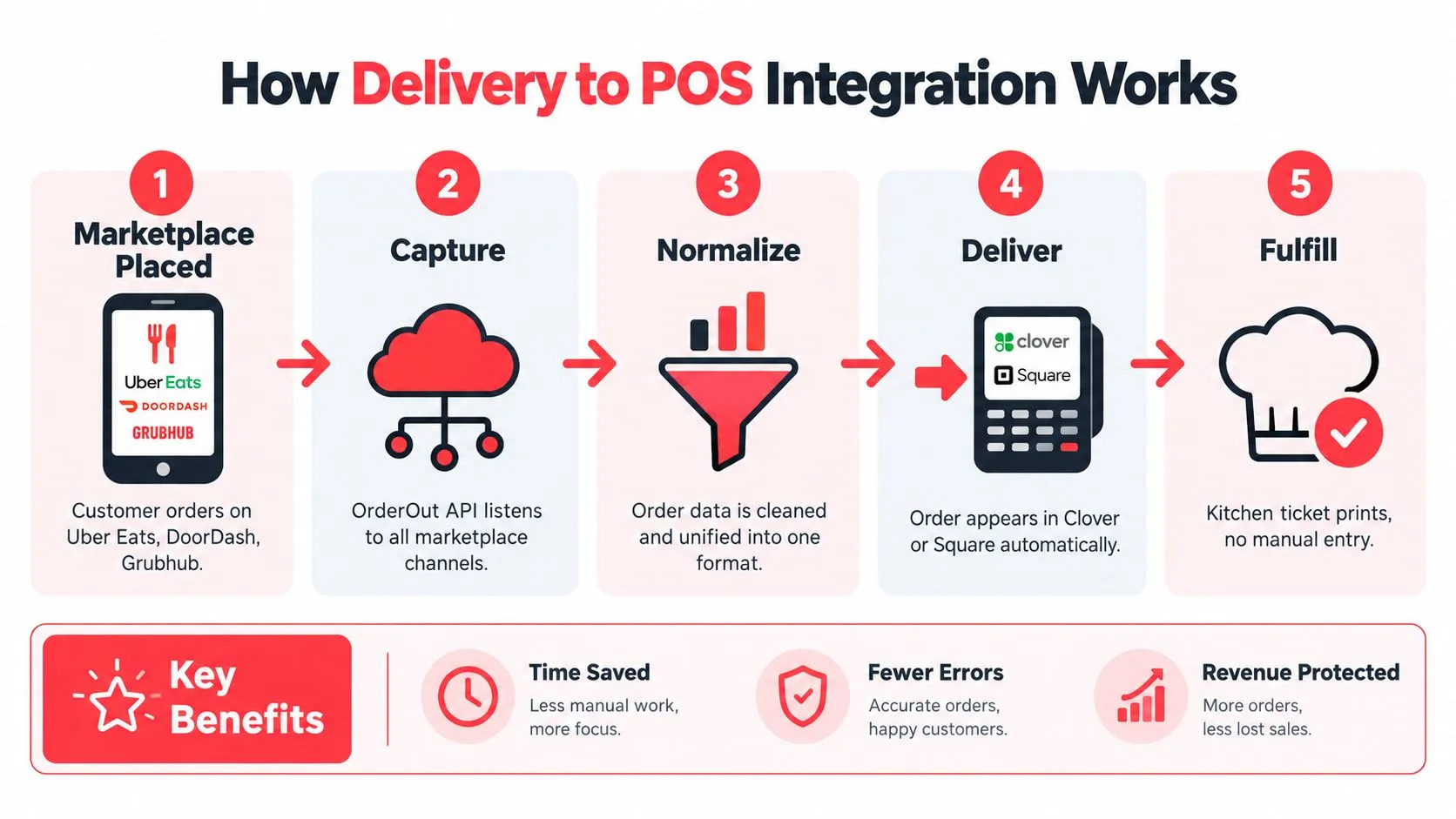
Delivery-to-POS integration connects marketplace order data to the restaurant’s POS through an integration layer. In OrderOut’s stated workflow, Uber Eats, DoorDash, and Grubhub orders route into Clover or Square as standard POS tickets, print in the kitchen, and appear in sales and reporting like in-house orders. (OrderOut’s delivery-to-POS integration workflow)
The technical detail that matters most is menu normalization. Each marketplace menu is mapped to a normalized POS schema, so different channel formats can resolve to the same restaurant items, modifiers, combinations, and instructions. Without that mapping, a customer’s DoorDash customization may arrive as free text or an ambiguous label instead of a usable production instruction.
The route from marketplace to kitchen
-
A customer places an order on Uber Eats, DoorDash, or Grubhub.
-
The integration receives the order through the marketplace connection rather than asking staff to read a tablet and copy the information.
-
The system normalizes the data, matching marketplace items and modifiers to the restaurant’s POS structure.
-
Clover or Square receives the order as a standard ticket, keeping the restaurant’s existing production workflow in place.
-
The kitchen fulfills the ticket from the POS and printed output, while the order remains connected to sales and reporting.
This process removes extra delivery tablets and manual re-keying. It also makes menu hygiene operationally important. If a restaurant changes a modifier in Clover but leaves an old marketplace option active, the integration has to resolve a mismatch that the operator created upstream.
Practical rule: Clean menu mapping is not an administrative task. It’s part of kitchen capacity planning.
A real example is a DoorDash order for a sandwich with a combination, a substitution, and a special instruction. A useful integration should carry those details into Clover or Square in a form the kitchen can act on, rather than forcing staff to interpret the marketplace screen separately.
For a deeper technical explanation, review real-time restaurant order integration. Operators can also watch the embedded walkthrough before deciding how much of the current workflow should change.
Managing Unpredictable Multi-Channel Demand
A dinner rush can arrive in layers: dine-in tickets hit the kitchen, pickup orders follow, and delivery marketplaces add volume before the team has cleared the first wave. The failure point is often routing, not staffing. If each channel reaches the operation differently, managers cannot see the combined queue or judge whether a station can absorb the next order.
Traffic conditions can shift sharply for established operators, which makes fixed staffing assumptions unreliable. Labor also carries a real cost, so adding people before identifying the bottleneck can leave the restaurant paying for capacity it cannot use. Operators need live visibility into channel demand and the ability to send every order through a consistent production path.
Fragmented routing versus one production queue
| Fragmented tablet workflow | Unified POS routing |
|---|---|
| Staff watch separate marketplace devices | Orders enter one operational system |
| Employees re-key items and modifiers | Mapped data reaches Clover or Square |
| Kitchen sees channels at different times | Production receives a consistent ticket format |
| Managers reconcile missing details | Staff handle exceptions within a defined workflow |
Separate tablets preserve marketplace visibility, but they split attention and delay sequencing. A ringing device confirms that an order exists. It does not show where that order belongs beside dine-in and pickup tickets, or whether the grill can accept another item.
Unified routing gives the manager one operational queue to review. During a spike, that view helps identify whether the constraint sits at order acceptance, ticket printing, expo, or a cooking station. If an item becomes unavailable, the team can update its established menu and availability process instead of allowing stale options to keep generating tickets.
Use a restaurant demand forecasting guide to plan dayparts and staffing. Forecasting supports preparation, while live POS routing exposes the actual workload as it changes.
Capacity planning without automatic overstaffing
Adding labor may solve a station shortage, but it will not fix orders waiting on an unattended tablet, incomplete modifiers, or manual re-entry. Delivery-to-POS integration acts as a throughput multiplier by removing clerical delay before tickets reach production. It does not create grill space or cooking time, so managers still need to protect the true constraint.
During an unpredictable spike, ask:
- Where does the queue form? At the marketplace tablet, cashier station, POS, printer, expo, or cooking station?
- Which information is missing? Item choice, modifier, special instruction, timing, or availability?
- Who owns the exception? A manager, expeditor, cashier, or station lead?
The answers determine the response. A routing problem calls for cleaner integration and defined exception handling. A station problem may require moving labor or limiting availability. A menu problem requires correcting the source data. OrderOut can reduce preventable clerical congestion, but the restaurant still has to match channel volume with the capacity of each production station.
Your Integration Launch Checklist
Integration should be tested like a kitchen change, not switched on casually before a busy service. A simple order may pass while a customized order exposes a mapping problem, a missing modifier, or an unavailable item that the team hasn’t planned to handle.
OrderOut’s integration guidance recommends verifying Clover or Square compatibility, confirming account access, and testing complex orders with modifiers, combinations, special instructions, and unavailable items before going live. (OrderOut’s API integration launch guidance)
Audit the current route
Start with an inventory of every active delivery channel. Confirm that the restaurant can access each marketplace account and the target Clover or Square account. Clover’s own Grubhub setup requires the merchant to sign in to the Dashboard, open Account & Setup, then Business Operations and Online Ordering, select Get started under Grubhub, and link the restaurant URL associated with the required customer ID format. (Clover’s Grubhub delivery integration flow)
Validate the menu structure
Review item names, modifier groups, combinations, taxes, availability, and special instructions. A marketplace menu shouldn’t contain choices the POS can’t interpret or the kitchen can’t fulfill.
Test the difficult orders first:
- Modifiers: Remove, add, substitute, and nested choices.
- Combinations: Check bundled items and side selections.
- Instructions: Confirm special requests reach the correct ticket field.
- Unavailable items: Mark an item unavailable and verify how the order is handled.
- Printing: Confirm that the kitchen ticket is readable and routed to the right production area.
Train for exceptions
Staff should know what a normal integrated ticket looks like and what to do when one doesn’t. Keep the escalation path short. The person who sees the mismatch should know whether to pause fulfillment, contact the manager, or correct the menu mapping.
Run sample orders during a controlled service window, then monitor the first live period closely. Don’t judge the launch only by whether orders arrive. Check whether the kitchen can interpret them without asking the front of house to translate every detail.
Frequently Asked Questions
Does OrderOut work with Clover?
OrderOut routes Uber Eats, DoorDash, and Grubhub orders into Clover as standard POS tickets, with kitchen printing and reporting handled through the POS. It is also available through the Clover App Market listing. During onboarding, the common failure is incomplete account or menu mapping. Confirm that the connected location, tax rules, and fulfillment settings belong to the same restaurant before service begins.
Does OrderOut work with Square?
OrderOut routes supported third-party delivery orders into Square without requiring staff to re-key every order. The operational risk is usually account configuration rather than the connection itself. Confirm the correct Square location is connected, and assign one person to review failed or delayed orders so exceptions do not sit unnoticed during a rush.
What happens if an integration drops an order?
Treat the POS and marketplace records as separate until the order is reconciled. Check the marketplace status, confirm whether payment was captured, and record any replacement ticket clearly if the kitchen must start production manually. After service, compare channel totals with POS sales and flag missing orders before closing reports.
How should a restaurant handle a marketplace menu change that misses the POS?
Pause the affected item or modifier on the marketplace if it cannot be fulfilled reliably. Then correct the source menu, review the corresponding POS mapping, and document who approved the change. A small mismatch can create repeated calls, refunds, and production delays across several channels, so assign ownership instead of leaving updates to whoever notices first.
Can the integration handle a volume spike?
It can reduce the routing work created by simultaneous delivery orders, but it does not remove capacity limits in the kitchen. Watch ticket age, printer queues, and item availability during unpredictable surges. If those signals deteriorate, pause a channel or narrow its menu before missed promises spread.
OrderOut routes Uber Eats, DoorDash, and Grubhub orders into Clover or Square as standard POS tickets, giving high-volume restaurants one clearer production workflow. Visit OrderOut to review the integration and start onboarding your restaurant for free in a few clicks.