
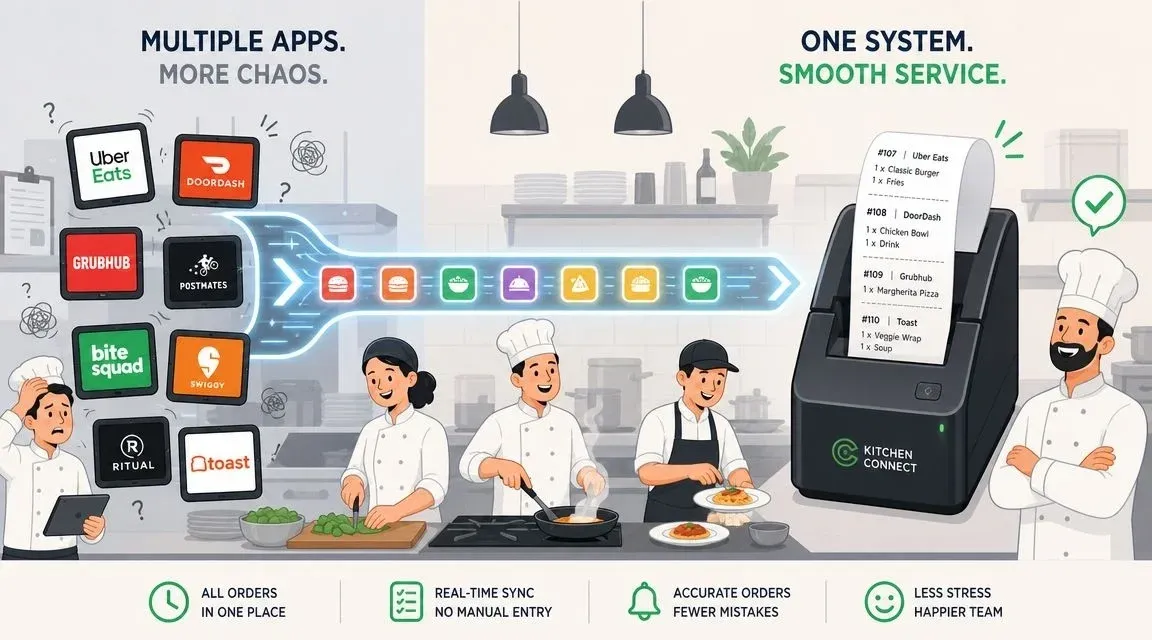
Picture your restaurant on a packed Friday night. Instead of the constant pinging of tablets and staff scrambling to punch in orders from Uber Eats and DoorDash, what if every order just appeared instantly in your POS? That’s the magic of order processing automation. It turns chaos into a smooth, profitable operation.
What Is Restaurant Order Processing Automation?
In simple terms, order processing automation is a digital bridge that connects all your third-party delivery apps (like Uber Eats and DoorDash) directly to your restaurant’s Point of Sale (POS) system.
Think of it like this: when an order comes in from a delivery app, this technology automatically “translates” it and sends it straight to your kitchen printer, exactly like an order placed by a customer in your restaurant. This completely removes the need for a staff member to manually read the order off a tablet and re-type it into the POS.
This isn’t about replacing your staff; it’s about eliminating a repetitive, error-prone task so they can focus on what matters—creating great food and serving your in-house guests.
Why It Matters: From Tablet Chaos to Restaurant Efficiency
Without automation, every delivery app is its own separate system. Each tablet has a different alert sound, a different layout, and its own stream of orders that someone has to manually manage. During a dinner rush, this is a recipe for stress, costly mistakes, and missed orders that hurt your bottom line and reputation.
Order processing automation is what turns that delivery chaos into operational calm. By creating a direct link between delivery apps and your POS, you can handle a high volume of orders with far fewer errors and a less stressed team.
This type of food tech is designed to make the systems you already use work together seamlessly. For example, a restaurant using a Clover or Square POS can receive an Uber Eats order directly, as if the customer ordered at the counter. The benefits are immediate:
- Error Reduction: The risk of a “no cheese” becoming “extra cheese” plummets when no one is manually typing orders. This saves money on wasted food and comped meals.
- Time Savings: Saving even 60 seconds per order adds up to hours of paid labor saved each week, freeing up your team for more valuable tasks.
- Increased Staff Productivity: Employees can focus on managing the kitchen flow and helping customers instead of being chained to a wall of tablets.
Ultimately, automation consolidates all your orders into a single, organized workflow. It ensures every order, whether from a walk-in or a delivery app, follows the same path, creating consistency and boosting your restaurant’s efficiency. To take it a step further, many restaurants also use an order ready screen to keep the front and back of house perfectly in sync.

Why Automation Is Crucial for Modern Restaurant Operations
We’ve covered what order processing automation is, but let’s get to the question every restaurant owner asks: why does it actually matter for my business? The short answer is that it directly impacts your bottom line, staff morale, and customer satisfaction. In today’s competitive market, moving away from manual order entry isn’t a luxury—it’s essential for survival and growth.
Think about it. Every time a staff member has to re-enter an order, it’s a potential point of failure. A simple missed “no onions” modifier doesn’t just create an unhappy customer. It kicks off a costly chain reaction: wasted food, comped meals, and precious staff time spent on damage control. Even worse, it can lead to that dreaded one-star review that hurts your reputation long after the incorrect order is forgotten.
H2: The ROI of Food Tech: Quantifying Gains in Time and Money
When you do the math, the time saved with automation is staggering. Shaving just 60 seconds per order might not sound like a lot, but for a kitchen handling 100 delivery orders on a Saturday night, that’s over an hour and a half of labor you just got back. Over a month, that adds up to dozens of hours your team can spend on productive tasks—instead of acting as data entry clerks.
This need for speed and accuracy is especially true for certain restaurant models. For a closer look, understanding the principles of managing QSR operational challenges provides some excellent context on high-volume operations.
This isn’t just a restaurant-specific trend. The business world at large has seen huge returns from similar automation. For instance, some industries report an average 200–300% ROI within the first year of adopting document processing automation, with error rates falling by a massive 90%. For your restaurant, this translates directly into fewer botched delivery orders and faster ticket times during your busiest rushes. These automation statistics and their impact show a clear pattern of success.
H2: Boosting Staff Productivity and Restaurant Delivery Morale
Beyond the numbers, one of the most underrated benefits is the effect on your team. Eliminating the frustrating task of managing a wall of ringing, beeping tablets immediately reduces a major source of burnout.
When your crew isn’t constantly worried about missing an order or making a typo, they can be more focused, engaged, and productive. They can concentrate on the craft of cooking and hospitality. It fosters a much healthier work environment, which is key to retaining great staff. This ties directly into the bigger picture of on-demand fulfillment for restaurants.
Your Practical Next Step: Take a moment to think about your last chaotic weekend. How many order mistakes did you have to fix? How much time did your team spend just punching in orders from delivery apps? Calculating that lost time and food cost is the first step in building a powerful business case for making a change.
How POS Integration Powers Order Processing Automation
Think about your current setup: a sea of tablets from DoorDash, Uber Eats, and other services, all demanding attention. Each one is its own island, and your staff has the thankless job of manually punching every single order into your Point of Sale (POS) system. This is where costly mistakes and time sinks happen.
This is where POS integration comes in. In simple terms, it’s the technology that acts as a digital bridge, connecting all those separate delivery apps directly to your restaurant’s POS. When a customer places an order on Uber Eats, it doesn’t just land on another tablet. Instead, it flows straight into your POS, prints in the kitchen just like an in-house ticket, and is automatically recorded in your sales data.
Essentially, it makes every third-party order behave as if it were placed right at your counter.
H3: The Technical Magic Behind Seamless POS Integration
So, how does this actually work? It’s not magic, but a smart API (Application Programming Interface) connection built by an integration partner. An API is just a set of rules that lets different software programs talk to each other.
For example, a platform like OrderOut can use APIs to connect your Clover or Square POS directly to incoming delivery orders. The moment a customer hits “confirm purchase,” the order data is sent, translated, and appears on your POS screen—no manual entry needed. This is often an app you can find in your POS provider’s app marketplace.
The benefits of this automated approach ripple across your entire restaurant operations, impacting everything from your budget to your team’s morale.

As the graphic shows, the advantages are clear. Fewer manual errors mean less food waste and no more costly remakes. Saving even a few seconds on every transaction adds up to hours of reclaimed labor, allowing your team to focus on what matters: your food and your customers. This leads to a less chaotic kitchen and a healthier bottom line.
If you’re interested in learning more about the foundation of these systems, you can also read about what makes a great POS in our related article.
By connecting your delivery apps to your POS, you aren’t just saving time—you’re centralizing your entire restaurant delivery operation into one manageable workflow. This is the foundation of modern restaurant efficiency.
This unified system gives you a single source of truth for sales data, menu updates, and inventory levels. It turns what was once a chaotic process into a powerful business advantage.
A Practical Guide to Implementing Order Processing Automation
Diving into order processing automation sounds more complicated than it is. Modern tools are built for busy restaurant owners, not IT experts. Here’s a straightforward, four-step plan to automate your operations and finally ditch the chaos of manual order entry.
H3: Step 1: Audit Your Current Restaurant Operations & Tech
First things first: take stock of what you’re already using. Make a list of every delivery service you partner with, like Uber Eats and DoorDash. How many tablets are cluttering your counter?
Next, identify your Point of Sale (POS) system. Are you running on a modern platform like Clover or Square? Knowing exactly which systems need to connect is the essential starting point. This quick audit gives you a clear map of your current food tech ecosystem.
H3: Step 2: Choose the Right Integration Partner
With your list in hand, it’s time to find the “bridge” that connects all your delivery apps to your POS. You’re looking for an integration partner that specifically lists your delivery services and your exact POS system as compatible. A great place to start is your POS provider’s own app marketplace—they often feature pre-vetted, proven tools.
This partner is what makes the magic happen, turning a mess of incoming orders into a single, clean workflow that prints directly to your kitchen.

H3: Step 3: Connect and Configure Your Accounts
This part is surprisingly fast—we’re talking minutes, not days. Most platforms walk you through a simple setup: you’ll log into your delivery app accounts (like DoorDash) and your POS account, then authorize the connection. It’s usually just a few clicks to give the systems permission to talk to each other.
Many restaurants even take this a step further by creating their own branded ordering system. If you’re looking to build out your direct channel, our guide on white-label mobile applications can show you how to streamline that process, too.
H3: Step 4: Train Your Team to Trust the System
This is the final, and most critical, hurdle: getting your staff on board. The entire point of automation is to free them from tablet duty, so you must train them to trust the new system and let go of the old manual process.
The goal of order processing automation is to get your staff’s eyes off the tablets and back on the customers. Make it clear that they no longer have to be the go-between; the system handles punching in orders automatically. This frees them up for what really matters—guest service and food quality.
Once your team gets through one chaotic Friday night rush without touching a single tablet, they’ll be sold. The relief from that constant stress is all the proof they’ll need.
Measuring the ROI of Your Food Tech Investment
It’s easy to talk about the benefits of new technology, but as a restaurant owner, you need to see the proof on your bottom line. So, how do you actually measure the return on investment (ROI) when you bring in order processing automation?
The best way is a simple before-and-after comparison. You look at your key operational numbers before you automate, and then you measure them again a few weeks or a month after. The difference is your ROI, spelled out in real dollars and improved efficiency.
H3: Hard ROI: Tracking Cost Savings and Error Reduction
To get a clear financial picture, you need to track the hidden costs of manual order entry. These are the metrics that show where your money is going.
- Order Entry Time: Time how long your staff takes, on average, to enter a single delivery order. Saving just 45-60 seconds per order adds up to hours of recovered labor costs every week.
- Order Error Rate: For one week, track every order that was wrong due to a manual entry error. Each mistake directly costs you in wasted food and comped meals. A real-world example: A DoorDash order for a “cheeseburger, no onions” gets punched in wrong, and the kitchen makes it with onions. You have to remake the burger (food cost), and the staff time spent fixing it is also a cost.
- Food Waste Costs: Add up the literal cost of the ingredients you threw out and the meals you had to remake because of those errors. This is a direct hit to your profit margins.
- Wasted Staff Labor: Calculate the hours your team spends babysitting tablets. Those are hours they could be spending with guests or helping the kitchen, making your entire operation run smoother.
A Cost Comparison: Manual vs. Automated Order Processing
When you put the numbers side-by-side, the financial argument for automation becomes crystal clear. Manual entry seems “free,” but it carries significant hidden costs in labor, mistakes, and waste.
Manual vs. Automated Order Processing: A Cost Comparison
Metric Manual Processing (Per Order) Automated Processing (Per Order) Staff Labor 1-2 minutes of staff time 0 seconds of staff time Error Rate 15-20% industry average Under 1% Cost of Errors Varies (e.g., $15-$20 per mistake) $0 Speed to Kitchen 1-3 minutes Instant
As the table shows, automating your order flow doesn’t just save a few seconds—it eliminates entire categories of cost and inefficiency that drain your profits every day.
H3: Soft ROI: Improving Staff Productivity and Morale
Not all returns show up on a spreadsheet. Order processing automation also delivers powerful “soft ROI”—improvements you can feel throughout your restaurant. Think about the reduced stress on your team during a chaotic dinner rush or the glowing customer reviews that mention how their order is always perfect.
Happier employees stick around longer, cutting your turnover and training costs. Satisfied customers become regulars and your best marketers. This is where you can reconcile the difference between hard data and operational feel.
A useful parallel comes from other industries. In accounts payable, top teams spend only $2.78 to process an invoice, while average teams spend $12.88. The difference is automation. Every “touch” in your order workflow—every time a human re-enters data—drives up your costs. The same principle applies to your restaurant, as seen in these business automation statistics.
So, what’s your next step? Use the metrics above to run a quick estimate. Figure out what manual entry is costing you each week, then multiply that by 52. That final number is what you stand to save every year with automation.
Common Pitfalls When Automating Restaurant Orders
Jumping into order processing automation is a game-changer, but there are a few common mistakes that can turn a great investment into a new headache. Avoiding these pitfalls is key to ensuring your new system actually saves you time and money.
H3: Incompatible Systems and Poor POS Integration
The most painful mistake is choosing an integration partner that doesn’t genuinely connect with your existing tools. Imagine signing up, only to find the system can’t talk to your Clover POS or doesn’t support that local delivery app that brings in a third of your orders. It’s an instant headache.
Right alongside this is bad menu mapping. This is a translation issue. Your POS system understands “Large Coke,” but the incoming Uber Eats order says “Lg. Coca-Cola.” Without proper mapping, the order fails, and a staff member has to drop everything to fix it manually, defeating the purpose of automation.
The disconnect between what a delivery app calls an item and what your POS calls it is responsible for most initial automation errors. A good integration partner will meticulously map every menu item and modifier to prevent this.
H3: Lack of Staff Training and Trust in New Food Tech
The final pitfall is human error. You can have the most perfect system, but if your staff doesn’t trust it, you’ve wasted your money. If your team is used to monitoring tablets, old habits die hard. They’ll keep checking them and double-handling orders, wiping out any time savings.
You have to get your team on board. Here’s how:
- Prove it works. Run the system during a slow period and let them see that every order comes through flawlessly before a busy Friday night.
- Redefine their roles. Make it clear their job is no longer punching in orders. Now, they can focus on guest experience and food quality.
- Show them the benefit. Frame it as a tool to reduce their stress, not replace them.
Successfully implementing order processing automation is about more than just technology. It requires a smart approach to choosing partners, managing data, and, most importantly, leading your team.
Ready to make your restaurant run smoother? You can get started with a system that avoids these pitfalls and integrates seamlessly with platforms like Square.
Your Next Step: A More Efficient, Profitable Restaurant
We’ve covered what order processing automation is, why it’s critical for modern restaurant operations, and how to implement it successfully. The daily chaos of juggling tablets, deciphering orders, and fixing costly mistakes doesn’t have to be your reality.
It comes down to a simple choice: continue with manual entry and its hidden costs, or let an integrated system turn your delivery and takeout operations into a smooth, reliable, and more profitable part of your business.
Taking control of your restaurant’s future means you stop putting out fires and start focusing on what you do best: creating great food and unforgettable guest experiences. Automation gives you the headspace and the resources to do just that.
Ready to see how much simpler things can be? Start by connecting your delivery apps directly to your POS and reclaim your time, reduce your costs, and empower your team.
You can start onboarding for Free in a few clicks at https://dashboard.orderout.co and see the results for yourself.