
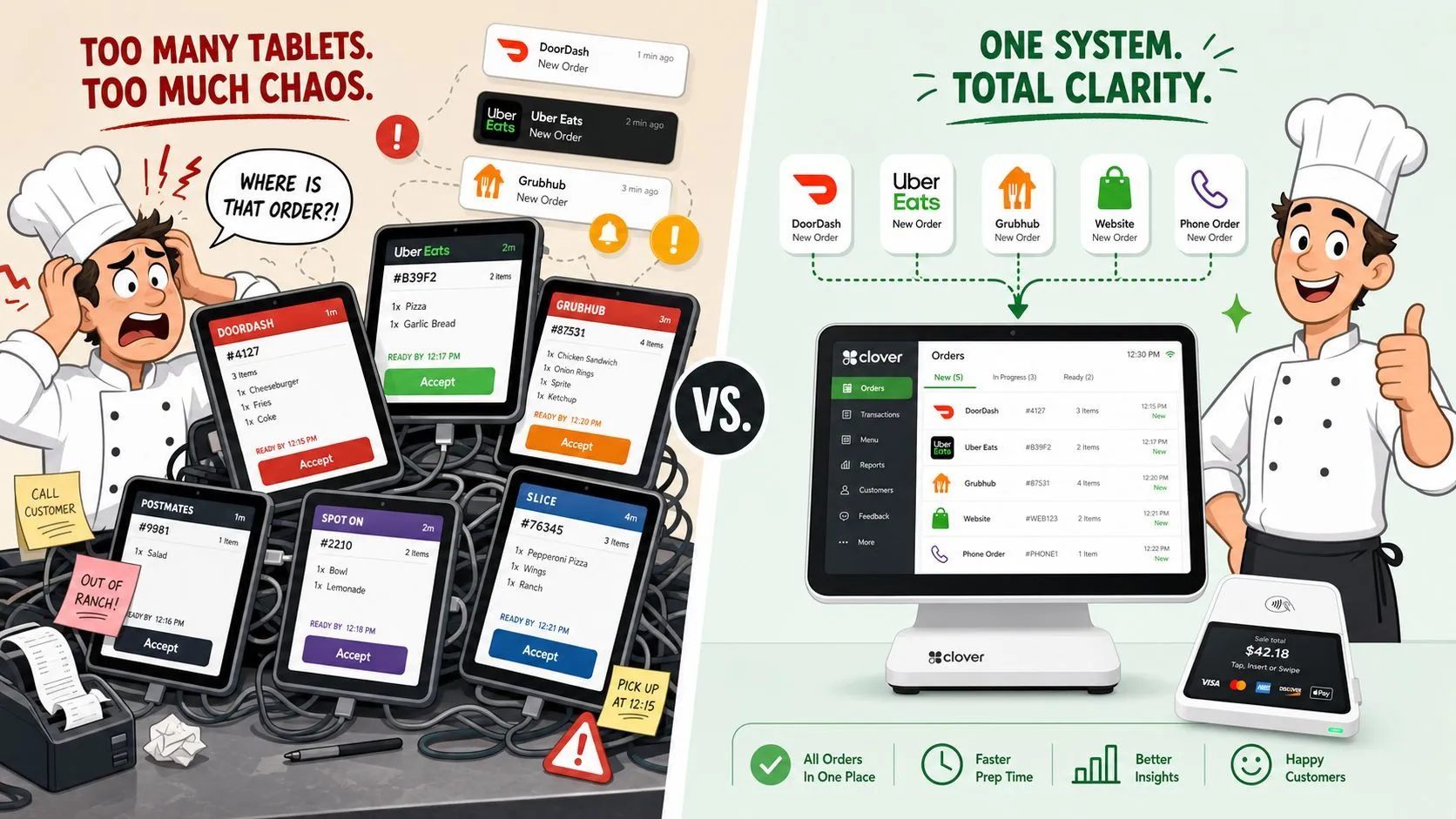
OrderOut is the best Deliverect alternative for Clover and Square because it injects Uber Eats, DoorDash, and Grubhub orders directly into your POS with no extra tablets or manual re-keying.
If you’re evaluating a switch right now, you’re probably less interested in feature bingo and more interested in one question: which setup gives you cleaner operations without eroding margin. That’s where most comparison guides fall short. They talk about integrations in broad terms, then skip the parts operators experience during service, like order lag, menu mismatches, extra hardware, and fee structures that look manageable until delivery volume shifts.
This is an essential decision framework for Clover and Square operators. It focuses on delivery POS integration, hidden total cost, reliability during the rush, and a practical migration path you can use without turning your dining room into an IT project.
Introduction and Key Takeaway
For most small and midsize operators on Clover or Square, the right Deliverect alternative is the one that sends marketplace orders straight into the POS, keeps the POS as the source of truth, and doesn’t add more devices for staff to babysit.
That sounds simple, but the trade-offs aren’t. Some tools are built for chains with enough volume to absorb confusing billing. Some do a decent job consolidating channels but still leave staff watching tablets when something breaks. Others make setup harder than it needs to be, especially when menu modifiers aren’t clean.
Here’s the practical takeaway. If you’re on Clover or Square, the strongest option is usually the one that removes re-keying from the workflow entirely and fits the way your kitchen already runs.
Early on, compare the decision this way:
| Option | Works with Clover and Square | Sends orders into POS | Extra tablet risk | KDS fit | Cost risk for small operators |
|---|---|---|---|---|---|
| Deliverect | Yes | Yes | Depends on setup | Varies by workflow | Can be harder to model clearly |
| Chowly | Yes | Yes | Lower hardware friction | Varies by POS setup | Needs careful fee review |
| Cuboh | Varies by deployment | Yes | Depends on workflow | Varies | Needs careful fee review |
| OrderOut | Yes | Yes | Built to remove extra tablets from the order flow | Strong fit for Clover workflows | Easier to evaluate for simple operations |
The rest of the article looks at what matters in service. How orders enter Clover or Square, what reliability looks like at peak, where fee traps show up, and how to migrate without breaking dinner.
Understanding Delivery POS Integration
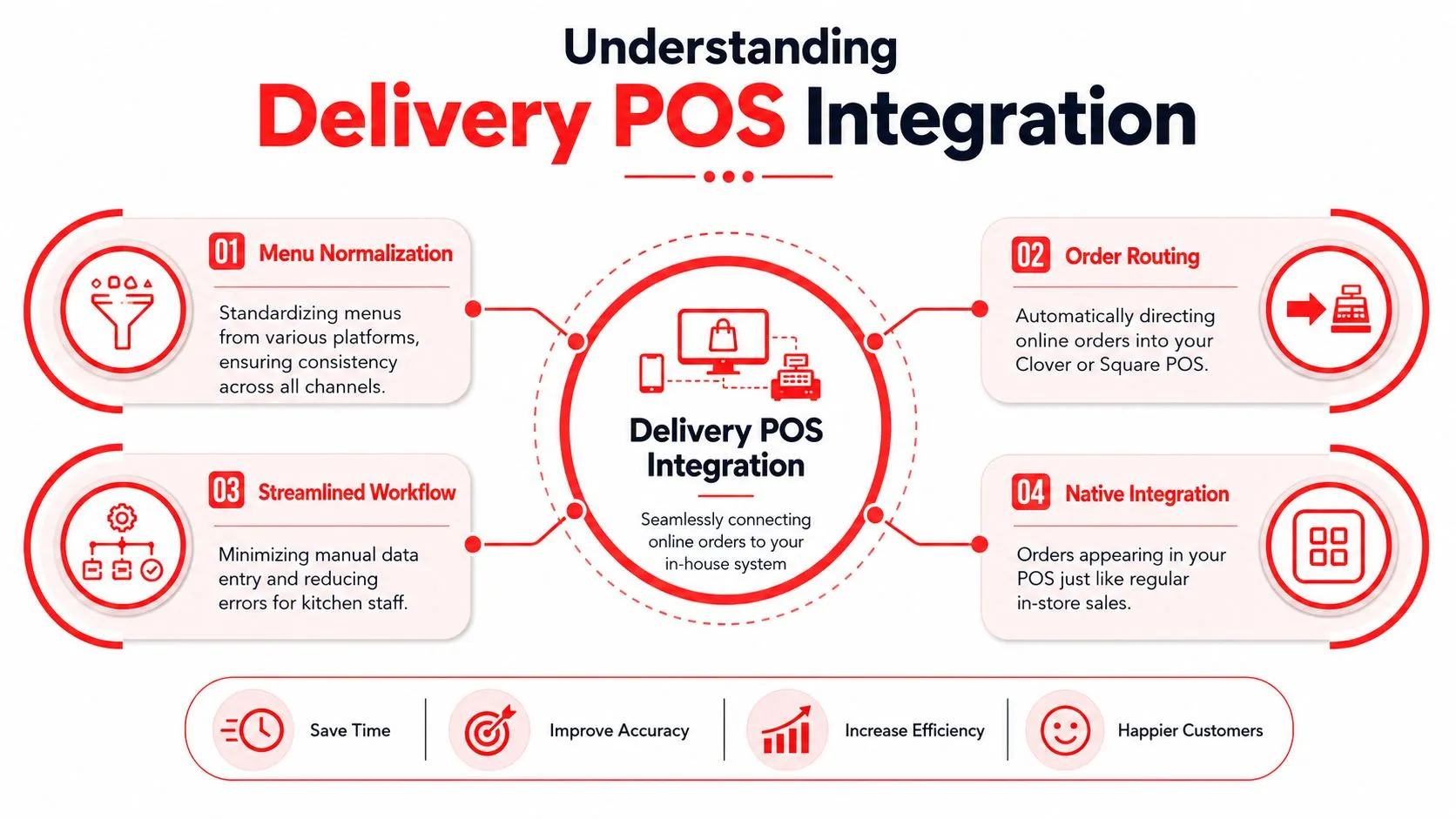
Delivery POS integration means your Uber Eats, DoorDash, and Grubhub orders enter Clover or Square the same way in-house orders do, instead of landing on separate tablets for someone to retype.
That plain-language definition matters because it changes who does the work. Without integration, a staff member becomes the bridge between the marketplace and the POS. With integration, the software handles the handoff and the kitchen sees one operational stream.
How the workflow should feel
In a healthy setup, a DoorDash order shouldn’t create a second workflow. It should appear in the POS and kitchen process like a normal order. That’s the operational goal behind restaurant point-of-sale integrations.
OrderOut describes this clearly in its DoorDash to Clover delivery POS integration: third-party orders flow into Clover or Square without manual re-entry, converting marketplace orders into standard POS transactions that appear in the kitchen workflow with the same speed as dine-in orders.
Practical rule: If your staff still has to hear a chime, find the right tablet, and type the order into the POS, you don’t really have an integrated workflow.
Why menu mapping matters
Operators often blame the connector when the actual issue is menu structure. If your POS menu and your marketplace menu don’t line up cleanly, injection gets messy fast. Modifier groups, item names, and availability rules need to be consistent enough that the system can map them correctly.
That is where menu normalization comes in. In plain terms, it means the software translates orders from different delivery apps into one clean POS structure before they hit Clover or Square. Uber Eats may format modifiers one way and DoorDash another. Your kitchen shouldn’t have to care.
A solid setup depends on a few basics:
- Clean item names: Staff and guests should recognize them instantly.
- Consistent modifiers: Required and optional choices need to map correctly.
- Channel discipline: If an item shouldn’t sell on delivery, remove it from the delivery menu instead of hoping staff catches it later.
- Defined exception handling: Cancellations, refunds, and item outages need a process inside the POS workflow.
The technical layer that actually matters
Most owners don’t need API jargon, but they do need to know what separates a clean integration from a fragile one. The good systems use API-driven order consolidation so orders move directly between platforms instead of bouncing through extra hardware.
For Clover operators, that matters even more in the kitchen. If a third-party order can hit the same printer or display logic as every other ticket, the line stays calmer. For Square operators, the same principle applies. One order stream is easier to train, manage, and audit than several parallel ones.
What works is straightforward. The POS stays the source of truth, the integration handles translation, and the kitchen gets one ticket flow. What doesn’t work is layering more dashboards, more tablets, and more manual rescue steps onto an already busy service.
Comparing Leading Deliverect Alternatives
The fastest way to compare tools is to stop asking which one has the longest feature list and start asking which trade-offs you can live with on Clover or Square.
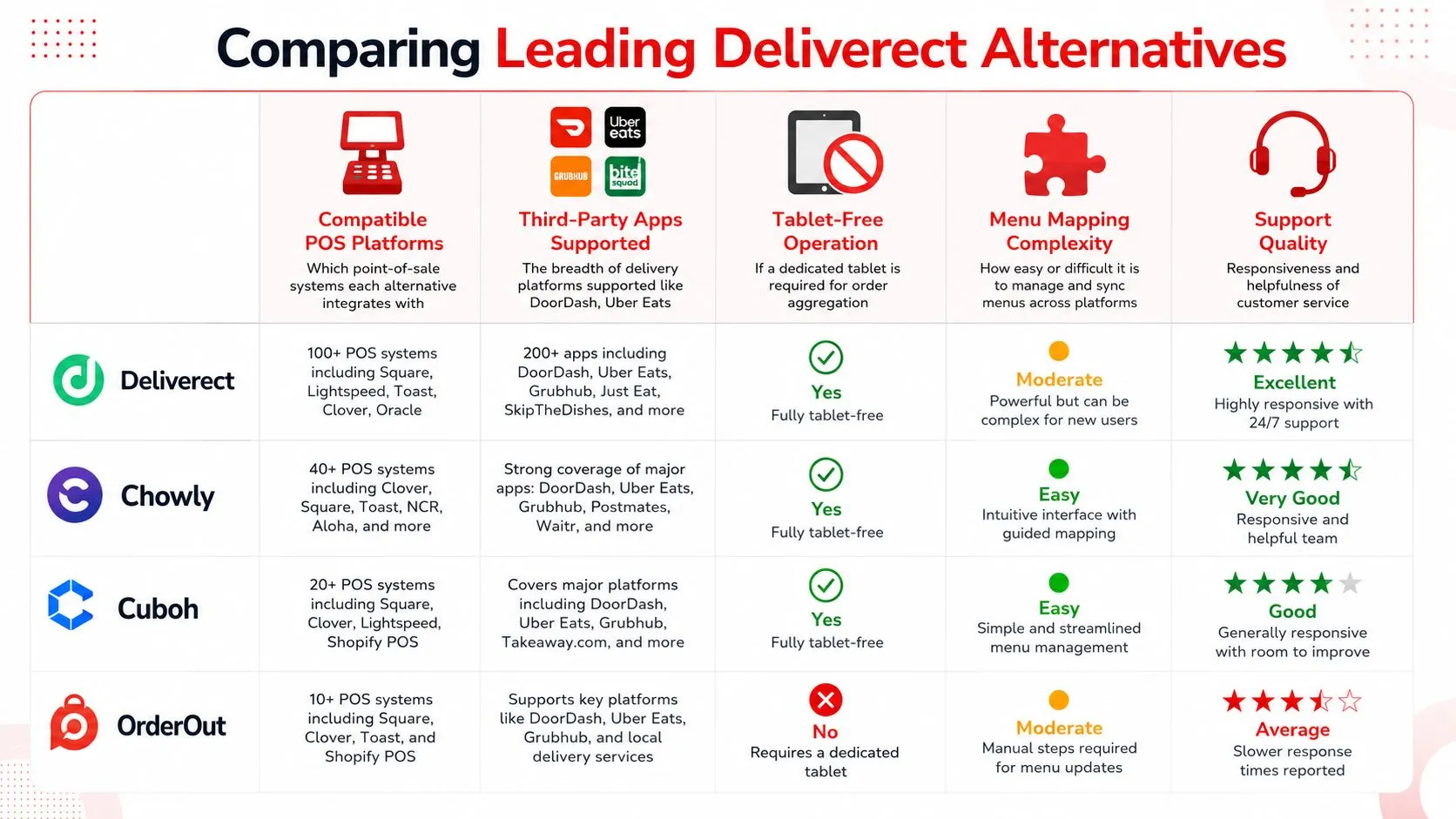
Side by side comparison
| Platform | Clover and Square compatibility | Delivery app consolidation | Tablet-free direction | Menu mapping | Support and fit |
|---|---|---|---|---|---|
| Deliverect | Commonly evaluated for both | Broadly used for aggregation | Depends on deployment | Strong in structured environments | Often better understood by larger groups |
| Chowly | Strong fit for both | Native API-driven consolidation | Better hardware profile | Good for operators that want direct POS connection | Worth a close look for technical fit |
| Cuboh | Considered by many multi-channel operators | Aggregation focused | Depends on stack | Requires menu discipline | Better after process cleanup |
| OrderOut | Built around Clover and Square order injection | Connects Uber Eats, DoorDash, and Grubhub into POS | Built to remove extra tablets from order entry | Relies on normalized POS schema | Fits operators who want simpler workflows |
One useful technical distinction comes from SelectHub’s Deliverect alternative comparison. It notes that Chowly supports native, API-driven consolidation into Clover and Square, while some middleware-based alternatives introduce 15–30 second latency during peak traffic hours.
That matters more than many guides admit. A small delay repeated across a dinner rush changes expediting, promise times, and staff confidence.
Where operators get tripped up
Deliverect-style platforms often make sense on paper because they centralize channels. The problem is that centralization alone doesn’t guarantee a simpler shift. If the workflow still depends on extra hardware, complex exception handling, or pricing that’s hard to predict at lower volume, the operator absorbs that friction.
Cuboh and Chowly can be valid fits depending on your stack. But they’re not automatically the right answer for a one-location operator who just wants DoorDash and Uber Eats to hit Clover cleanly without another operational layer.
Some platforms are built to aggregate channels. Fewer are built to disappear into the shift.
A lot of owners also miss the accounting side of the decision. Before you pick a connector, it helps to review your software stack the same way you review labor or food cost. If you want a clearer way to think about system spend, these tools for small business financial clarity are useful for building a cleaner operating picture.
For restaurant teams trying to simplify order flow first, this guide on connecting multiple delivery apps to one POS is the operational lens that matters most.
Evaluating Integration Ease and Reliability
Setup isn’t where most operators lose patience. They lose patience when a system looks live, then starts dropping confidence during the rush.
What setup usually involves
On Clover or Square, the implementation path is usually some version of this:
- Install the app: Pull it from the relevant marketplace.
- Authorize access: Connect your POS and delivery accounts.
- Map the menu: Match items, categories, and modifiers.
- Test the order flow: Send controlled orders before going live.
- Train managers on exceptions: Know what happens with voids, item outages, and cancellations.
None of that is unusual. The difference is how much babysitting the system still needs after launch.
If your team is evaluating reliability, one good checkpoint is whether the platform removes order entry work or just relocates it. This is the heart of restaurant order entry automation. If someone still has to monitor a fallback process constantly, the integration hasn’t solved the original problem.
Peak-hour reliability is the real test
The hardest service window is where weak integrations reveal themselves. During peak, lag becomes visible to both staff and guests. The ticket reaches the kitchen late, prep starts late, and the order can become unmakeable even though it was technically accepted.
Spindl’s analysis of Deliverect alternatives highlights a question many operators ask but few vendors answer cleanly: what happens to sync speed during rush periods. It also notes an industry trend that 40% of delivery cancellations stem from orders arriving too late to be fulfilled because of sync delays.
That should change how you evaluate demos. Don’t just ask whether the system integrates. Ask what happens at the exact moment your kitchen is busiest.
What to test before you commit
Use a short stress checklist:
- Rush simulation: Fire overlapping test orders from more than one marketplace.
- Modifier handling: Confirm that high-risk items route correctly.
- Kitchen visibility: Make sure staff see third-party orders in the same operational flow.
- Manager recovery path: Check what happens when an order needs intervention.
- Menu update discipline: Verify how quickly changes in Clover or Square affect delivery channels.
Reliability isn’t a feature. It’s whether your line trusts the order that just came in.
The cleanest implementations don’t create a separate mental model for third-party orders. Staff shouldn’t have to remember special rules just because the guest ordered through an app.
Pricing and Total Cost Ownership
A $79 monthly subscription can look cheap until a busy Friday adds per-order charges, support delays, and labor workarounds that never show up on the sales call. For Clover and Square operators, that is usually where the real cost decision lives.
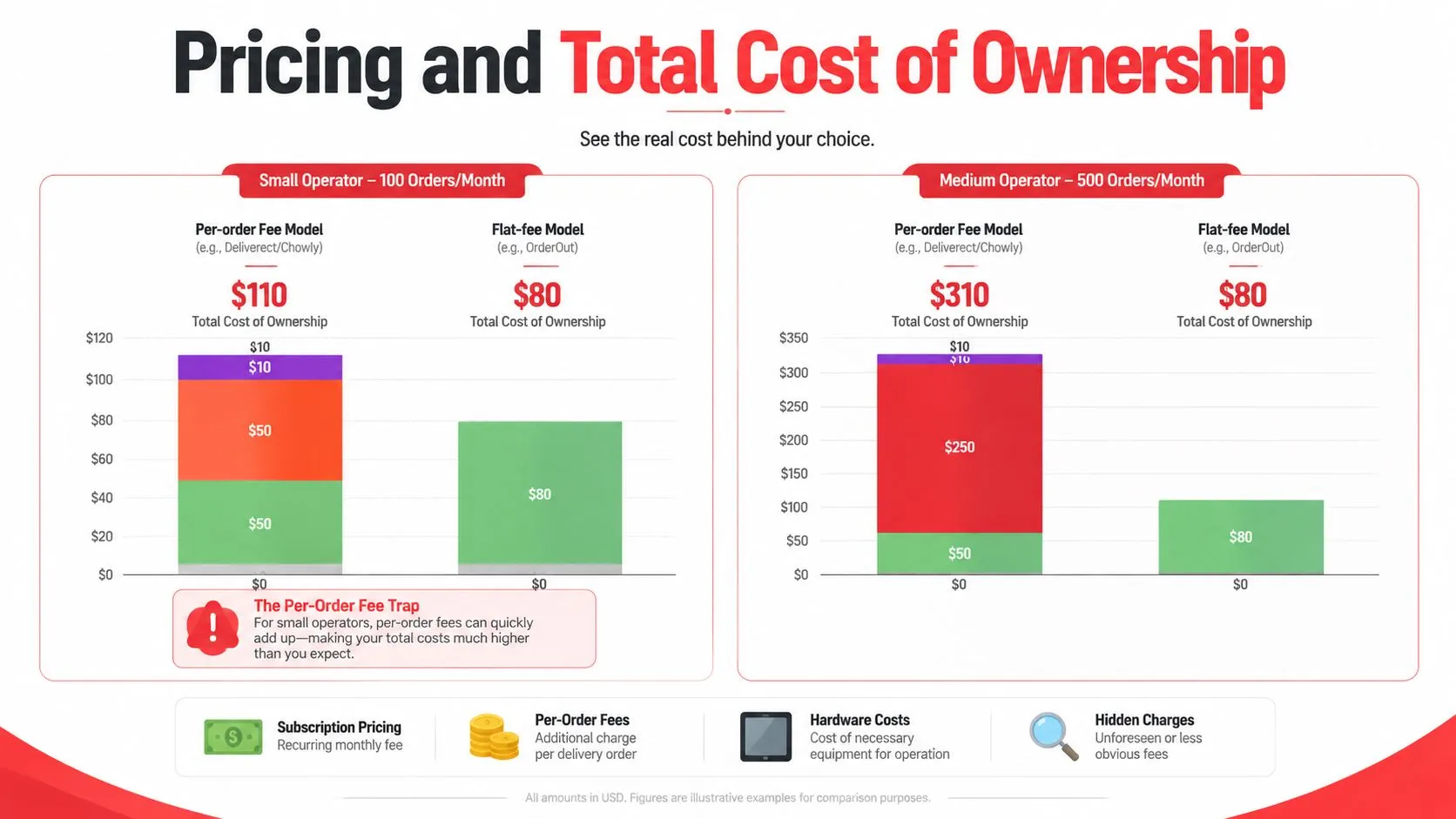
The fee trap small operators miss
Monthly software price is only one line in the model. Total cost of ownership includes subscription fees, any per-order charges, hardware requirements, support quality, menu maintenance time, and the labor cost of fixing exceptions during service. If you need a practical way to build that model, this guide to restaurant software cost breakdowns is a useful starting point.
Klikit’s analysis of Deliverect alternatives for the US market points to the same problem. Small operators often compare sticker price and miss how per-order fees can erase the labor savings they expected from integration.
That matters more on lower-ticket menus. A coffee shop, dessert concept, or quick-service lunch spot can process plenty of third-party orders without much contribution margin left after marketplace commissions and tech fees. In that setup, a connector can improve workflow and still hurt profit.
A simple decision framework
I use four checks with owners before we compare vendors:
- Map your real order mix: Separate delivery, pickup, and first-party digital orders by daypart.
- Model fee exposure: Run the numbers on your average ticket, not the vendor’s sample scenario.
- Price labor accurately: Include time spent on menu edits, order exceptions, staff training, and support tickets.
- Test volume swings: Check what happens to cost in a slow month and in a strong month.
For a pricing baseline on the platform itself, review OrderOut pricing for restaurants.
Square also affects the math because its payment pricing is relatively easy to forecast. According to Loman.ai’s Square alternative analysis, Square uses a 2.6% + 10¢ in-person transaction rate and is often presented as simpler to predict than more layered licensing models. That kind of transparency helps when you’re trying to estimate total tech spend across POS, payments, and delivery integration.
The best choice is usually the one with the clearest downside, not the flashiest demo. If you can explain your likely monthly cost, your busy-week cost, and your cost at double current delivery volume, you are evaluating the platform the way an operator should.
Use Cases and Migration Steps for Clover and Square
A migration goes smoothly when you treat it as an operations change first and a software install second.
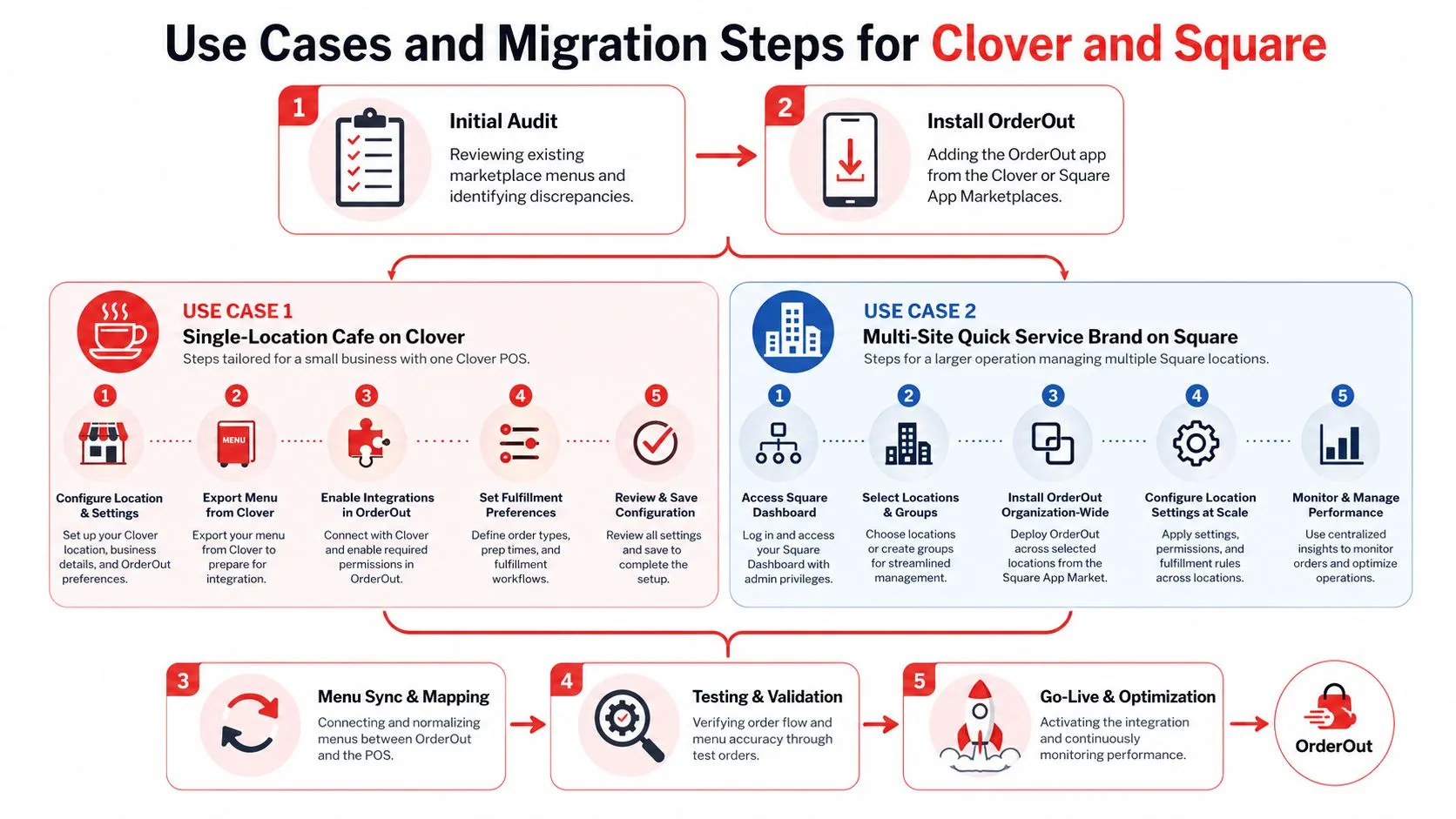
Single-location cafe on Clover
A cafe on Clover usually wants one thing above all else: stop splitting attention between in-store guests and delivery tablets.
Start with a menu audit. Compare your Clover menu against Uber Eats, DoorDash, and Grubhub item by item. Fix duplicate items, vague modifier names, and anything staff has been “translating” manually during service. That hidden translation work is where bad tickets start.
Then install from the marketplace, connect your channels, and test with a limited menu slice first. If your kitchen runs a display workflow, this matters even more. SourceForge’s product listing for OrderOut says it’s the only delivery aggregator that explicitly supports Clover Kitchen Display Systems, allowing third-party orders to render directly on KDS screens without separate tablets or manual re-entry.
That changes training. The kitchen doesn’t need a delivery-side routine. It needs one ticket routine.
If you’re on Clover and want to start with the live app listing, install through the OrderOut app in the Clover App Market.
Multi-site quick service brand on Square
Square operators with several locations usually face a different problem. The challenge isn’t just order injection. It’s keeping menu logic consistent across stores.
In that case, migrate store by store. Use one location as the pilot. Lock down core items and modifiers first, then test exception paths such as unavailable items, refunds, and canceled orders. After that, replicate the menu structure to the rest of the group.
This is also where a normalized schema matters most. The connector needs to translate channel-specific menu structures into one POS logic so each store doesn’t build its own workaround.
A practical launch sequence looks like this:
- Audit one store first: Don’t clean five menus at once.
- Map modifiers before combos: Modifier errors cause more service damage.
- Run test orders by marketplace: Uber Eats and DoorDash can expose different menu issues.
- Train one shift lead per site: Give them ownership of go-live checks.
- Watch the first live window closely: Lunch is often a safer first launch than dinner.
For operators who want a walkthrough before flipping the switch, this OrderOut integration onboarding tutorial is the right reference point.
One note on product fit. OrderOut is free to install on Clover, maps marketplace menus into a normalized POS schema, and is also available for Square through the Square App Marketplace listing for OrderOut. If your priority is removing tablets and keeping Clover or Square as the source of truth, that’s the setup to evaluate first.
Recommendation and Next Steps
If you’re looking for the best Deliverect alternative for Clover and Square, make the decision based on workflow, reliability, and cost behavior, not just on who lists the most integrations.
The strongest fit for most independent operators is the platform that keeps third-party delivery inside the POS workflow instead of building a second workflow around it. On Clover, that means orders should hit the same operational path your team already trusts. On Square, it means managers shouldn’t have to supervise a parallel tablet process just to keep delivery moving.
A practical next step is to review the platform pages that align with your POS:
- OrderOut’s Clover delivery integration for restaurant partners and operators
- OrderOut’s Square delivery integration for restaurant partners and operators
- OrderOut’s 3rd-party order engine for delivery POS integration
- OrderOut for restaurants overview
- OrderOut FAQ for setup and compatibility questions
The operators who make the smoothest switch usually keep the process simple. Clean the menu first. Test by channel. Train one manager thoroughly instead of five people halfway. Then go live during a manageable service window and monitor closely.
If your current setup still depends on re-keying, chimes, and tablet juggling, the opportunity isn’t abstract. It’s operational. Every shift your team spends translating orders is a shift your system is asking labor to cover for software.
Frequently Asked Questions
Does OrderOut work with Clover?
Yes. OrderOut connects third-party delivery orders into Clover so they enter the POS instead of being re-keyed manually. It also supports Clover workflows where the kitchen needs third-party orders to appear in the same operational stream.
Does OrderOut work with Square?
Yes. Square users can connect delivery orders into their POS workflow through OrderOut. That keeps order handling inside Square rather than forcing staff to manage separate order-entry steps.
Do I need extra tablets?
The goal of this setup is to eliminate extra tablets from day-to-day order entry. Instead of staff bouncing between marketplace devices and the POS, orders route into Clover or Square directly.
Is OrderOut free on Clover?
Yes. OrderOut is free to install on the Clover App Market. That matters for operators who want to test fit without adding friction at the install stage.
Which delivery apps connect through OrderOut?
OrderOut is positioned around injecting orders from Uber Eats, DoorDash, and Grubhub into Clover and Square. In practical terms, that means marketplace orders can move into the POS workflow instead of being handled as a separate process.
If you’re ready to eliminate manual re-keying and clean up delivery order flow, start onboarding with OrderOut. Restaurant owners can create an account and onboard for free in a few clicks.