
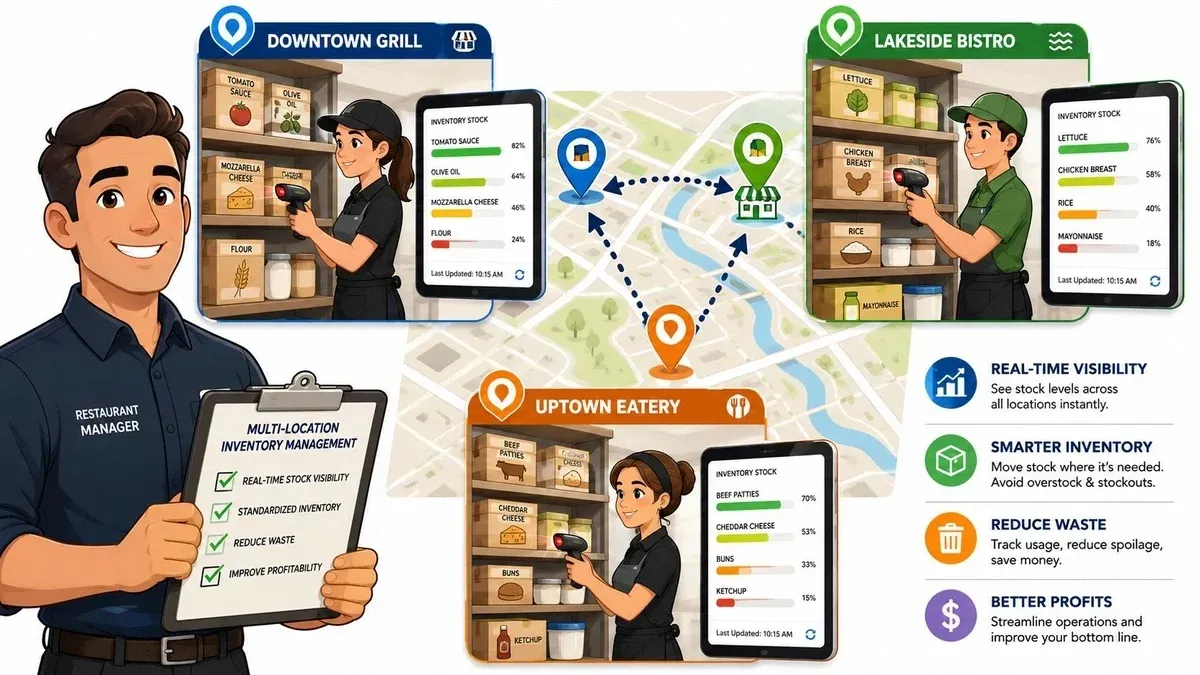
One store is out of mozzarella by dinner rush. Another has extra cases in the walk-in and no plan to use them before quality drops. Your downtown unit gets slammed on delivery apps after a local event, while the suburban location preps for a normal night and ends up overstocked. Most multi-unit restaurant groups don’t have an inventory problem in theory. They have an inventory visibility problem in practice.
That gap gets expensive fast when stock, sales, transfers, and delivery orders all live in separate systems. Managers start texting each other for counts. Someone updates a spreadsheet after the shift. Another store forgets to log a transfer. The POS shows sales, but the inventory file doesn’t reflect what left the shelf. By the time anyone notices, waste has already happened.
Multi-location inventory management works when operators stop treating it as a counting exercise and start treating it as an integration problem. The restaurants that get control usually do three things well. They clean up their item data, connect POS and delivery sales to inventory movement, and enforce simple daily workflows that staff can follow.
Why Inventory Control Is Critical for Multi-Unit Restaurants
The financial stakes are bigger than most operators think. The U.S. National Retail Federation estimated retail inventory shrink at $112.1 billion in 2022, up from $94.5 billion in 2021, according to Netstock’s summary of NRF reporting. For restaurant groups, even small percentage errors become material when they repeat across many units, frequent deliveries, and constant replenishment.

In restaurants, shrink doesn’t just mean theft. It shows up as spoilage, bad receiving, unlogged comps, missed transfer records, portion drift, and delivery sales that hit one system but never properly reduce stock in another. Multi-unit brands feel this harder because every added location creates another place where process breaks.
What breaks first in a multi-unit setup
The first failure point is usually disconnected data. A manager orders based on yesterday’s count, but another location already moved product. A catering order drains a key item, but the delivery menu still shows it available. Staff then spend time reacting to problems that should have been prevented.
The second failure point is manual reconciliation. If your teams are entering online orders by hand, updating spreadsheets after service, or counting only when something feels off, you’re running slow and inaccurate at the same time.
A practical way to spot this is to look at the same metrics every week. If you’re already reviewing restaurant performance metrics that expose operational leaks, inventory accuracy should sit next to labor, sales mix, and fulfillment speed, not in a separate back-office bucket.
Operator reality: Inventory errors rarely arrive as one dramatic event. They show up as constant small misses that managers normalize.
What good control looks like
Strong multi-location inventory management gives each location enough autonomy to run service while keeping stock movement visible at the group level.
That means:
- One live inventory record: Every receipt, sale, waste event, and transfer updates the same system.
- Location-level stock decisions: Each unit carries stock based on local demand, not chain-wide averages.
- Fast exception handling: Teams can see shortages, surpluses, and transfer opportunities before placing another order.
The payoff isn’t abstract. You reduce waste, save manager time, cut emergency purchasing, and keep delivery menus more accurate. In restaurant operations, that translates directly into smoother shifts and fewer preventable misses.
Build Your Data Foundation for Smarter Stock Levels
Before software helps, your item data has to make sense. The simplest way to think about this is a single source of truth. Every store should be using the same master reference for ingredients, pack sizes, units, and recipe links. If one location counts “chicken breast” by case and another counts it by piece, your reports will look complete but still be wrong.

I usually describe this to operators as the inventory version of a master recipe book. If every kitchen follows a different version, food cost and prep planning drift almost immediately. Inventory data works the same way.
Standardize the item master first
Start with the products that create the most movement and the most headaches. Industry guidance recommends focusing initial cycle counting on the top 20% of best-selling SKUs and running weekly audits on 10% to 20% of random SKUs to maintain accuracy without shutting down for a full count, according to Coupler’s guide to multi-location inventory management.
That advice matters because most restaurant groups try to clean up everything at once. That slows the project and burns out the team. A better approach is to fix the items that affect ordering, prep, and menu availability every day.
Build your master list with clear naming rules:
- Product name: “Avocado, Hass” is better than “avocado.”
- Purchase unit: Case, bag, bottle, each, pound, gram.
- Count unit: The way staff receive and count it.
- Conversion rule: How a case translates into smaller units for recipe depletion.
- Location exceptions: Approved substitutions or vendor differences by store, if needed.
Clean data before automation
Restaurants often want automated reorder points right away. That’s understandable, but automation built on messy item records creates faster mistakes.
Use this sequence instead:
- Audit current item lists across every location.
- Merge duplicates where the same ingredient appears under different names.
- Fix unit-of-measure conflicts so receiving, counting, and recipe usage align.
- Map ingredients to menu items that drive depletion.
- Set count schedules for the items that move fastest or cost the most.
A reorder rule is only as good as the count, and the count is only as good as the item setup.
A lot of operators also benefit from tightening up their par level system for inventory decisions. Not because par levels solve everything, but because they force a conversation about what each location needs on hand to get through service without carrying dead stock.
A simple data foundation checklist
Area What to standardize Why it matters Item names One naming convention across all stores Prevents duplicate SKUs and reporting errors Units Purchase, count, and recipe units Keeps depletion and ordering aligned Vendor records Approved supplier and pack details Reduces receiving confusion Recipes Ingredient links to menu items Turns sales into usable inventory data Audit routines Count cadence by item priority Maintains accuracy without full shutdowns
The restaurants that move fastest here don’t aim for perfect on day one. They aim for clean enough to trust, then tighten the system through regular counts and audits.
Mastering Your Restaurant Tech Stack and POS Integration
Most inventory systems either become useful or become shelfware. In a modern restaurant, the biggest inventory depletion events are sales. If your sales data doesn’t flow cleanly into your inventory workflow, you’re asking managers to rebuild reality by hand every night.

An effective multi-location inventory control program needs a centralized system with real-time stock visibility. Industry guidance also points to manual processes and lack of centralized data as major failure modes, as explained in MRPeasy’s overview of multi-location inventory management. In restaurant terms, that means disconnected ordering channels create inventory errors long before anyone starts counting.
Why the integration layer matters
Many operators focus on the POS and the inventory tool, but the integration layer between them matters just as much. That’s the part that translates a sale into an inventory event across every channel.
Here’s a common example. A guest orders a Spicy Chicken Sandwich on DoorDash. That order should flow into the restaurant’s POS, such as Square or Clover, without manual re-entry. Once the POS records the sale, the inventory system should reduce the linked ingredients based on the recipe or item mapping.
If that chain breaks, the problems pile up fast:
- Staff re-enter orders manually: This wastes time and creates duplicate or missed tickets.
- Inventory doesn’t deplete correctly: Your on-hand numbers stay wrong until someone counts.
- Delivery menus stay inaccurate: Guests can order items the kitchen can’t fulfill.
What good POS integration looks like
A strong setup does more than import tickets. It creates one clean operating loop between ordering channels, the POS, and stock movement.
Use this standard:
- Every sales channel feeds the POS: In-store, pickup, and restaurant delivery orders all land in one system.
- The POS is mapped to menu items consistently: The same sandwich should not exist under slightly different names across channels.
- Inventory deductions follow recipes or ingredient links: A sale should trigger depletion automatically.
- Exceptions are visible: Voids, refunds, substitutions, and out-of-stocks need review paths.
For teams comparing systems, this walkthrough on how restaurant POS integrations affect service flow is useful for thinking about operational fit, even if your current stack includes different platforms.
This short video gives a practical view of how connected ordering and POS workflows reduce friction in service.
Practical rule: If a delivery order can hit the kitchen without touching your inventory records, your system isn’t integrated enough.
Where operators get this wrong
The biggest mistake is assuming “connected” means “fully synced.” Plenty of restaurants have orders flowing into the POS but still rely on manual updates for modifiers, combo items, or recipe depletion. That creates false confidence.
The second mistake is ignoring menu governance. If Uber Eats, DoorDash, and in-store POS menus drift apart, your deductions won’t match what was sold. Inventory accuracy starts at the menu build, not the month-end count.
Streamline Daily Restaurant Operations and Workflows
Technology won’t save a weak floor process. The restaurants that keep inventory accurate across multiple units don’t rely on heroic managers. They build daily routines that are simple enough for any trained shift lead to follow.

The most impactful technical gain in distributed inventory comes from using network-level visibility to rebalance stock before ordering more. That reduces waste by moving excess inventory to higher-demand locations instead of creating another purchase order, as described in Lowry Solutions’ guidance on multi-location inventory cost control. In restaurant operations, that only works if transfers are logged cleanly and fast.
Receiving done right
Receiving is the first point where reality and paperwork often separate. If staff accept deliveries without checking quantity, quality, and pack size against the purchase order, bad data enters the system before product even reaches storage.
Do this:
- Verify against the PO at the door: Check item, quantity, and condition before storing.
- Record substitutions immediately: Don’t leave “we got something close” for later.
- Use barcode or digital receiving tools when available: They reduce hand-entry mistakes.
Don’t do this:
- Sign first and check later
- Let invoices pile up for end-of-day entry
- Assume every location receives the same pack configuration
Transfers that actually help
Transfers are one of the biggest missed opportunities in multi-location inventory management. Operators often know one store has extra stock and another needs it, but the move happens over text message and never makes it into the system.
That defeats the purpose.
A workable transfer process is short:
- The sending store creates the transfer in the system.
- Product is picked, labeled, and physically moved.
- The receiving store confirms the quantity on arrival.
- Any discrepancy is investigated the same day.
If you’re trying to reduce admin load around this kind of work, order processing automation for restaurant teams is worth reviewing because the same principle applies. Standardized digital workflows beat informal communication every time.
Move stock first in the system, then in the car, then onto the shelf. If one of those steps is missing, your count will drift.
Cycle counts that staff will actually complete
Full physical counts still have a place, but they aren’t the best daily control tool for busy restaurants. Cycle counts work better because they fit service reality. Count a small set of high-risk items every day or every week, fix discrepancies quickly, and keep the system warm.
A practical rhythm for managers looks like this:
Workflow Best daily habit What it prevents Receiving Check every inbound delivery before storage Bad stock records at the start Transfers Log both send and receive on the same day Phantom inventory between stores Cycle counts Count a small priority set consistently Surprise variances at month end Waste logging Record spoilage and discard in real time Inflated on-hand numbers Reconciliation Review unusual gaps before close Repeating errors and staff guesswork
Good workflows save time because they reduce rework. They also improve accountability. Staff know what happened, where it happened, and who confirmed it.
Using Forecasting and Reporting for Proactive Food Tech
Once your data is clean and your workflows are reliable, reporting stops being historical paperwork and starts becoming a planning tool. At that point, multi-location inventory management becomes more than stock control. It becomes a way to order smarter, prep better, and protect service.
The biggest forecasting mistake in restaurant groups is treating all stores like one combined pool. That looks efficient from headquarters, but it usually creates local shortages and local overstock at the same time. A common pitfall is failing to calibrate stock when location demand shifts week to week because of weather, events, or menu mix changes. More centralization alone doesn’t solve misallocation without location-level data, as noted in Doss’s practical guide to multi-location inventory management.
Use reporting to adjust local decisions
A downtown lunch-heavy unit and a suburban dinner-heavy unit shouldn’t carry the same pars just because they share a brand. The sales pattern is different. The delivery mix is different. The timing of demand is different.
That’s why the most useful reports are local first, group second.
Focus on reports that answer questions like:
- Which items are repeatedly running short at one store but not another
- Which ingredients are being ordered consistently above actual usage
- Which menu items create the most volatile demand by location
- Where waste logs and sales mix suggest the recipe map needs review
Operators who want to make this practical should spend time with restaurant data analytics that connect reporting to decisions. The point isn’t to collect more dashboards. It’s to identify what each location should stock differently next week.
Turn par levels into living controls
Par levels work best as a moving target, not a fixed rule buried in a binder. If delivery demand rises on weekends at one unit, that location may need a higher prep threshold for key ingredients. If another location sees slower movement on a menu category, its safety stock should tighten.
Think about forecasting in three layers:
- Base demand: What the location sells in a normal week
- Known events: Local events, promotions, weather patterns, school schedules
- Channel mix: In-store, pickup, and restaurant delivery behavior by daypart
This doesn’t need to become overly technical. Managers already know most of these patterns. The win comes from getting those observations into the system instead of leaving them in someone’s head.
Central oversight is useful. Local demand signals are what make it accurate.
Which KPIs matter most
Restaurants can drown in reports, so keep the KPI set tight. The most useful inventory-related measures are the ones that prompt action.
A good working set includes:
- Inventory turnover: Helps identify items that sit too long or move faster than expected
- Waste percentage: Highlights products, prep routines, or ordering habits that need attention
- Cost of goods sold: Keeps menu performance tied to actual usage and purchasing behavior
- Transfer frequency: Shows whether one location is regularly acting as the safety valve for another
- Stockout patterns: Reveals where demand planning is consistently late
The practical goal is simple. Stop ordering because a shelf looks low. Start ordering because your sales data, local conditions, and current stock position tell you what the next service period requires.
Your Implementation Checklist and Next Steps
Most restaurant groups don’t need a giant transformation project. They need a disciplined rollout with clear ownership. The fastest path is to tighten the basics, connect the sales channels, and then improve forecasting once the system is trustworthy.
A practical rollout checklist
-
Assess current inventory flow Map how each location handles receiving, counting, transfers, waste, and delivery orders today. Find the handoffs where staff still rely on texts, spreadsheets, or memory.
-
Standardize the item master Clean up names, units, pack sizes, and recipe links. If two stores describe the same ingredient differently, fix that before adding more automation.
-
Integrate POS and delivery channels Make sure in-store and online orders hit the same operational system and can be tied back to inventory depletion.
-
Train by workflow, not by software menu Teach receiving, transfers, cycle counts, and waste logging as daily habits. Staff retain process better than screens.
-
Audit early and often Review discrepancies while the rollout is fresh. Small variances tell you where process or setup still needs work.
The failure points to watch
Most breakdowns come from familiar causes:
- Inconsistent data entry: Staff use shortcuts when the process is too slow or unclear.
- Weak training: Managers understand the system, but line-level staff don’t know what to record.
- Skipped audits: The setup looks good at launch, then count discipline fades.
- Over-centralized ordering: Corporate sets one rule for every location and ignores local demand signals.
The fix is usually operational, not technical. Tighten the SOP, make the workflow easier, and review exceptions every week until the behavior sticks.
For restaurant owners, the payoff is straightforward. Better inventory control reduces waste, cuts manual admin, keeps delivery menus more accurate, and helps every unit run with less friction. That means fewer emergencies for managers and a better guest experience across channels.
The next step should be concrete. Pick one category, one location cluster, or one workflow this week and clean it up fully before expanding.
If you want to remove manual order entry, connect delivery apps directly into your POS, and get a cleaner operational view across locations, take a look at OrderOut. Restaurant owners can start onboarding for free in a few clicks at OrderOut Dashboard.