
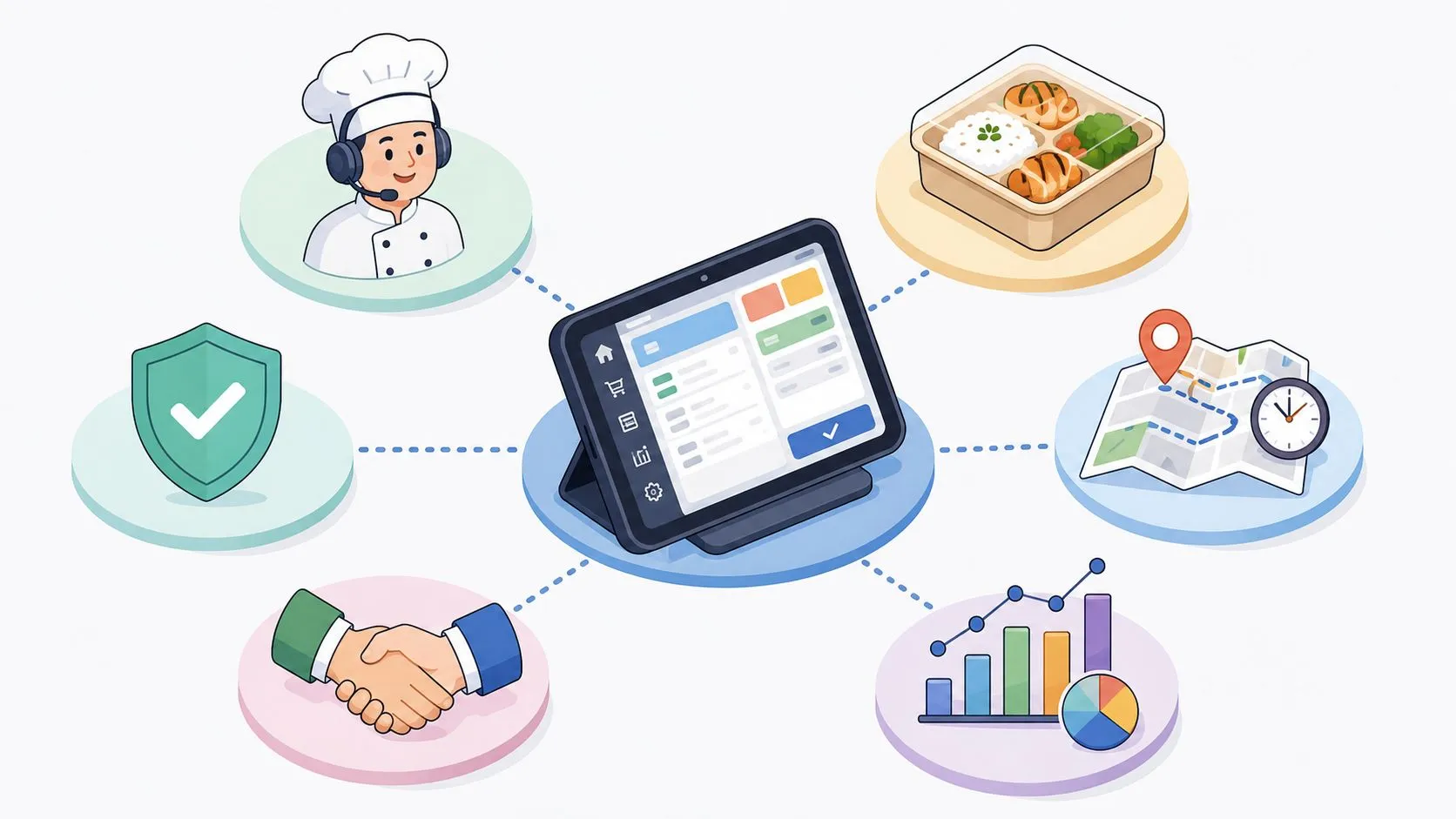
Delivery management best practices are the difference between a restaurant that just survives the dinner rush and one that controls it. The delivery-management software market is expanding fast, with one forecast projecting an increase of USD 666.7 billion from 2023 to 2028 at a 7.26% CAGR, and another projecting growth from USD 2.17 billion in 2024 to USD 4.94 billion by 2031 at a 10.82% CAGR (Technavio). That growth is a signal, operators are moving away from manual dispatch and toward systems that keep orders, drivers, and staff aligned.
For restaurant teams, the win isn’t “more tech,” it’s less rework. If your Uber Eats, DoorDash, and Grubhub orders still bounce across extra tablets before they reach Clover or Square, you’re paying for friction with every rush. The operators who get ahead treat delivery as a system, not a pile of app notifications, and they start by making the POS the center of gravity.
From chaos to control starts with one simple rule, every delivery order should enter the kitchen the same way every time. That’s how you free up time with better processes, reduce errors, and keep staff focused on food instead of retyping tickets (free up time with better processes).
1. Integrate and consolidate orders into your POS
The fastest way to lose control of delivery is to let every marketplace run its own lane. When Uber Eats, DoorDash, and Grubhub arrive on separate tablets, staff spend their time translating tickets instead of filling them, and that’s where errors start. A direct POS flow puts Clover or Square back at the center, so the team works from one order stream instead of three competing screens.
That matters because the POS should be the source of truth, not a stack of buzzing tablets. OrderOut is built around that workflow, and its Clover App Market listing makes it easier for operators who want to remove manual re-keying and extra devices from the rush. A busy pizza shop using that setup can see a Grubhub order land directly on the Clover kitchen display while the team keeps moving, no one stops to transcribe a ticket, and no one has to guess which tablet just rang. For a practical walkthrough, see how to connect multiple delivery apps to one POS.
Why consolidation changes everything
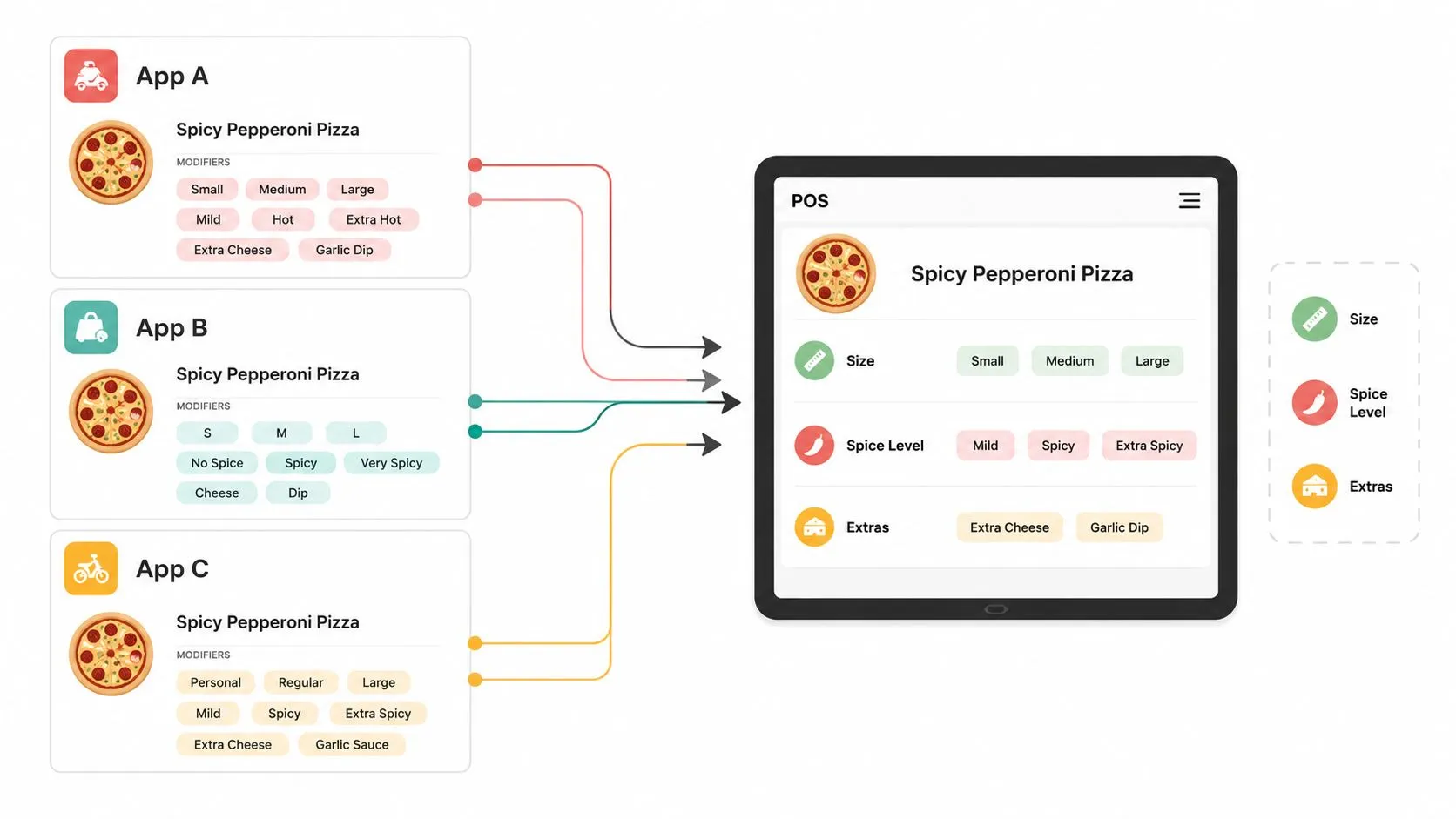
Once orders flow into the POS, the rest of the operation gets easier to control. The kitchen watches one queue, the expo labels from one ticket source, and managers have one record to check when a customer calls about a missing item. Menu hygiene matters too, because OrderOut maps each marketplace menu into a normalized POS schema, and inconsistent item naming is how clean automation turns messy.
Practical rule: if staff still have to compare a marketplace screen to a POS screen, the integration is not ready.
Before you go live, audit the menu names, modifiers, and item groups across Uber Eats, DoorDash, Grubhub, and your POS. Then train the team on the new habit. They watch the POS, not the tablets. If you’re on Clover, OrderOut is free to install on the Clover App Market, and if you’re on Square, the Square marketplace listing for OrderOut is the place to start. The restaurant staffing and scheduling guidance from OrderOut fits this setup because schedules should reflect actual order flow, not guesswork.
2. Optimize your workflow and staffing for delivery volume
Delivery breaks restaurants when it’s treated like a side task. A strong operator builds a separate rhythm for delivery orders, then staffs around it. That means one person is responsible for the handoff, one zone is reserved for packing, and the line team knows that delivery tickets don’t get treated like dine-in tickets with a different sticker.
A good example is the fast-casual restaurant that keeps a shelving unit near the exit just for completed bags. During lunch, a Square-fed ticket hits the expo screen, one packer checks the contents, adds condiments, seals the bag, and moves the order to the driver shelf. The driver flow stays orderly, and dine-in guests don’t pay the price for delivery chaos.
Build the room around the work
Use the POS data you already have to identify the busiest delivery windows, then staff those hours on purpose. Don’t ask the line cook to become the bagger whenever the phone rings, because that’s how both service modes slow down. A dedicated expo or packer creates consistency, and consistency is what keeps errors from snowballing.
The restaurant staffing and scheduling guidance from OrderOut fits this approach well because the schedule should mirror actual order flow, not assumptions. In practice, that means the person packing delivery needs a checklist, a clear station, and a simple escalation path if an item is missing or a driver is early.
- Assign one handoff owner: One person checks bag accuracy, seal integrity, and the driver match.
- Create a packing zone: Keep delivery orders physically separate from dine-in pickup bags.
- Use automatic labels: Print customer names and order numbers from the POS so nobody has to guess.
- Review rush periods weekly: Adjust labor to the hours that stretch the team.
The goal isn’t to make delivery fancy, it’s to make it predictable. Predictable staffing saves time because the team stops improvising every night, and that alone reduces stress.
3. Invest in quality packaging to protect food integrity
Good packaging is a delivery system, not an afterthought. Once food leaves the kitchen, the box, bag, and seal become part of the product, and weak packaging turns a strong order into a complaint. Fried items need airflow, hot foods need insulation, and sauces need containment, because sogginess and temperature loss usually start with the package.
A burger shop can do everything right in the kitchen and still lose the guest if the fries arrive limp. The fix is usually simple, foil-lined wraps for burgers, vented cartons for fries, and separate sealed cups for sauces and dressings. Add a tamper-evident sticker and the customer gets one more signal that the order was handled carefully.
Treat packaging like part of the menu
The best operators test packaging the same way they test recipes. Make one delivery order, let it sit for a while, then taste it the way the customer will. If the food can’t hold up long enough to survive a realistic handoff, the issue isn’t just speed, it’s material choice and assembly.
Your packaging should keep the food honest. If it can’t survive the ride, it isn’t ready for delivery.
Cold items deserve their own bag when possible, and heavy containers should not crush delicate ones. That sounds basic, but basic is where a lot of delivery issues live. The last-mile delivery management software guidance from OrderOut fits here because packaging and timing have to work together, not separately.
A restaurant that seals each bag, separates hot and cold components, and packs condiments consistently looks more organized to the guest and the driver. The result is less rework in the kitchen and fewer customer complaints that start with “my fries were cold” or “the lid was open.”
4. Streamline delivery routing and timing
Speed matters, but only when it’s tied to readiness. The worst pickup experience is not a slow driver, it’s a driver who arrives before the order is packed and then waits while food cools. A better system tells the marketplace when an order is ready, so dispatch happens at the right time instead of on guesswork.
That’s why the “Ready for Pickup” status in the POS matters so much. In a Clover workflow, when the team marks an Uber Eats order complete in the POS, that status can move back through the system and cue the driver timing more accurately. The kitchen stays in control of the handoff, and the platform has better information to work with.
Use timing as an operational tool
If you manage your own drivers, routing software helps you organize the day and reduce wasted movement. If third-party platforms handle the driver, your job is to give realistic prep times and hit the ready signal only when the order is boxed and sealed. Either way, timing is a promise, and broken promises show up as cold food and frustrated guests.
The dispatch and tracking guidance from OrderOut is relevant because delivery management works best when third-party and in-house movement live in the same workflow. That makes it easier to see where the handoff stalls, especially when a rush hits and driver ETAs start overlapping.
Practical rule: never mark an order ready because you want the driver to wait less. Mark it ready because the order is actually ready.
Restaurant operators who tighten this step usually find that their kitchen feels calmer. Staff stop rushing to beat an arbitrary driver arrival, and drivers stop hovering at the door while bags are still being packed. That change doesn’t just protect food quality, it reduces the constant interruptions that slow the whole line.
5. Use data and KPIs to continuously improve
You can’t run delivery on instinct alone. Your POS already holds the data that shows which channels are working, which items get repeated issues, and where the team is losing time. The point of delivery management best practices is not to collect more dashboards, it’s to use a few useful KPIs to make better decisions.
Industry guidance consistently points to the same controls, data quality, training, and KPI monitoring are the highest-impact levers for delivery execution (Locate2u). In restaurant terms, that means cleaner order data, better staff habits, and regular review of the numbers that affect service. A centralized dashboard visible to operations and management is also a strong practice, especially when the team needs a shared view of performance (Splunk).
Start small, then get consistent
Track a few metrics every week and make the review short enough that the team will do it. Order volume by platform shows where demand is coming from, average prep time shows how the kitchen is absorbing that demand, and order accuracy tells you whether the workflow is holding up under pressure. If you need a formal structure, service-delivery guidance also recommends clear targets through an SLA at the start of the relationship, with SLOs where appropriate, so expectations are measurable rather than vague (Atlassian).
The data and analytics guidance from OrderOut belongs here because better reporting only matters when the POS is trustworthy. If DoorDash sales and POS sales don’t reconcile, the team ends up arguing about numbers instead of improving the operation.
A manager who reviews trends every week can see patterns like one channel producing better ticket quality or one item creating constant packing issues. That’s not glamorous, but it’s where better margins often come from. The more standardized the order flow, the easier it is to spot the bottleneck.
6. Actively manage delivery partner relationships
Third-party platforms are not set-and-forget vendors. If you’re on Uber Eats, DoorDash, or Grubhub, you still need to manage your menu, hours, reviews, and support issues like a business partner, because the platform is shaping part of the guest experience. A passive account usually turns into a neglected account.
A manager who notices a Grubhub review about a missing item and responds quickly is doing more than damage control. That public response tells future guests the restaurant is paying attention. The same mindset applies to platform support, if drivers are consistently late or order data is showing up wrong, the restaurant should escalate the issue instead of absorbing it.
Make partner management part of the week
Set a weekly block to review reviews, menu changes, and promotion options. During slower periods, platform promotions can help create demand, but they should be used deliberately, not automatically. If the kitchen is already stretched, more volume without more control just creates more friction.
OrderOut’s 3rd-party order engine helps simplify this work because menu updates can be managed from one place instead of being edited separately across every marketplace. That doesn’t remove the need for partner management, but it does cut down on duplicate work and keeps restaurant staff focused on service instead of screen hopping.
Keep your platform relationships active, because every correction you make early is one less problem the kitchen has to absorb later.
Real-world delivery management gets better when the restaurant takes ownership of the partnership. Marketplace support, menu accuracy, and public responses all influence how smoothly the next order arrives. The less fragmented the workflow, the easier it is to stay on top of those moving parts.
7. Standardize your menu across all platforms
Menu inconsistency is one of the fastest ways to create avoidable errors. If the same item has different names, modifiers, or prices across DoorDash, Uber Eats, and your POS, the kitchen has to decode the order instead of fulfilling it. That slows service and raises the chance of a mistake.
A cafe with “Latte” in Clover, “Classic Latte” on DoorDash, and “Espresso Latte” on Uber Eats is setting itself up for friction. Standardizing that item across channels gives the POS integration a clean path, and the mapping becomes much more reliable. That’s especially important when OrderOut injects marketplace orders directly into the POS, because the system works best when the menu on each side speaks the same language.
Make the POS the master menu
Start with the restaurant’s own POS menu, then push that structure outward to each delivery platform. Don’t let each marketplace drift into its own naming logic, because every drift creates more manual correction later. A simple spreadsheet can help your team line up item names, modifiers, and special instructions before anything goes live.
The OrderOut restaurants overview is useful if you want to understand how the platform fits into a restaurant workflow without adding complexity. Menu mapping is not glamorous work, but it’s what makes the rest of the automation dependable.
- Use one master item name: Keep the POS version as the source of truth.
- Match modifiers exactly: Small differences create big mapping problems.
- Review seasonal items first: Limited-time items are where drift often starts.
- Keep descriptions readable: Clear names reduce guest confusion and kitchen questions.
A standardized menu also makes training easier. New staff don’t need to remember platform-specific exceptions, because the order looks the same no matter where it came from. That’s the kind of operational simplicity that saves time every single shift.
8. Establish a clear process for error mitigation
Even with a clean POS flow, errors still happen. A menu item sells out, a bag gets mislabeled, or a driver shows up late. The difference between a steady restaurant and a chaotic one is how fast the team responds when something breaks.
If a Grubhub order comes in and the kitchen is out of avocado, the shift lead needs a clear playbook. The guest should be contacted through the app, the issue should be acknowledged right away, and the team should know which substitutions are approved. When the response is consistent, the restaurant can solve the problem before it turns into a lost customer.
Document the recovery path
Every common error should have a standard owner and a standard response. That includes refunds, remakes, substitutions, and customer contact. If a team member has to stop and ask three people what to do during the dinner rush, the process is too vague.
The OrderOut FAQ is a good place to check practical details about setup and fit, especially if you’re tightening your delivery workflow around the POS. On the restaurant side, the work is creating a simple escalation path that staff can use without hesitation. OrderOut also matters here because it keeps marketplace orders flowing into the POS, which gives the team one place to spot problems and act before they spread.
Practical rule: if the answer changes every time, the process isn’t documented well enough.
Role-play a missing-item complaint, an angry guest, and a driver delay during a pre-shift meeting. That builds muscle memory before the problem hits. Tie that training to clear POS notes, because the team moves faster when the issue, the fix, and the follow-up all live in one system. If you also rely on telematics for last mile delivery, use those updates to confirm whether a delay came from the kitchen, the handoff, or the route. The goal is not to eliminate every mistake, it’s to resolve mistakes fast enough that they don’t turn into reputation damage.
8-Point Delivery Best Practices Comparison
| Item | Implementation Complexity 🔄 | Resource Requirements ⚡ | Expected Outcomes 📊 | Ideal Use Cases 💡 | Key Advantages ⭐ |
|---|---|---|---|---|---|
| Integrate & Consolidate Orders into Your POS | Medium, initial menu mapping and integration setup | Moderate, integration tool, stable internet, setup time | Unified order queue, fewer entry errors, faster prep | Multi-platform restaurants using Clover/Square | ⭐ Single source of truth; reduces errors and labor |
| Optimize Your Workflow & Staffing for Delivery Volume | Medium, new roles, scheduling and process changes | Moderate–High, dedicated staff hours and packing space | Higher order accuracy, less dine‑in disruption | High-volume/rush periods; fast‑casual concepts | ⭐ Improved throughput and consistent handoffs |
| Invest in Quality Packaging to Protect Food Integrity | Low, source and test packaging options | Moderate, higher per‑unit cost and storage needs | Better temperature/texture retention; fewer complaints | Items sensitive to sogginess or long delivery times | ⭐ Preserves quality; reduces refunds and negative reviews |
| Streamline Delivery Routing & Timing | Medium, tools + disciplined status updates | Moderate, routing/dispatch tools or APIs; training | Reduced driver wait, accurate ETAs, fresher deliveries | In‑house fleets or restaurants with many third‑party drivers | ⭐ Better on‑time performance and platform ratings |
| Use Data & KPIs to Continuously Improve | Medium, configure reports and review cadence | Low–Moderate, time for analysis and reporting tools | Identifies profitable channels; reveals bottlenecks | Operations scaling delivery or optimizing margins | ⭐ Data‑driven decisions; measurable operational gains |
| Actively Manage Delivery Partner Relationships | Low–Medium, ongoing platform admin and outreach | Low, regular time investment for platform management | Improved visibility, faster issue resolution, promo access | Businesses relying heavily on app traffic | ⭐ Better placement, marketing options, and support |
| Standardize Your Menu Across All Platforms | Medium, perform audit and enforce consistency | Low–Moderate, time for mapping; vendor support helpful | Fewer mapping errors; smoother POS integration | Multi‑platform listings with inconsistent names/prices | ⭐ Simplifies automation; consistent customer experience |
| Establish a Clear Process for Error Mitigation | Low, document flows and train staff | Low, time for templates, training, and signage | Faster, consistent resolutions; preserved customer loyalty | Any location aiming to reduce service failures | ⭐ Empowers staff; turns issues into recovery opportunities |
Implement your delivery best practices today
Delivery management gets easier when the restaurant stops treating each problem separately. Order flow, staffing, packaging, timing, reporting, partner management, menu consistency, and error recovery all get stronger when the POS sits in the middle and acts as the operational source of truth. That’s why integrating Uber Eats, DoorDash, and Grubhub directly into Clover or Square is such a high-value move, it supports the rest of the system instead of sitting off to the side.
The market data points in the same direction. Delivery-management software is growing fast, and operators are clearly investing in digital orchestration instead of manual dispatch (Technavio). The best restaurant teams aren’t chasing every new feature, they’re building one clean workflow that reduces rekeying, exposes the right metrics, and keeps staff focused on serving food well.
If you’re still juggling tablets, start with the step that removes the most friction. Get your delivery orders into the POS, standardize the menu, and build the rest of the process on that foundation. That’s what makes delivery management best practices work in a busy restaurant.
OrderOut helps restaurants pull Uber Eats, DoorDash, and Grubhub orders straight into Clover or Square so staff can stop re-keying tickets and keep the POS as the source of truth. If you want a cleaner delivery workflow with fewer moving parts, visit OrderOut and see how it fits your restaurant’s setup.