
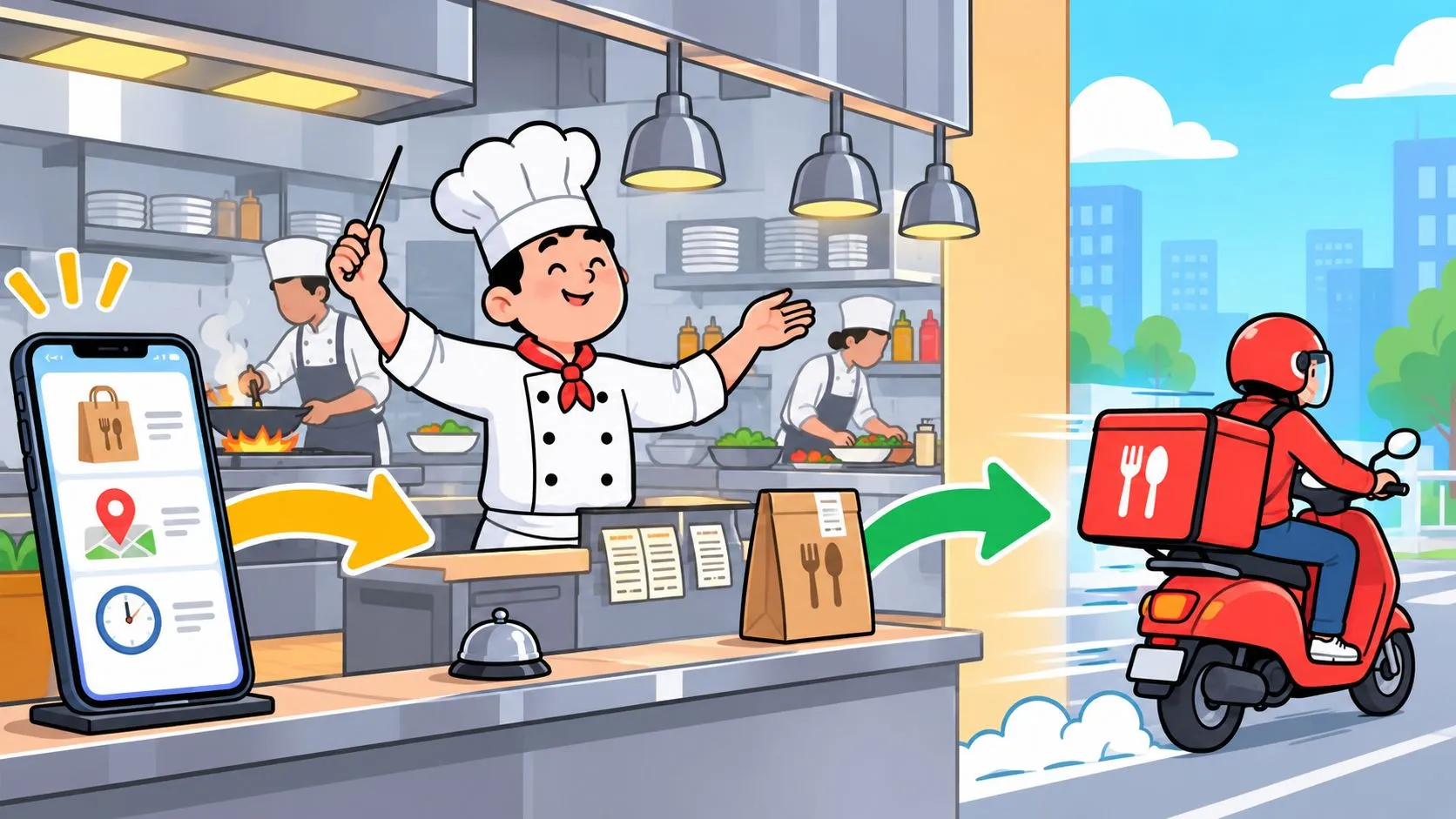
Delivery management is the end-to-end system restaurants use to receive, route, track, and fulfill delivery orders from third-party apps and direct channels, and the core KPIs include on-time delivery rate, first-attempt delivery rate, order accuracy, average cost per delivery, and vehicle capacity utilization. In practical terms, if a restaurant finishes 950 on-time deliveries out of 1,000, its on-time delivery rate is 95% (SmartRoutes).
That definition matters because a Friday dinner rush isn’t judged by whether food left the building. It’s judged by whether the right order was packed, handed off fast enough, and delivered without creating a refund, a remake, or a guest complaint.
Defining Delivery Management for Modern Restaurants
Delivery management is the control loop that keeps a restaurant’s delivery business from turning into chaos when the apps start firing at once. Planning, execution, monitoring, and customer communication all sit inside that loop, along with order intake, carrier allocation, real-time tracking, and proof of delivery (Project44). For operators, that means delivery management is not a driver problem alone, and it’s not just route planning. It’s the whole path from tablet or POS to kitchen line to handoff.
On a normal night, the system is quiet enough to hide its weaknesses. Then Friday hits, Uber Eats is pinging one screen, DoorDash another, Grubhub a third, and the expo is trying to keep tickets readable while the line is already buried. When delivery management is working, the order lands cleanly, the kitchen sees it once, and the handoff happens without a scramble. When it isn’t, staff waste time re-keying, the wrong modifier slips through, and the driver stands there waiting while food quality drops.
Practical rule: if your delivery process depends on staff remembering which tablet to check next, it’s not managed, it’s improvised.
Restaurants feel this most at the handoff point because that’s where the promise gets tested. The order can look perfect in an app and still fail in the building if dispatch, timing, and packing aren’t coordinated. That’s why the best restaurant delivery setups treat delivery management as an operational nerve center, not a back-office chore.
For a broader operator view, OrderOut’s modern guide to your system of delivery frames the same reality from the restaurant floor, where speed, accuracy, and guest communication all collide at once.
The Core Components of a Delivery Management System
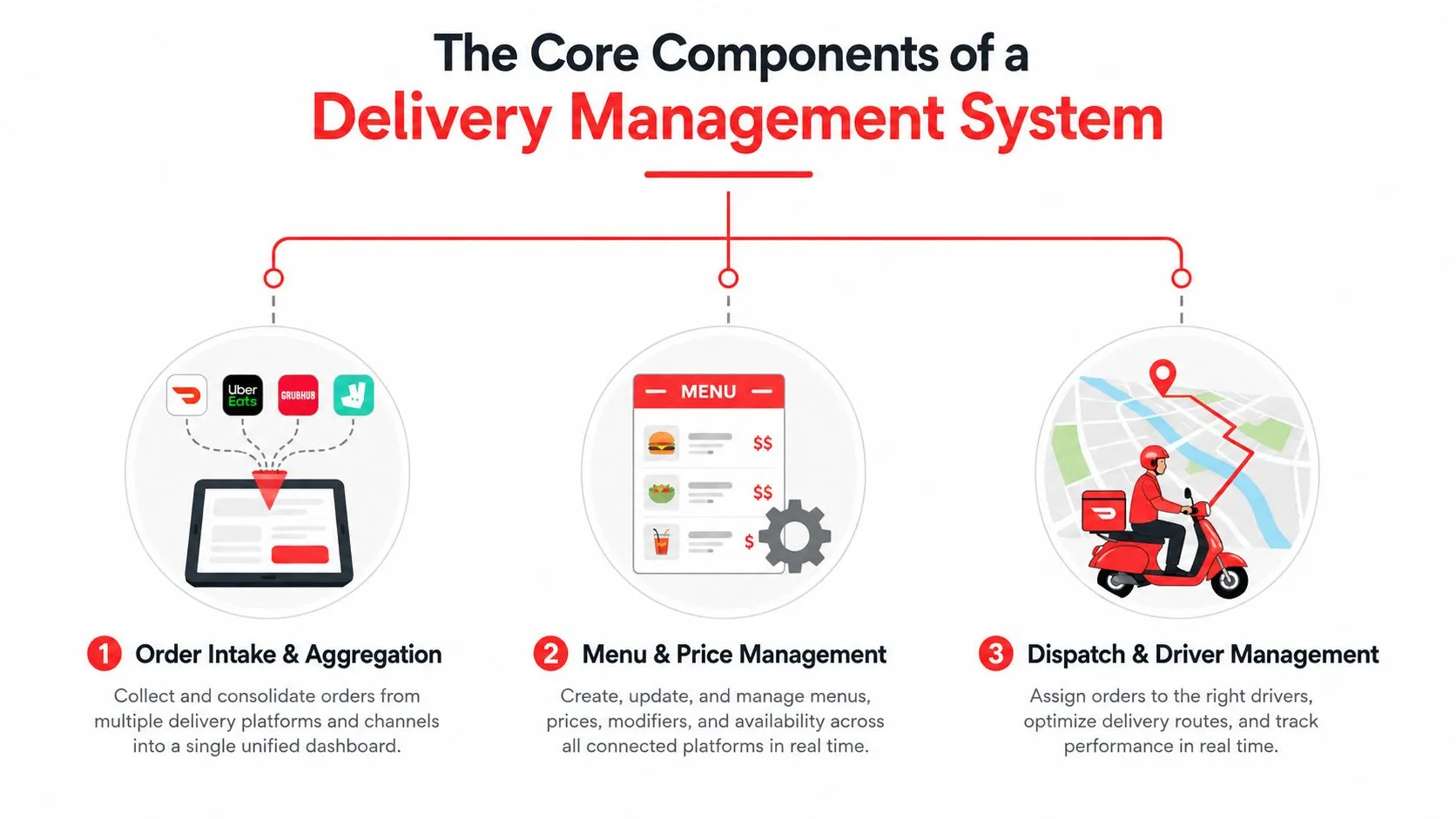
A delivery management system usually breaks into a few connected pieces, and each one has to behave or the whole operation leaks time. Independent logistics guides describe the system as a coordinated flow of planning, coordinating, tracking, order processing, dispatch, route optimization, and proof of delivery (nShift). That’s exactly how it feels in a restaurant too. One bad menu sync or one missed dispatch step creates work for the kitchen, the front counter, and the manager on duty.
Order Intake and Aggregation
The first job is getting orders into one workable flow. In restaurant terms, that means Uber Eats, DoorDash, and Grubhub should not be treated like separate worlds if the kitchen only has one line and one POS. If each marketplace creates its own pile of work, staff spend the rush translating instead of cooking.
Menu and Price Management
The next layer is menu hygiene. Marketplace menus have to match the kitchen’s actual setup, including modifiers, item names, and out-of-stock items, or the operation starts generating avoidable errors. That’s where delivery management becomes more technical, because the software has to map each marketplace menu into a normalized POS schema so the restaurant sees consistent tickets no matter where the order came from.
Dispatch and Driver Management
Dispatch is the point where the order becomes movement. The restaurant needs to know what’s ready, what’s waiting, what can go out, and what’s still in the window. That’s why delivery management software is often described as streamlining dispatching, scheduling, reporting, and tracking, while reducing manual work and human error (C3 Solutions). For operators, the value is plain, fewer decisions are made by guesswork and more are made from the same live order stream.
OrderOut’s food delivery management software overview is useful if you want to see how those pieces show up in a restaurant context rather than a warehouse context.
Why Last-Mile Costs Make Delivery Management Critical
A Friday dinner rush shows how fast delivery economics can slip. One late handoff, one missing item, or one confused driver can turn a profitable ticket into a refund, a remade dish, or a bad review. The last mile is where those costs show up first, because it sits at the point where the restaurant hands control over to the guest experience.
Industry reporting from SmartRoutes says last-mile delivery accounted for 41% of total shipping costs in 2018 and rose to 53% in 2024. That does not mean a restaurant is running a parcel operation, but it does show why the final handoff now carries outsized operational weight. If the last mile is expensive, sloppy handoff habits get expensive too.
Guest expectations have moved faster than a lot of restaurant systems. One industry compilation reports that 90% of consumers consider 2- to 3-day delivery the baseline, while 30% expect same-day delivery (SmartRoutes). Even if a restaurant is not promising parcel-style shipping, those expectations still shape how guests judge the order. They want speed, certainty, and fewer excuses.
A manual tablet workflow makes the problem worse because it adds hidden labor. Staff re-enter data, managers chase corrections, and the floor loses attention at the exact moment it should stay focused on service. An integrated flow keeps the POS as the source of truth and lets the team move without double handling. For the packing side of that handoff, food packaging for hospitality businesses matters because the order has to leave the kitchen intact, not just on time.
High delivery costs punish every extra touch. If staff have to touch the same order twice, you are already paying for inefficiency.
That is why delivery management sits at the center of restaurant operations. Margin, guest experience, and staff workload all meet there, and the pain shows up fast in refunds, labor stress, and late-night reconciliation. A practical last-mile delivery management software setup helps restaurants control the part they can influence, the handoff, the timing, and the data flow.
Manual Tablet Workflows Versus Integrated POS Delivery
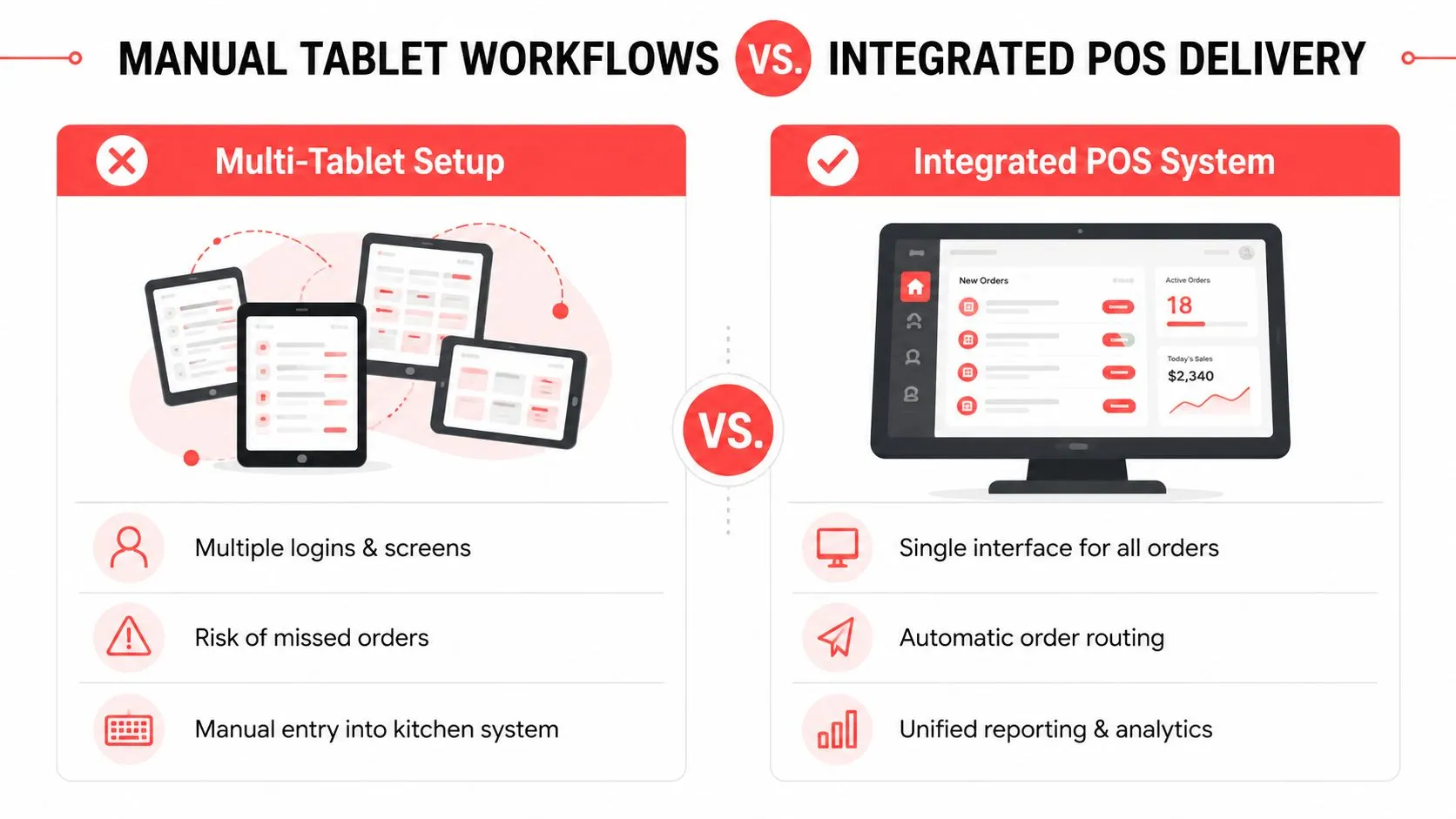
Most restaurants still end up choosing between two messy options. One is the classic tablet stack, with Uber Eats, DoorDash, and Grubhub all asking for attention on separate devices. The other is an integrated POS flow, where those orders land in one system the kitchen already uses. The difference isn’t just convenience. It’s whether the team is managing orders or babysitting screens.
In a tablet setup, the manager or cashier has to watch for incoming orders, check for modifier differences, and often re-key the same details into Clover or Square. That work sounds small until the dinner rush compresses every action into a few minutes. Then one missed tap turns into a wrong ingredient, a delayed ticket, or a driver waiting at the counter while the expo tries to clean up the mess.
What Integration Changes
Integrated delivery POS workflows remove the duplicate work. The marketplace menu is mapped to a normalized POS schema, so orders inject cleanly into the restaurant’s system instead of being translated by hand. That keeps Clover or Square as the operational source of truth, which matters when the kitchen, the cashier, and the manager all need to see the same order status.
What Operators Usually Notice First
- Fewer screens to watch: staff stop flipping between marketplace tablets.
- Cleaner ticket flow: orders land once, not three different ways.
- Less end-of-night cleanup: the team doesn’t spend closeout time hunting mismatches.
This is also where the business case gets obvious. Delivery management software is repeatedly described as reducing manual tasks, improving communication, and freeing up resources for other work (Feedough). In a restaurant, that freed-up time usually goes straight back to the line or the guest, which is where it should have been in the first place.
For a deeper look at why extra tablets hurt restaurant flow, OrderOut’s tablet management guide for restaurants maps the pain points operators already know from the floor.
Key Performance Indicators for Delivery Operations
A Friday dinner rush shows the value of delivery KPIs fast. Orders are flying in, drivers are waiting, and the kitchen is already juggling dine-in tickets. The numbers matter because they show whether the operation is fast, reliable, and efficient at the same time, not just busy. On-time delivery rate, first-attempt delivery rate, order accuracy, average cost per delivery, and vehicle capacity utilization are the KPIs that tell a manager where the leak is before guests start complaining.
| KPI | What It Measures | Why It Matters |
|---|---|---|
| On-time delivery rate | How often deliveries arrive within the promised window | Shows whether timing is under control |
| First-attempt delivery rate | Whether the first delivery attempt succeeds | Failed first attempts create redelivery expense and customer friction |
| Order accuracy | Whether the right items and modifiers reach the guest | Reduces remakes, credits, and complaints |
| Average cost per delivery | What each completed delivery costs the business | Helps protect margin |
| Vehicle capacity utilization | How efficiently the delivery asset is being used | Reveals wasted trips or underused routing |
Insight comes from how those metrics move together. If on-time performance looks fine but first-attempt success is weak, the operation is probably hiding redelivery waste. Research on delivery performance points out that first-attempt failure rates can vary widely by geography and delivery type, which is enough to matter on a busy weeknight because each failure creates another call, another dispatch action, and another chance for a mistake (SmartRoutes).
Measure the order once, not five different ways. If the POS, the kitchen, and the marketplace disagree, the KPI won’t save you.
For restaurant operators using Clover or Square, the cleanest way to track these KPIs is through one delivery flow rather than separate app records. When the order lives in the POS first, reporting becomes less about reconciling systems and more about reading what happened on the shift. That is the point of POS-centered delivery management, it gives you a usable operational record instead of a pile of disconnected app data. For a closer look at how that reporting layer fits into the broader system, see this guide to point-of-sale integrations for restaurants.
How POS Integration Solves Real Delivery Problems
Delivery-to-POS integration solves the problems that show up when a restaurant tries to manage third-party delivery by hand. In practical terms, OrderOut injects Uber Eats, DoorDash, and Grubhub orders directly into Clover or Square, with no extra tablets and no manual re-keying. That matters because every manual touch adds delay and opens the door to an order-entry error.
The technical part is simple enough to explain without jargon. Each marketplace menu is mapped to a normalized POS schema, which means item names, modifiers, and customizations line up in a consistent way before the order reaches the kitchen. The restaurant doesn’t have to translate the same burger three different ways depending on which app sent it. The POS stays in control, and the kitchen gets one clean ticket stream.
What Changes on the Floor
- Staff stop toggling devices: one screen replaces a stack of tablets.
- Kitchen communication gets cleaner: the same order format shows up every time.
- Service feels less frantic: people spend less time fixing entry problems.
That workflow also helps during the parts of the shift operators hate most, the silent errors. A missing modifier, a swapped side, or a cut-off note is often the result of translation between systems, not bad cooking. Delivery management fixes that by removing the translation layer.
If you want to see how this fits into a broader POS strategy, OrderOut’s guide to point-of-sale integrations for restaurants connects the operational dots clearly. For Clover users, OrderOut is also free to install on the Clover App Market, which makes it easy to start without changing the whole stack at once.
Building Your Delivery Management Implementation Plan
A good delivery plan starts with the pain you can already see on the floor. If the team is missing marketplace orders, re-entering tickets by hand, or losing time at end of night to cleanup, those are not isolated annoyances. They’re signs that the delivery workflow isn’t centralized enough.
Start by consolidating every third-party channel that feeds the kitchen. Uber Eats, DoorDash, and Grubhub shouldn’t each have their own operational logic if the restaurant only wants one source of truth. Then clean up menu data so modifiers, item names, and availability match across channels. That step sounds tedious because it is, but it’s what keeps the integration usable once the rush starts.
The next move is staff training. If the team doesn’t know where orders appear, how exceptions are handled, or which screen gets checked first, the best software in the building won’t help much. Delivery management only works when the floor follows one process, even when the phones are ringing and the dining room is full.
A Simple Rollout Checklist
- Assess current pain points. Track where errors, delays, and manual work keep showing up.
- Consolidate platforms. Reduce the number of places staff have to watch.
- Train the shift team. Make the new workflow clear before the next rush.
- Review performance weekly. Use the same KPIs every time so trends are visible.
The final piece is consistency. A manager who checks the same delivery metrics every week can spot leaks faster than a manager who waits for guest complaints. That’s true whether the operation runs one location or many, because the workflow still lives or dies on the same handoff points.
If your restaurant runs Square instead of Clover, OrderOut’s delivery integration for Square is the right place to look. If you’re on Clover, the delivery integration for Clover keeps the same promise, direct app-to-POS flow without the extra tablet pileup.
Frequently Asked Questions
What is delivery management in a restaurant?
Delivery management is the system that coordinates order intake, routing, tracking, and handoff so delivery orders move cleanly from the app to the kitchen and then to the guest. In a restaurant, it also includes communication, exception handling, and the reporting needed to see whether the operation is performing well.
Does OrderOut work with Clover and Square?
Yes. OrderOut is positioned to inject third-party delivery orders into Clover and Square, so restaurants can manage delivery without extra tablets or manual re-keying. That makes the POS the main operational record instead of forcing staff to juggle multiple app screens.
Does OrderOut require extra hardware?
No extra tablets are part of the value proposition. The goal is to route delivery orders directly into the POS your team already uses, which cuts down on device clutter and the manual work that comes with it.
How does menu mapping help delivery management?
Menu mapping keeps marketplace items aligned with the restaurant’s POS structure, including modifiers and customizations. When that mapping is clean, the kitchen sees fewer translation errors and staff spend less time fixing orders after they’ve already been placed.
What should I track first if my delivery process feels messy?
Start with on-time delivery rate, first-attempt delivery rate, and order accuracy. Those three will usually show whether your problem is timing, handoff failure, or entry errors, and they’re the fastest way to tell if your process is improving.
OrderOut connects Uber Eats, DoorDash, and Grubhub directly into restaurant POS systems like Clover and Square, so the delivery line runs through one clean workflow instead of a pile of tablets. If delivery management has turned into nightly re-entry work and preventable errors, take a look at OrderOut and see how it fits the way your team already operates. When you’re ready to simplify the handoff, start onboarding at dashboard.orderout.co.