
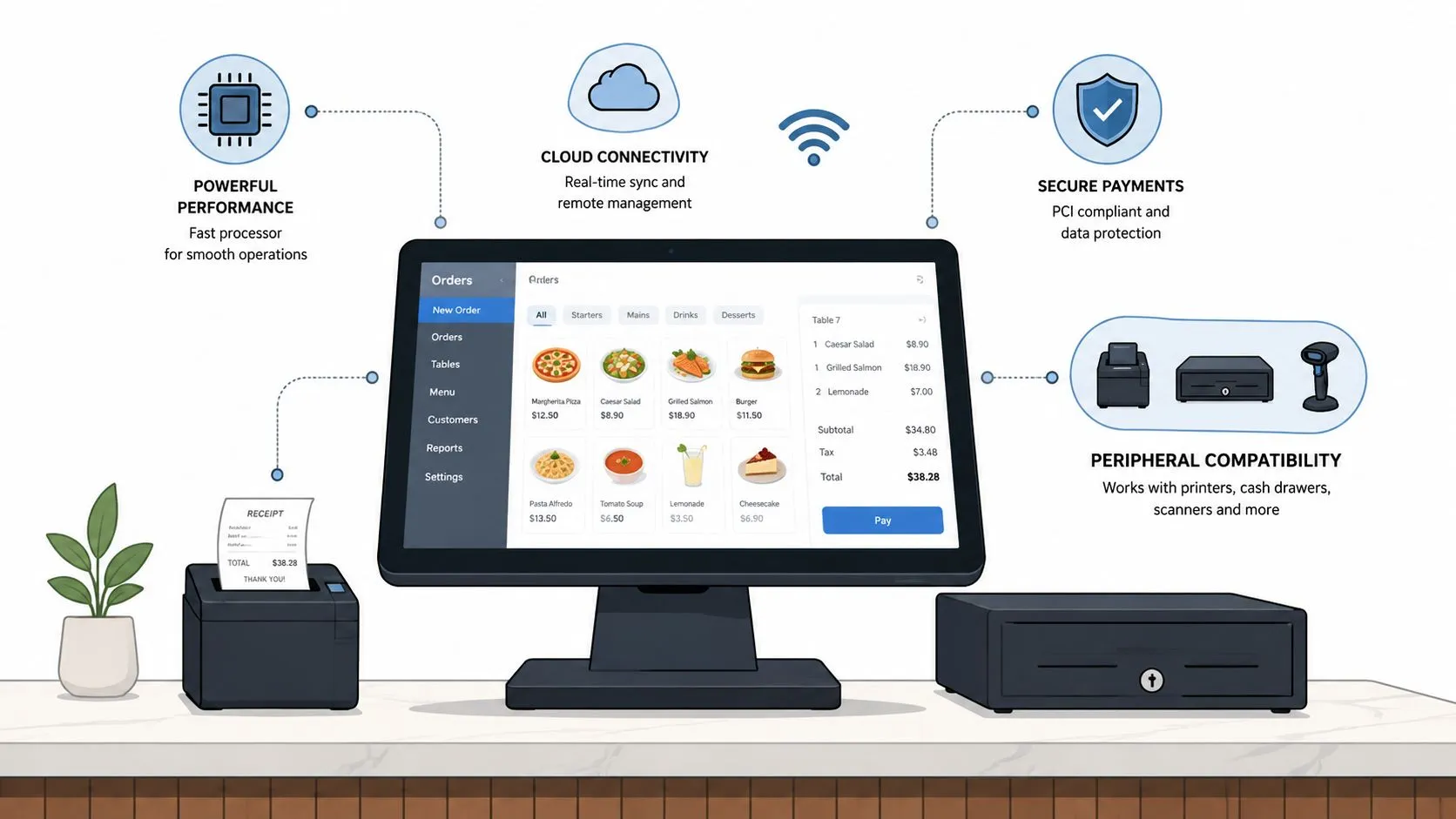
A modern restaurant POS system needs a cloud-capable terminal, reliable network and power with failover, PCI and EMV-ready payment security, compatible peripherals, and integration-ready software for delivery, online ordering, and back-office tools. In plain terms, it has to take payments, keep orders moving, and stay connected when the rush hits.
That’s a very different job from the old cash register model. The modern register was patented in 1879, which marked the move from manual cash handling toward standardized transaction recording in retail operations, but today’s restaurant POS has become the operating core for sales, inventory, customer data, and reporting, with common hardware like card readers, barcode scanners, receipt printers, and touchscreen displays (Hotel Tech Report on POS statistics).
If you run a restaurant, you already know the question isn’t “Do I need a POS?” It’s “What has to keep working when a DoorDash ticket lands, a server rings in a dine-in order, and the Wi-Fi gets flaky at the same time?” That’s the lens to use, because POS system requirements are no longer about one terminal at the counter. They’re about keeping the whole service flow intact.
What a Restaurant POS System Must Do Today
A restaurant POS system has to do more than ring up a sale. It needs to accept payment, send orders to the right place, keep inventory and reports current, and fit into the rest of the tools your team uses every day. If it cannot handle those jobs together, it turns into another screen staff have to work around instead of a tool that helps service move.
Start with the business, not the box
A useful way to define POS system requirements is to treat the POS as the restaurant’s control layer. It should handle dine-in, counter service, online ordering, and third-party delivery without forcing staff to switch between disconnected systems. That matters because a restaurant using Uber Eats, DoorDash, and Grubhub is not just taking payments, it is coordinating several order sources at once.
Integration is part of the requirement, not an add-on. POS platforms now typically combine hardware and software for transaction processing, sales tracking, inventory management, customer data, and reporting. Industry analysts also see continued growth in the category, which reflects how central the POS has become to daily restaurant operations (Hotel Tech Report on POS statistics).
Why delivery changes the requirement set
Once delivery orders flow into the POS, the system has to do more than accept input. It has to preserve the same menu structure, modifiers, prices, and routing logic the kitchen already depends on. If that mapping is wrong, staff end up fixing orders by hand, and the POS stops being the source of truth.
A good test is simple. If your delivery channels cannot land in the same POS your team uses in-house, you are managing two systems, not one.
That is why restaurants using Clover or Square often treat delivery-to-POS integration as core infrastructure. OrderOut’s Clover delivery integration is one example of a setup built to inject marketplace orders straight into the POS without extra tablets or manual re-keying, which keeps the front counter focused on service rather than admin. For a plain-language overview of how that kind of system fits together, see OrderOut’s POS system basics guide.
If you are already comparing options, start with how your current POS handles live service, then compare that against a real delivery workflow on the Clover App Market listing for OrderOut.
Hardware and Operating System Baselines
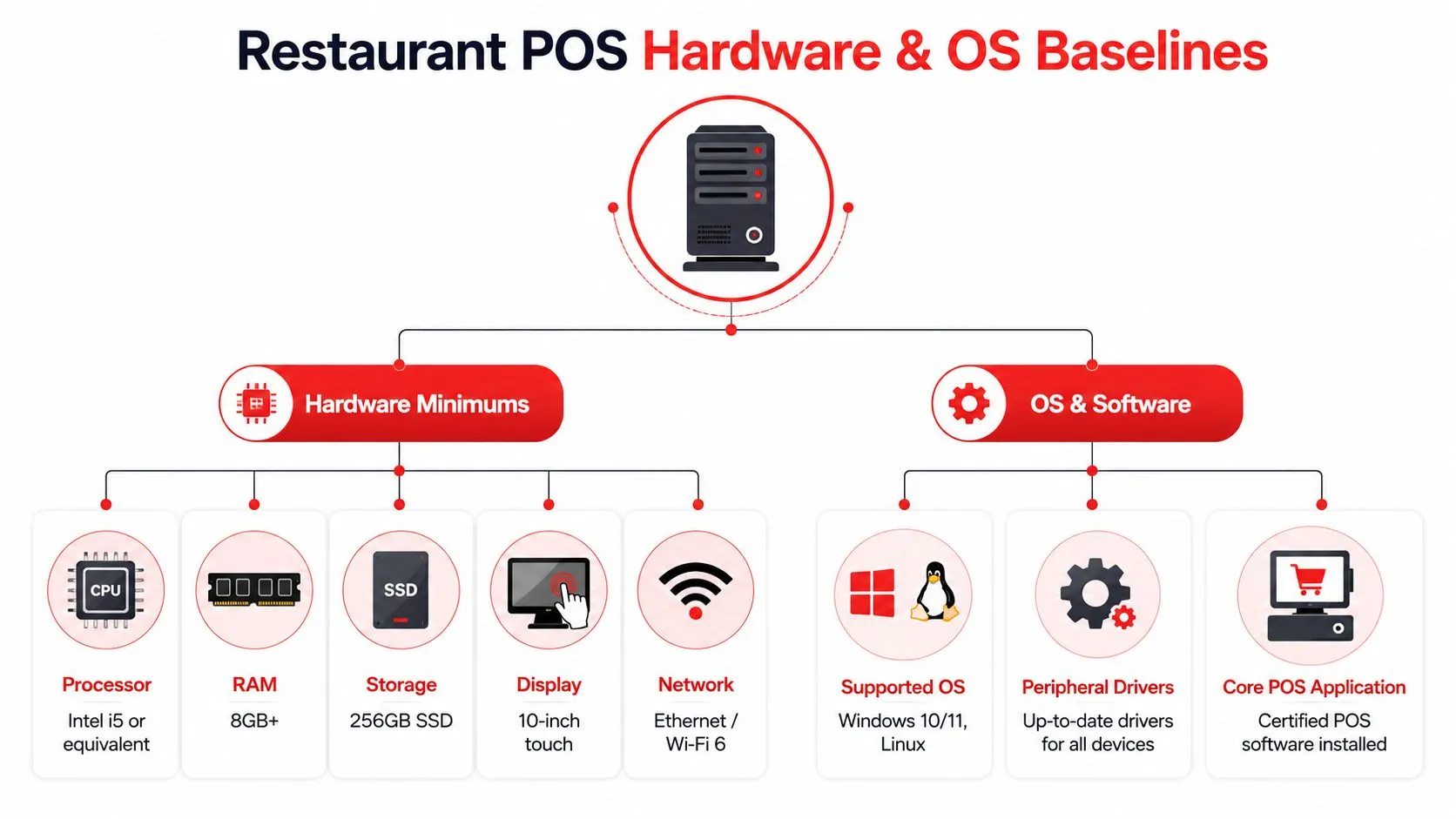
A restaurant POS terminal does not need to be flashy, but it does need enough compute power to stay steady when the room gets busy. If the device is underpowered, staff feel it as lag, frozen screens, slow syncs, and extra tapping while guests wait. The right baseline keeps that bottleneck from showing up in service.
Read the spec sheet like an operator
Government and vendor requirements show that modern POS terminals commonly start at 4 GB RAM and 8 GB ROM/flash with touchscreen displays and support for Android 6+ or Windows 10. More demanding multi-store back-office deployments may require 64-bit Windows 11 and larger disk allocations for central services. The point is not that every restaurant needs the heaviest setup. The point is that the terminal on the line should match the work it is expected to do.
A clean way to read those requirements is to split the job in two. Front-of-house terminals should stay light and fast, while reporting, integrations, and central management belong on stronger machines. When one device tries to do everything, memory and storage become the first weak points. For the underlying specification details, see the ETA POS specs PDF.
A POS should be fast enough that staff stop noticing it during service. The second people start commenting on the system, it is already too slow.
Separate the front line from the back office
The same spec source points to a direct tradeoff. As transaction volume and connected functions rise, low-memory or 32-bit devices become bottlenecks because they cannot reliably host local POS, loyalty, central management, and synchronization services at the same time. For a restaurant owner, the takeaway is straightforward. Do not ask one cheap terminal to run the whole business if your operation depends on delivery, reporting, and offline continuity.
If you are comparing hardware, look for SSD-based devices with at least 8 GB of RAM when the terminal also has to handle reporting, integrations, and resilience tasks. For a practical restaurant-focused framing of tablet-based setups, see OrderOut’s guide to iPad POS systems in restaurants.
Use this rule when you read a quote. If the vendor cannot explain what happens under load, the spec sheet is not complete enough for a restaurant.
Peripherals a Modern Restaurant POS Must Support
A POS terminal only works as well as the devices around it. If the printer drops tickets, the drawer won’t open, or the scanner doesn’t pair cleanly, the staff blames the software even when the actual problem is peripheral mismatch. That’s why the hardware list should be treated like a compatibility contract, not a shopping wishlist.
The devices that actually affect service
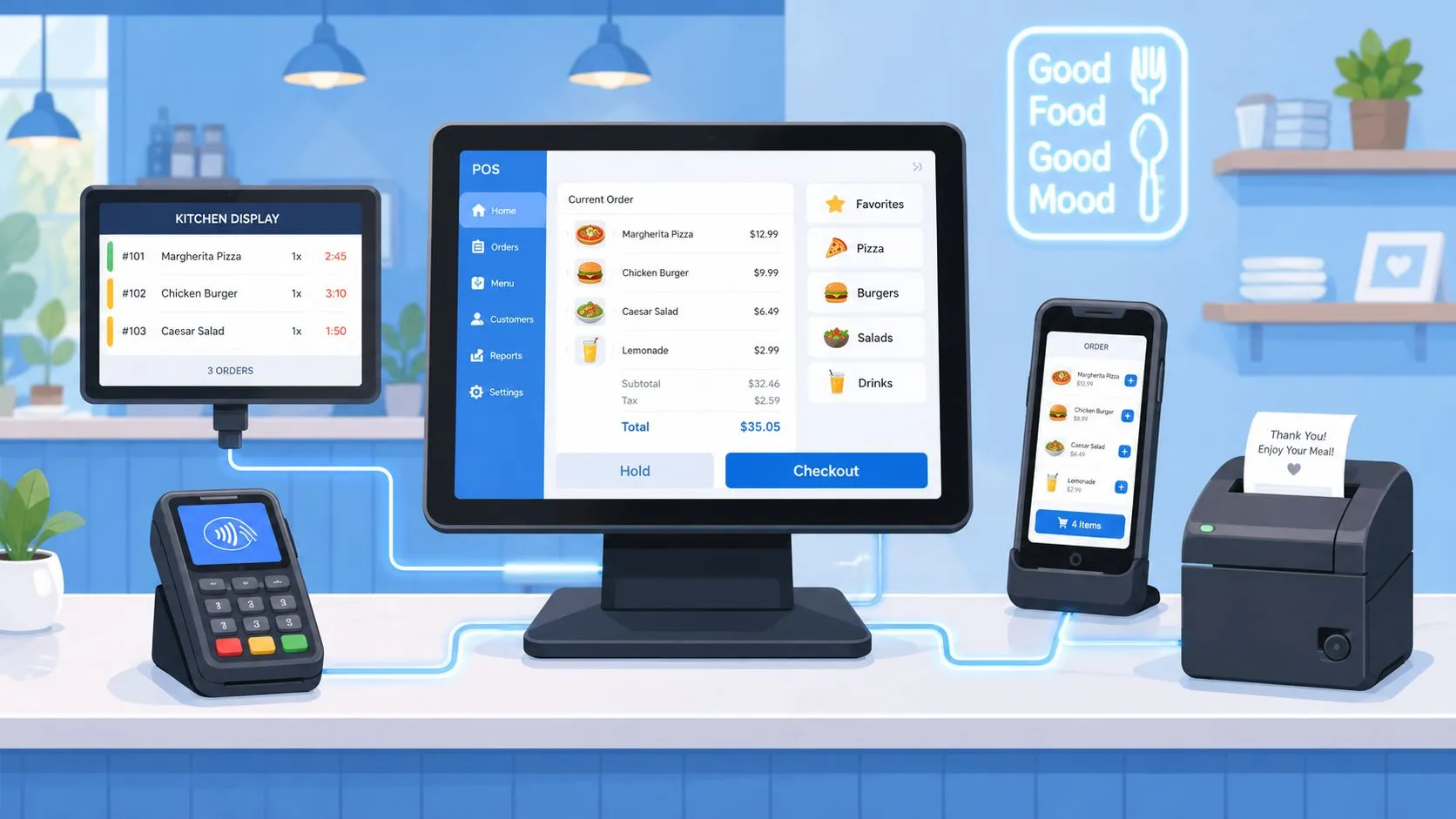
A receipt printer has one job, get the order where it needs to go, whether that’s the guest, the expo station, or the kitchen. A cash drawer needs to fire on the right signal so staff don’t have to fumble with it during a rush. A barcode scanner matters when menus or inventory behave more like retail than classic table service, while a customer-facing display helps confirm totals and reduce confusion at checkout.
There’s also the kitchen display system, which matters even more when the POS is receiving orders from outside channels. If a platform like OrderOut is injecting delivery orders into Clover or Square, the peripherals still have to behave like one connected stack. That’s exactly where the OrderOut Clover delivery integration and OrderOut Square delivery integration fit into the hardware conversation, because the POS stays the center of the operation while the delivery orders arrive cleanly into it.
What goes wrong when peripherals don’t match
The failure pattern is usually the same. A printer model doesn’t support the driver stack, a drawer cable doesn’t match the cash drawer pulse, or a scanner isn’t recognized by the terminal. Staff see the symptom at the counter, but the cause lives in compatibility.
Operational reality: Most “software bugs” in a restaurant POS turn out to be device or driver mismatches.
That’s why hardware procurement should include exact model checks, not just category names. A receipt printer is not a receipt printer if it won’t talk to the rest of your stack, and the same is true of scanners, drawers, and displays.
For a deeper look at the printer side of that setup, use OrderOut’s point-of-sale printer guide.
Network Bandwidth and Firewall Requirements
A restaurant network used to be about getting online. Now it has to keep orders, payments, and sync moving even when the day gets messy. If the connection drops, cloud POS features can stall, payment processing can pause, and delivery orders from outside apps may never reach the terminal at the right time.
Think in terms of continuity
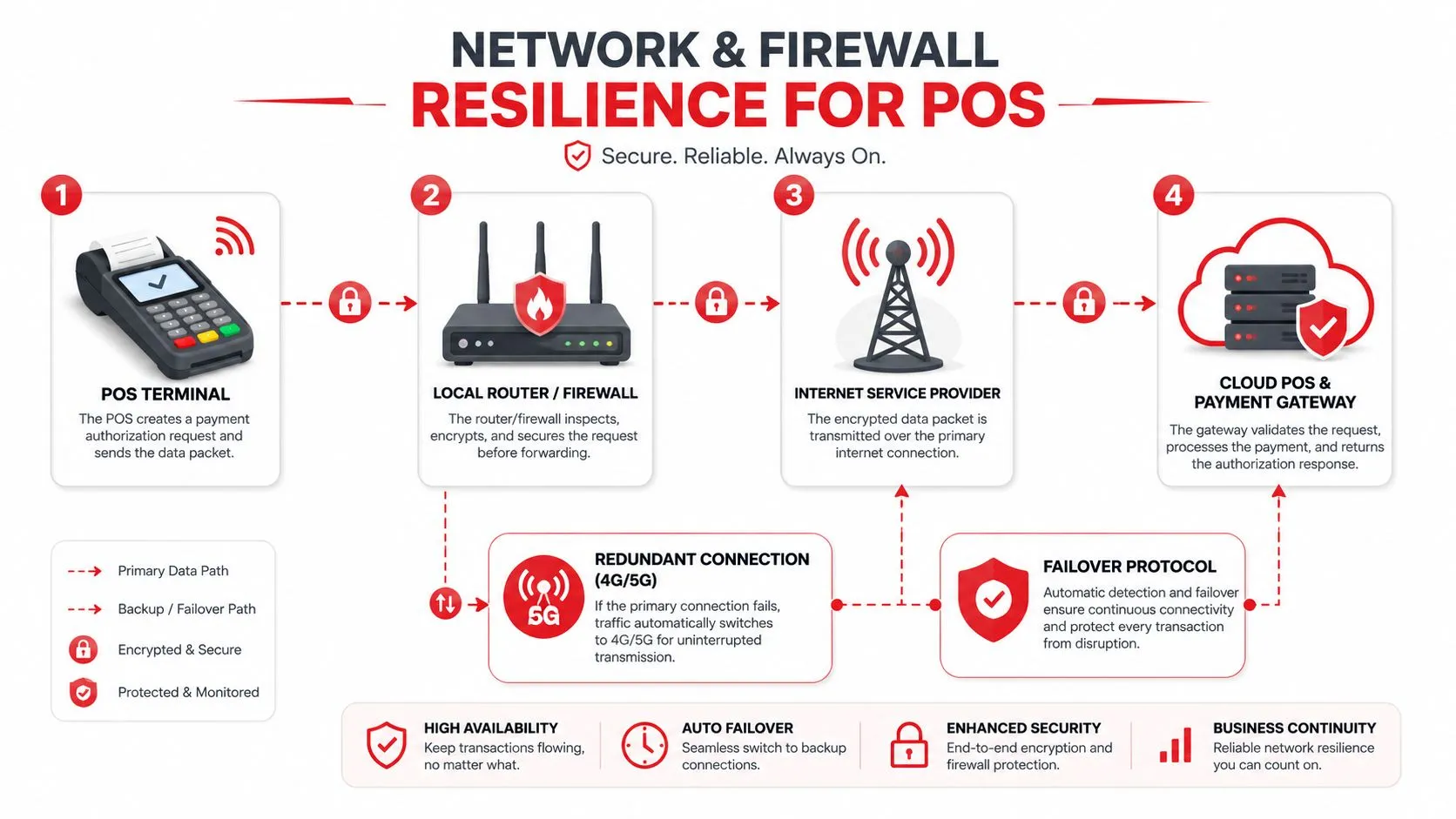
Stable connectivity with a backup path is a fundamental requirement. Cloud POS guidance indicates the system needs a reliable internet connection for payment processing and cloud synchronization, plus power protection such as a UPS, because outages or surges can halt operations (Stripe POS systems guide). That means the network design should anticipate brief failures and recover from them without disrupting the front counter.
For delivery-heavy operators, the pressure is higher. The POS has to handle in-house transactions and also receive orders from outside apps without creating a dead end in the network path. If the connection degrades or a port is blocked, staff do not just lose convenience, they lose order flow and have to start filling gaps by hand.
Ask for the network plan, not just the Wi-Fi password
If you work with an IT provider, ask how the POS traffic is separated from guest Wi-Fi, how the firewall handles cloud sync, and what happens when the main connection fails. A third-party order engine needs a clean route to the POS, and the restaurant should know whether that route survives a short outage or drops completely.
If the network cannot carry orders during a brief disruption, the restaurant is one outage away from manual recovery.
For operators who want a practical reference point when discussing network support, the guide to picking an Edmonton IT provider is a useful read because it frames support in business terms, not just technical jargon.
The same thinking applies to payment routing. The way your POS talks to processors, gateways, and connected apps should be mapped clearly, and a payment processing integration guide can help you see where the handoffs happen before a weak link turns into a checkout delay.
Payment Security and Compliance Requirements
A restaurant can move every ticket quickly and still create risk at the payment screen. The right POS has to accept cards safely, record what happened, and keep those records in a form you can rely on later if a processor, auditor, or manager asks for proof. Staff do not need to understand every security standard, but the system should keep them from expanding exposure every time they tap, dip, or swipe a card.
Translate compliance into restaurant language
At the counter, PCI means the POS and payment flow should protect cardholder data instead of spreading it across reports, exports, and extra devices. EMV means chip cards are handled through the standard chip path, not as a legacy swipe-first setup. Those controls matter because they reduce the amount of sensitive data the restaurant has to guard in the first place.
Recordkeeping matters just as much as card acceptance. A reliable POS system must record all relevant events in the sales process, including metadata for who, what, when, and where, and the recorded data must be stored for a 7-year legal retention period while remaining authentic, intact, and protected from unauthorized or undocumented changes (Reliable POS system standard). In practical terms, that means the system should leave a clean trail from order entry to settlement, so disputes, audits, and internal reviews can be checked against the same source of truth.
A useful way to judge this is to ask whether the POS treats payment data like a controlled record or just another line item. If a manager can edit logs without trace, or if the system spreads payment details across too many tools, the restaurant loses clarity fast. That is why operators often ask their support partner to explain the payment path end to end, and the guide to picking an Edmonton IT provider is a practical reference for that kind of conversation because it frames support around business continuity, not just device setup.
Know what to ask your processor or reseller
Start with simple questions. Does the setup support EMV cleanly? How does it narrow the scope of sensitive data? How are logs retained, and who can change them? Those answers usually tell you more than a feature list.
The same review should cover how the POS hands payment data to connected systems. A payment processing integration guide helps map those handoffs before a weak link turns into a checkout delay. If your restaurant runs delivery, online ordering, and in-house payments through the same counter, you want to know where each handoff begins, where it ends, and what happens if one part of that chain fails.
Offline Mode and Failover Behavior
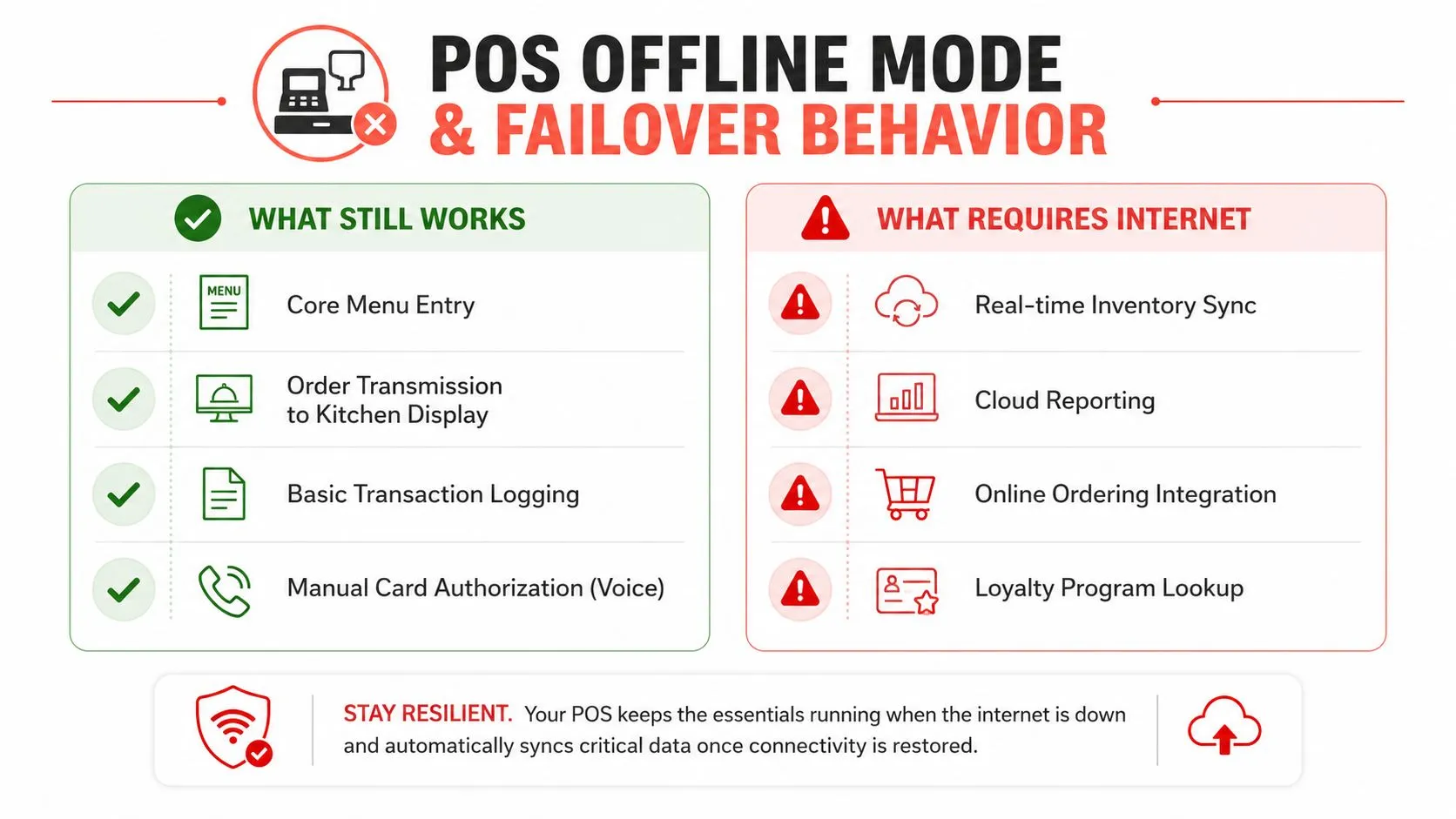
The test of a POS comes when the internet or a connected service drops during service. A system that only works when everything is perfect isn’t enough for a restaurant. You need to know what still functions, what pauses, and how fast the team can recover without losing the thread of service.
Offline mode is not one thing
There’s a big difference between offline transaction queuing and offline order injection. A POS may let staff enter a sale locally and sync it later, but that doesn’t mean delivery orders, inventory updates, or loyalty lookups will keep working the same way. Restaurants with multiple digital channels need to ask what survives a gateway failure, a cloud sync interruption, or an internet outage.
Independent checklists emphasize offline mode, automatic sync, audit logs, and reliability, but the more useful question is operational. Can the system preserve order capture, reconciliation, and error recovery when connected services go down? That’s the standard that matters in a service environment where one bad hour can create a long cleanup.
Demand graceful degradation
A hard crash is the worst outcome. A better system keeps the menu visible, records transactions locally, and syncs cleanly when the connection returns. Audit logs matter because they show what happened during the outage, and automatic sync matters because staff shouldn’t have to reconstruct the shift by hand later.
Practical rule: Ask vendors what still works without the internet, then ask what happens to each record when connectivity comes back.
For delivery-heavy restaurants, this also affects the injected order flow from outside channels. If the POS can’t accept those orders cleanly in a degraded state, the team needs a fallback process that’s still workable under pressure.
Integration Checklist for Third-Party Delivery and Online Ordering
A restaurant POS should fit the channels you already use, not force you to rebuild them. If you’re running delivery through Uber Eats, DoorDash, and Grubhub, the integration has to map marketplace menus into the POS cleanly, keep modifiers aligned, and avoid creating another stack of tablets on the counter.
Check the fit before you sign
Start by asking whether the POS can receive delivery orders directly into the system your team already uses. In a Clover or Square setup, that means the delivery engine has to translate external marketplace menus into a normalized POS schema, not just dump raw order data onto a screen. If that mapping isn’t clean, staff end up fixing order details by hand.
That’s where OrderOut’s 3rd-party order engine comes in as one integration path, because it’s built to inject third-party delivery orders into the POS rather than add another workflow on top of it. For a specific example, the engine also connects through channel-and-POS combinations such as Grubhub to Clover delivery integration, which is the kind of direct path restaurants need when the room is busy.
Use a simple pre-install checklist
- Menu mapping: Make sure item names, modifiers, and combos will land in the POS in a form the kitchen already understands.
- Tablet count: Confirm that delivery orders won’t force staff to juggle extra devices.
- Error handling: Ask what happens when a marketplace, gateway, or sync step fails.
- Support and contract terms: Review support response, contract flexibility, and upgrade handling before rollout.
- Pilot testing: Test one live flow before you let it touch every order source.
The broader point is simple. If a solution saves time, reduces re-entry, and keeps staff focused on guests instead of devices, it belongs in the conversation. If it adds another console, it’s solving the wrong problem.
For restaurant owners who want a clean starting point, OrderOut’s restaurant overview and OrderOut pricing are useful places to compare the operational fit before you move ahead.
Frequently Asked Questions
Does OrderOut work with Clover?
Yes, OrderOut is positioned to inject third-party delivery orders into Clover so staff don’t have to re-key them. That keeps Clover as the system the team works from while the delivery orders land in the POS flow.
Does OrderOut work with Square?
Yes, OrderOut also supports Square in the same delivery-to-POS model. The goal is to keep third-party orders inside the POS your staff already uses, instead of spreading the workflow across extra tablets.
What happens if the internet drops during a delivery rush?
That depends on your POS setup, network design, and failover plan. A restaurant should require offline continuity, local recordkeeping, and clean sync behavior so the team can keep moving without losing the service thread.
Do menu mappings matter for injected delivery orders?
They matter a lot. OrderOut maps each marketplace menu to a normalized POS schema, which helps keep modifiers, items, and routing aligned when the order hits the POS. That’s how you avoid the messy re-entry step that slows staff down.
Is PCI compliance handled by the integration or by the restaurant?
The restaurant still needs a compliant payment environment. An integration can help keep order flow clean, but payment security, card acceptance, and recordkeeping remain part of the overall POS requirement set.
If your restaurant is trying to turn delivery chaos into one clean POS flow, OrderOut connects Uber Eats, DoorDash, and Grubhub into Clover or Square without extra tablets or manual re-keying. It’s a practical way to make your POS do the job it should already be doing, keep orders moving, reduce avoidable errors, and give your staff more room to focus on guests. Start by visiting OrderOut and see how the setup fits your operation.