
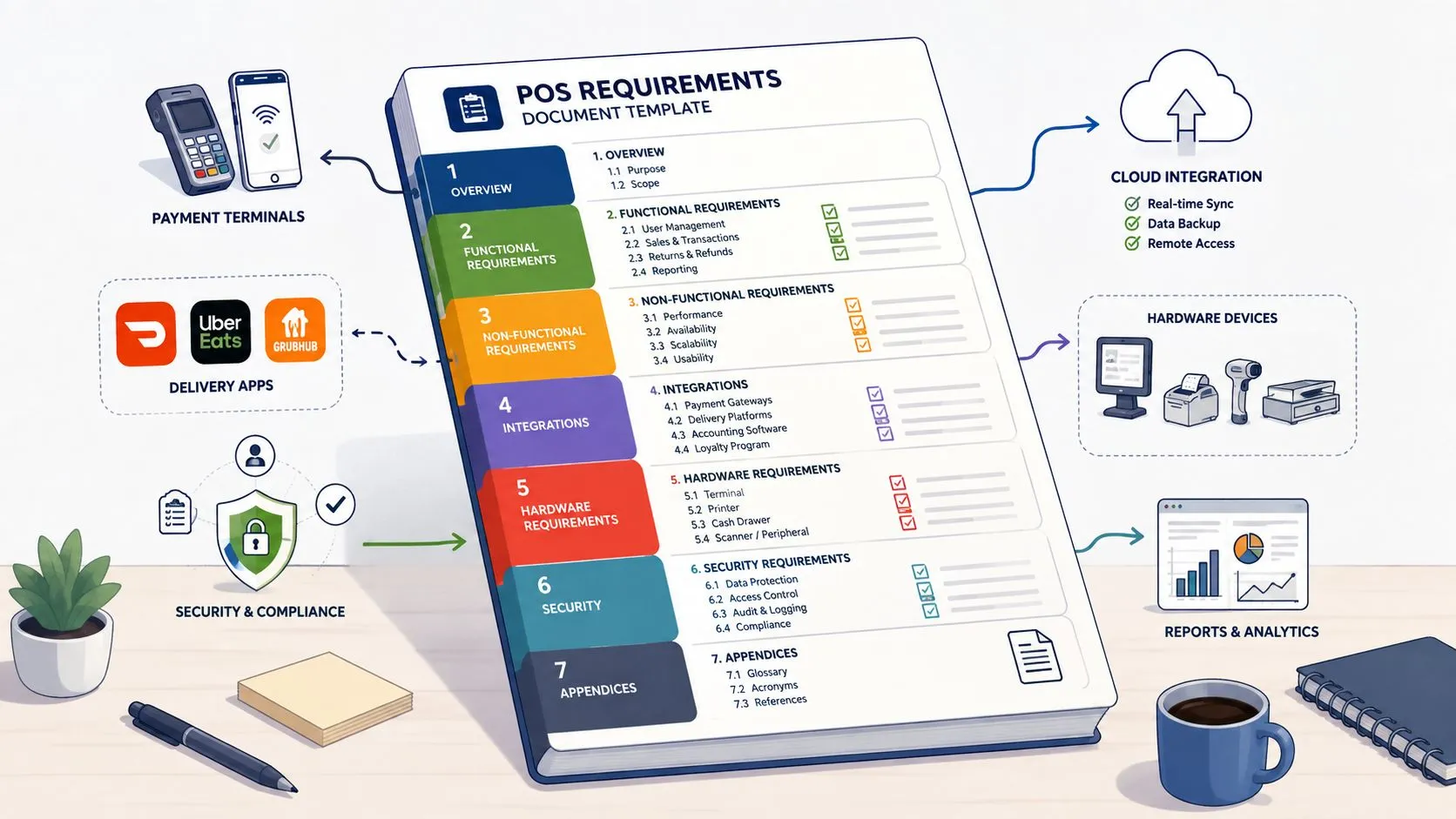
A point of sale system requirements document is a structured blueprint that defines functional, non-functional, integration, hardware, data, security, and acceptance requirements for selecting and implementing a restaurant POS. It turns operational needs into testable specifications, so Clover or Square can become the reliable source of truth for dine-in, pickup, and delivery orders.
That distinction matters when Uber Eats, DoorDash, and Grubhub orders need to reach the POS without an extra tablet or manual re-keying. A vague feature list might mention “delivery integrations,” but it usually won’t define menu ownership, modifier mapping, failed-order handling, reconciliation, or rollback. Those omissions are where restaurant launches become fragile.
What a Point of Sale System Requirements Document Actually Does
A point of sale system requirements document records what the restaurant needs the system to do, how well it must do it, which systems it must connect to, and how the team will prove that it works. Operators use it during vendor selection. Systems leads use it during configuration and integration. Managers use it during training, testing, and rollout.
It isn’t the same as an RFP. An RFP asks vendors to respond to a business need. The requirements document defines that need in enough detail for every vendor to answer against the same baseline. A vendor proposal then explains how a specific product will satisfy those requirements, including any limitations, dependencies, or additional implementation work.
Restaurant POS technology has moved well beyond basic payment entry. One published history records a microprocessor-controlled cash register system built for McDonald’s Restaurants in 1974, followed by Gene Mosher’s graphical touchscreen POS software for the Atari 520ST in 1986. The same history describes requirements such as membership discounts, promotional pricing, inventory adjustments after physical counts, expiry tracking for perishables, multiple-outlet control, and inventory audit trails. Restaurant POS history and capabilities
Use the document before vendor demos
Write the document before comparing Clover, Square, or a delivery integration provider. Otherwise, the first impressive demo can become the specification. A vendor may show a smooth order screen while leaving unanswered questions about:
- Order ownership: Which system owns the order number, status, tax, and payment state?
- Menu mapping: Who maps marketplace items, modifiers, sizes, prices, and availability to POS records?
- Failure handling: What happens when an order is accepted by a marketplace but cannot be injected into the POS?
- Reconciliation: Which reports are compared when marketplace, integration, and POS totals disagree?
- Change control: Who approves menu changes, and how are changes tested before reaching live stores?
The document should remain useful after procurement. Link each requirement to a configuration decision, a test case, an owner, and a sign-off. That creates a traceable chain from business need to production behavior.
Practical rule: If a requirement can’t be demonstrated, tested, or assigned to an owner, it isn’t ready for vendor evaluation.
For a plain-language foundation, see this guide to what a restaurant POS system does. Then rewrite generic statements such as “supports delivery” into specific behavior, such as “the system shall receive an Uber Eats, DoorDash, or Grubhub order, map it to the normalized menu schema, create the corresponding POS order, and return an acceptance or failure state.”
The restaurant POS market is large and expanding. Grand View Research valued the global restaurant POS terminal market at USD 22,263.9 million in 2023 and projected USD 38,159.5 million by 2030, with an 8% CAGR from 2024 to 2030. Grand View Research restaurant POS market estimate That scale helps explain why a requirements document now functions as a business-critical implementation blueprint rather than a casual checklist.
How to Structure Your Requirements Document for Traceability
A usable document needs a structure that lets a restaurant operator, POS vendor, integration engineer, and tester find the same requirement without interpretation. Give every requirement a unique identifier and use hierarchical numbering so sub-requirements remain connected to their parent function. This approach supports scope control, testing, and change management across ordering, payments, refunds, and device management. Requirements writing guidance on traceability
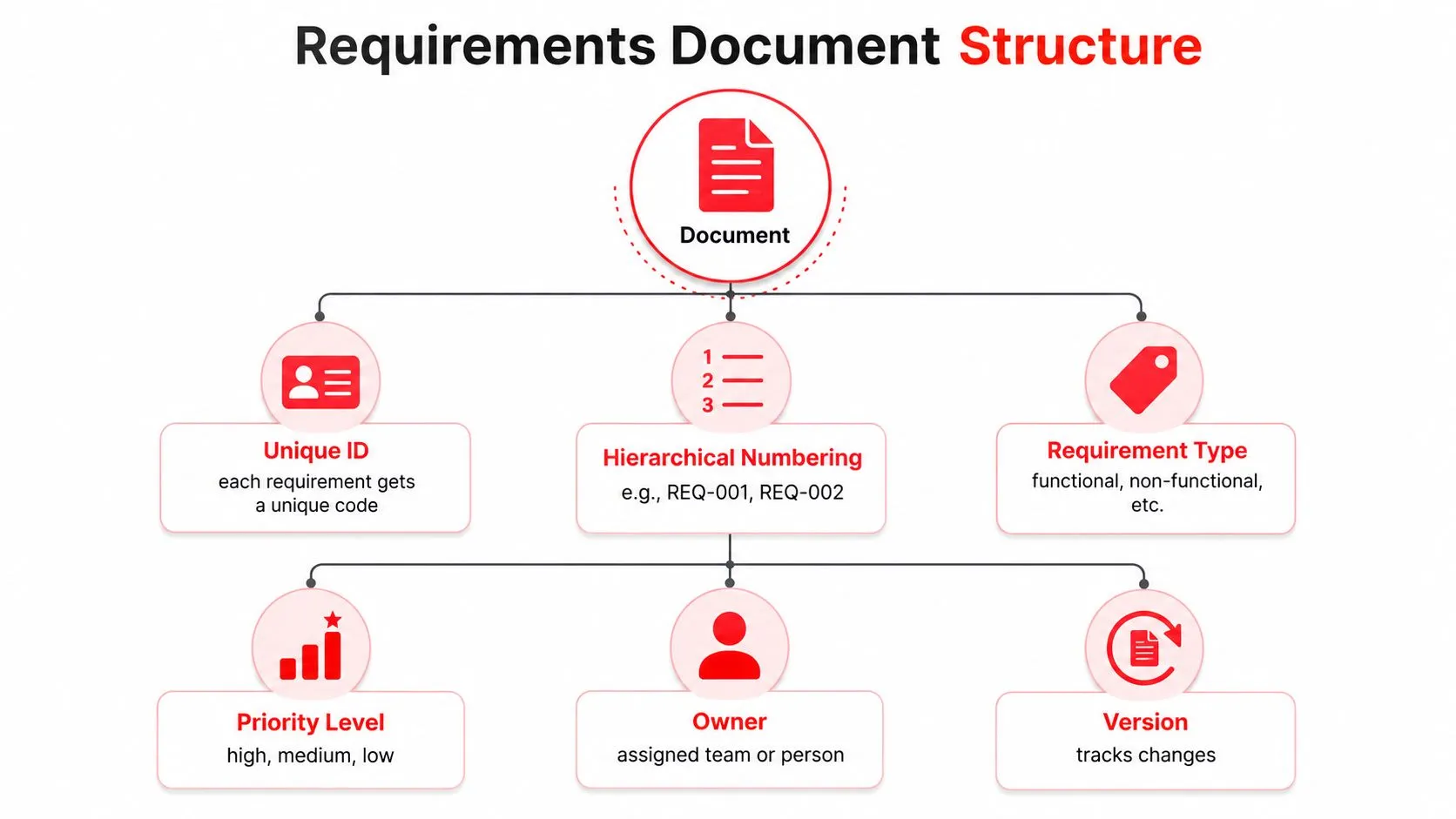
Give every requirement a durable identity
A simple convention might look like this:
- ORD-001: The POS shall create an order from an approved delivery channel.
- ORD-001.1: The order shall preserve marketplace order identification.
- ORD-001.2: The order shall map menu items and modifiers to the normalized POS schema.
- PAY-001: The system shall record payment state separately from fulfillment state.
- DEV-001: The system shall route approved orders to the assigned POS device or printer.
The code doesn’t need to match these examples exactly. It needs to stay unique, stable, and meaningful. Avoid renumbering the entire document whenever someone adds a requirement. A stable identifier lets a test case, vendor response, support ticket, and rollout decision refer to the same obligation.
Add metadata that explains responsibility
Each row should include:
| Field | Purpose |
|---|---|
| Requirement ID | Provides a stable reference |
| Requirement text | States one behavior or constraint |
| Type | Identifies functional or non-functional scope |
| Priority | Separates essential behavior from later enhancements |
| Owner | Names the responsible business, POS, or integration team |
| Dependency | Records required devices, APIs, menus, or accounts |
| Acceptance test | Defines evidence of completion |
| Version | Shows when the requirement changed |
| Status | Tracks draft, approved, tested, or rejected |
Keep one requirement per row. “The system shall ingest orders, update inventory, print kitchen tickets, and reconcile payments” contains several requirements and will be difficult to test. Split it into separate records, then connect them through the hierarchy.
For rollout work, keep a change log beside the requirements matrix. Record the decision, affected IDs, approver, reason, and test impact. A maintained document becomes part of the operating system, not a file that disappears after the contract is signed. Related onboarding controls are covered in this guide to vendor onboarding.
Functional Requirements Every Restaurant POS Needs
Functional requirements describe the work the system must perform. Write them as observable behavior, not marketing language. “Easy to use” is an opinion. “A cashier can open a delivery order, review modifiers, apply an authorized adjustment, and route the ticket to the correct preparation station” is testable.
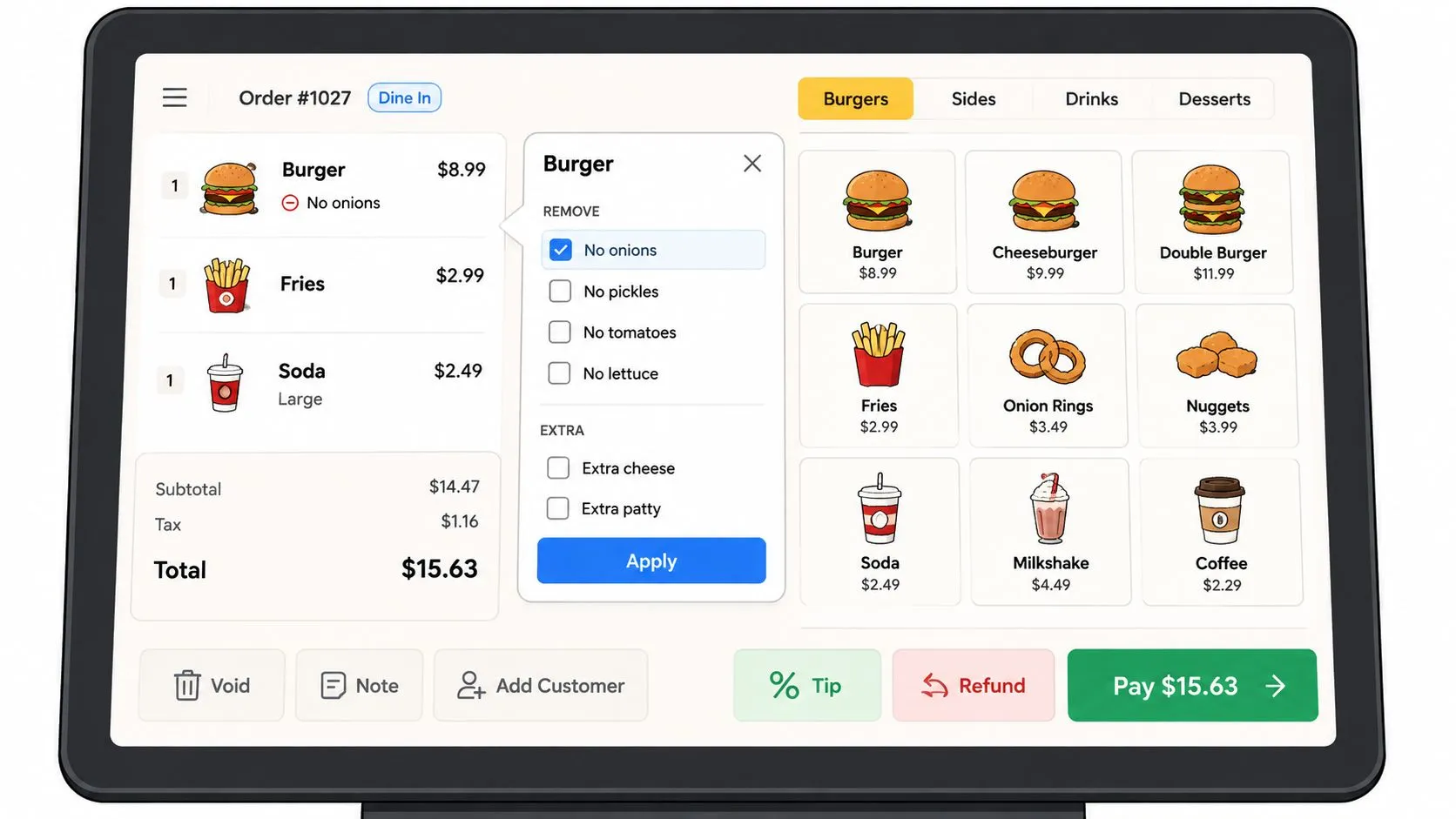
Order and menu behavior
Start with the order lifecycle. Specify how the POS should create, edit, hold, cancel, refund, and close orders from each channel. Include dine-in, pickup, delivery, QR ordering, kiosk ordering, and online ordering if those channels are in scope.
Useful wording includes:
- Order creation: The system shall create a POS order when an approved marketplace order passes validation.
- Order identity: The system shall retain the marketplace order ID and link it to the POS order record.
- Status updates: The system shall send accepted, rejected, ready, canceled, and fulfilled states according to the integration contract.
- Duplicate prevention: The system shall identify a repeated marketplace event without creating a second POS order.
- Availability: The system shall support item and modifier availability changes without deleting historical order detail.
Menu requirements deserve their own subsection. Define the relationship between marketplace menus and POS records, including item names, internal IDs, prices, taxes, sizes, modifier groups, required modifiers, optional modifiers, and special instructions. A normalized schema is only reliable when the source menus are clean. If two modifiers represent the same kitchen instruction under different names, mapping and reporting become harder to control.
Payments, inventory, and promotions
Specify whether the POS records a delivery order as paid, unpaid, or paid through an external marketplace. Define partial payments, failed payments, refunds, voids, tips, taxes, service charges, and adjustments separately. Square’s Orders API supports itemized payments through custom line items or catalog objects and can send orders to physical point-of-sale devices for fulfillment. Square Orders API documentation
For inventory and promotions, include the controls operators use:
- Inventory adjustment: The system shall support stock adjustments after a physical count.
- Promotional pricing: The system shall apply approved promotional prices within defined dates and channels.
- Membership discounts: The system shall apply eligible membership discounts while recording the reason and authorizing user.
- Perishable items: The system shall support expiry tracking where the inventory workflow requires it.
- Audit history: The system shall record who changed an item, price, availability state, or inventory quantity.
A generic checklist often fails. It names “inventory” but doesn’t say whether a marketplace order decrements the same item used by the cashier, or whether a failed injection reverses the reservation. Write the expected result for each edge case.
A restaurant evaluating broader capabilities can use this practical guide to POS systems for restaurants. The vendor’s demo should follow your actual workflows, not a prepared happy path.
A short walkthrough can help stakeholders visualize the user-facing flow, but the written acceptance criteria remain the source of truth.
Roles and reporting
Define permissions by task. A cashier may open and close orders, while a manager may approve refunds, change availability, or review reconciliation exceptions. Reports should distinguish channel, fulfillment type, payment state, discount, refund, and adjustment.
The test question is simple: can the restaurant explain a marketplace order from receipt through kitchen preparation, fulfillment, payment, and reporting without opening several unrelated systems? If not, the requirement is incomplete.
Non Functional Requirements for Speed Reliability and Offline Mode
Non-functional requirements describe operating quality. They matter most during a rush, when modifier-heavy orders arrive across several channels and staff can’t stop to diagnose an ambiguous failure. Restaurant POS buying guidance emphasizes fast ticket opening, offline mode, and complex modifier handling, while integration research identifies brittle dependencies, inconsistent data contracts, timing assumptions, and weak documentation as common sources of failure. Restaurant POS system requirements checklist
The supplied visual includes example thresholds such as ticket opening under two seconds, latency under 100 milliseconds, and 99.9% uptime. Treat these as specification examples, not universal restaurant standards. Your own requirements should define the measurement method, test environment, transaction mix, and acceptable result before a vendor is scored.
Measure the rush, not the brochure
Write performance requirements around realistic workloads:
- Ticket display: The system shall open a representative order within the agreed threshold under a defined load.
- Modifier handling: The system shall process a large modifier set without truncating, reordering, or losing required selections.
- Concurrent traffic: The test shall include simultaneous dine-in, pickup, and delivery events.
- Error visibility: The system shall show an actionable error when an order cannot be created or routed.
- Retry behavior: The integration shall retry recoverable failures without duplicating accepted orders.
Avoid “real time” unless you define it. Does it mean the order appears promptly on the POS screen, reaches a kitchen printer, updates the marketplace, or all three? Each event needs its own timing and evidence.
Design for interruptions
Offline mode needs more detail than “works without internet.” Specify which actions remain available, what data is queued locally, how the system identifies unsent orders, and how it reconciles after connectivity returns. Payment behavior deserves special care because an offline transaction can create authorization, duplicate, or settlement questions.
A staging environment should contain production-like menus, modifiers, taxes, printers, user roles, and channel events. Test network interruptions, expired credentials, unavailable menu items, delayed webhooks, and device restarts. Then define a parallel cutover, where the old process remains available while the new flow is observed and verified.
A resilience requirement isn’t complete until it explains what staff see, what the system stores, and who clears the exception.
Document recovery ownership. The POS vendor may own device behavior, the integration provider may own retry logic, and the restaurant may own menu corrections. If those boundaries aren’t written down, every failed order becomes a support argument during service.
Integration Requirements for Delivery Apps Payments and Hardware
Delivery-to-POS integration is the part most generic templates under-specify. The document must describe how Uber Eats, DoorDash, and Grubhub orders reach Clover or Square, how menu data maps into the POS, and how the restaurant handles exceptions without returning to manual re-keying.
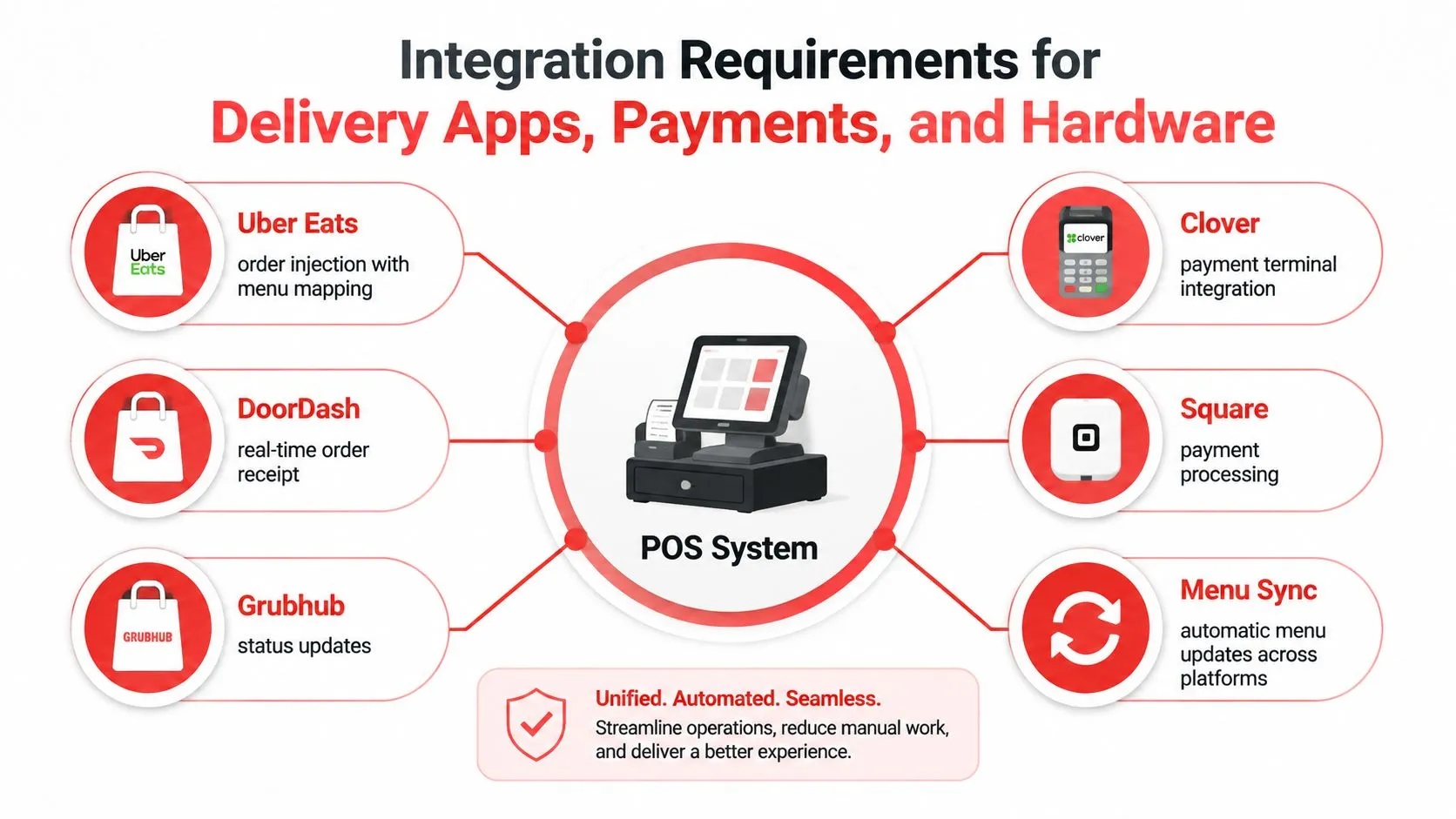
The integration contract should identify the source and destination for every field. A normalized POS schema can map a marketplace item to a Clover or Square catalog item, carry modifier selections into kitchen instructions, preserve channel metadata, and maintain the relationship between external and internal order IDs.
Clover’s REST API supports creating a complete order with line items, modifiers, discounts, and service charges in one API call. It also supports overriding default tax rates or item prices for non-standard orders. Clover order API documentation Square requires fulfillment details and a fully paid order before that order appears in the Square Point of Sale app. Its supported fulfillment types include PICKUP, SHIPMENT, and DELIVERY. Square fulfillment requirements
Assign the work nobody wants to own
A sound requirements document names the owner for:
- Menu and modifier field mapping.
- Price, tax, and service-charge validation.
- Order injection and status events.
- Retry, duplicate prevention, and dead-letter handling.
- Marketplace-to-POS reconciliation.
- Dispute investigation and correction.
- Rollback to the prior ordering process.
OrderOut is one implementation option for this workflow. It maps each marketplace menu to a normalized POS schema and injects Uber Eats, DoorDash, and Grubhub orders into Clover or Square, removing extra delivery tablets and manual re-keying from the defined process. Operators can review the OrderOut third-party order engine, including the Clover delivery integration and Square delivery integration.
The requirements should still define what happens when the integration fails. A rollback procedure might pause marketplace ordering, preserve already accepted orders, notify the restaurant, and restore the prior process without creating duplicate tickets. Reconciliation should compare order identity, item detail, discounts, taxes, fees, tips, refunds, and final payment state.
Use a responsibility matrix
| Integration Point | Sample Requirement | Owner | Verification |
|---|---|---|---|
| Marketplace order intake | The system shall receive Uber Eats, DoorDash, and Grubhub order events and preserve external IDs | Integration owner | Send approved test orders and compare IDs |
| Menu mapping | The system shall map items, sizes, modifiers, prices, and availability to the normalized POS schema | Restaurant and integration owner | Compare a controlled menu against POS records |
| POS injection | The system shall create the corresponding order in Clover or Square | POS and integration owners | Verify itemization, modifiers, taxes, and routing |
| Fulfillment | The system shall assign the correct pickup or delivery state | Operations owner | Test each supported fulfillment workflow |
| Payment state | The system shall record payment status without treating an unconfirmed payment as settled | POS and payments owner | Test paid, failed, refunded, and partial states |
| Reconciliation | The system shall identify mismatches between marketplace and POS records | Finance or operations owner | Run an exception report and resolve sample mismatches |
| Rollback | The team shall restore the approved fallback process without duplicate orders | Implementation lead | Conduct a controlled failure exercise |
Regional API behavior and authentication also belong in the document. Clover uses different production base URLs for North America, Europe, and Latin America, and recommends expiring access and refresh tokens to protect merchant data. Clover REST API calls and authentication Specify the intended market, endpoint handling, token storage, expiration behavior, and credential rotation responsibility.
For teams evaluating API terminology and ownership, this explanation of POS API integration provides useful context. Keep the requirement itself precise.
Data Security and Compliance Requirements for Restaurant POS
Security requirements should identify the control, the asset it protects, the responsible party, and the evidence required. For card-present payments, anchor device requirements to PCI PTS POI rather than inventing an informal security checklist. PCI PTS POI defines a device-level baseline for protecting PINs and sensitive payment data, while PCI DSS addresses environment controls such as network segmentation, strong authentication, secure transmission, and vulnerability management. PCI PTS POI requirements
Specify payment-device controls
Use requirement language that a vendor can answer directly:
- Approved hardware: The vendor shall identify payment-device classes that meet the applicable PCI PTS POI requirements.
- Authentication: The environment shall require strong authentication for administrative access and replace default passwords before production use.
- Transmission: Sensitive payment data shall use protected transmission paths between approved components.
- Patching: The vendor shall document patch ownership, supported versions, and the process for addressing vulnerabilities.
- Tamper checks: The restaurant shall receive documented inspection procedures for identifying signs of device tampering.
- Access logging: The system shall record administrative access, permission changes, refunds, voids, and configuration changes.
- Token handling: Integration credentials and tokens shall be stored securely, expire according to the approved policy, and be revoked when access is no longer required.
Don’t confuse encryption with complete compliance. A secure payment terminal can still sit inside a poorly controlled environment if staff share administrator credentials, devices remain unpatched, or the network allows unnecessary access between systems.
Protect operational data too
Marketplace orders contain customer, delivery, payment, and operational information. Define what data the integration stores, what it sends to Clover or Square, how long records are retained, and which roles can view or export them. Require vendors to explain logging, incident notification, support access, and deletion behavior in plain language.
The requirements document should also distinguish payment data from ordinary order data. Kitchen instructions, item names, and fulfillment states may need operational retention, while sensitive payment information should remain under the approved payment architecture. Ask for a data-flow diagram and a list of subprocessors or connected services relevant to the implementation.
A practical review includes the restaurant operator, POS provider, payment processor, integration owner, and whoever manages the network and devices. Each party should sign off on its control area before production credentials are issued.
Acceptance Criteria and Vendor Evaluation for Your RFP
Acceptance criteria turn promises into evidence. Each requirement should state the preconditions, test action, expected result, evidence, and approver. “Supports partial payments” isn’t enough. Define how the system records the partial state, what staff can do next, and how reports represent the remaining balance.
Write tests for failure paths
For a delivery-to-POS workflow, include at least these scenarios:
- Valid order: A marketplace order with modifiers creates one correctly itemized POS order.
- Unknown item: An unmapped item is rejected or quarantined with a visible reason.
- Unavailable item: The system follows the approved substitution, rejection, or availability process.
- Duplicate event: Replaying the same marketplace event doesn’t create another order.
- Failed payment: The order doesn’t appear as settled until the required payment state is confirmed.
- Partial payment: The POS preserves the remaining balance and shows the correct operator action.
- Refund: A refund records the original order relationship and appears in the required reports.
- Role restriction: An unauthorized user can’t perform a protected void, refund, or configuration change.
- Rollback: The team can return to the approved fallback flow without losing accepted orders.
Run the script in a staging environment and then in a controlled pilot. Compare marketplace records with POS records using order IDs, item detail, modifiers, taxes, discounts, fulfillment state, and payment state. Don’t accept a screenshot of a successful order as proof of reconciliation.
Score the proposal against your document
Use a weighted rubric only after defining the scoring evidence. Score functional coverage, integration depth, operational resilience, security controls, implementation ownership, support quality, and total fit against the restaurant’s workflows. Require vendors to label each requirement as fully supported, configurable, dependent on another system, requiring custom work, or unavailable.
A vendor that says “yes” to every line may still be a poor fit if it can’t demonstrate the edge cases. Ask each finalist to run the same order script using the restaurant’s menu structure and modifier patterns.
For complex rollouts, an experienced POS system integrator can help translate the document into configuration, test execution, and cutover ownership. The integrator shouldn’t replace the restaurant’s requirements authority. The operator still needs to approve what counts as correct.
Name the final signatories. Operations should approve the workflow, the POS owner should approve configuration, the integration owner should approve data exchange, and the payment or security owner should approve payment controls. Store the test evidence with the requirement IDs so future changes can be assessed instead of guessed.
Exportable Template and Quick Reference Checklist
Copy this outline into a document, spreadsheet, or requirements-management tool. Keep the wording specific enough that a vendor can respond without a discovery call for every row.
Template structure
Document control
- Document title: Restaurant POS and delivery integration requirements
- Business owner: Name and role
- Implementation owner: Name and role
- Target POS: Clover, Square, or both
- Channels: Uber Eats, DoorDash, Grubhub, direct ordering, and other approved channels
- Version: Current revision and approval date
- Change log: Decision, affected requirement IDs, approver, and test impact
Requirement register
| ID | Type | Requirement | Priority | Owner | Dependency | Acceptance Evidence | Status |
|---|---|---|---|---|---|---|---|
| ORD-001 | Functional | Create one POS order from an approved marketplace event | High | Integration lead | Marketplace credentials | Test order and POS record | Draft |
| MEN-001 | Functional | Map items and modifiers to normalized POS records | High | Menu owner | Clean catalog | Mapping comparison | Draft |
| PAY-001 | Functional | Preserve payment state through exceptions and refunds | High | Payments owner | POS payment flow | Payment test set | Draft |
| PERF-001 | Non-functional | Meet approved performance threshold under representative load | High | Technical lead | Staging environment | Load-test evidence | Draft |
| SEC-001 | Security | Protect credentials and restrict administrative access | High | Security owner | Identity controls | Configuration review | Draft |
| REC-001 | Operational | Reconcile marketplace and POS records by external and internal IDs | High | Operations lead | Reports | Exception report | Draft |
Final checklist
Before sending the document to vendors, confirm that it covers:
- Order lifecycle: Creation, edits, acceptance, cancellation, refunds, and fulfillment.
- Menu data: Items, modifiers, prices, taxes, availability, and special instructions.
- Ownership: Mapping, sync failures, reconciliation, support, and rollback.
- POS behavior: Clover or Square order creation, device routing, printers, and payment state.
- Resilience: Offline behavior, retry rules, duplicate prevention, and recovery.
- Security: PCI-aligned device controls, authentication, token handling, patching, and logs.
- Testing: Happy paths, failed transactions, partial payments, role restrictions, and channel mismatches.
- Cutover: Pilot, parallel operation, fallback process, and sign-off.
- Maintenance: Menu changes, API changes, credential rotation, and version control.
Export the approved version to PDF for vendor distribution, but retain the working version in Word or a controlled spreadsheet so owners can update status and evidence. Link the document to the third-party order engine solution or commission-free online ordering solution only after confirming that each integration requirement has an owner and acceptance test.
OrderOut injects Uber Eats, DoorDash, and Grubhub orders directly into Clover or Square through normalized menu mapping, without extra delivery tablets or manual re-keying. Use this requirements document as your implementation checklist, then visit OrderOut to connect the delivery-to-POS workflow and start onboarding free in a few clicks.
Frequently Asked Questions
Does OrderOut work with Clover?
OrderOut connects third-party delivery orders from Uber Eats, DoorDash, and Grubhub to Clover so the POS remains the operational source of truth. Its requirements should still be validated against the restaurant’s menu, modifiers, fulfillment workflow, and reconciliation process.
Does OrderOut work with Square?
OrderOut supports delivery-to-POS workflows for Square. The restaurant should define payment state, fulfillment details, item mapping, and exception handling in its requirements document before moving the integration into production.
Why does menu mapping matter in a POS requirements document?
Marketplace menus and POS catalogs must agree on items, modifiers, prices, taxes, and availability. A normalized schema makes that relationship explicit, while poor menu hygiene can cause rejected orders, incorrect kitchen instructions, or reporting mismatches.
What should happen when a delivery order fails to reach the POS?
The requirements document should define the failure state, notification, retry behavior, duplicate prevention, fallback process, and reconciliation owner. Staff need a clear operational action instead of an unexplained marketplace or POS error.
Is OrderOut free to install on Clover?
OrderOut is free to install on the Clover App Market. Operators can begin through the OrderOut Clover App Market listing.