
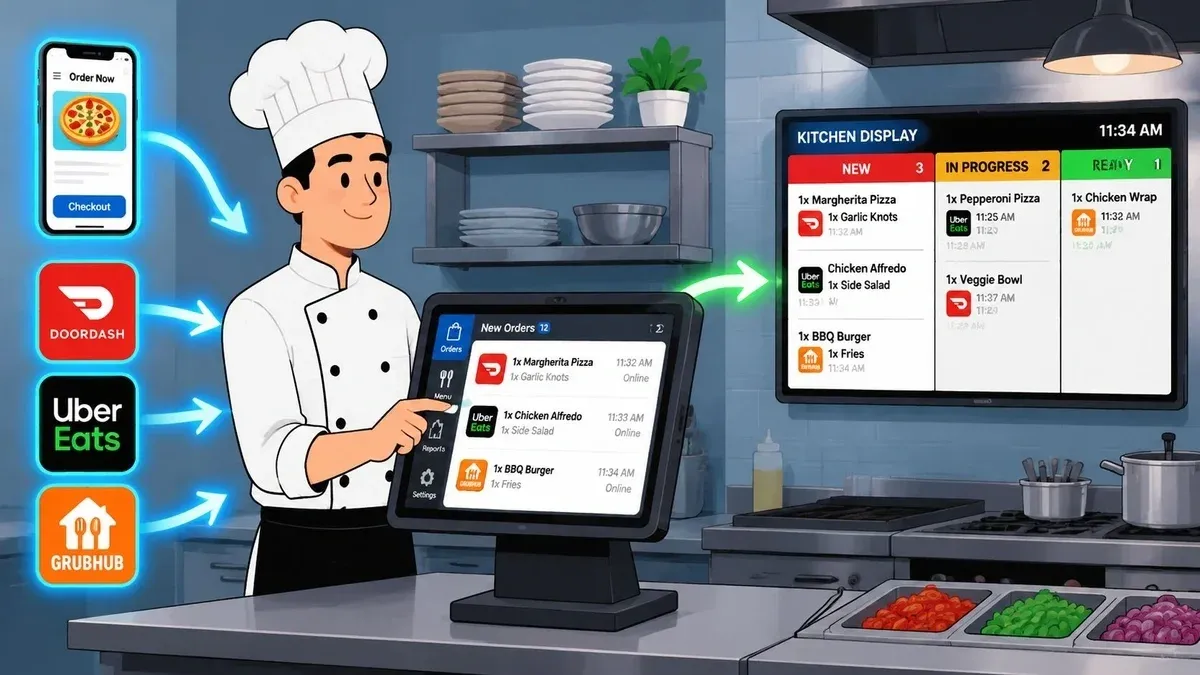
Saturday dinner rush usually tells you whether your delivery operation is real or improvised. One tablet starts chiming from Uber Eats. Another lights up for DoorDash. A cashier is trying to answer the phone, a line cook is asking which ticket is priority, and someone at the expo station is retyping an order because the modifier on one app didn’t match what went into the POS. Nobody in that moment is thinking about “fulfillment strategy.” They’re just trying not to miss an order.
That’s exactly why restaurants need to think about on demand fulfillment differently than eCommerce brands do. In a warehouse, the problem is often distance, storage, and carrier choice. In a restaurant, the problem is internal chaos. The core issue is whether an order moves cleanly from customer to POS to kitchen to pickup without staff acting as the middleware.
When owners ask why delivery feels harder now than it did a few years ago, the answer is simple. The speed expectation has changed, but many kitchens are still running a patched-together workflow built for lower volume and slower service windows.
The Reality of Modern Restaurant Delivery Demands
On paper, restaurant delivery looks straightforward. A guest places an order, the kitchen makes it, a driver picks it up, and the guest eats. In practice, the weak point is almost always the handoff between systems.
A typical busy shift exposes every crack. Marketplace orders come in on separate tablets. A team member manually keys them into the POS. An item is out of stock on one platform but still live on another. The prep time shown to the guest doesn’t reflect what the kitchen can handle. A driver arrives before the food is ready, then the kitchen gets blamed for being slow.
That’s where on demand fulfillment stops being a buzzword and starts being an operating model. For restaurants, it means building a workflow where orders are received, routed, prepared, and handed off with as little manual intervention as possible.
What changed for customer expectations
The pressure for speed isn’t hypothetical. Market data shows 24% of customers expect delivery within two hours, according to delivery expectation data compiled by Local Express. For restaurants, that matters because guests don’t separate food quality from delivery speed. If the ETA slips, they usually judge the whole experience.
A lot of operators still think the biggest delivery problem is choosing the right marketplace. It usually isn’t. The bigger problem is that many restaurants are trying to meet modern delivery expectations with disconnected tools and manual workarounds.
Practical rule: If your staff has to read from one screen and type into another, your fulfillment process is already slower and riskier than it should be.
The kitchen is the real fulfillment center
Generic fulfillment guides often talk about inventory nodes, pick-pack-ship logic, and carrier orchestration. Restaurants have their own version of that. Your line is the fulfillment floor. Your prep stations are your pick path. Your bagging area is your pack station. Your dispatch shelf is your handoff point.
When operators see it that way, better decisions follow:
- Reduce duplicate entry: Every manual re-entry step creates delay and opens the door to modifier mistakes.
- Control prep timing: If your kitchen can’t sequence incoming orders well, faster demand just creates a bigger pileup.
- Protect staff focus: Cooks should cook. Cashiers should handle guests. Managers shouldn’t spend rush hour reconciling app tickets.
The restaurants that handle delivery well usually aren’t doing one magical thing. They’ve removed friction from the order path. That lowers mistakes, cuts noise, and gives the team a workflow they can repeat under pressure.
Understanding On Demand Fulfillment Models for Restaurants
The simplest way to understand on demand fulfillment in a restaurant is this. It’s the system that moves an order from the customer’s phone into your kitchen and out the door without confusion.
In restaurant operations, there are really two models. One is manual and reactive. The other is integrated and controlled.
The manual model known as tablet hell
In the manual model, every order channel acts like its own little island. Uber Eats sends one signal. DoorDash sends another. Your website may send orders somewhere else. Phone orders and walk-ins sit in their own lane.
A typical manual flow looks like this:
- A customer places an order on a marketplace app.
- The order lands on a tablet.
- A staff member notices it.
- That person retypes it into the POS.
- The kitchen gets the ticket after the re-entry step.
- Staff bag the order and wait for pickup.
That system “works” until volume rises. Then the weak spots show up fast.
- Missed modifiers: Extra sauce, no onions, allergy notes.
- Lag between acceptance and prep: The order exists, but the kitchen hasn’t seen it yet.
- Menu mismatch: A sold-out item remains available on one channel.
- Staff overload: One person becomes the bridge between every system.
If you’re also evaluating channel mix, this comparison of direct ordering vs delivery apps is useful because it highlights how each ordering source changes your operational burden, not just your marketing economics.

The integrated workflow that actually scales
The integrated model treats the restaurant like one connected system. Orders from multiple channels feed into the POS or order management layer automatically. The kitchen receives the same structured data every time. Staff work from one source of truth.
That flow is much cleaner:
Stage Manual workflow Integrated workflow Order intake App tablet POS-connected intake Ticket creation Staff re-enters order System creates ticket automatically Kitchen visibility Delayed Immediate Menu sync Often inconsistent More controlled Handoff Staff checks multiple systems Staff works from one queue
The practical difference is labor quality. In the manual model, employees spend time copying information. In the integrated model, they spend time producing and checking food.
A restaurant doesn’t need more order channels if every new channel creates another place for errors to hide.
For operators who want a clearer picture of how merchant-side marketplace workflows function, this overview of Uber for merchants in restaurant delivery is worth reading. It helps frame where marketplace demand fits into the broader operating system instead of treating it like a separate side project.
What restaurants should optimize first
Most owners don’t need a complicated transformation plan. They need to stabilize the order path.
Start with these basics:
- One order stream: Consolidate incoming digital orders so the team isn’t watching multiple devices.
- One menu logic: Keep item availability, pricing, and modifiers aligned across channels.
- One kitchen queue: The line should see orders in the right sequence, not based on which tablet beeped first.
That’s on demand fulfillment in restaurant terms. It’s not about adding more technology. It’s about removing unnecessary motion.
How POS Integration Automates Your Restaurant Operations
If on demand fulfillment is the operating model, POS integration is the mechanism that makes it usable in a live kitchen.
The plain-English version is simple. Your POS becomes the central system that receives orders, passes them to the kitchen, tracks what’s happening, and keeps the rest of the operation aligned. Without integration, each platform speaks its own language. With integration, the systems can exchange the same order data without someone translating it by hand.
Why integration matters on the line
Industry guidance on on-demand fulfillment stresses that effective operations rely on real-time inventory visibility and system integration across ordering and kitchen systems, because that setup enables automated order routing and prep while reducing manual handoffs and shortening the order lifecycle. You can read that broader logistics framing in Atomix’s explanation of connected fulfillment architecture.
For a restaurant, that translates into a few direct wins:
- Orders hit the kitchen faster: No waiting for a cashier or manager to re-enter tickets.
- Staff touch fewer screens: Less bouncing between app tablets and POS terminals.
- Availability stays cleaner: Menu changes can be handled with more consistency.
- Drivers get better timing: Pickup works better when the system reflects real prep progress.

A lot of operators hear “integration” and assume it means a long technical project. Usually, what matters most is not complexity. It’s whether the setup removes repetitive work from the shift.
What an integrated order flow looks like
Take a common setup. A guest places an order on Uber Eats or DoorDash. Instead of landing on a separate tablet that someone has to monitor, the order moves directly into the POS. From there, the kitchen display system or printer gets the ticket, the team starts prep, and the order is staged for pickup.
That central role is why the POS deserves more attention than it often gets. If you want a straightforward breakdown, this explanation of what a POS means in restaurant operations is useful for owners who think of the POS only as a payment tool.
Here’s where real examples help. If you run on Square or Clover, integration matters because those systems can act as the operating hub instead of just the checkout screen. Platforms such as OrderOut connect marketplace orders into POS environments like those, so staff don’t have to babysit multiple tablets during service.
Integration should make a shift calmer. If it adds clicks, exceptions, and mystery failures, it’s not solving the right problem.
This walkthrough gives a visual sense of how connected ordering and fulfillment can work inside a modern restaurant operation.
What works and what usually fails
What works is boring in the best way. Orders arrive consistently. Modifiers map correctly. Staff trust the kitchen queue. Managers check exceptions instead of doing data entry.
What fails is predictable too:
- Partial integrations: Orders flow in, but modifiers or item mappings break.
- Channel-by-channel fixes: Every app gets managed separately, so complexity grows with every added platform.
- No kitchen workflow changes: Operators install software but keep the same handoff bottlenecks.
The best restaurant food tech doesn’t ask your team to become more technical. It removes the need for them to be.
Essential Metrics for On Demand Fulfillment Success
Restaurants get into trouble when they judge delivery by feel alone. “We were slammed.” “Drivers were early.” “The apps were busy tonight.” Those observations matter, but they don’t tell you where the failure started.
The most useful metric in on demand fulfillment is order cycle time. In plain language, that’s the time from order receipt to delivery or, for most kitchen decision-making, from order receipt to ready for pickup. Guidance on fulfillment analytics recommends measuring order cycle time and breaking it into smaller stages such as processing, prep, and packing so operators can pinpoint the bottleneck instead of guessing. That framework is laid out in this practical guide to fulfillment analysis and granular order data.
Start with the vital few
Most restaurants don’t need a giant dashboard on day one. They need a short list of metrics they’ll review.

Three metrics matter immediately:
- Order cycle time: Measure when the order was received, when prep began, when it was packed, and when it was ready for pickup.
- Order accuracy rate: Track missing items, wrong modifiers, and remake incidents.
- Cost per order: Include marketplace fees, labor involved in handling the order, packaging, and the hidden cost of mistakes.
A fourth metric matters during rush periods:
- Peak-hour queue stability: Watch whether your kitchen handles demand smoothly or starts stacking late tickets.
If you’re building a dashboard for this, a strong guide for better business decisions can help you avoid vanity metrics and focus on measures that change staffing and workflow decisions.
How to use metrics without overcomplicating it
You don’t need perfect reporting to start. You need consistent reporting.
A simple working table might look like this:
Metric What to review What it tells you Order cycle time By daypart and channel Where delay starts Accuracy issues By item and modifier Which menu setups create mistakes Cost per order By fulfillment channel Which orders are profitable Pickup readiness By rush window Whether prep timing is realistic
One useful habit is to review bad orders in sequence, not in isolation. If a delivery was late, ask:
- Did the order sit before hitting the kitchen?
- Did prep stall on one station?
- Did bagging or expo create delay?
- Was the order marked ready too early or too late?
That’s where on demand fulfillment becomes operational discipline instead of software talk.
Watch this first: If your team can’t break a late order into receipt, prep, pack, and handoff stages, you’re still troubleshooting by instinct.
For restaurants that want a more structured way to think about measurement, this overview of restaurant KPIs that operators actually use is a practical next read.
What not to measure first
Don’t start with broad customer sentiment scores if your core workflow is unstable. Fix the parts you can control inside the restaurant first. If order timing is inconsistent and modifiers are getting lost, a polished reporting layer won’t help.
Measure the moments where work changes hands. That’s where most delivery mistakes are born.
Common Pitfalls in Restaurant Food Tech and How to Avoid Them
The most common mistake in restaurant food tech is thinking speed is the only problem. It isn’t. A lot of delivery systems get faster on the surface while becoming more fragile underneath.
That fragility usually shows up when restaurants add channels without redesigning the workflow. Broad fulfillment guidance often misses this point, but the harder question for operators isn’t just whether they can move quickly. It’s whether they can reduce the error rate and decision delays created by separate marketplace, POS, and direct-order streams, as discussed in Radial’s look at fulfillment complexity across channels.
More channels can mean less control
Operators often assume that adding another delivery app automatically adds profitable demand. Sometimes it does. Sometimes it just adds another source of menu drift, ticket confusion, and staff interruption.
Here are the failure modes I see most often:
- Menu inconsistency: An item is paused in one system but still live elsewhere.
- Modifier mismatch: The app captures the request, but the kitchen ticket doesn’t show it clearly.
- Split decision-making: Staff check one tablet for acceptance, another screen for prep, and the POS for payment history.
- Rush-hour overrides: Managers create manual shortcuts during service, then nobody follows the same process the next day.
Staff resistance usually signals bad workflow design
When teams push back on new delivery tools, owners sometimes call it a training problem. Sometimes it is. More often, staff are reacting to a messy process they know will fail in a rush.
A good system reduces mental load. A bad one asks a cashier to become a dispatcher, a data-entry clerk, and a customer service rep all at once.
If your team keeps creating workarounds, pay attention. Workarounds are usually evidence that the official process doesn’t fit live service.
That’s also why financial reconciliation matters more than many operators realize. If app orders, POS records, and payouts don’t line up cleanly, managers lose time chasing small discrepancies instead of fixing service issues. This guide on how to reconcile the difference between delivery channels and POS records is useful because it connects operational mess to accounting friction.
The hidden cost of fragmented food tech
The direct cost of bad restaurant tech is easy to spot. Extra labor, comped meals, refund requests.
The hidden cost is tougher:
Hidden issue Operational effect Constant tablet monitoring Staff attention leaves the floor Inconsistent prep signals Drivers wait, food sits, guests complain Duplicate systems Managers spend time checking instead of leading Exception-heavy workflows Training gets harder and turnover hurts more
Restaurants don’t need the biggest stack. They need a stack that behaves predictably on a busy night.
Your On Demand Fulfillment Implementation Checklist
Most restaurants don’t need to rebuild everything at once. They need a short implementation plan that fixes the highest-friction parts of delivery first.
The strategic question is cost, not novelty. A useful way to frame it comes from broader fulfillment analysis: restaurants need to model the break-even point where variable third-party fulfillment costs and the hidden cost of manual errors become more expensive than investing in an integrated in-house system. That idea is highlighted in Amazon’s discussion of on-demand fulfillment trade-offs and cost pressure.
A practical rollout sequence

Use this checklist:
-
Audit your current order flow
Write down every step from customer order to pickup. Include tablets, phone calls, POS entry, kitchen handoff, and bagging. -
Find the manual choke points
Look for re-entry steps, duplicate menu maintenance, and moments where staff have to stop service to update another system. -
Choose the integration layer carefully
Don’t buy based on feature lists alone. Test whether orders map cleanly into your actual menu and modifier structure. -
Simplify before you automate
If your online menu is overloaded with inconsistent naming and edge-case modifiers, clean that up first. -
Train by shift scenario
Don’t train in a quiet room only. Run lunch and dinner rush simulations so staff see how the workflow behaves under pressure. -
Review metrics after launch
Watch cycle time, accuracy, and cost by channel. Fix one recurring failure at a time.
What owners should ask before going live
A short pre-launch review catches most problems:
- Can the kitchen trust the ticket format?
- Can a manager see all digital demand in one place?
- Can staff handle app outages or exceptions without improvising a new process?
- Does the economics model still make sense at your current order volume?
For operators comparing long-term build-versus-buy choices, this look at food delivery application development and delivery system planning helps frame what should stay in-house and what should be integrated instead.
The goal isn’t to become a tech company. It’s to build a delivery operation that your team can run cleanly on the busiest night of the week.
If your restaurant is still juggling tablets, manual entry, and disconnected delivery workflows, the next step is to centralize the order path. OrderOut connects delivery apps with POS systems so orders flow into the kitchen with less manual handling. Restaurant owners can also start onboarding for free in a few clicks at the OrderOut dashboard.