
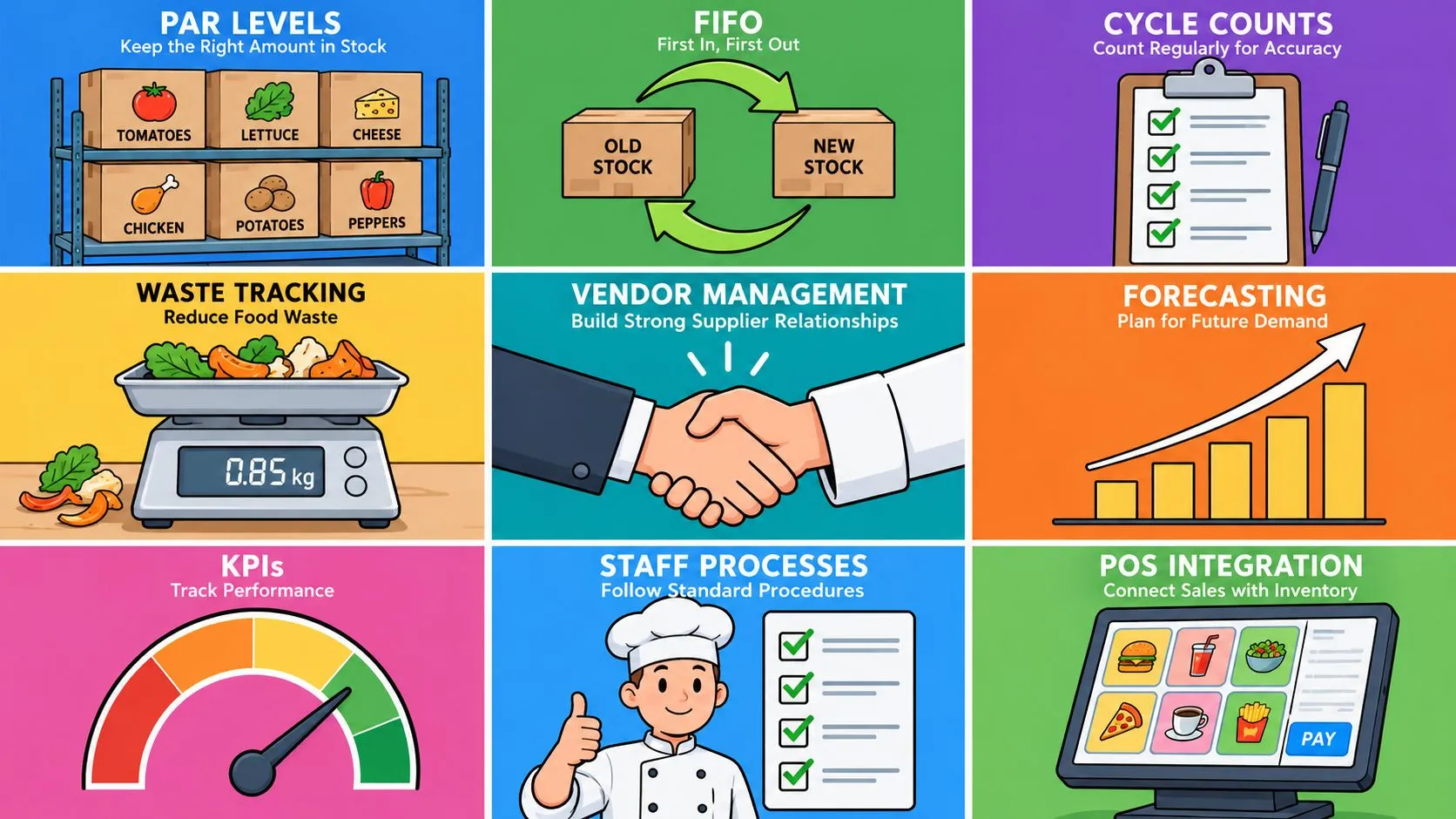
About 20% of SKUs typically drive 70–80% of revenue, so the smartest inventory programs focus on the items that matter most, not every item equally. The best practices for inventory management in restaurants combine classic control methods like FIFO and par levels with real-time POS integration so every sale, from dine-in to delivery, updates stock fast enough to guide purchasing, prep, and reordering.
Most operators don’t lose margin because they forgot how to count boxes. They lose margin because stock data is late, scattered, or wrong, especially when Uber Eats, DoorDash, and Grubhub are all selling from the same menu while the kitchen is trying to keep up. A restaurant can only control what it can see, and visibility gets much better when Clover or Square becomes the operational source of truth instead of a stack of tablets and manual re-entry.
That’s why the inventory conversation has changed. Modern guidance favors centralized data, real-time dashboards, and scheduled review cycles, and one benchmark says each function should track no more than 5–7 metrics so teams can act on them (NetSuite inventory management KPIs and metrics). A 2024 to 2025 PMC research article also found that inventory measurement and inventory control were the most relevant internal capabilities influencing profitability in micro and small enterprises, with active monitoring tied to better financial outcomes. In restaurant terms, that means the stores with disciplined stock systems usually spend less time reacting and more time serving.
For operators who want a practical next move, OrderOut’s Clover delivery integration is built to inject third-party delivery orders straight into the POS with no extra tablets and no manual re-keying. If you’re already using Clover or Square, that connection can make every inventory habit below easier to run and easier to trust.
1. Unify Your Stock with Real-Time POS Integration
The first inventory fix is direct. Stop letting each sales channel keep its own version of the truth. When Uber Eats, DoorDash, Grubhub, in-house orders, and your POS all update from one live system, stock counts become usable instead of hopeful.
That matters on the floor because one channel can still show an item as available after another channel has already sold it. The result is avoidable comp work, frustrated guests, and managers spending the rush reconciling menus by hand instead of running the shift. A unified setup also helps you spot overstock in one location while another store runs short, which matters even more for operators managing multiple sites.
Why POS integration changes the inventory habit
A connected POS does more than record sales. It makes the rest of your inventory controls more accurate. Par levels are easier to set because they reflect live demand, not stale exports, and reorder decisions can follow actual movement instead of rough estimates. OrderOut’s integrated POS system guidance fits that approach, because integration gives inventory data a single place to live.
Practical rule: if the item sold in the app didn’t reduce stock in the POS, your inventory system already lied to you once.
Operators who still rely on separate delivery tablets feel the gap fast. Clover or Square should be the center of the operation, not a side screen on the counter. A unified POS setup helps every order flow through one record, which reduces manual re-entry and keeps purchasing and prep decisions tied to the same numbers the kitchen is using.
A restaurant using Clover with OrderOut can receive Uber Eats, DoorDash, and Grubhub orders directly into the POS, then use that live data to tighten purchasing and prep. That is cleaner operations, and it is cleaner stock math.
2. Master Stock Rotation with First-In, First-Out
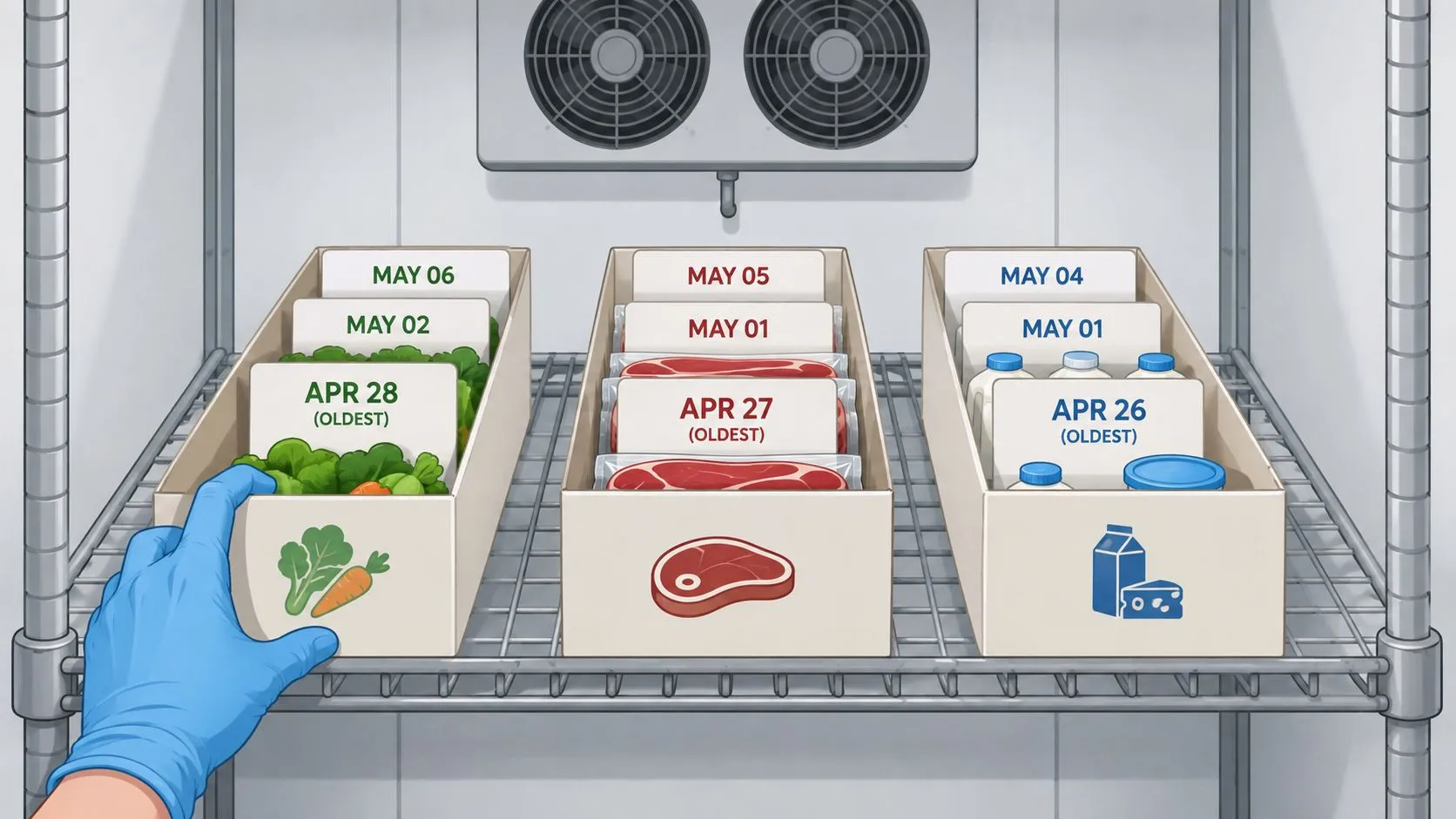
FIFO sounds basic because it is basic, and that’s exactly why it works. Old stock should leave before new stock touches the line, especially in a restaurant where spoilage can turn into daily waste. If the walk-in is arranged badly, the kitchen can be throwing away profit while believing it’s just “busy.”
The value of FIFO is consistency. Staff don’t need to decide which case of chicken or carton of dairy to grab, they follow the storage pattern and use the oldest product first. That keeps ingredients fresher, protects food quality, and reduces the chance that good product expires behind newer deliveries.
How to make FIFO stick in a busy kitchen
The system breaks down when receiving becomes rushed. New cases get dropped wherever there’s space, staff ignore labels, and prep cooks take the nearest item instead of the oldest one. The fix is visual discipline, clear bin labels, and a receiving routine that puts newer stock behind older stock every time.
OrderOut’s back of house definition guide is a useful reminder that inventory control lives where prep, storage, and line production meet. Once your team sees the back of house as a control center instead of a storage closet, FIFO becomes part of workflow, not a reminder management has to repeat all week.
Restaurants don’t need a complicated FIFO theory. They need a receiving habit, a storage plan, and enough room in the cooler to follow both.
POS integration amplifies FIFO because real-time sales data tells you what’s moving fastest. If a dish spikes on DoorDash, the kitchen can rotate those ingredients more aggressively and avoid letting slower-moving stock sit untouched. The system won’t organize the cooler for you, but it will tell you where the risk is coming from.
3. Set Smart Par Levels and Reorder Points
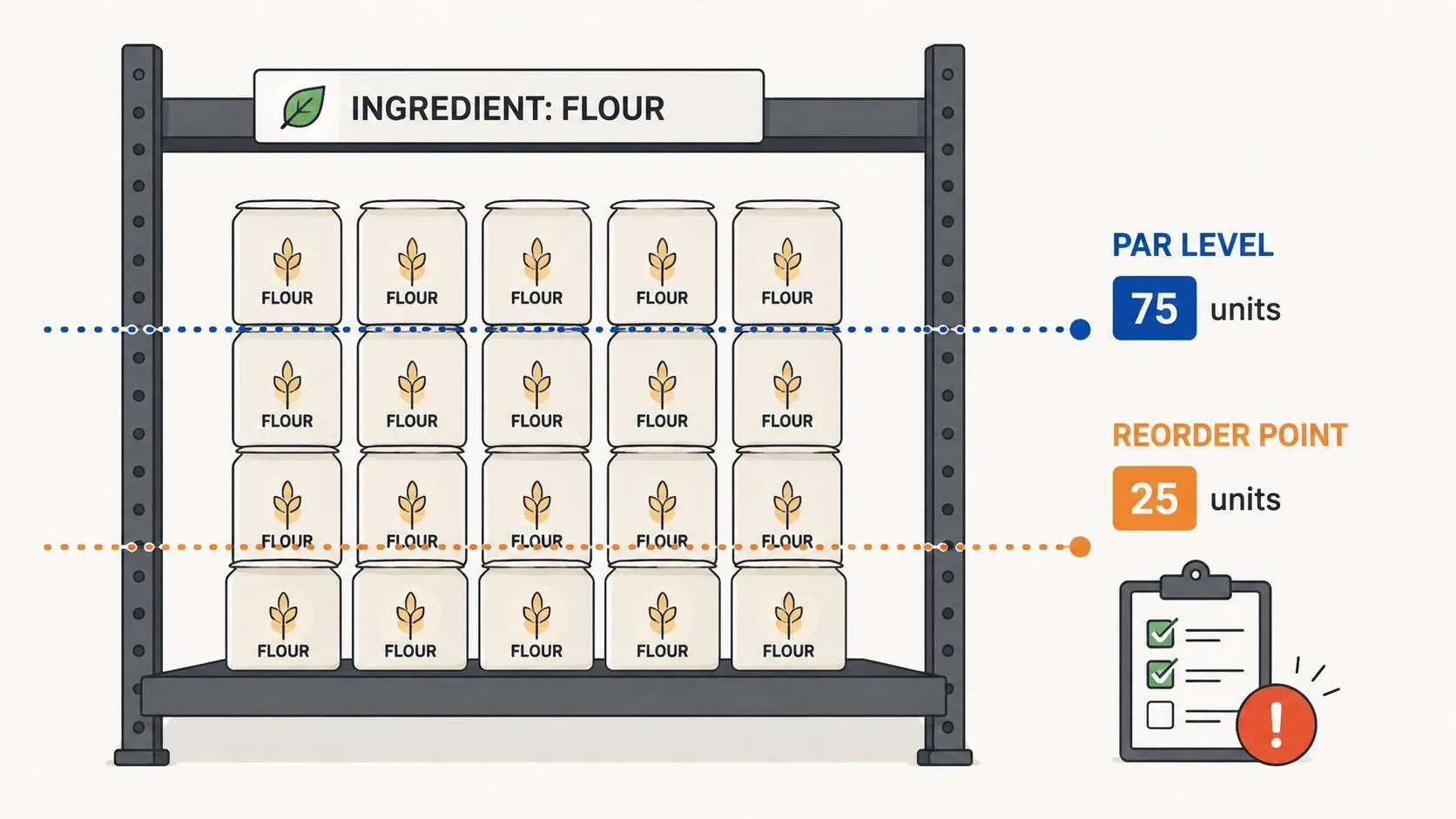
Par levels turn inventory from a guessing game into a threshold system. Instead of asking, “Do we have enough?” the manager asks, “Do we have enough to get through the next delivery window?” That one shift makes purchasing calmer, faster, and easier to train.
Reorder points do the same thing for buying. The stock level drops to a set trigger, then the order goes out before the item becomes a problem. In a restaurant, that matters because demand swings are normal, and a late supplier run can turn a healthy menu into a limited menu overnight.
Use sales data, not hunches
Par levels work best when they’re tied to historical sales from the POS. If brunch eggs move differently on Saturday than on Tuesday, one par level for the whole week is too blunt. The point isn’t to over-engineer purchasing, it’s to make the order sheet reflect actual business patterns.
OrderOut’s restaurant demand forecasting guide fits neatly into this practice because demand data is what makes par levels credible. If the POS sees all channels in one place, the manager can set thresholds around the actual demand picture instead of treating delivery and in-store sales like separate businesses.
A practical operator move is to set tighter thresholds for ingredients used across multiple menu items and looser ones for slower movers. That keeps cash from sitting in overbought product while still protecting the guest experience. It also helps locations with different traffic patterns avoid one-size-fits-all ordering.
**Good par levels protect cash twice, first by avoiding overbuying, then by preventing stockouts that force last-minute, high-stress purchases.
4. Conduct Frequent Cycle Counts for Accuracy
Cycle counts beat giant end-of-month inventory marathons because they catch problems while they’re still small. Count a portion of the stock each day, and the numbers stay close enough to reality that managers can trust them. That matters when spoilage, waste, or receiving mistakes start creeping into the system.
A cycle count is also easier on staff. Instead of stopping operations for one massive count, the team can check a category, fix the discrepancy, and keep moving. That rhythm works well in kitchens, bars, and multi-unit concepts where nobody has time for a full shutdown just to confirm the pars.
OrderOut’s restaurant back office software guide is relevant here because the back office is where counts, reports, and purchase decisions meet. When the POS has live order data from Clover or Square, the count sheet becomes much more trustworthy, which means the team spends less time chasing bad numbers.
Make counts part of the shift, not a project
- Count high-risk items first: Proteins, dairy, and expensive ingredients deserve more frequent attention because errors there hurt fastest.
- Keep the method consistent: Use the same count time, same category order, and same storage walk every time.
- Fix discrepancies immediately: If the count is off, look for unrecorded waste, portion drift, or receiving errors before the next shift starts.
To get the accurate, real-time data needed for effective cycle counting, start by integrating your delivery apps with your POS. You can install OrderOut for free from the Clover App Market or Square App Marketplace today.
A cycle count only works if the system behind it reflects actual sales. That’s where delivery-to-POS integration pays off. If orders from Uber Eats, DoorDash, and Grubhub are flowing straight into Clover or Square, the count has a fair shot at matching reality.
5. Standardize Recipes and Portion Sizes
Inventory data means very little if every cook uses a different scoop, ladle, or handful. Standardized recipes connect the menu to the stockroom, and portion control makes the connection measurable. That’s how a restaurant turns “we think we’re wasting too much” into a fixable operational issue.
The biggest advantage is predictability. If every burger uses the same amount of cheese, sauce, and garnish, inventory deductions become more accurate and food costs are easier to understand. Without that standard, sales data and stock data drift apart, and managers spend their time guessing where the margin went.
Keep the recipe visible and the tool close
A good recipe should be written where the line can use it, not hidden in a binder nobody opens. Scales, ladles, scoops, and portion cups keep the kitchen honest when volume rises and the team starts cutting corners to stay caught up. Training matters too, because standards only hold when the shift lead enforces them.
OrderOut’s food cost percentage guide belongs in this conversation because cost control starts with the portion. If a delivery surge floods the POS with ticket volume, the kitchen needs the same portion discipline on the last order of the night as on the first. Delivery integration helps by making order flow smoother, but recipe standardization is what keeps each ticket from pulling inventory off plan.
A clean POS count can still hide a sloppy kitchen. The recipe is where inventory truth either holds or breaks.
For a restaurant using Square or Clover, this practice becomes even more valuable when third-party delivery orders enter the same system as in-house sales. The POS can reflect the volume, but the kitchen still has to serve consistent portions for that data to mean anything.
6. Track and Analyze Food Waste
Waste is one of the clearest signals that inventory management is slipping. Spoilage, over-prep, cooking errors, and returned orders all deserve a log because each one tells a different operational story. If the team just throws product away and moves on, the same mistake keeps happening under a cleaner name.
A simple waste sheet near the trash bin works better than memory. When staff write down the item, quantity, and reason, managers get patterns instead of vague complaints. That makes it easier to see whether a product is overordered, a prep step is too aggressive, or a station is missing training.
Look for repeat waste, not one-off noise
Waste analysis doesn’t need to be fancy to be useful. If the same ingredient keeps appearing on the sheet, the issue is probably ordering, prep, or storage, not luck. If returned orders show up often, the problem may be portion size, ticket accuracy, or an upstream menu description that doesn’t match what the kitchen is sending out.
OrderOut’s delivery API page is relevant because a unified delivery flow makes it easier to spot when waste is tied to specific channels. If delivery orders are manually re-entered, the source of an error can be hard to trace. If those orders flow into the POS cleanly, the restaurant can connect waste patterns to the channel, item, or modifier that caused them.
That kind of visibility matters on busy nights when the staff are focused on speed. A tight delivery-to-POS setup reduces the chance that a missed modifier becomes a remade order and then becomes waste.
Waste tracking works best when the team treats it as operational data, not blame.
7. Manage Supplier Relationships and Lead Times
A restaurant’s inventory system is only as strong as its suppliers. If lead times swing from one order to the next, reorder points stop being reliable, and a kitchen that otherwise runs well can still run short. Supplier relationships need active management, not attention only after a stockout or a missed delivery.
The payoff is steadier purchasing. When a supplier understands your ordering rhythm and your team knows the cutoff time, orders move more predictably and last-minute substitutions land on the menu less often. Backup suppliers matter too, especially for ingredients that appear across multiple high-volume dishes.
A government-hosted best-practice guide says to avoid ordering more than three months’ supply of any item, which is a useful ceiling for limiting overbuying and storage strain (Best Practice in Inventory Management PDF). That does not mean every restaurant should push inventory toward that limit. It means supplier planning has to stay disciplined so stock does not turn into a warehouse problem.
Plan around the vendor, not against them
- Know the cutoff times: Missed deadlines create avoidable rushes and expensive freight decisions.
- Track lead times by item: One vendor may bring in produce quickly but take longer on dry goods.
- Keep a backup list: If a key ingredient slips, the kitchen should already know the substitution plan.
OrderOut’s 3rd-party order engine hub helps here because the POS can reflect actual demand faster, which makes supplier conversations more grounded. When delivery spikes appear in the same system as walk-in sales, managers can explain what sold, where it sold, and why that matters for the next drop. That is where measuring middle-mile performance becomes useful, because supplier decisions improve when the team can see demand patterns clearly instead of guessing from scattered reports.
The trade-off is straightforward. Lean inventories reduce waste, but they also reduce slack. Good supplier management keeps lean from turning fragile.
8. Track Key KPIs Inventory Turnover and Food Cost %
Inventory improves when the team watches a small set of numbers every week and acts on them. Inventory turnover shows how fast stock sells and gets replaced, while food cost percentage shows how much ingredient cost sits behind your sales. These two KPIs do not fix problems on their own, but they point managers toward the right shelf, the right menu item, or the right vendor conversation.
Slow drifts are usually the problem. A cooler stays too full, a prep item moves too slowly, or a recipe cost rises a little at a time and no one sees it until margins tighten. If the numbers are buried in separate systems, those changes blend into the noise of a busy shift.
Keep the KPI set small and useful
A good dashboard stays focused. One useful benchmark in the verified data is to keep each functional area to no more than 5–7 metrics. That limit matters because people stop using dashboards when they become cluttered, and the point is to make decisions, not collect charts.
OrderOut’s pricing page helps operators think about system value, but the inventory KPI habit itself comes down to discipline. If Clover or Square is capturing every order from Uber Eats, DoorDash, and Grubhub, the sales side of the calculation becomes much cleaner. That gives managers a more reliable read on turnover and food cost than a spreadsheet assembled after service.
For operators who also need measuring middle-mile performance, the same habit applies. Track the few numbers that expose waste, slippage, and reorder problems, then review them often enough to act before the next buying cycle locks in the mistake.
If a KPI doesn’t lead to a decision, it’s decoration.
POS integration makes those numbers useful. Accurate sales data turns inventory KPIs into decisions, and the more channels a restaurant runs through one POS, the less time the manager spends reconciling orders by hand and correcting bad counts after the fact.
9. Build a Disciplined Team with Clear Processes
Even the best software fails if the team doesn’t use it the same way every shift. Inventory discipline comes from simple, repeatable processes that new and experienced staff can follow without a supervisor hovering over them. If receiving, storage, counting, and waste logging are inconsistent, the data will always be shaky.
Training should be practical and visual. Staff need to know where product goes, how it gets labeled, what to do when a delivery arrives damaged, and how to log waste without slowing the line. Checklists help because they reduce memory load during rush periods, and rush periods are exactly when mistakes happen.
Make the process visible
A disciplined team usually needs fewer heroic interventions from management. That happens when the rules are easy to see and easy to repeat. Receiving one order the right way, every time, is more valuable than a perfect policy nobody follows.
- Use receiving checklists: Staff should inspect quantities, dates, and packaging before stock gets put away.
- Label clearly: Date labels and location labels keep FIFO and counts aligned.
- Train the why, not just the steps: People follow inventory rules better when they understand how waste and stockouts hit the P&L.
OrderOut’s restaurants overview fits naturally here because the goal is simpler operations, not more complexity. When delivery orders flow directly into Clover or Square, staff get fewer manual tasks to juggle, and that frees attention for the procedures that protect inventory.
A restaurant with a disciplined team gets more value out of every other practice in this list. The POS can centralize the data, but the crew still has to receive the product, rotate it, portion it, and record the waste correctly.
9-Point Inventory Best Practices Comparison
| Item | Implementation Complexity 🔄 | Resource Requirements ⚡ | Expected Outcomes ⭐📊 | Ideal Use Cases 💡 | Key Advantages ⭐ |
|---|---|---|---|---|---|
| Unify Your Stock with Real-Time POS Integration | 🔄 Moderate–High: POS/API setup, testing | ⚡ Dev time, POS access, possible subscription | ⭐📊 Real-time accurate inventory, fewer stockouts | 💡 Multi-channel restaurants using Clover/Square + delivery apps | ⭐ Single source of truth, eliminates manual re-entry |
| Master Stock Rotation with First-In, First-Out (FIFO) | 🔄 Low–Moderate: process + training | ⚡ Staff time, labeling, storage organization | ⭐📊 Reduced spoilage, improved food safety | 💡 Perishable-heavy kitchens (produce, dairy, meat) | ⭐ Consistent freshness, lower waste |
| Set Smart Par Levels and Reorder Points | 🔄 Moderate: analysis and tuning | ⚡ Historical POS data, inventory tools, purchasing discipline | ⭐📊 Optimized stock levels, fewer overstocks/stockouts | 💡 Locations with variable demand or delivery spikes | ⭐ Better cash flow, more accurate ordering |
| Conduct Frequent Cycle Counts for Accuracy | 🔄 Moderate: scheduling and procedures | ⚡ Daily staff time, POS baseline, counting tools | ⭐📊 Higher inventory accuracy, early discrepancy detection | 💡 High-volume or inventory-sensitive kitchens | ⭐ Continuous accuracy; less disruptive than full counts |
| Standardize Recipes and Portion Sizes | 🔄 Low–Moderate: documentation & training | ⚡ Recipe docs, scales, staff training time | ⭐📊 Predictable food costs, consistent product quality | 💡 Chains, franchises, or high-consistency menus | ⭐ Accurate inventory deductions, quality control |
| Track and Analyze Food Waste | 🔄 Low: simple logging + review | ⚡ Waste sheets/tools, weekly analysis time | ⭐📊 Reduced waste, actionable cost-saving insights | 💡 Operations with high prep or spoilage rates | ⭐ Identifies problem items and reduces food cost % |
| Manage Supplier Relationships and Lead Times | 🔄 Moderate: vendor coordination | ⚡ Procurement time, backup suppliers, lead-time data | ⭐📊 Fewer unexpected stockouts, better reorder timing | 💡 Restaurants reliant on external suppliers | ⭐ Supply resilience, potential for better terms |
| Track Key KPIs: Inventory Turnover and Food Cost % | 🔄 Moderate: reporting setup & data hygiene | ⚡ Clean POS data, reporting tools, finance time | ⭐📊 Measurable performance, informed financial decisions | 💡 Managers focused on profitability and efficiency | ⭐ Visibility into efficiency and cost drivers |
| Build a Disciplined Team with Clear Processes | 🔄 Moderate: culture change & ongoing training | ⚡ Training time, checklists, management commitment | ⭐📊 Consistent procedure adherence, fewer errors | 💡 Teams with high turnover or new systems | ⭐ Sustained compliance, better execution and accountability |
Turn Your Inventory into a Competitive Advantage
Inventory management stops being a back-of-house chore when it’s run like a control system. The restaurants that do this well don’t treat FIFO, par levels, cycle counts, waste logs, supplier planning, and KPI review as separate chores. They treat them as one connected process that protects food quality, cash flow, and guest experience at the same time.
The biggest shift comes from building a single source of truth. When every sale, from in-house service to Uber Eats, DoorDash, and Grubhub, flows into Clover or Square in real time, managers can trust the numbers behind their decisions. That trust changes everything, because ordering gets sharper, counts get easier, and the kitchen stops fighting blind spots created by disconnected tablets and manual re-entry.
Modern inventory best practice is also about prioritization. The ABC approach puts the most attention on the items that drive the most value, and the operational logic is easy to apply in restaurants. High-value items deserve tighter review, more frequent counts, and stronger forecast discipline, while slower movers can be reviewed less often. That’s how a team keeps labor aligned with business impact instead of wasting time treating every ingredient the same.
The same applies to forecasting and review. The verified guidance points to 80–85% forecast accuracy for A items, 70–80% for B items, and keeping dead stock under 5% of total inventory value (VNDLY inventory management best practices 2026). Those are useful targets because they connect classification with action, and action is what keeps stock from drifting out of control.
If your restaurant is still juggling extra tablets or manual order entry, that’s the first bottleneck to remove. OrderOut’s delivery-to-POS integration makes Clover and Square work like the operational center they’re supposed to be, so the rest of your inventory discipline has a chance to hold.
If you want inventory to be easier to count, easier to trust, and easier to act on, connect your sales channels to your POS first. OrderOut helps restaurants bring Uber Eats, DoorDash, and Grubhub into Clover or Square without extra tablets or manual re-keying, so inventory decisions start with cleaner data. Set up onboarding at dashboard.orderout.co and build your inventory process on a system your team can rely on.