
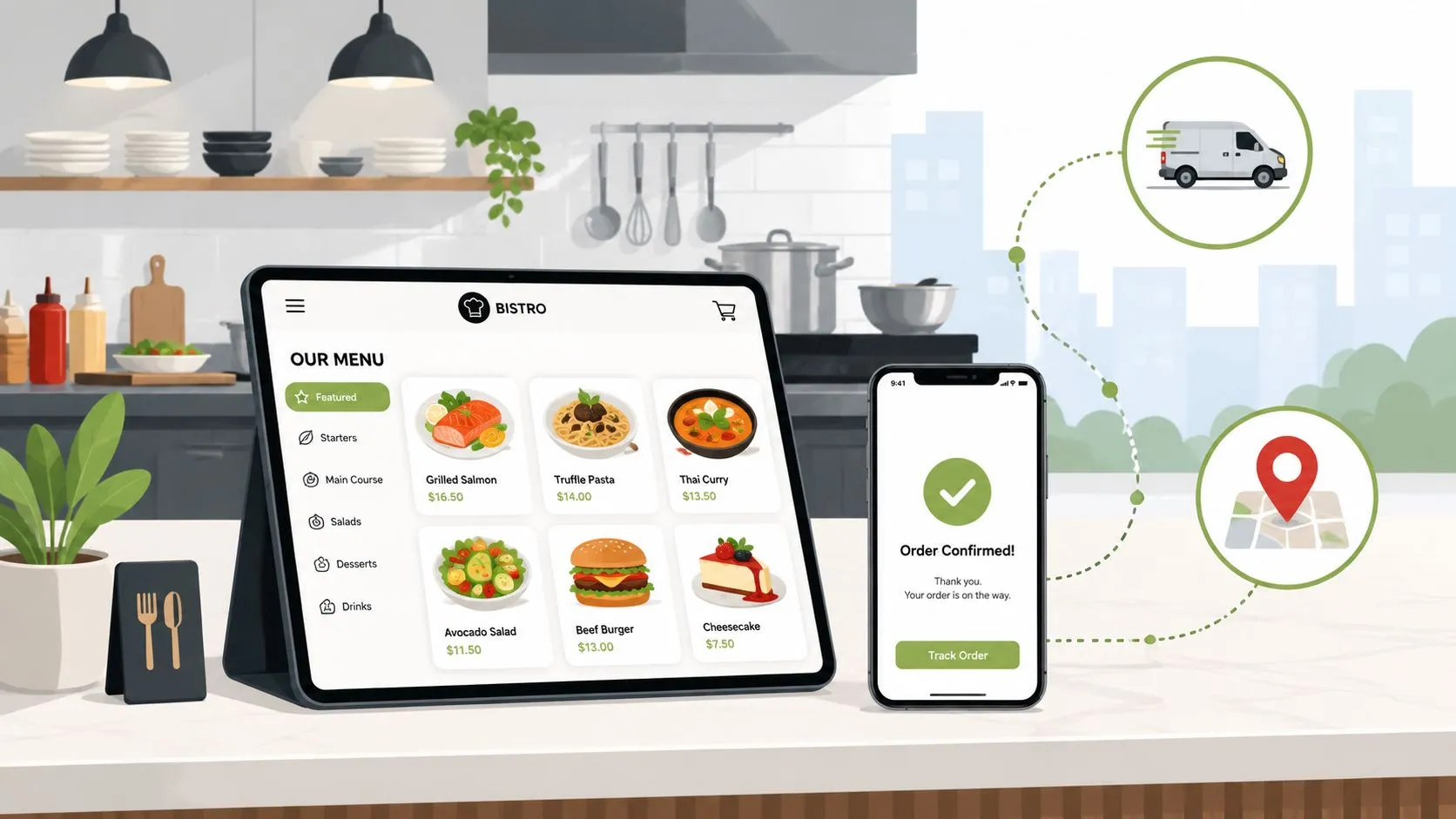
Setting up Square Online Ordering for your restaurant means turning on Square Online in your dashboard, syncing it with your Square POS, building a clean menu, configuring pickup or delivery, and publishing a direct ordering site your guests can use right away. In a market where 78% of restaurant owners said online ordering was the channel driving the most orders, Square online ordering for restaurants is no longer a side tool. It’s part of the core operating system.
If you already use Square, the appeal is obvious. You want direct orders flowing into the same environment your staff already uses. You want fewer workarounds, fewer missed modifiers, and less time bouncing between systems during a rush. The trick is that launching your direct channel is only step one. Running direct orders and marketplace orders through one clean workflow is what reduces chaos.
Why Your Restaurant Needs a Direct Ordering Channel
Square online ordering for restaurants gives you a commission-free direct channel that connects ordering, payment, menu management, and fulfillment inside the same Square ecosystem. That matters because guests increasingly want to order from the restaurant itself, not through an app that sits between you and the customer.
According to Restolabs’ online ordering statistics roundup, 67% of consumers prefer a restaurant’s own website or app for delivery, and 61% of that group say they prefer it because they want to support the restaurant directly. The same source reports that the average digital order value is 23% higher than in-person transactions.
Direct orders give you control
A direct ordering channel does three jobs at once:
- It protects the guest relationship: You control the ordering experience, the branding, and the follow-up.
- It keeps operations cleaner: Menu changes happen in the same system your team already knows.
- It improves order quality: When items, modifiers, and fulfillment settings are aligned, staff spend less time fixing avoidable mistakes.
That’s why many operators treat direct ordering as part of broader restaurant and hospitality automation, not just a website project. The point isn’t to look modern. The point is to reduce manual work.
Practical rule: If a guest wants to order direct and your process still sends staff into side systems, spreadsheets, or phone callbacks, the channel exists but the workflow doesn’t.
The margin issue is real
Direct ordering also matters because restaurants need operational efficiency, not just more order sources. Square’s 2025 restaurant commerce data found that online ordering had become the top order-driving channel for 78% of restaurant owners. The same release showed average tips on food and beverage transactions slipping from 15.17% in Q1 2025 to 14.99% in Q2 2025, alongside margin pressure for higher-end restaurants.
That combination changes the conversation. More online demand is good. More online demand with weak execution is expensive.
For operators comparing platforms, this is also why it helps to understand the difference between a basic site and a real food online ordering system for restaurants. A direct channel should reduce friction for guests and for staff.
Activating and Configuring Your Square Online Store
Square’s pitch is straightforward. Restaurants already using Square can launch their own ordering site quickly, and Square says marketplace commissions can run as high as 30% compared with third-party food apps on its Square Online ordering page. That’s a strong reason to get your direct store live before you do anything more complex.
Start with a usable store, not a perfect one
Most operators lose time here by overthinking design. Your first version only needs to be clear, on-brand, and easy to order from on a phone.
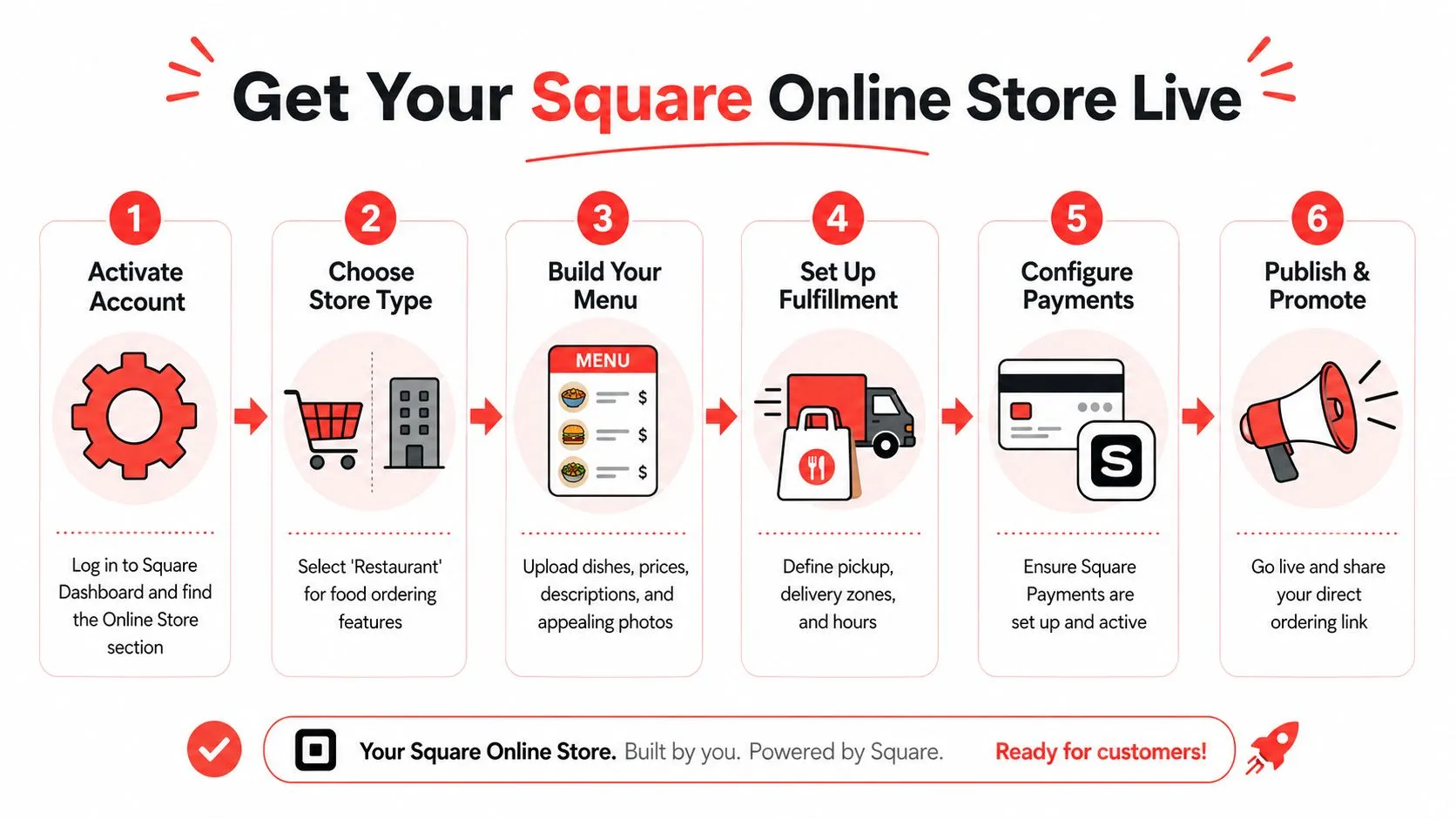
A practical setup flow looks like this:
- Enable Square Online in your dashboard: Choose the restaurant ordering setup, not a generic retail layout.
- Add your core business details: Hours, logo, service area, pickup instructions, and contact info need to be accurate before traffic hits the page.
- Connect your Square item library: Pull from the menu structure you currently use in service, not a separate marketing version.
- Set payment and fulfillment defaults: Don’t publish until pickup times and delivery rules reflect reality.
A lot of the value comes from keeping Square as the operational center. If you need a broader primer on how that ecosystem works, this guide to Square POS integration for restaurant operations is useful context.
Here’s a walkthrough video if you want to see the setup flow visually:
Keep the launch simple
Your online store should answer a few guest questions immediately:
- Can I order right now
- When will it be ready
- Is the menu current
- Can I trust this checkout flow on mobile
If any of those answers are muddy, conversion drops and staff get dragged back into phone support.
For operators also thinking about site presentation, local traffic, and driving restaurant reservations online, the same principle applies. Make the path clear. Don’t force guests to hunt for the order button.
Clean beats clever. A plain menu that loads fast and routes correctly will outperform a beautiful ordering page that creates confusion.
Syncing Your Menu and Managing Fulfillment
The menu is where most online ordering problems start. Not the homepage. Not the payment screen. The menu.
When Square online ordering works well, the menu is treated as a single source of truth. The item names, sizes, modifier groups, availability, and prep assumptions all line up across your POS and your online store. When that doesn’t happen, guests see items you can’t make, staff guess at modifier intent, and the kitchen gets inconsistent tickets.
Build for operational accuracy
The most common setup mistake is copying a dine-in menu structure straight into online ordering without editing for digital behavior. Online menus need clearer categories, cleaner modifier logic, and fewer edge cases.
Use this checklist before you publish:
- Trim duplicate choices: If guests can pick the same option in two different places, staff will eventually get conflicting instructions.
- Name modifiers the way your kitchen understands them: “No onion” is better than an internal abbreviation your guest won’t recognize.
- Hide what you can’t fulfill consistently: If an item regularly creates confusion or long ticket times online, take it off the digital menu until the process is fixed.
- Organize for mobile scanning: Guests should find mains, sides, drinks, and add-ons quickly without endless scrolling.
A strong menu structure also makes later channel integration easier. This article on restaurant menu data and POS mapping is worth reading if you’re cleaning up modifier logic or product taxonomy.
Match fulfillment to real kitchen capacity
Online ordering fails when the site promises speed your line can’t deliver. Pickup windows, prep time, and delivery availability have to reflect the kitchen you have today, not the kitchen you wish you had on a calm Tuesday afternoon.
A practical way to set this up is to think in service constraints:
| Fulfillment setting | What to decide |
|---|---|
| Pickup | How much lead time the kitchen needs during normal and rush periods |
| Local delivery | Which areas you can serve without breaking food quality |
| Order pacing | How many orders you can absorb before wait times get unrealistic |
| Item availability | Which items should be suppressed by daypart or service window |
If your team is manually pausing items, apologizing for sold-out dishes, or calling guests to fix order details, your menu and fulfillment settings still need work.
Once your direct channel is stable, add your marketplace channels into the same operating rhythm instead of letting them run as separate side systems. If you want to see how restaurants normalize menu structures before doing that, install the app from the Square App Marketplace listing for OrderOut.
Unifying All Orders with Third-Party Integration
Friday dinner service is humming, and three marketplace tablets start chirping while your Square tickets keep printing. Someone on expo is reading modifiers off one screen, a cashier is keying the order into Square, and the kitchen is waiting on a clean ticket. That is how small mistakes turn into remakes, refunds, and missed pickup times.
Direct online ordering through Square is the first step because it gives you a commission-free channel you control. It does not fix the bigger operating problem if Uber Eats, DoorDash, and Grubhub still live outside the POS.
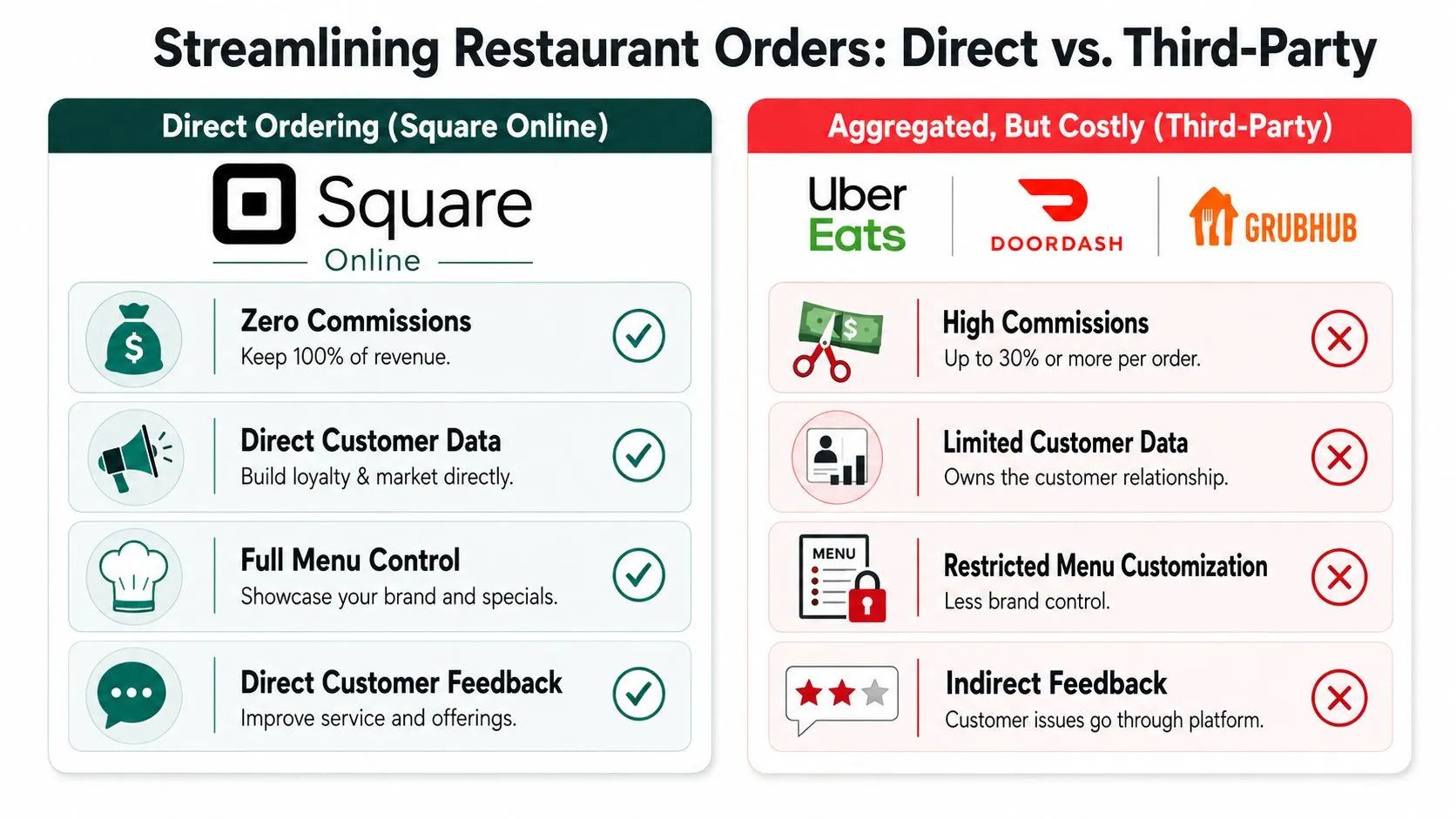
Fix the order flow, not just the storefront
The cost is not just extra hardware. It is the labor of watching multiple devices, re-entering tickets, and correcting menu mismatches under pressure. If marketplace item names, modifier groups, and sizing rules do not map cleanly to Square, staff become the integration layer.
That setup breaks down fast during rushes.
The goal is straightforward: every digital order, whether it comes from your Square site or a third-party marketplace, should arrive in Square with the right item, the right modifiers, and the right fulfillment details so the kitchen works from one ticket stream.
Where third-party delivery POS integration earns its keep
A third-party delivery integration connects marketplace channels to the same Square workflow your staff already uses. Instead of treating each app as a separate system, it maps marketplace menus to your Square menu and pushes orders into the POS automatically.
That changes day-to-day operations in a few concrete ways:
- Uber Eats orders arrive in Square without manual re-entry
- DoorDash modifiers follow mapped POS logic instead of staff interpretation
- Grubhub tickets enter the same production flow as Square Online orders
- Menu edits have a better chance of staying aligned across channels
OrderOut is one example of that setup. Its Square delivery integration for restaurants connects third-party delivery orders into Square POS and reduces manual entry by mapping marketplace menus to a normalized POS structure. Operators comparing approaches can also review the broader third-party order engine and a channel-specific example like Uber Eats to Square POS integration.
If you want a plain-English explanation of how this works behind the scenes, this article on integration with a restaurant POS system walks through the routing and menu-mapping logic.
One practical caution. Integration only helps if your Square menu is clean first. If the POS has inconsistent item names, missing modifier groups, or duplicate products, those problems carry straight into third-party channels.
For operators also thinking about channel mix and customer acquisition, this guide to growing your brand in 2026 is a useful companion read.
One direct ordering site plus a stack of marketplace tablets still leaves staff managing two operating systems. The better model is Square as the foundation for direct orders, then a connector layer that brings marketplace volume into that same POS workflow.
Advanced Tips for Higher Conversions and Efficiency
Once your ordering stack is live, the work shifts from setup to tuning. Square’s restaurant research found that self-serve QR code ordering can produce a 35% average sales increase within the first 30 days after implementation, according to Square’s Future of Commerce restaurant research PDF. The lesson isn’t that QR codes are magic. It’s that online ordering responds to active optimization.

Improve the guest-facing experience
A few changes usually make the biggest difference:
- Lead with top sellers: Don’t make guests dig through long category trees to find the most popular items.
- Use photos selectively: Strong photos help. Inconsistent, low-quality photos can make the menu feel less trustworthy.
- Write concise descriptions: Guests need enough detail to order confidently, especially on modifiers, spice, and allergens.
- Promote the direct link everywhere: Website header, Instagram bio, Google Business Profile, in-store signage, and QR cards all matter.
If you’re also reworking your broader acquisition strategy, this guide to growing your brand in 2026 is a useful outside read for digital visibility trends.
Watch for the common operational leaks
The biggest performance issues usually come from process drift, not software failure.
Look for these warning signs:
- Menu mismatch: An item is available in one channel but not another.
- Modifier confusion: Guests choose options that don’t map cleanly to kitchen production.
- Bad prep windows: The ordering site promises pickup times that your line can’t sustain.
- Routing mistakes: Orders appear in the POS but don’t hit the right printer or production station.
A good marketing plan helps bring traffic in, but clean operations keep online ordering profitable. This article on digital marketing for restaurants is useful if you’re trying to connect promotion with actual order conversion.
The fastest way to lose confidence in online ordering is to drive more demand into a menu and fulfillment setup that isn’t disciplined.
Frequently Asked Questions
How do I set up Square online ordering for restaurants?
Start in your Square Dashboard, enable Square Online, choose the restaurant ordering setup, connect your menu, and configure pickup or delivery before publishing. Keep the first version simple, then tighten menu structure, modifiers, and prep timing once orders start coming in.
Does Square Online help restaurants avoid marketplace fees?
Yes. Square positions its direct online ordering product as a way to avoid marketplace commissions that can reach up to 30% on third-party apps, according to Square’s online ordering product page cited earlier in this guide. That’s a major reason many operators launch direct ordering first.
Can I run Square Online and third-party delivery apps at the same time?
Yes, and many restaurants do. The problem isn’t whether you can run both. The problem is whether your staff has to manage them in separate workflows, which usually creates more manual work and more room for order-entry mistakes.
Do I need extra tablets for Uber Eats, DoorDash, and Grubhub if I use Square?
Not necessarily. With a third-party delivery integration, marketplace orders can be injected into Square so staff don’t have to re-key them from separate tablets. The exact setup depends on how your menus and channels are mapped.
Where can I learn more about common POS integration questions?
If you want a plain-English primer on setup concerns, channel mapping, and workflow issues, review these OrderOut POS integration frequently asked questions. It’s a practical starting point if you’re comparing manual tablet workflows against direct POS injection.
If you’re ready to move from a basic direct ordering setup to a cleaner multi-channel workflow, start with OrderOut for restaurants, review OrderOut pricing, or check the OrderOut FAQ. When you’re ready to onboard, create your free account in the OrderOut dashboard.