
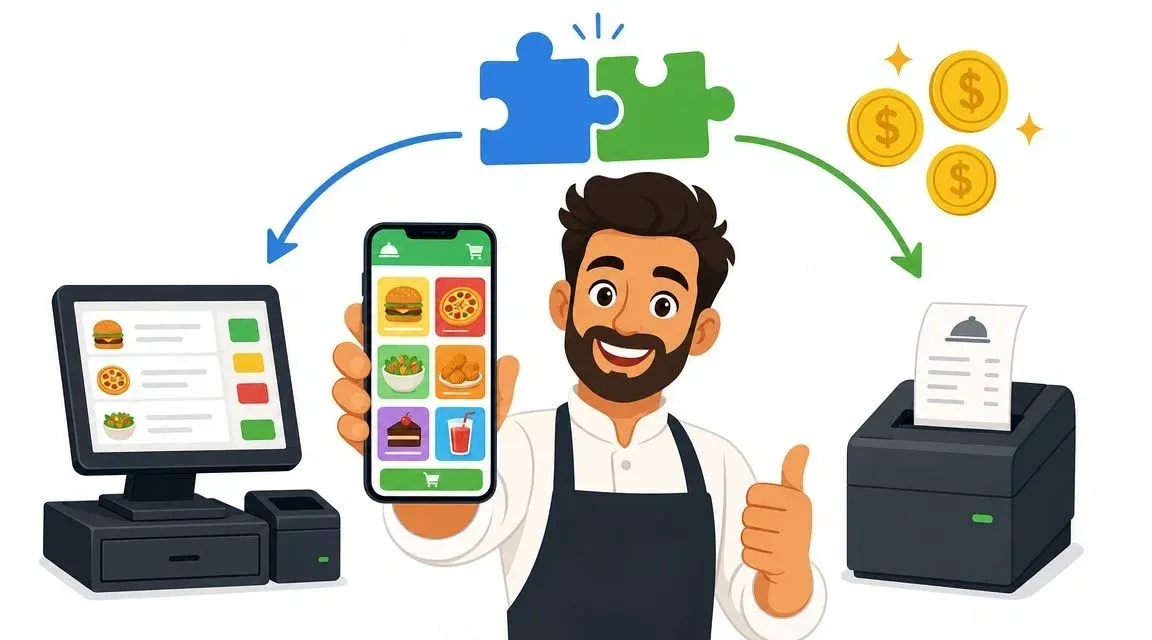
You’re probably looking at an online ordering tool that says it’s free and wondering what the catch is.
That’s the right instinct. In restaurant tech, “free” can mean several different things. Sometimes it means no monthly software fee. Sometimes it means no setup fee. Sometimes it means the front end is free but the actual cost shows up in payment processing, limited features, manual work for staff, or weak POS integration.
For independent restaurants, that distinction matters more than the headline price. A system that costs nothing up front but forces your team to re-enter orders during a dinner rush can end up costing more than a paid tool that sends every order straight into the POS. The key decision isn’t about software price alone. It’s about total cost of ownership. That includes labor, order accuracy, training time, customer data, and how cleanly the system fits into your restaurant operations.
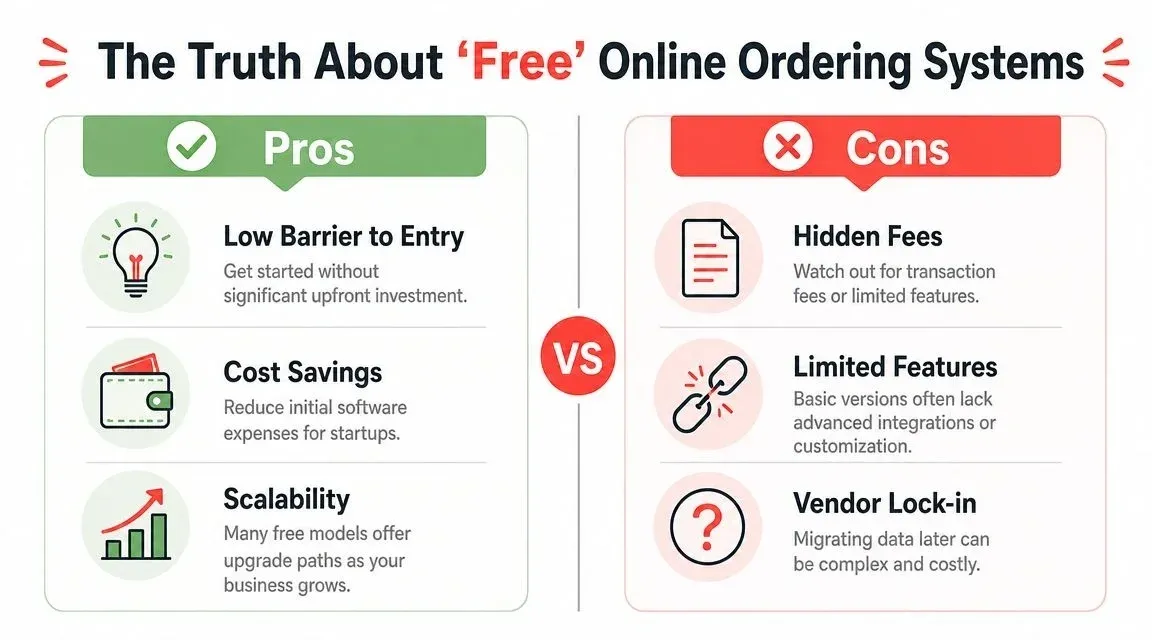
The Truth About ‘Free’ Online Ordering Systems
Most owners are skeptical of the word free, and they should be.
The mistake is assuming all free tools work the same way. They don’t. Some are commission-free but still require payment processing and optional add-ons. Others are free to start but keep you inside a model that gets expensive as order volume grows. The biggest hidden cost often isn’t on the invoice at all. It’s in the dining room, at the expo station, and behind the counter.
What free usually means in food tech
Here’s the practical breakdown restaurant operators should use:
Model What it sounds like What to check Free setup No upfront cost to launch Ask about transaction costs, hardware, support, and upgrade limits Commission-free No percentage taken from each order Confirm whether payment processing, delivery tools, and integrations cost extra Marketplace-based free Easy to join, fast exposure Check whether the platform takes a share of each order or controls customer data
Many people seeking an online ordering system free are really asking a different question: “Can I add digital ordering without hurting my margins?” That’s the right question.
As noted by GloriaFood’s overview of free restaurant ordering tools, many searches for “free online ordering system” overlook hidden operating costs. The meaningful issue isn’t whether the ordering page is free. It’s whether the system removes manual POS re-entry and lowers order-handling errors.
Practical rule: If staff still have to read a tablet and type the same order into the POS, the system isn’t cheap. It’s just cheap-looking.
The hidden costs that change the math
Restaurant owners usually spot subscription fees. They’re less likely to price out the costs below:
- Manual entry time: Every retyped order pulls a staff member away from guests, phones, packing, or the line.
- Order mistakes: Wrong modifiers, missed add-ons, and duplicate entries create refunds, remakes, and frustration.
- Training burden: A clunky workflow means new staff take longer to learn it and veterans avoid using it properly.
- Weak data ownership: If another platform controls the customer relationship, you can’t market directly as effectively.
- Migration pain later: Free starter tools often become awkward once you need better restaurant delivery controls.
If you’re also working on your digital storefront basics, a resource like cómo hacer tu carta digital QR can help frame the customer-facing side of menu access. But ordering is different from display. A QR menu doesn’t solve the back-of-house workflow problem.
The best way to evaluate a “free” system is to reconcile advertised savings against operational friction, and for this, a good restaurant order reconciliation process becomes useful. It shows whether your team is saving time or just moving the work around.
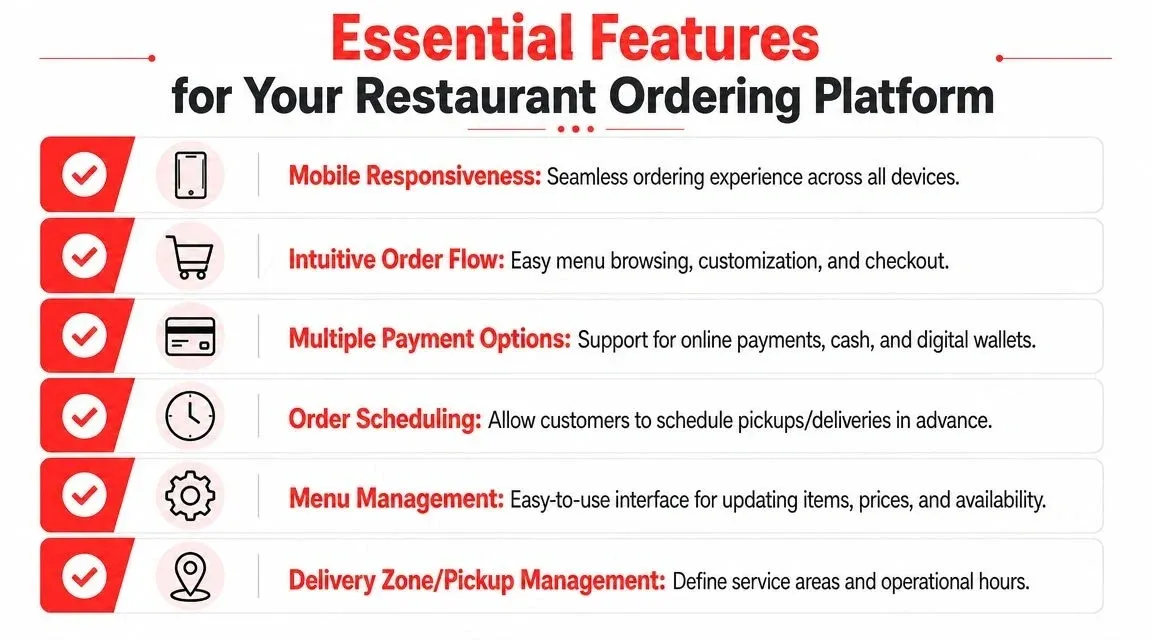
Essential Features for Your Restaurant Ordering Platform
A basic order form isn’t enough anymore. If the system can’t handle real restaurant operations, it becomes another workaround your team has to babysit.
The benchmark that matters most is economic. ChowNow’s online ordering overview notes that third-party delivery marketplaces commonly take 20%–30% per order, while direct ordering systems typically use a flat-fee or subscription model. The same source highlights a major operational risk: failed POS integration. Automatic order transmission matters because it reduces manual entry and supports features like digital wallets and analytics.
The non-negotiables
When I assess an online ordering system free option for an independent restaurant, I look for these features first:
- Mobile responsiveness: Most customers order on their phones. If the menu is hard to browse, they drop off.
- Clear order flow: Customers need a simple path from item selection to checkout, especially for modifiers.
- Payment flexibility: The system should support online payment and modern wallet options without confusion.
- Scheduling tools: Pickup and delivery windows help smooth restaurant operations.
- Simple menu management: Managers need to update prices and item availability without calling support.
- Delivery zone controls: This keeps service areas realistic and protects food quality.
What each feature does for the bottom line
Not every feature matters equally. Some are convenience items. Others directly affect labor and accuracy.
Feature Operational payoff Menu management Fewer calls and fewer wrong-item orders when sold-out items are hidden quickly Scheduling Better pacing for the kitchen and less counter congestion Payment options Less checkout friction and cleaner handoff at pickup Delivery zone control Fewer late deliveries and fewer quality complaints POS-ready order flow Less staff time spent copying data between systems
A polished online menu helps sales. A connected order workflow protects profit.
If you’re comparing platforms, don’t just ask whether the system looks good. Ask what happens after the customer clicks “Place Order.” Does the order print in the kitchen correctly? Does it sync modifiers? Does it show up in reports cleanly?
That’s where modern food delivery management software becomes relevant. The front-end checkout gets attention, but the back-end routing determines whether the tool saves labor.
Why POS Integration Is Your Secret Weapon for Restaurant Operations
This is the feature that separates a real operating system from a digital order form.
Online food delivery is no longer a side channel. One market overview projects global online food delivery revenue to reach US$1.91 trillion by 2029, up from US$0.68 trillion in 2024, with a projected 15.01% CAGR and a meal-delivery user base of 2.7 billion by 2029 according to RestoLabs’ restaurant online ordering statistics. For operators, that means digital ordering has to be managed like core infrastructure.
Here’s the workflow visual most owners need to see before they buy anything:
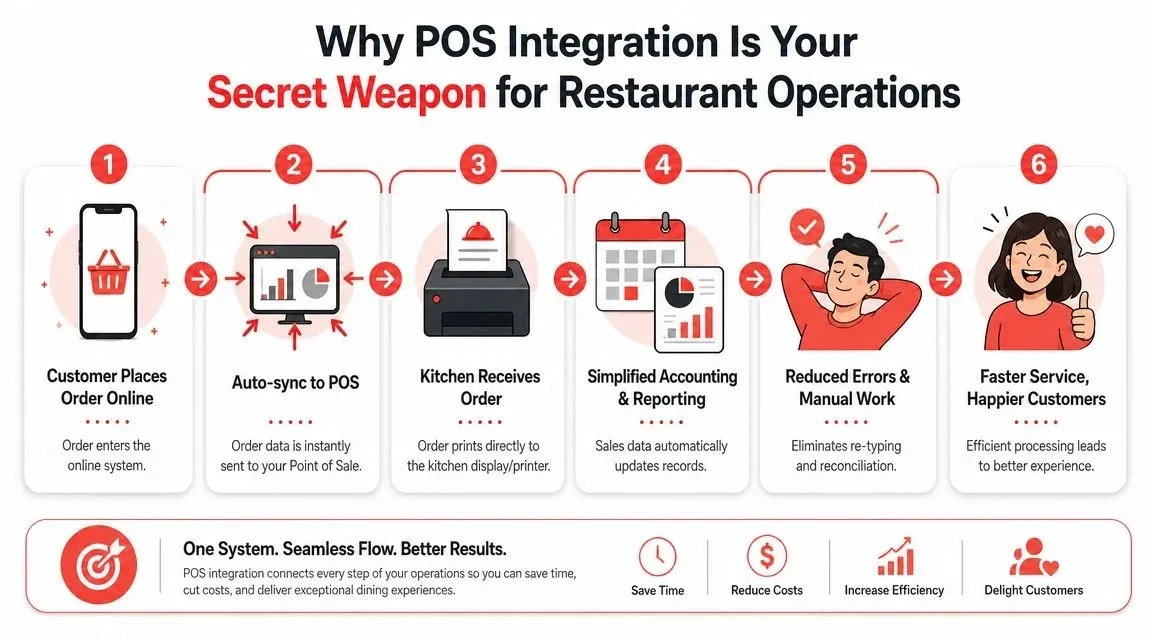
Without POS integration, Friday night gets messy fast. A team member watches one tablet for Uber Eats, another for DoorDash, maybe another for direct orders, then types each order into the POS by hand. Every extra tap is a chance to miss a modifier, ring in the wrong size, or delay the kitchen.
With POS integration, the order enters once and moves where it should.
What good integration looks like
A clean setup usually does five things well:
- Receives online orders automatically
- Pushes them into the POS without retyping
- Sends clean tickets to the kitchen
- Keeps reporting in one place
- Reduces reconciliation work at close
That’s why I push owners to evaluate their POS before they obsess over website design.
For operators using Clover or Square, this matters even more because those systems often sit at the center of payment, menu, and reporting workflows. If online orders don’t connect cleanly, your staff ends up doing the integration manually.
This walkthrough is worth a look before you choose your setup:
Why this matters more than a free front end
A free ordering page can still create expensive labor habits. Strong integration cuts that risk.
One example is OrderOut’s integration change management approach, which focuses on routing delivery app orders directly into the POS so restaurants don’t have to manage orders by hand across disconnected systems. That’s the kind of operational fix owners should prioritize.
The best online ordering tool is the one your staff barely has to think about.
A Practical Guide to Launching Your New System
Most restaurants don’t need a months-long rollout. They need a setup that works, a menu that’s accurate, and a staff workflow that won’t fall apart during a rush.
A practical deployment method comes from iShopo’s commission-free ordering system guide, which recommends five steps: select a platform with POS compatibility, brand the storefront, configure payments and order routing, launch direct-order promotions, and monitor performance metrics such as order volume, average order value, and repeat purchases.
Step 1 and 2 pick the platform and make it look like your restaurant
Start with compatibility, not aesthetics. If the ordering system doesn’t fit your current POS and service model, the launch will be painful no matter how nice the storefront looks.
Then brand it properly. Add your logo, colors, hours, service types, and menu categories so customers feel they’re ordering from you, not from a generic widget.
Step 3 configure the operational rules
In such cases, weak launches usually fail.
You need to set:
- Payment settings: Make sure accepted payment methods match how you operate.
- Prep timing: Don’t promise pickup windows the kitchen can’t hit.
- Routing rules: Decide whether orders go to a tablet, printer, kitchen display, or directly into the POS.
- Menu availability: Hide items when they’re unavailable instead of asking staff to call customers after the fact.
Set the system up for your busiest hour, not your quietest hour.
Step 4 and 5 launch simply and measure what happens
You don’t need a grand campaign. You need customers to notice the direct ordering option and staff to trust the workflow.
Start with a short launch checklist:
- Place test orders from a phone and a desktop.
- Check the ticket format in the kitchen.
- Verify modifier accuracy on key menu items.
- Train one shift leader to troubleshoot basic issues.
- Promote the direct link on your site, social pages, and printed materials.
After launch, review the basics every week. Are customers completing orders cleanly? Are staff still re-entering anything? Are certain items causing confusion?
Those operational reviews matter more than whether the setup felt “free.”
Marketing Your System and Owning Your Customer Data
Launching direct ordering doesn’t automatically change customer behavior. You still have to steer people to it.
The U.S. numbers show why this is hard and why it’s worth doing. In 2015, 66 million Americans ordered US$8.7 billion of food delivery. By 2020, that grew to 111 million users and more than US$26 billion in revenue. By March 2021, 47% of Americans had used a food delivery app, up from 38% in March 2020. The same source reports that DoorDash held 45% of the U.S. market by the end of 2020, ahead of Uber Eats at 22%, according to Hotel Tech Report’s online ordering and food delivery statistics.
That’s an app-heavy market. Restaurants still need those channels for visibility, especially Uber Eats and DoorDash. But they also need a plan to convert repeat customers into direct customers over time.
Simple ways to push direct orders
Most independents don’t need fancy campaigns. They need consistency.
- Add your direct order link everywhere: Website header, Google Business Profile, Instagram bio, and receipt footer.
- Train staff to mention it: A short pickup handoff line works better than a long script.
- Use in-store prompts: Counter cards, bag stickers, and window signage are enough.
- Promote direct-only perks: Keep it simple. Faster pickup, easier reordering, or menu bundles.
If you want broader ideas for local visibility, 2026 Maryland restaurant marketing tips offers useful local marketing thinking that can be adapted well beyond one state.
Why owning customer data matters
When a guest orders through a marketplace, the platform sits between you and the customer. When a guest orders through your own system, you can see patterns that help operations.
That might include:
Data you can use Why it matters Order history Helps with repeat-order prompts and menu planning Popular dayparts Supports staffing and prep decisions Favorite items Makes targeted promotions more relevant Customer contact data Lets you drive repeat orders directly
A practical next step is to tie direct ordering into your broader restaurant marketing ideas so the system isn’t just a checkout page. It becomes part of how you build loyalty and reduce channel dependence.
Marketplace apps are good at discovery. They’re not built to help you own the relationship.
From Free to Pro Planning Your Food Tech Growth Path
A free system can be the right move. It just shouldn’t become a trap.
Some restaurants only need a clean direct ordering page, basic pickup controls, and a workable payment flow. For a low-volume operation or a single-location shop just starting digital ordering, that can be enough. The problem starts when the restaurant grows but the system doesn’t.
Square’s online ordering direction reflects where the market is going. As discovery shifts toward mobile apps and AI-assisted search, restaurants need more than a free checkout page. The focus is moving toward menu updates, order tracking, neighborhood reach, and stronger ownership of customer data.
Signs you’re outgrowing the free setup
You’re probably ready for a more advanced stack if these issues keep showing up:
- Your team is juggling channels manually
- You need better reporting across delivery and pickup
- You want stronger repeat-order tools
- Your menu changes too often for a basic system
- You’re managing more than one location
- Your POS integration still has gaps
That doesn’t mean you need the most complex platform on the market. It means your system should match your current operating reality.
A sensible growth path
The best upgrade path usually looks like this:
- Start with direct ordering that your staff can run confidently.
- Make sure the POS workflow is stable.
- Add better reporting and channel control.
- Improve customer retention through owned data.
- Expand into a stronger branded experience if volume justifies it.
For some operators, that eventually includes branded app experiences and tighter customer retention tools. If you’re thinking ahead, white-label mobile applications for restaurants are worth reviewing as a later-stage option, not as the starting point for every store.
The key question isn’t whether your online ordering system free plan is technically free. It’s whether it still supports the way your restaurant runs.
If you want a practical place to start, OrderOut is built for restaurants that need online orders and delivery app orders connected directly to the POS so staff spend less time re-entering tickets and fixing mistakes. Restaurant owners can begin onboarding in a few clicks through the OrderOut dashboard.